Read the statement by Michael Teeuw here.
MMM-KitchenTimer - Touch-friendly countdown timer
-
Description:
A newly refreshed fork of MMM-KitchenTimer, a responsive, touch-friendly countdown timer for MagicMirror².
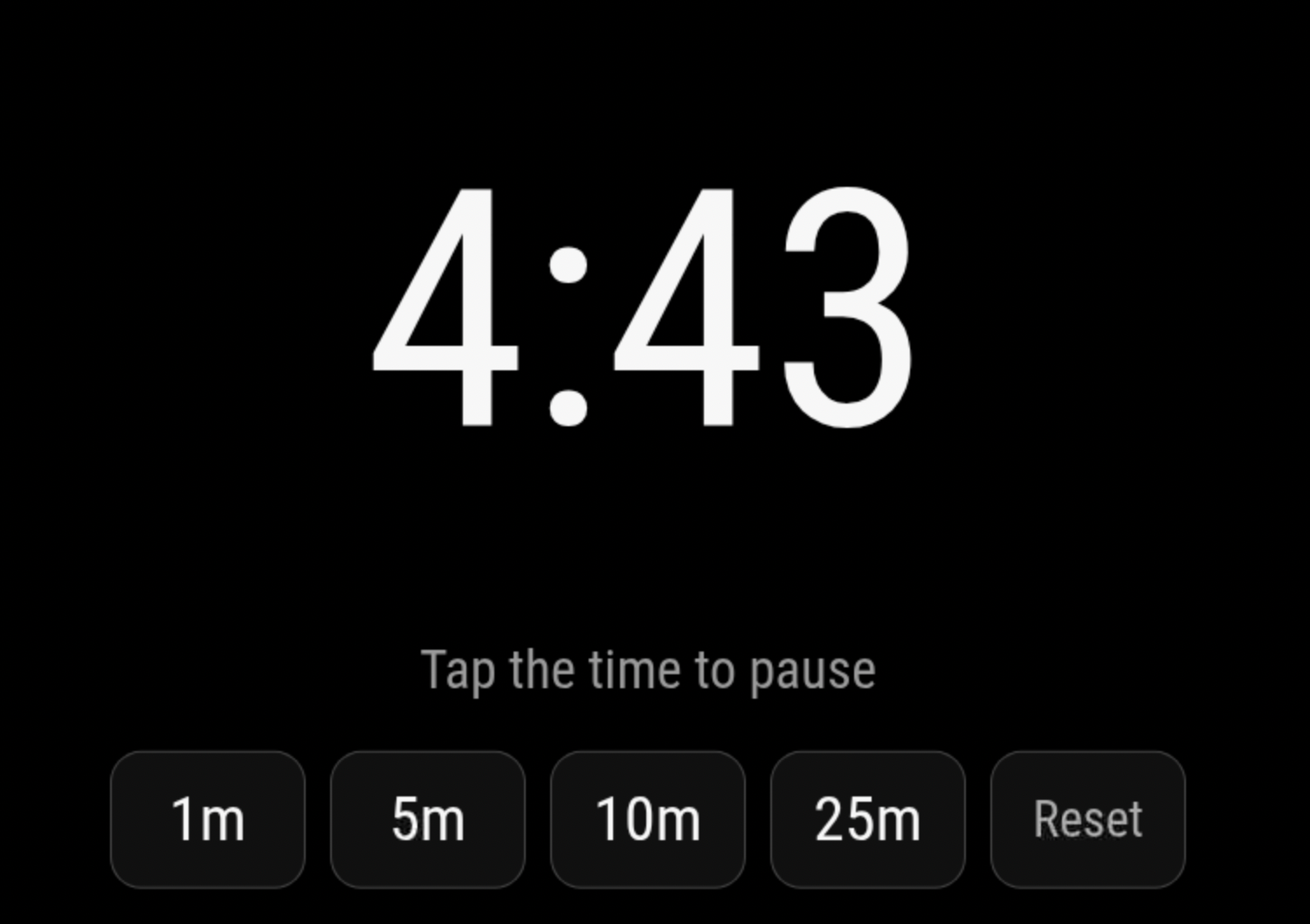
It provides a large countdown display, configurable quick-duration presets, and accessible controls for touch, mouse, and keyboard. Tap the time display to pause or resume the countdown, and use the Reset or Dismiss control to cancel the timer or silence its alarm.
The module supports compact and full-screen layouts, optional alarm and button sounds, and reliable wall-clock timing. Active timers continue running and can finish while the module is hidden by page-management modules such as MMM-pages.
MMM-KitchenTimer also provides incoming and outgoing MagicMirror notifications. Other modules can start, add time to, pause, resume, reset, or dismiss the timer. Semantic state notifications make it possible to integrate voice assistants, smart lights, MQTT bridges, physical controls, notification centers, and other automations without embedding hardware-specific behavior in the timer.
This is a maintained fork of the module originally created by Tom Short, published with his permission. The original MIT attribution and existing configuration compatibility have been preserved.
Screenshots:
Download:
https://github.com/bwente/MMM-KitchenTimer
Installation:
cd ~/MagicMirror/modules
git clone https://github.com/bwente/MMM-KitchenTimer.git
Version 1.2.0
- Added a configurable alarmVolume option
- Alarm volume accepts values from 0 to 1 and remains independent of button feedback volume
- Invalid alarm-volume values fall back safely to full volume
- Improved outgoing notification semantics for smart-home integrations
- Starting a timer from a preset now emits KITCHEN_TIMER_STARTED
- Adding time to a running or paused timer continues to emit KITCHEN_TIMER_UPDATED
- Makes it easier for MQTT, Home Assistant, Alexa, and other integrations to distinguish new timers from
Version 1.1.0
- Added Bulgarian, Danish, German, English, Spanish, French, Hungarian, Dutch, Russian, and Thai translations
- Follow MagicMirror’s global language setting automatically
- Added localized controls, status messages, and accessibility labels
- Preserve keyboard and touchscreen focus while the timer display updates
- Added stable control identifiers for external integrations
- Expanded automated test coverage
Version 1.0.1
- Keep active timers and completion events running while hidden
- Improve compatibility with page-management modules such as MMM-pages
Version 1.0.0
- Modernized the original module as a maintained MagicMirror² module
- Added large, touch-friendly controls
- Added configurable quick-duration presets
- Added tap-to-pause and resume behavior
- Added compact and full-screen layouts
- Added incoming timer-control notifications
- Added outgoing semantic state and progress notifications
- Preserved the original configuration options and MIT attribution
-
@bwente Nice module. How can I change the size of the module. I try something at CSS but nothing works. I want to use the module at bottom_right. THX
-
@Niggich Thanks! For bottom_right, try enabling the module’s built-in compact layout:
{ module: "MMM-KitchenTimer", position: "bottom_right", config: { compact: true, }, }, -
@bwente That’s it. Thank you. Is there a way to change the language to german?
-
@Niggich Update the module and it will use you language setting in your overall config.
-
@bwente thank you. I did already and it works.
-
Hey @bwente I have an Idea, but I don’t know if this is possible. I have the Screen with touch in my kitchen and also an Alexa and the old Echo Wall Clock. Maybe it’s possible to start the the Alexa Timer when I hit the Timer on my Touchscreen because I don’t have speakers at my Touchscreen.
-
@Niggich it’s a good idea, but unfortunately it can’t directly start a normal Alexa timer.
One option is to pair your Screen with the Echo over Bluetooth. That would give you the alarm sound through the Echo, but it wouldn’t activate the timer indicator on the Echo Wall Clock.
Another possibility may be installing
alexa-remoteon the Mirror or use HA. The module could notify it when a timer starts, and it could then ask the Echo to set the corresponding timer. That should also activate the Wall Clock. maybe? -
@bwente Thank you for your answer. HA it’s a good idea, but how I tell HA I start the Timer on the mirror? I also have an iobroker. Maybe this helps…
-
Yes. Since you use Home Assistant, MagicMirror can publish an MQTT message when the timer starts, and HA can start a matching Alexa timer on the Echo paired with the Wall Clock.
The catch is they are separate timers, not truly synced. Starting and canceling can be synced, but pausing the MagicMirror timer will not pause Alexa.
-
Ok, I try to configure MMM-MQTTbridge to connect the mirror to my HA. I think the connection from Mirror to HA is working but I don’t know how to configure the module to Send Notifications to my HA. Sorry…
-
@Niggich On the HA side you would listen for the timer topic.
alias: Start Echo timer from MagicMirror triggers: - trigger: mqtt topic: magicmirror/kitchen-timer/started actions: - action: media_player.play_media target: entity_id: media_player.kitchen_echo data: media_content_type: custom media_content_id: >- set a timer for {{ trigger.payload_json.remainingSeconds | int }} seconds -
@bwente Ok, thank you. So I don’t need to configure something at the MMM-MQTTbridge just in HA?
edit: I try the whole afternoon, but I don’t know how to do. I also try it with MMM-HomeAssistant.
-
Something like this for your MMM-MQTTbridge config on your mirror.
{
  module: "MMM-MQTTbridge",
  disabled: false,
  config: {
    mqttServer: "mqtt://USERNAME:PASSWORD@192.168.1.10:1883",
    stringifyPayload: true,

    mqttConfig: {
      // This example only sends MagicMirror events to MQTT.
      listenMqtt: false,
      interval: 300000,
    },

    notiConfig: {
      listenNoti: true,
      ignoreNotiId: ["CLOCK_MINUTE", "CLOCK_SECOND", "NEWS_FEED"],
      ignoreNotiSender: ["system"],
      qos: 0,
    },
  },
},
then edit
~/MagicMirror/modules/MMM-MQTTbridge/dict/notiDictionary.jsvar notiHook = [ { notiId: "KITCHEN_TIMER_STARTED", notiPayload: [ { notiMqttCmd: ["Kitchen timer started"], }, ], }, ]; var notiMqttCommands = [ { commandId: "Kitchen timer started", mqttTopic: "magicmirror/kitchen-timer/started", stringifyPayload: true, retain: false, qos: 0, }, ]; module.exports = { notiHook, notiMqttCommands };after restarting your mirror you should be able to listen for the topic: magicmirror/kitchen-timer/started in Home Assistant developer tools.
-
@bwente Wow, you’re great. My Echo know I want to start a Timer but it’s asking for how long.
-
My Echo know I want to start a Timer but it’s asking for how long.
Great, now that you’ve confirmed MQTT is working, the next step is to add the Home Assistant automation.
alias: MagicMirror kitchen timer started
triggers:
  - trigger: mqtt
    topic: magicmirror/kitchen-timer/started

actions:
  - action: media_player.play_media
    target:
      entity_id: media_player.kitchen_echo
    data:
      media_content_type: custom
      media_content_id: >-
        set a timer for
        {{ trigger.payload_json.remainingSeconds | int }}
        seconds
I think that will work. I don’t know if it needs to be escaped or not.
-
@bwente I add the automation already and change it again but the echo still asking “for how log should be the timer”… I also try to fix it with ChatGPT but this was not working.
-
@Niggich looks like
trigger.payload_json.remainingSecondsis empty or double quoted. Can you view just the payload and see? -
@bwente I’m sorry but where I found
trigger.payload_json.remainingSeconds? -
@Niggich in an HA. Automation are variable to help you do want you want
One of those is
trigger. - what started the automation
If you go into HA , settings, automations, pick any one,
Look at the traces (3 dot menu). You can see the variables and values for each step of the automation

Hello! It looks like you're interested in this conversation, but you don't have an account yet.
Getting fed up of having to scroll through the same posts each visit? When you register for an account, you'll always come back to exactly where you were before, and choose to be notified of new replies (either via email, or push notification). You'll also be able to save bookmarks and upvote posts to show your appreciation to other community members.
With your input, this post could be even better 💗
Register Login