Read the statement by Michael Teeuw here.
[MMM-NetworkScanner] disable logging
-
@binderth Im guessing that this somehow rotates or makes new logs for anything running on pm2?
Any config steps for this besides just installing it?
-
@pugsly jepp, this rotates the log (like Linux-logs or log4j): have a look here:
https://www.npmjs.com/package/pm2-logrotatethis eliminates the need to buy a new SD Card every month (just kidding), but leaves the initial problem open: how can I remove those log-entries, because if I don’t Need them after setup, they’re just filling the log, leaving me scrolling for other stuff I need to have a look at while debugging or whatever. Perhaps there is a switch, but I don’t see it…
-
There is a (currently undocumented)
debugconfig option in the module which minimises the logging. By default it should be set to false, but you can explicitly set it yourselfi.e.
debug: false,In earlier versions it had little effect, but in the latest commit, it should significantly reduce the volume of logging.
See how it goes
“Live as if you were to die tomorrow. Learn as if you were to live forever.” - Mahatma Gandhi
-
@ianperrin I don’t get anymore logging from MMM-Networkscanner after
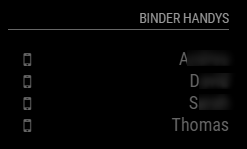
git pull & npm install, but I also don’t get to see my devices, they all seem offline.{ module: 'MMM-NetworkScanner', position: 'top_right', header: 'Binder Handys', config: { devices: [ { ipAddress: "192.168.xx.x", name: "S", icon: "mobile"}, { ipAddress: "192.168.xx.x", name: "A", icon: "mobile"}, { ipAddress: "192.168.xx.x", name: "T", icon: "mobile"}, { ipAddress: "192.168.xx.x", name: "D", icon: "mobile"}, ], showUnknown: false, showOffline: true, showLastSeen: false, keepAlive: 180, debug: false, updateInterval: 30, } },in the mm-out-0.log:
Connecting socket for: MMM-NetworkScanner
Starting module: MMM-NetworkScanner
(...)
MMM-NetworkScanner received CONFIG
edit:
after changingdebug: true,in the config andpm2 restart mmI experience the same behaviour.
after deleting the debug-line completely, nothing changes also. -
Did you restart the mirror after the upgrade?
Are there any errors in the browser console?
What happens if debug is set to true?“Live as if you were to die tomorrow. Learn as if you were to live forever.” - Mahatma Gandhi
-
@ianperrin said in [MMM-NetworkScanner] disable logging:
Did you restart the mirror after the upgrade?
Are there any errors in the browser console?
What happens if debug is set to true?as described, I did a
pm2 restart mm, the behaviour is the same if debug: true as described.the browser console re MMM-NetworkScanner:
loader.js:182 Load script: modules/MMM-NetworkScanner//MMM-NetworkScanner.js
module.js:415 Module registered: MMM-NetworkScanner
loader.js:152 Bootstrapping module: MMM-NetworkScanner
loader.js:227 File already loaded: moment.js
loader.js:157 Scripts loaded for: MMM-NetworkScanner
loader.js:227 File already loaded: font-awesome.css
loader.js:159 Styles loaded for: MMM-NetworkScanner
loader.js:161 Translations loaded for: MMM-NetworkScanner
(...)
MMM-NetworkScanner.js:32 Starting module: MMM-NetworkScanner
(...)
module.js:117 MMM-NetworkScanner received a system notification: ALL_MODULES_STARTED
(...)
module.js:117 MMM-NetworkScanner received a system notification: DOM_OBJECTS_CREATED
(...)
module.js:115 MMM-NetworkScanner received a module notification: CURRENTWEATHER_DATA from sender: currentweather
(...)
module.js:115 MMM-NetworkScanner received a module notification: CALENDAR_EVENTS from sender: calendar
(...)
still, all devices are shown offline:
hth! Thanks for your effort!
-
@binderth said in [MMM-NetworkScanner] disable logging:
MMM-NetworkScanner received CONFIG
This started happening yesterday to me, too. Now only macAddress works. ipAddress no longer works. And it used to work perfectly. I started a new topic. Forgive me for that. I was in a panic. Still am.
MMM-NetworkScanner received CONFIG -
I spent a good amount of time with this, yesterday and today.
module: 'MMM-NetworkScanner',
        		position: 'top_left',
        		config: {
			debug: false,
            		devices: [
                    	{ macAddress: "bc:9f:ef:bb:1c:de", name: "Dove", icon: "medkit"},
                    	{ macAddress: "e0:b5:2d:d3:e6:26", name: "BottlePop", icon: "globe"},
                    	{ macAddress: "0c:d7:46:1e:a0:3f", name: "Donna", icon: "venus"},
			{ macAddress: "64:9a:be:e3:83:6b", name: "Nikki", icon: "coffee"},
			{ macAddress: "90:b6:86:d2:16:99", name: "Jason", icon: "fire-extinguisher"},
			{ macAddress: "84:d6:d0:f9:8b:f6", name: "MJD", icon: "child"}
                		],
            		showUnknown: false,
            		showOffline: true,
			showLastSeen: false,
            		keepAlive: 180,
            		updateInterval: 10,
            		residents: ["BottlePop"],
Here are my cells phones using macAddress because ipAddress no longer works for me. With
residents:set as above, BottlePop appears online always, even when the phone is powered off for 20 minutes. If I setresidentsas such, [“BottlePop”, “Dove”, “Donna”], then BottlePop blinks on and off about every 10 seconds. If I haveresidentsset to [], then each device goes online briefly and then offline until the device is used again -
-
@michael24h said in [MMM-NetworkScanner] disable logging:
What are material icons?
Dunno, but you can choose any of the icons at this site for use with MMM-NetworkScanner
-
@Mykle1 said in [MMM-NetworkScanner] disable logging:
material icons?
full set icons (Library),
I need airport extreme icon -
@Mykle1 said in [MMM-NetworkScanner] disable logging:
Dunno
can’t find airport ext. so wifi might do.
-
@michael24h said in [MMM-NetworkScanner] disable logging:
can’t find airport ext. so wifi might do.
Well, that sounds good. They don’t have EVERY icon but I found some that work perfectly for me




Hello! It looks like you're interested in this conversation, but you don't have an account yet.
Getting fed up of having to scroll through the same posts each visit? When you register for an account, you'll always come back to exactly where you were before, and choose to be notified of new replies (either via email, or push notification). You'll also be able to save bookmarks and upvote posts to show your appreciation to other community members.
With your input, this post could be even better 💗
Register Login