Read the statement by Michael Teeuw here.
Train status tracker
-
Getting the train in the morning is a big thing in my life (can’t be late for work!) and I’d love to check the departures from my station like this example, it would be so useful. I would only need to see the destination, status and platform - http://ojp.nationalrail.co.uk/service/ldbboard/dep/KGX
I have not got the skill to start this but do understand basic JS and can see that the National Rail (UK) has developer section - http://www.nationalrail.co.uk/46391.aspx
Can any help and get me started on this module
-
I built this yesterday lunchtime - https://github.com/nwootton/MMM-UKNationalRail
Needs more testing and I need to figure out how to get it on the third-party module list, but maybe it’ll help?
FYI - There’s a bus version as well… https://github.com/nwootton/MMM-UKLiveBusStopInfo
-
@nwootton said in Train status tracker:
I need to figure out how to get it on the third-party module list
Which one are you talking about?
The WIKI: https://github.com/MichMich/MagicMirror/wiki/MagicMirror²-Modules
Click on edit and enter the links to your modulesThe MODULE LIST: http://beta.magicmirror.builders/modules
Login with your github account and click on “Add Module”. You can select repositories from your github account -
@yawns - Thanks! I couldn’t figure out how to do the wiki - I assumed it would be an approval process of some kind! Didn’t even consider the Module list.
-
@nwootton Wow thank you so much, this is nearly perfect. I had been in the slow lane trying to build this and you have just hit the nail on the head.
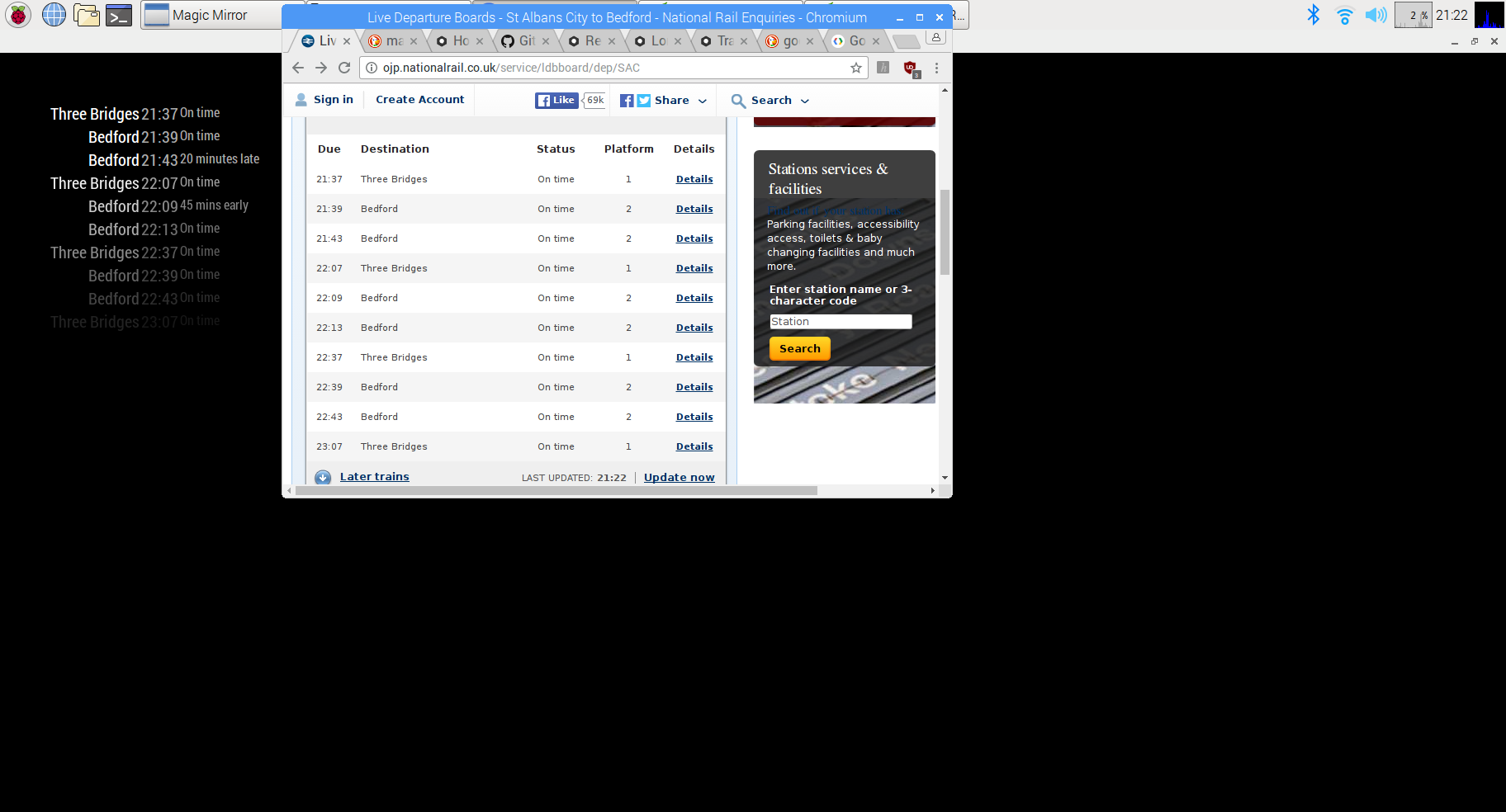
I have loaded the module in and does exactly what it is meant to however the status (late and early times) are a bit strange
I changed the code slightly so I could get a better idea what was going on (just added late and early free text to relevant text fields and swapped columns around)
The Status doesn’t seem to marry up with what is actually happening when I go to national rail. Also sometimes it is saying the trains are early, however, as the train gets closer to the station they get less early, it’s like their expected arrival time or something. Did you experience this?
-
Glad you like it.
I have to say that I built it more as a curiosity when bored during lunch, so I didn’t do any checking against the actual National Rail API/Website. I wanted to play with something (I was VERY bored) and MM has been on my todo list to look at for a while.
I have noticed some weirdness over early/late/on-time but I assumed it was a GIGO scenario coming into the TransportAPI and being pushed down to the results. Typically this has been the delays changing between refreshes - says 5 minutes late, I refresh the page and it says ‘on time’. I haven’t gone back to National Rail to compare them.
If you go to the TransportAPI document page here, you can put the query in and see the returned JSON.
{
        "mode": "train",
        "service": "24673205",
        "train_uid": "W36644",
        "platform": null,
        "operator": "SW",
        "aimed_departure_time": "10:00",
        "aimed_arrival_time": "10:00",
        "aimed_pass_time": null,
        "origin_name": "London Waterloo",
        "source": "Network Rail",
        "destination_name": "Hampton Court",
        "status": "ON TIME",
        "expected_arrival_time": "10:00",
        "expected_departure_time": "10:00",
        "best_arrival_estimate_mins": 35,
        "best_departure_estimate_mins": 35
      }
This contains 2 different times for departure and arrival as well as a countdown time, so I guess they could be updating each one in real time to “improve” accuracy.
I might have a look at the National Rail API to see if it’s easy to use and integrate with.
I also need to do some work to setup colours for Late/Early/On time/Cancelled and look at layouts, but if you want, feel free to change anything and ‘push request’ back at me :)
UPDATE: Just looked at the National Rail APIs - SOAP XML/WSDL… I think I’ll pass #shudder. However there is http://www.realtimetrains.co.uk/ that I’ll look at later.
-
@nwootton i’m loving this module
@jamielola said in Train status tracker:
I changed the code slightly so I could get a better idea what was going on (just added late and early free text to relevant text fields and swapped columns around)
Do you mind sharing the changes you made? i do like your layout!
Thanks!
-
I’ve finally had a chance to go back and have a look at the API response and I’ve tweaked the code. The new layout shows the destination, planned departure, (estimated departure) and a colour coded late/early/on time status.
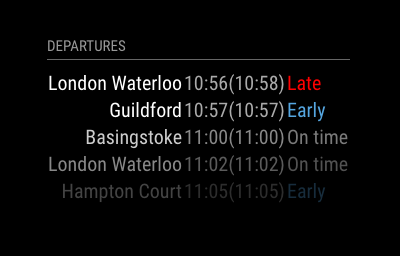
I’ve NOT gone and looked at the realtimetrains API - I got sidetracked by MQTT notifications in Magic Mirror instead.
-
Nice, I like it
-
@yawns Thanks. Now to tidy the bus version.
-
I’ve now added this to the Modules > Showcase >Transport section of the forum.
-
@nwootton sorry for the lack of response I have been away. Wow it looks great! I am going to install the updated module on my mirror tonight. Also thanks for the above ^^ explaining the late and early issue, this has been a good learning experience. @Reggiejagger it looks like @nwootton has set the columns in the same order as my screenshot so I wont post that old code.
-
@jamielola Just an update. I looked at the RealTimeTrains API and it gives the same information, but allows for less filtering of your request. For example you can’t filter to only show trains that have stopped at station X or are going through station Y. While this is something that might be of no use to the majority of users, there are bound to be some people who could make good use of this.
It’s also much easier to sign up for an account at the TransportAPI.com that at RealTimeTrains (rtt.api.io).
I’ll keep the module based on the TransportAPI unless we come up with a good reason to migrate.
{ locationDetail: { realtimeActivated: true, tiploc: "SURBITN", crs: "SUR", description: "Surbiton", gbttBookedArrival: "1526", gbttBookedDeparture: "1527", origin: [ { tiploc: "WATRLMN", description: "London Waterloo", workingTime: "150300", publicTime: "1503" } ], destination: [ { tiploc: "GUILDFD", description: "Guildford", workingTime: "160200", publicTime: "1604" } ], isCall: true, isPublicCall: true, realtimeArrival: "1526", realtimeArrivalActual: false, realtimeDeparture: "1527", realtimeDepartureActual: false, platform: "4", platformConfirmed: false, platformChanged: false, displayAs: "CALL" }, serviceUid: "W36325", runDate: "2017-03-29", trainIdentity: "2G41", runningIdentity: "2G41", atocCode: "SW", atocName: "South West Trains", serviceType: "train", isPassenger: true }, -
Thanks @nwootton from that explanation what you are saying makes sense.
I imported the module and it looks great! I thought the platform would be good (in my case anyway) so added it in
first row of table in JS script-
			var trainplatCell = document.createElement("td");
			trainplatCell.innerHTML = trains.platform;
			trainplatCell.className = "align-left bright platform";
			row.appendChild(trainplatCell);
added this in the getprams function
params += "&platform=" + this.config.platform;and this to the css
.platform { color:Green; padding:5px; }I have ambitions to try and calculate how many minutes late it is from its planned departure to its estimated departure, so its say “x minutes late”.I will let you know how I progress if I manage to figure JS out properly, think I have to create a function somewhere then do the calcualtion and save it in a var
-
@jamielola Nice. As our station only has an In and an out platform I never considered it!
If you want I can try to add you code to the repo and make it an option to display the platform via the config.
Something like:
{
showPlatform: true
}
If you want real time delay calculations have a look at my Bus Stop module here. That does deltas between time tabled and actual times.
N
-
Added platform as an option to the module.
Defaults to showing the platform, but can be turned off via config if not needed. If no platform specified, it will just display a -
-
this looks great, i cant wait to update
-
Hi
I’m really struggling to add a secondary CRS station, is there any documentation on how to show multiple stations?
-
@callum8004 You have to add a separate set of configs for each station that you want to track.
-
@nwootton sso if i wanted to replicate for ‘BSC’ station too how would do this in the below code?
{
			module: 		'MMM-UKNationalRail',
			position: 		'bottom_left',
			header:			'Walsall Live Departures',		/Optional - delete this line to turn OFF the header completely
			config:
				{
					stationCode: 		'WSL',	// CRS code for station
					app_id: 			'fe0f5d14', 		// TransportAPI App ID
					app_key: 			'7de7aa1439665fef7ad6eb151190a6a1', 		// TransportAPI App Key
					maxResults: 		3,  		//Optional - Maximum results to display.
					showOrigin: 		false,   	//Optional - Show the origin of the train in the table
					calling_at:			'BHM',
					showPlatform:		true,
				}
		},
complete newbie with any type of coding.
Thanks
Callum


Hello! It looks like you're interested in this conversation, but you don't have an account yet.
Getting fed up of having to scroll through the same posts each visit? When you register for an account, you'll always come back to exactly where you were before, and choose to be notified of new replies (either via email, or push notification). You'll also be able to save bookmarks and upvote posts to show your appreciation to other community members.
With your input, this post could be even better 💗
Register Login