Read the statement by Michael Teeuw here.
London Bus status
-
Try this - it’s based on a specific bus stop ATCOCode
-
It look good but it doens’t load. Any idea?
-
Do you have an account set up at Transportapi.com?
Do you have an app_id and app_key set up?
Do you know the ATCOCode for the bus stop?If you use the live api documentation here and put in the info you want to use does it respond without an error?
Is the info in your config the same as that you’ve used successfully in the live api docs?
Nick
-
Just Had a look at the Bus stop module again. When it’s used with certain other modules, it appears to error when trying to render the DOM.I managed to get it to fall over when used in conjunction with the commute module. I can see the data is coming in, I can see the params are correct, but an ‘appendChild’ error is being thrown when it tries to draw it on screen.I’ll investigate more tomorrow and see if I can figure it out.Nope I’m an idiot… the issue was a wrong location in my config “bottom_middle” instead of “bottom_center”
N
-
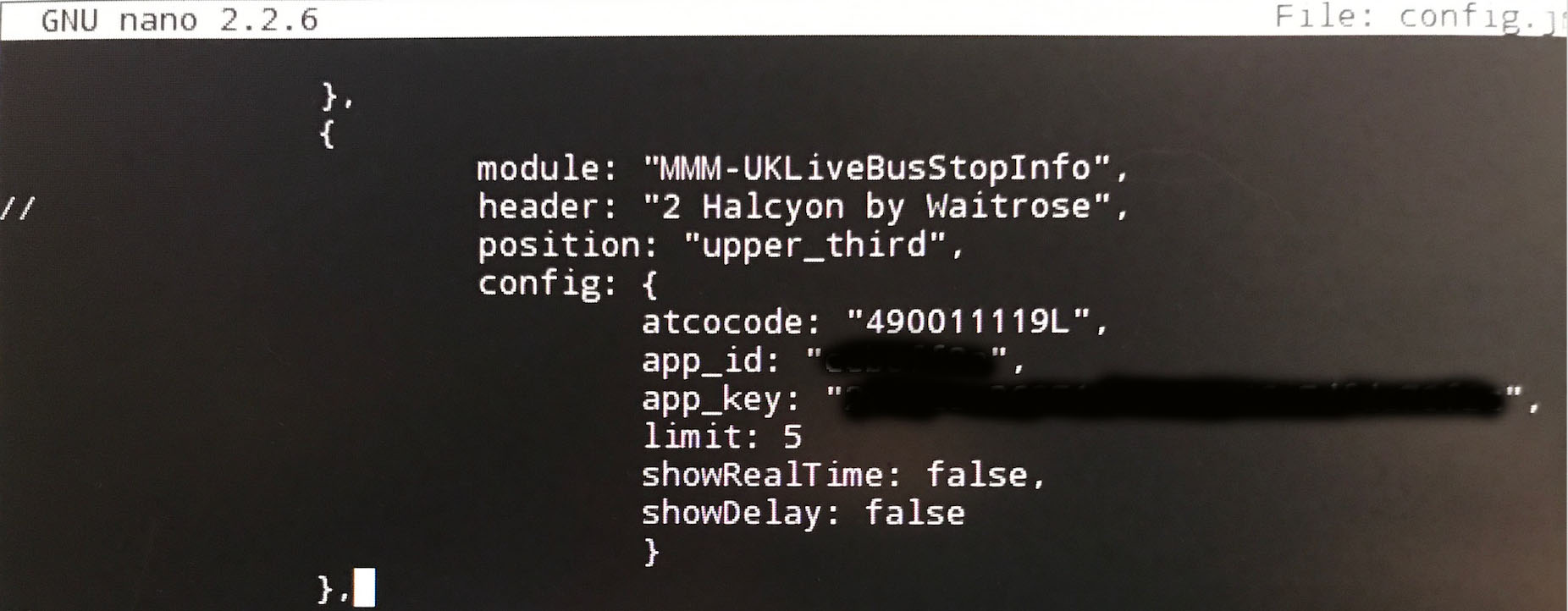
HI there! Thanks so much for tackling this. I seem to be a mess and can’t get it to load. There must be some mistake in my config file as I get the error upon loading. I have checked off all the boxes in the troubleshooting - as in I have an app_id, app_key and I know the atcocode - I have verified all against the live api docs and it runs without error. I will try to load my config entry and see if you guys can help me spot what I entered wrong. Thanks in advance!!
-
@soqueen I’d normally copy and paste the code into either my config or into jsonlint.com to check it’s validity. But, as you’ve posted a picture not a snippet, I can’t do that, so if I type it, it will not be the same as yours!
However, first glance you’ve got a ‘//’ on your header row (far left), nothing else stands out as being wrong.
Try pasting the entire config.js into jsonlint.com. That will tell you if the file is properly formed and highlight any errors.
If that comes back ok, try removing everything except the bus stop module and see if it still fails. If it does paste the reduced config and we’ll see what we can do next.
-
@soqueen there is a comma missing after
limit: 5Please create a github issue if you need help, so I can keep track
-
That certainly helped! The code loads now and now it’s stuck on Loading bus info… time to recheck my api codes?
-
@strawberry-3.141 good catch!
-
Thank you both! I have gotten it up and running! Looks GREAT!
-
@nmootton Hi there! Thank you for being so responsive! I had another question. I actually want to load 3 of these. I tried loading the module three separate times, but it just loads 3 of the initial entry, even though the atcocodes are different for each one. Any suggestions?
-
@soqueen I have to say I’ve never considered it. Both this and the rail version were something I built more as an experiment than anything else. I’m not even sure I’d know how to handle multiple instances of a module.
I’ll have to have a think/read and see how it could be done. Perhaps other more experienced devs may be able to chip in here?
I will say that running three of these could get expensive in terms of api calls per day… if you use the next bus capability that would be 30 points per call or a max of 33 calls per day (~ every 45 minutes), which might not be enough to make the module really useful. You could get three distinct API keys I guess, but I’m not sure how TransportAPI would view that!
I did consider some form of time range, but again it wasn’t something I needed for the experiment. Perhaps I need to find some time to reconsider that as an option!
-
your module has a node_helper
if there are 3 instances in the config of this module, all 3 share the same node_helper and therefore get the same socketnotifications
workaround that some users have done is copy the module folder and named it modulename2 also changed the modulename.js to modulename2.js and in the js file the string from modulename to modulename2. this will create a node_helper for modulename and one for modulename2
what a dev could do is the following, have the updateinterval in the module which is sending the requesturl to the nodehelper, so every instance sends it and gets executed and then you send the result back to the module and also for which station this request was performed, then you check in the module if the result is based on the station of this instance then process the data otherwise ignore that socketnotification.
-
@strawberry-3.141 If I get the chance I’ll look at passing an identity to the helper so it knows where to route the response back to.
-
Hm. I tried that. I copied the module and contents to modulename2, changed the .js to 2.js - edited the 2.js to (module.register) to modulename2 .
Then I changed my config file - copied the first module to another instance and changed its name to modulename2. (then i changed the atcocode for a new bus stop). --It’s stuck on loading bus info…
-
@soqueen I’ve just pushed a new version that hopefully allows you to have multiple instances of the module running. It’s been working happily this afternoon running three different bus stops around the area with no complaints.
You’ll need to do a git pull to update, then run the
cd MMM-UKLiveBusStopInfo
npm install
to install the new dependencies.
Give it a try and let me know. If it goes pear-shaped I can always roll the old version back and look again later.
-
It works! Thank you SO VERY much! I really appreciate it! Thank you!
-
HI there! One of the newest updates took off the heading for my multiple instances. It only puts a header on the first one. I tried adding a header in the config.js file but it ignors it. Help please?
-
@soqueen mmm weird, didn’t do that for me in testing. I’ll have a look later when I get home.
-
updated and now even the first one is missing. :)


Hello! It looks like you're interested in this conversation, but you don't have an account yet.
Getting fed up of having to scroll through the same posts each visit? When you register for an account, you'll always come back to exactly where you were before, and choose to be notified of new replies (either via email, or push notification). You'll also be able to save bookmarks and upvote posts to show your appreciation to other community members.
With your input, this post could be even better 💗
Register Login