Read the statement by Michael Teeuw here.
http request
-
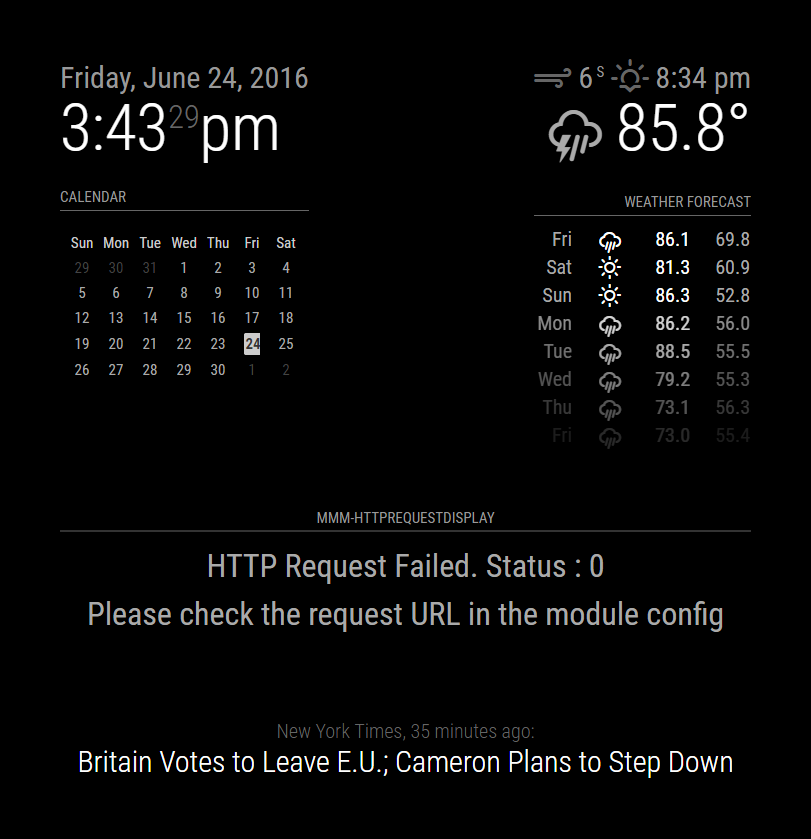
@KirAsh4 can you confirm MM startup with my module with this config file?
The module won’t show any results but MM should boot?
-
The file ‘status.xml’ doesn’t exist on my system, so it gets a 404 returned, however it does load up, and it does work.
-
I have the same message with my environment.
In a browse it’s ok -
Right, I have not tested this on an actual rpi … I’m at the office, so I’m running a serveronly setup. I can do an rpi test later, although I suspect it will still work, as opposed to resulting in a blank screen. It returns the error as expected when it can’t find the file.
-
with a browser on the pi, it’s also ok
-
@KirAsh4 I’ve isolated the issue as a Cross-Domain Access issue. Do you know of any particular way to make XMLHTTPRequests to external domains?
I wasn’t aware this would be an issue but apparently anybody who wants to use this and map to an external domain will have this issue unless they have a running PHP server that can store the XML results locally (or if they can access a server, they can add the line
Access-Control-Allow-Origin: *to their HTML headers.Any ideas?
-
XMLHTTPRequest. Look at how the
'currentweather'module does it in the'updateWeather()'function. -
Yeah that’s what I based my original request functionality on. The OpenWeather API response is CORS compatible due to the response header - this is why the example response works well. Outside of this domain though (say on http://www.w3schools.com/xml/cd_catalog.xml (or any other external server). This unfortunately makes problems - I’m still looking for a work-around.
-
Welcome to Javascript security issues.
-
This post is deleted! -
This post is deleted! -
This post is deleted! -
I’m using that code in php
$xml = simplexml_load_file('XML/status1.xml'); echo "<br>--------------<br>XML parsing <br>--------------<br>"; $result = array(); foreach($xml->children() as $child){ $result[$child->getName()] = trim($child); -
have a look in here https://forum.magicmirror.builders/topic/240/soccer-standings i had also problems with cors so i used the request module in my node_helper to fix it
-
I copied the xml file on a synology web server, same behaviour status :0
-
Thanks @strawberry-3-141 - I’ll take a look and see if there are any changes I can make.
-
I took contact with the provider, he advices me to use x-device techno?
-
@acdacd2 said in http request:
some errors with nom install
pi@raspberrypi:~/MagicMirror/modules/default/MMM-HTTPRequestDisplay $ npm install
npm WARN enoent ENOENT: no such file or directory, open ‘/home/pi/MagicMirror/modules/package.json’
npm WARN enoent ENOENT: no such file or directory, open ‘/home/pi/MagicMirror/modules/node_modules/node_helper/package.json’
npm WARN modules No description
npm WARN modules No repository field.
npm WARN modules No README data
npm WARN modules No license field.I’m having this same error with a module… What am I doing wrong… any hints much appreciated
-
Does that module actually require an
'npm install'to be run? Don’t blindly run commands that you don’t know are actually necessary. You need to ask the author of that module how to properly install it, what the steps are, what’s needed, etc., etc. I know nothing of that module.Edited to add: running an
'npm install'is generally only required if the specific module needs any additional node dependencies installed. However, the author would make this known. If it doesn’t say that anywhere, do not assume you have to do it yourself. You may end up causing more harm to your installation than good. -
I’ve updated the ReadMe appropriately for this module, and this is available on the github page.
There are a few outstanding issues I need to address such as the calls to external domains (and a few other underlying issues), but I’m in the USA until the 6th of August and I won’t have time to address those issues until I return home.
Once the module is copied to the Modules folder, and the relevant config changes have been made, you shouldn’t need to “npm install” anything. You should simply be able to launch the MM software. No installations should be necessary. Be sure to read the Readme carefully, but if you can be more specific about the steps you have taken I can help you further.

Hello! It looks like you're interested in this conversation, but you don't have an account yet.
Getting fed up of having to scroll through the same posts each visit? When you register for an account, you'll always come back to exactly where you were before, and choose to be notified of new replies (either via email, or push notification). You'll also be able to save bookmarks and upvote posts to show your appreciation to other community members.
With your input, this post could be even better 💗
Register Login