Read the statement by Michael Teeuw here.
Old LCD PC monitor
-
Hi all,
I’m starting my journey with the mirror. For the start I have dismantled my old PC monitor and have a question: can I use it? The controller is quite big, so maybe I can remove the steel or should I buy a new controller (if possible)?

Controller:

Plugs:

Thx for your support!
BR
birdy -
Hi!
Yes ofc you can! my tip is remove the metal and get some thin plastic that you drill holes in. then just mount the circuit board to the plastic and then directly on the back of the display.
The plastic will eliminate that the display short circuit.I just finished my MM and built it like this.
Need anything else i’m happy to help! -
Here you have how i did: https://forum.magicmirror.builders/topic/4614/thomas-magicmirror-with-two-screens-55x83cm
-
@tomyboy96 said in Old LCD PC monitor:
The plastic will eliminate that the display short circuit.
Absolutely right! You have to isolate the boards so if you remove them from the shielding you’ll have to do something like tomyboy did. I left mine in the shielding. There was plenty of room.
You can see it here.
-
Hi all,
for the start, thanks a lot for you answers!
Rasberry is there, so I wanted to test, if the screen is working. Ta-da! It’s not :(
I had already problems with HDMI (my cat threw the screen down from the piano…) but VGA was always working. Now neither nor. I have Samsung SyncMaster T260HD.
Any idea, what could be the problem? I alreday ordered the mirror (40x60 cm) so if I would like to buy a new screen, it will be expensive…

Cheers
birdy -
@birdy said in Old LCD PC monitor:
Any idea, what could be the problem?
Your cat threw it down from the piano! ;^)
Are you sure that your input is set correctly on the monitor?
I would try it with another pc to eliminate the possibility that the Pi is not sending video.
You can also try the DVI input. Again, making sure that the input is set to DVI when you try that.
-
small update:
I got the screen up and running (I forgot to switch over from the monitor body a small controll panel), unfortunatelly only via VGA. HDMI is definitely not working.Any idea:
- if I could connect RaPi to the monitor via DVI (micro HDMI DVI)?
- or is there a connector (micro HDMI VGA)?
-> do I need a digital connection (hdmi) or analog (vga)?
For me a good information for today is, I don’t have to buy a new 27 inch LCD panel :D
Cheers
birdy -
@birdy why the micro Hdmi?
I would recommend using dvi to hdmi since the Rapi will then recognise the cable directly and u won’t have to do any config to get the screen working propely.
If you wanna use a hdmi to vga i used this:
http://www.wish.com/c/557e6ed78fe81619f182a12b
Worked really good after a bounch of configures in the Rapi.
-
@tomyboy96 - I have no idea why did I write micro HDMI (maybe I was playing with the micro SD adapter). But thanks for your remark! Adapter ordered (hope it will work). Next update in few days :)
-
@birdy I used some stuff from this site when i configured the Rapi (Y)
https://www.raspberrypi.org/forums/viewtopic.php?p=269212
Good Luck!
-
Hi guys,
the new cable is working!!!

Now the easiest part: coding ;)
Next update, when I get a keyboard from somewhere :D
-
Hi,
there is also another challenge:

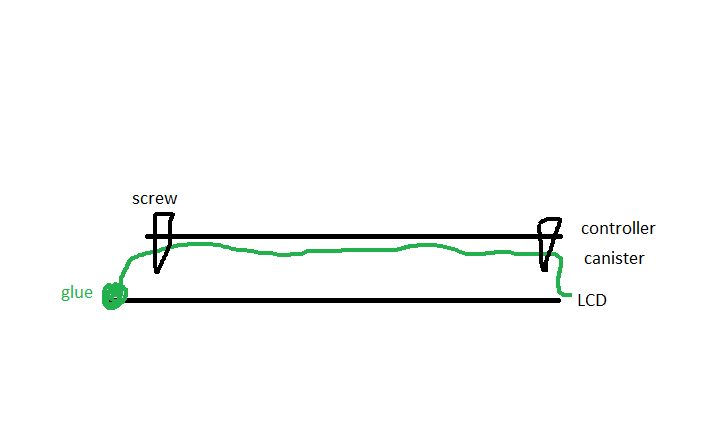
I would liek to get rid of these metal body. The side you can see shoud me glued to the plastic.What can I put between the curcuit and the plastic? Some small plastik tubes? Wood? Rubber? Should I then glue the boards or better (for the future) screw it to to the “legs”?
How about grounding it? Needed?
Cheers
Birdy -
@birdy i used one of thease.
http://www.biltema.se/sv/Fritid/Friluftsliv-och-camping/Kok-och-vatten/Vattendunk-2000023717/
Easy to bend och drill in
-
you used a plastic water canister? In what manner?
-
@birdy i cut out flat pices that i drilled the board to.
-
so like this (side view)?
-
@birdy yeah, but i used velcro tape insted of glue
-
one question, which is bothering me: the controller plate has spot for grounding (the plate was connected with the metal body before via this “grounding spot”). Do I need to ground it e.g. with power supply or similar or I can leave the plate ungrounded?
-
So I got the MM up an running :)

back side:

Next steps:
- MM configuration & understanding how it works
- to shorten the wooden legs
- to order + build a frame
- put everything together :)
BR
birdy -
Dear all,
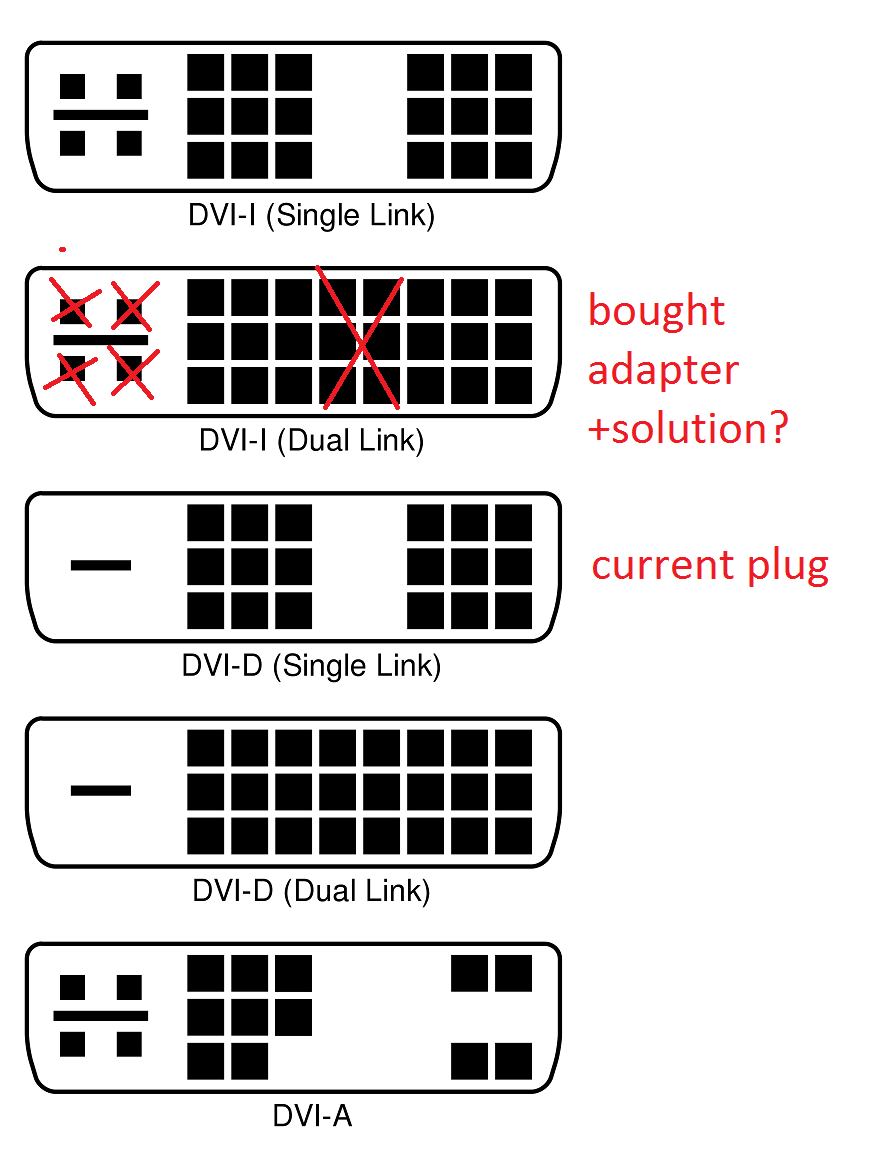
next issue: to reduce the empty space behind the LCD panel, I bought a 90 degrees DVI adapter. But I have noticed, my plug was DVI-D and I bought DVI-I.
Question: I don’t want to wait a week for a new one, can I remove few pins (esp. the 4 on the left) on my own? see picture below:
Thx for your help!
Regards
birdy

Hello! It looks like you're interested in this conversation, but you don't have an account yet.
Getting fed up of having to scroll through the same posts each visit? When you register for an account, you'll always come back to exactly where you were before, and choose to be notified of new replies (either via email, or push notification). You'll also be able to save bookmarks and upvote posts to show your appreciation to other community members.
With your input, this post could be even better 💗
Register Login