MagicMirror Forum
    • Recent
    • Tags
    • Unsolved
    • Solved
    • MagicMirror² Repository
    • Documentation
    • 3rd-Party-Modules
    • Donate
    • Discord
    • Register
    • Login
    A New Chapter for MagicMirror: The Community Takes the Lead
    Read the statement by Michael Teeuw here.

    electron size

    Scheduled Pinned Locked Moved Troubleshooting
    12 Posts 6 Posters 6.9k Views 6 Watching
    Loading More Posts
    • Oldest to Newest
    • Newest to Oldest
    • Most Votes
    Reply
    • Reply as topic
    Log in to reply
    This topic has been deleted. Only users with topic management privileges can see it.
    • D Offline
      duanzi
      last edited by

      after i rotate the screen, the electron module is very large and overlapped.
      Can anyone tell me how to change the size of it?
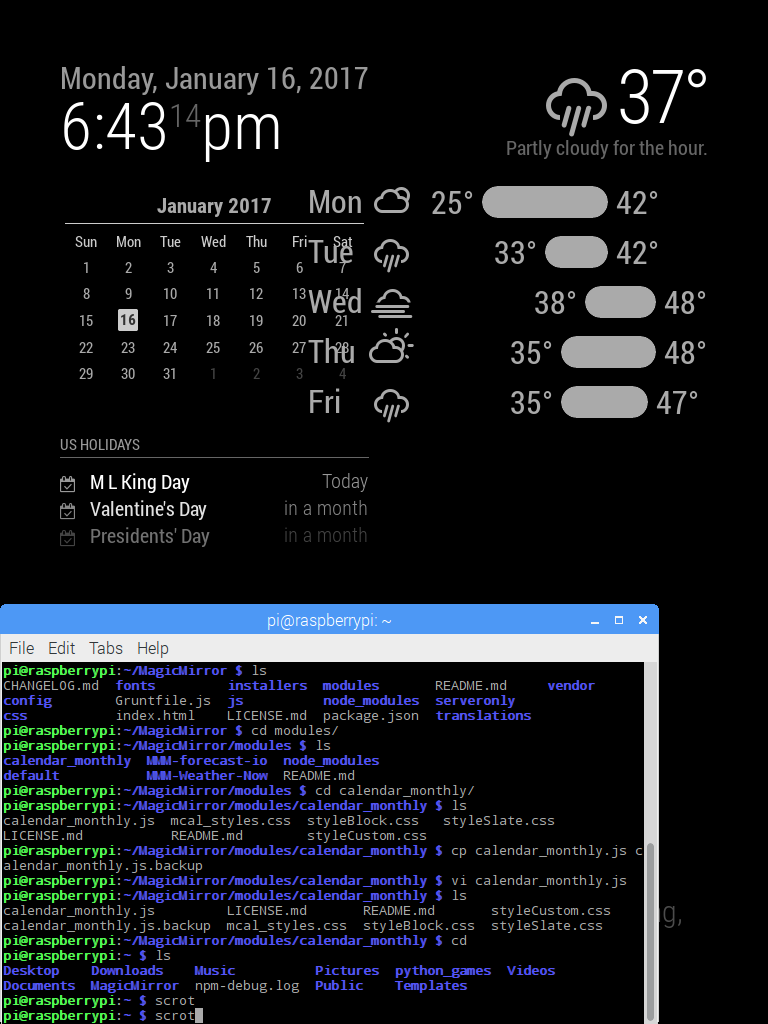
      0_1484610382031_2017-01-16-184315_768x1024_scrot.png

      FlatPepsiF 1 Reply Last reply Reply Quote 0
      • FlatPepsiF Offline
        FlatPepsi @duanzi
        last edited by

        @duanzi
        You ever got a solution? I have the same issue.

        brobergB 1 Reply Last reply Reply Quote 0
        • brobergB Offline
          broberg Project Sponsor @FlatPepsi
          last edited by

          @FlatPepsi changing the overall font size will make all modules to take upp less space.

          That and changing the margins will give you more space.

          I 1 Reply Last reply Reply Quote 0
          • I Offline
            ironman_DK @broberg
            last edited by

            @broberg where can I change the overall font size ?

            brobergB 1 Reply Last reply Reply Quote 0
            • brobergB Offline
              broberg Project Sponsor @ironman_DK
              last edited by

              @ironman_DK The most used classes for the font sizes are :

              .xsmall {
                font-size: 15px;
                line-height: 20px;
              }
              
              .small {
                font-size: 20px;
                line-height: 25px;
              }
              
              .medium {
                font-size: 30px;
                line-height: 35px;
              }
              
              .large {
                font-size: 65px;
                line-height: 65px;
              }
              
              .xlarge {
                font-size: 75px;
                line-height: 75px;
                letter-spacing: -3px;
              }
              

              Add these in the custom.css and change the font-size in each to fit your needs.
              Everything in custom.css will override the main.css

              1 Reply Last reply Reply Quote 1
              • eniacE Offline
                eniac
                last edited by eniac

                Sadly the same here
                freshly installed 2.1.3

                Is there no Option to Switch zoom size like in the Mozilla browser with Shit+/- ?

                ctrl 0 don’t work here …

                Mykle1M 1 Reply Last reply Reply Quote 0
                • Mykle1M Offline
                  Mykle1 Project Sponsor Module Developer @eniac
                  last edited by

                  @eniac

                  While the mirror is running:

                  The key commands are:

                  Zoom In = Ctrl + Shift + =

                  Zoom Out = Ctrl + -

                  Default size = Ctrl + 0

                  Create a working config
                  How to add modules

                  1 Reply Last reply Reply Quote 0
                  • eniacE Offline
                    eniac
                    last edited by eniac

                    As I wrote above that don’t work here … :-(
                    No Response form MM

                    Mykle1M 1 Reply Last reply Reply Quote 0
                    • Mykle1M Offline
                      Mykle1 Project Sponsor Module Developer @eniac
                      last edited by

                      @eniac

                      Then you have something else going on there

                      Create a working config
                      How to add modules

                      1 Reply Last reply Reply Quote 0
                      • eniacE Offline
                        eniac
                        last edited by eniac

                        I fixed it by moving the Center modules to the left …
                        But I would be very interesting why that is ok on my first Installation and not here …

                        Mykle1M 1 Reply Last reply Reply Quote 0
                        • Mykle1M Offline
                          Mykle1 Project Sponsor Module Developer @eniac
                          last edited by

                          @eniac

                          Who can say?

                          Create a working config
                          How to add modules

                          eniacE 1 Reply Last reply Reply Quote 0
                          • eniacE Offline
                            eniac @Mykle1
                            last edited by eniac

                            @Mykle1

                            @FredSWG said in ZOOM /Scaling:

                            you can change it in css/custom.css file

                             body {
                             	zoom: 75%;
                             }
                            

                            I didn’t find why the config file value is not taken in consideration. I assume something is overwriting this value.

                            Will do the Job :-) I use 80% …

                            1 Reply Last reply Reply Quote 1

                            Hello! It looks like you're interested in this conversation, but you don't have an account yet.

                            Getting fed up of having to scroll through the same posts each visit? When you register for an account, you'll always come back to exactly where you were before, and choose to be notified of new replies (either via email, or push notification). You'll also be able to save bookmarks and upvote posts to show your appreciation to other community members.

                            With your input, this post could be even better 💗

                            Register Login

                            • 1 / 1
                            • First post
                              Last post
                            Enjoying MagicMirror? Please consider a donation!
                            MagicMirror created by Michael Teeuw.
                            Forum managed by Sam, technical setup by Karsten.
                            This forum is using NodeBB as its core | Contributors
                            Contact | Privacy Policy