Read the statement by Michael Teeuw here.
Auto-Start Failed
-
Hey so I’m having trouble auto-starting my magic mirror.
I used this guide:
https://github.com/MichMich/MagicMirror/wiki/Auto-Starting-MagicMirror
And followed it line by line.
That being said, I dug through the forums and it seems like people were having trouble doing this in the older versions of MM but I couldn’t find anything current.
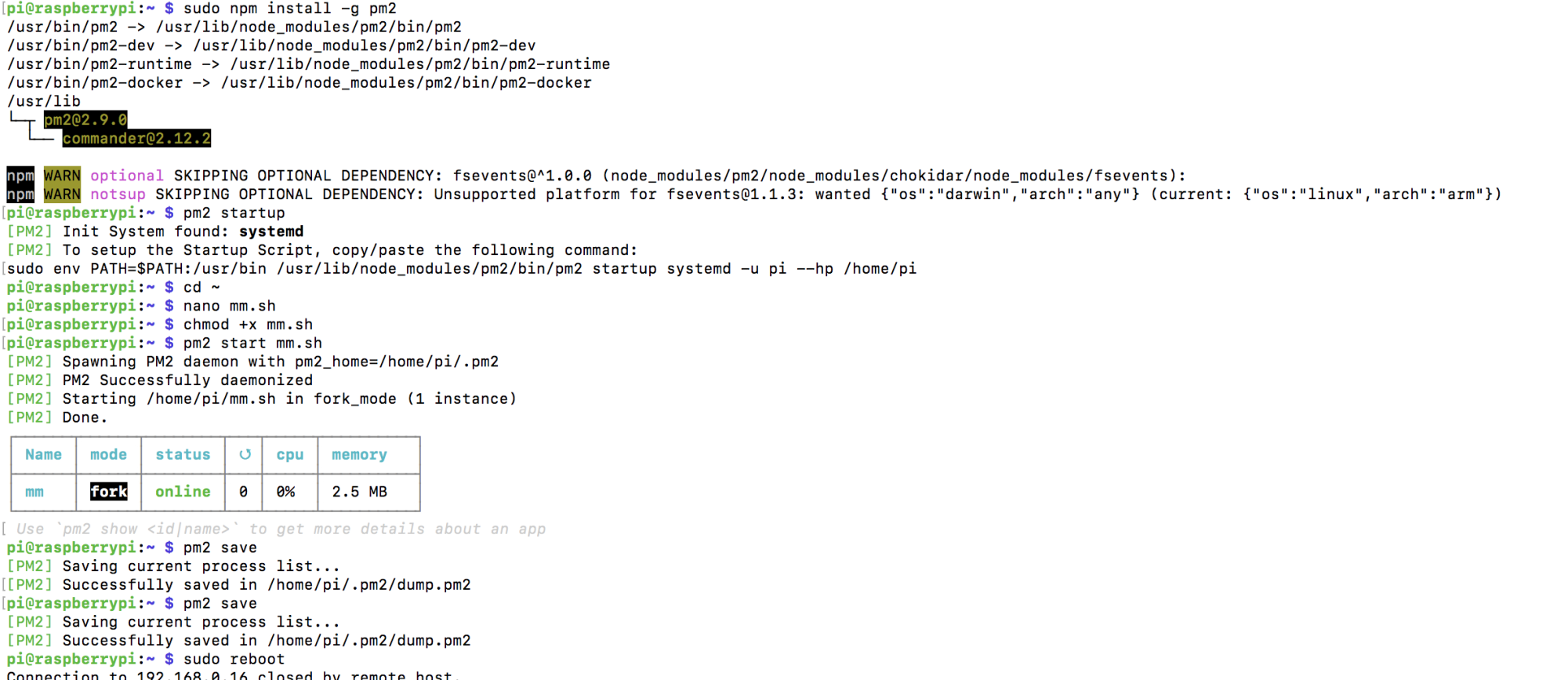
This is what I’ve been getting. It looks fine, but the mm.sh file just doesn’t actually execute on startup. I have to manually enter
pm2 start mm.sh
to get the MM to actually start.Any help with this?
Thanks!
-
It doesn’t seem as if you executed the command circled in red.

-
So I went back and ran that sudo command.
*
*
pi@raspberrypi:~/MagicMirror $ pm2 startup
[PM2] Init System found: systemd
[PM2] To setup the Startup Script, copy/paste the following command:
sudo env PATH=$PATH:/usr/bin /usr/lib/node_modules/pm2/bin/pm2 startup systemd -u pi --hp /home/pi
pi@raspberrypi:~/MagicMirror $ sudo env PATH=$PATH:/usr/bin /usr/lib/node_modules/pm2/bin/pm2 startup systemd -u pi --hp /home/pi
[PM2] Init System found: systemd
Platform systemd
Template
[Unit]
Description=PM2 process manager
Documentation=https://pm2.keymetrics.io/
After=network.target[Service]
Type=forking
User=pi
LimitNOFILE=infinity
LimitNPROC=infinity
LimitCORE=infinity
Environment=PATH=/usr/bin:/bin:/usr/local/sbin:/usr/local/bin:/usr/sbin:/usr/bin
Environment=PM2_HOME=/home/pi
PIDFile=/home/pi/pm2.pidExecStart=/usr/lib/node_modules/pm2/bin/pm2 resurrect
ExecReload=/usr/lib/node_modules/pm2/bin/pm2 reload all
ExecStop=/usr/lib/node_modules/pm2/bin/pm2 kill[Install]
WantedBy=multi-user.targetTarget path
/etc/systemd/system/pm2-pi.service
Command list
[ ‘systemctl enable pm2-pi’,
‘systemctl start pm2-pi’,
‘systemctl daemon-reload’,
‘systemctl status pm2-pi’ ]
[PM2] Writing init configuration in /etc/systemd/system/pm2-pi.service
[PM2] Making script booting at startup…Executing systemctl enable pm2-pi
[DONE]
Executing systemctl start pm2-pi
[DONE]
Executing systemctl daemon-reload
[DONE]
Executing systemctl status pm2-pi
● pm2-pi.service - PM2 process manager
Loaded: loaded (/etc/systemd/system/pm2-pi.service; enabled; vendor preset: enabled)
Active: active (running) since Thu 2017-12-14 16:59:48 CST; 6min ago
Docs: https://pm2.keymetrics.io/
Main PID: 640 (PM2 v2.9.0: God)
CGroup: /system.slice/pm2-pi.service
└─640 PM2 v2.9.0: God Daemon (/home/pi)Dec 14 16:59:48 raspberrypi pm2[425]: [PM2] Restoring processes located in /home/pi/dump.pm2
Dec 14 16:59:48 raspberrypi pm2[425]: [PM2][ERROR] Failed to read dump file in /home/pi/dump.pm2
Dec 14 16:59:48 raspberrypi pm2[425]: [PM2] Restoring processes located in /home/pi/dump.pm2
Dec 14 16:59:48 raspberrypi pm2[425]: [PM2][ERROR] Failed to read dump file in /home/pi/dump.pm2.bak
Dec 14 16:59:48 raspberrypi pm2[425]: [PM2][ERROR] No processes saved; DUMP file doesn’t exist
Dec 14 16:59:48 raspberrypi pm2[425]: ┌──────────┬────┬──────┬─────┬────────┬─────────┬────────┬─────┬─────┬──────┬──────────┐
Dec 14 16:59:48 raspberrypi pm2[425]: │ App name │ id │ mode │ pid │ status │ restart │ uptime │ cpu │ mem │ user │ watching │
Dec 14 16:59:48 raspberrypi pm2[425]: └──────────┴────┴──────┴─────┴────────┴─────────┴────────┴─────┴─────┴──────┴──────────┘
Dec 14 16:59:48 raspberrypi pm2[425]: Usepm2 showto get more details about an app
Dec 14 16:59:48 raspberrypi systemd[1]: Started PM2 process manager.
[DONE]
±--------------------------------------+
[PM2] Freeze a process list on reboot via:
$ pm2 save[PM2] Remove init script via:
$ pm2 unstartup systemd
pi@raspberrypi:~/MagicMirror $ pm2 save
[PM2] Spawning PM2 daemon with pm2_home=/home/pi/.pm2
[PM2] PM2 Successfully daemonized
[PM2] Saving current process list…
[PM2] Successfully saved in /home/pi/.pm2/dump.pm2
pi@raspberrypi:~/MagicMirror $ cd ~
pi@raspberrypi:~ $ nano mm.sh
pi@raspberrypi:~ $ chmod +x mm.sh
pi@raspberrypi:~ $ pm2 start mm.sh
[PM2] Starting /home/pi/mm.sh in fork_mode (1 instance)
[PM2] Done.
┌──────────┬────┬──────┬──────┬────────┬─────────┬────────┬─────┬──────────┬──────┬──────────┐
│ App name │ id │ mode │ pid │ status │ restart │ uptime │ cpu │ mem │ user │ watching │
├──────────┼────┼──────┼──────┼────────┼─────────┼────────┼─────┼──────────┼──────┼──────────┤
│ mm │ 0 │ fork │ 1304 │ online │ 0 │ 0s │ 2% │ 2.6 MB │ pi │ disabled │
└──────────┴────┴──────┴──────┴────────┴─────────┴────────┴─────┴──────────┴──────┴──────────┘
Usepm2 showto get more details about an app
pi@raspberrypi:~ $ pm2 save
[PM2] Saving current process list…
[PM2] Successfully saved in /home/pi/.pm2/dump.pm2
pi@raspberrypi:~ $ sudo reboot
*
*
*
and nothing happened still…any thoughts/suggestions? -
@jaerenull
any update? this is what mine is currently doing.

Hello! It looks like you're interested in this conversation, but you don't have an account yet.
Getting fed up of having to scroll through the same posts each visit? When you register for an account, you'll always come back to exactly where you were before, and choose to be notified of new replies (either via email, or push notification). You'll also be able to save bookmarks and upvote posts to show your appreciation to other community members.
With your input, this post could be even better 💗
Register Login