Read the statement by Michael Teeuw here.
MMM-CalendarExt
-
Hey, is there a way to rename/hide the location of an event for a specific calendar?
You can hide location by modifying CSS, but no way to rename. You should do it in your feed.
-
I have a problem that a all day event, also shows up the next day. Have tried both daily and weeks view, and same error.
I use locale da-DK -
@simzdk Seems @nn1mda is having the same problem here. @Sean is busy, but maybe we can convince him to have a look. As @modderhut suggests, best to open an issue on Github.
-
@simzdk
Send me your configuration and ical to test.
My email is in my profile.
And as @ninjabreadman said, I’m so busy to catch up the forum. if you leave your request in Github, I’ll try to support. -
@Sean, Thanks!
Email sent!
-
This may be a silly question, but I am pretty new to using git. I am wanting to install this module on a RPI Zero and cannot figure out how to “git clone” the sub tree repository with the RPI 1 compatibility changes.
Is there a way to tell the git to clone from a sub folder/branch?
Thanks!
-
@abetterway I think you mean switch the origin branch of the MMM-CalendarExt repository to
forRPI1.In this case, use
git checkout forRPI1within the~/MagicMirror/modules/MMM-CalendarExtdirectory. -
That’s exactly what I needed. Thank you!
-
This post is deleted! -
Hello,
I would like to know if it is possible to have a visual per hour.
For example from 8h to 18h.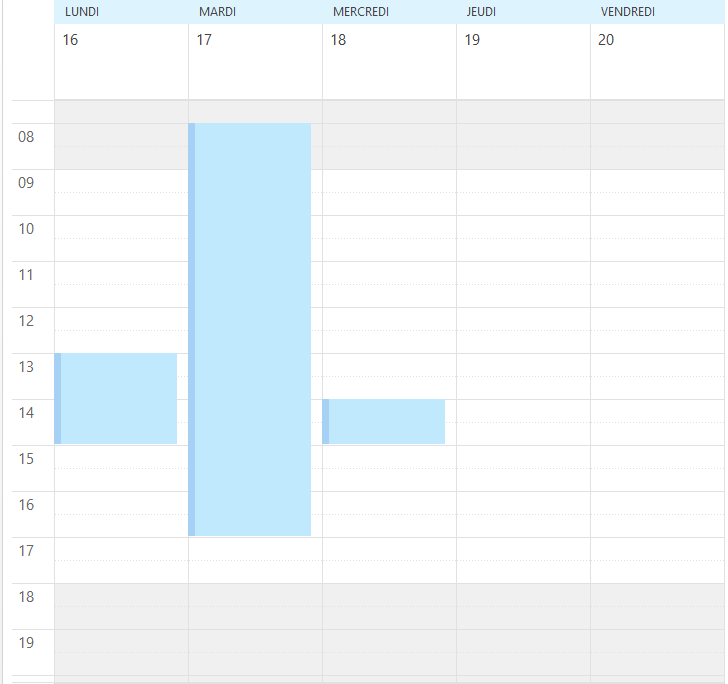
Thank you
-
Hi Guys!
I hope you can help me. ;-)
I’m looking for a way to hide the column “KW”.
So the first column should be the “Monday (Mo)” column - at the " weeks" view.(Hide the red marked column)
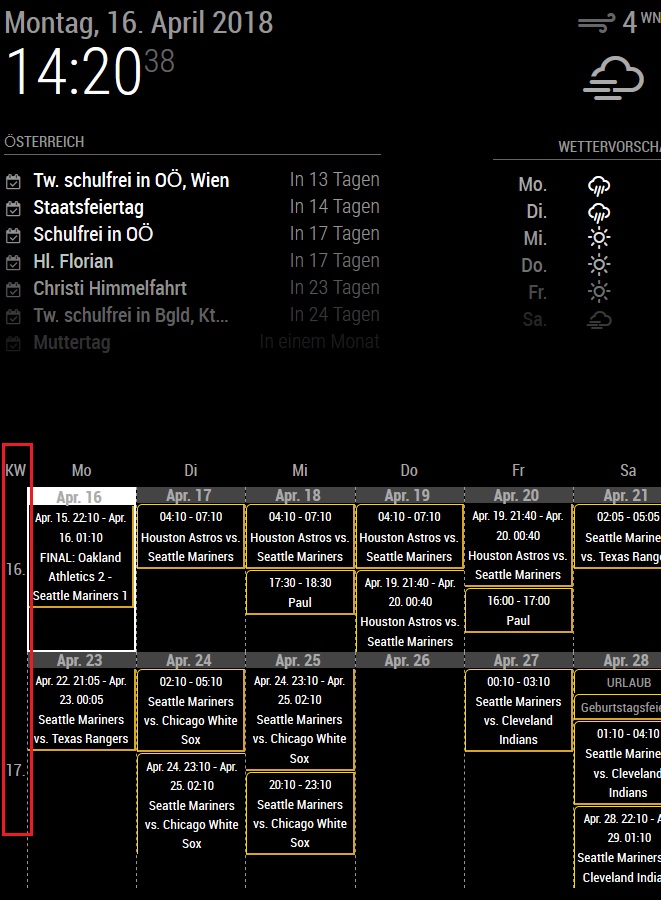
Is that possible?!
-
Yes, look at https://github.com/eouia/MMM-CalendarExt/wiki/Configuration, search for
showWeeksand add that to your config. -
@yawns
THANK YOU
It’s so easy - I have to be blind -
Hi… thank you so much for building this module… I am trying to customize the views… i originally setup weeks view with just one week… got my css where I wanted it, but I realized what i really wanted was a days view… the days view is much different and doesn’t show times on the events… can you help me get exactly like my picture, but in the days view? with the week starting on monday. I have my locale set to en-US…
Thursday, Friday, and Saturday day names are missing though…
-
First of all thankyou for this great module!!
One little question. I use my calendar in weekly View with 2 weeks shown.
I would like to reduce the black margin left and right. Could you tell me which code I have to add in the custom.css to define the width of the calendar?Thank you so much
Sandy -
Hi :),
Is it possible to start MMM-CalendarExt hidden and let it show up with this.sendNotification(‘CHANGED_PROFILE’, {to:‘daddy’}) or something like that?`
Background ist that I want to use Buttons at my Mirror to hide all other modules and show CalendarExt in fullscreen (MMM-Toggle).
Problem is that Calendar do not refresh in hidden mode.my config:
{
			module: 'MMM-CalendarExt',
			position: "top_left", //anywhere. It is not related to real position of view
			config: {
			  system: {
				show: ["weeks"], //you can select views which you want to show.
				locale: 'de',
				showEmptyView: 1,
				},
				views: {
					weeks: {
						position: "middle_center",
						showWeeks: 1,
						weeksTitle: 'Woche',
						weeksFormat: 'WW',
						weekdayFormat: 'dd',
						titleFormat : 'D',
						overTitleFormat : 'D. MMM',
						monthTitleFormat: "MMMM",
						counts: 6,
						overflowRolling: 1,
						oneLineEvent: 1,
					},
				},
				calendars: [
					{
					  name: "Kalender",
					  styleName:"style5",
					  url: "https://calendar.google.com...
					},
					{
					  name: "Geburtstage",
					  styleName:"style15",
					  symbol:"birthday@em",
					  url: "https://calendar.google.com...
					},
					{
					  name: "Müllabfuhr",
					  styleName:"style3",
					  symbol:"wastebasket@em",
					  url: "https://calendar.google.com...
					},
					{
					  name: "WM Kalender",
					  symbol:"soccer@em",
					  url: "https://calendar.google.com....
					},
				],
			}
		},
Thanks in advance :)
-
I am having problems with my mirror, and I can’t figure out which module is the culprit. In my logs, I am seeing something related to this one, so maybe someone could help me out. Any ideas what the error below means?
0|mm | Whoops! There was an uncaught exception... 0|mm | TypeError: Cannot read property 'replace' of null 0|mm | at new Calendar (/home/pi/MagicMirror/modules/MMM-CalendarExt/components/Calendar.js:38:32) 0|mm | at Calendars.registerCalendar (/home/pi/MagicMirror/modules/MMM-CalendarExt/components/Calendars.js:37:18) 0|mm | at Class.cmd_ADD_CALENDAR (/home/pi/MagicMirror/modules/MMM-CalendarExt/node_helper.js:45:20) 0|mm | at Class.socketNotificationReceived (/home/pi/MagicMirror/modules/MMM-CalendarExt/node_helper.js:36:14) 0|mm | at Socket. (/home/pi/MagicMirror/modules/node_modules/node_helper/index.js:113:11) 0|mm | at emitTwo (events.js:125:13) 0|mm | at Socket.emit (events.js:213:7) 0|mm | at /home/pi/MagicMirror/node_modules/socket.io/lib/socket.js:528:12 0|mm | at _combinedTickCallback (internal/process/next_tick.js:131:7) 0|mm | at process._tickCallback (internal/process/next_tick.js:180:9) 0|mm | MagicMirror will not quit, but it might be a good idea to check why this happened. Maybe no internet connection? 0|mm | If you think this really is an issue, please open an issue on GitHub: https://github.com/MichMich/MagicMirror/issues -
@Sean
I have done an update from your module.
But know the view of my “bank holidays” does not work anymore (the google calender dates are still working fine)
Can it be that there is some problem accordingly.
I am using via “webcal” these datas from the following adress:
www.ecoline-media.de/ics/bayern_gf.icsThanks for you help and your great work
Cheers -
@vauxdvihl
In my system, it works.

Log:
[CALEXT] http://www.ecoline-media.de/ics/bayern_gf.ics  >> Fetch starts.
[CALEXT] http://www.ecoline-media.de/ics/bayern_gf.ics  >>
{ state: 'renewed',
  lastFetchedTime: '18-09-03 08:52:25',
  lastFetchedEvents: 8,
  lastFetchedOldEvents: 0,
  lastServedEvents: 8,
  error: null }
Config:
{
      //disabled:true,
      module: 'MMM-CalendarExt',
      position: "top_left",
      config: {
        system: {
          show: ['monthly']
        },
        views: {
          monthly: {
            counts:6
          }
        },
        calendars: [
          {
            url: "http://www.ecoline-media.de/ics/bayern_gf.ics"
          }
        ]
      }
    },
Is there any symptom (eg. error logs) for your issue?
-
@Sean
It is strange
I have copied the file to the systemLog:
[CALEXT] http://localhost:8080/modules/bayern_gf.ics  >>
0|mm       | { state: 'renewed',
0|mm       |   lastFetchedTime: '18-09-08 09:07:31',
0|mm       |   lastFetchedEvents: 17,
0|mm       |   lastFetchedOldEvents: 0,
0|mm       |   lastServedEvents: 17,
0|mm       |   error: null }
Config:
calendars: [
				  {
					name: "Ferien Bayern",
					url: "http://localhost:8080/modules/bayern_gf.ics",
					styleName: "style1",
					symbol: 'de@em',
				    maxEntries: 50,
					maxDays:365,
					interval: 24*60*60*1000,
				  },
But the module will not show the datas in the calendar.
Other google calendars are shownAny idea?
Thank
Hello! It looks like you're interested in this conversation, but you don't have an account yet.
Getting fed up of having to scroll through the same posts each visit? When you register for an account, you'll always come back to exactly where you were before, and choose to be notified of new replies (either via email, or push notification). You'll also be able to save bookmarks and upvote posts to show your appreciation to other community members.
With your input, this post could be even better 💗
Register Login