Read the statement by Michael Teeuw here.
MMM-CalendarExt
-
@yawns
Yeah, i saw this already. Unfortunately my english isn’t good enough to understand this :/I just create a bash script with following content:
pm2 flush
The script will be executed by a cronjob every sunday at 4am.Maybe not the cleanest solution…
I will take a look again at the log rotate method. :) thanks dude
-
@cruunnerr
Understood. If you don’t figure it out I will try when I am back home next weekend -
Hey guys,
I am trying to show the same calendar on “weeks” and on “upcoming” but with different “maxEntries”. Is that possible?
tried it like this:
                               {
                                        //Muellkalendar
                                      url: "webcal://p53-calendars.icloud.com/published/2/.....",
                                      styleName: "style2",
                                      maxEntries: 20,
                                      symbol: "delete-empty@md",
                                      views: ["weeks"],
                                      interval: 86400000, // 24 Stunden
                                },
                                {
                                        //Muellkalendar-Upcoming
                                      url: "webcal://p53-calendars.icloud.com/published/2/.....",
                                      styleName: "style2",
                                      maxEntries: 2,
                                      symbol: "delete-empty@md",
                                      views: ["upcoming"],
                                      interval: 86400000, // 24 Stunden
                                },
But then i get the “create a config” message
-
@cruunnerr
maxEntriesis only worked for the count of loading events ofcalendar, not theview. You can uselimitfor limitation of the number of events of specificview. -
Thanks for your reply.
I already used limit for the upcoming view. I have 3 calendars in the upcoming view and the limit works fine.
But i want to show the same calendar once in the weeks view with up to 20 entries and in the upcoming view max. 2 so the other calendar entries will not be blocked by the calendar i just need 2 entries.
anyhow, it seems not to be possible. But thank u anyway. Great module at all :)
-
Hi,
Thanks a lot for a great module!!!Currently doing my finishing touches on my MagicMirror and CalendarExt.
I’m using 1 daily view (bottom_bar) and 2 column view (top_left), each with a dedicated google calendar.
Have tried to configure 2 upcoming view, still without any luck.I have 2 questions:
-
How can I set up CalendarExt to use 2 upcoming views or reconfigure one of the other views to function and present as the upcoming view?
(Preferable without being affected by future updates.) -
Is there any method (or planned feature) to limit my calendars from 3 to 1 by filtering, including or excluding events per view?
Example:
		 calendars: [
                        {
                        name: "Birthdays",
                        title: "Birthdays",
                        views: ['upcoming'],
			includeEvent: ["/Birthday/gi']
                        url: "https://calendar.google.com/calendar/ical/....",
                        },
                        {
                        name: "Calendar",
                        views: ['daily'],
			excludeEvent: ["/Birthday/gi']
                        url: "https://calendar.google.com/calendar/ical/....",
                        },
                        ],
Hope you can help.
-
-
- You cannot use “2 upcoming views” at the same time. sorry. If you use “profile”, you can select or change to show the view from “multi upcoming views”, but not together.
- I hadn’t imagined that kind of function. I think some kind of filtering function would be needed for your purpose. When I have a time, I might add that.
-
Thanks for your update and for considering the feature.
Hope to see filtering sometime in the future in this already great module. -
@Sean
Hey, is there a way to rename/hide the location of an event for a specific calendar?
Similar to thereplaceTitleconfiguration.
Thanks, -
Hey, is there a way to rename/hide the location of an event for a specific calendar?
You can hide location by modifying CSS, but no way to rename. You should do it in your feed.
-
I have a problem that a all day event, also shows up the next day. Have tried both daily and weeks view, and same error.
I use locale da-DK -
@simzdk Seems @nn1mda is having the same problem here. @Sean is busy, but maybe we can convince him to have a look. As @modderhut suggests, best to open an issue on Github.
-
@simzdk
Send me your configuration and ical to test.
My email is in my profile.
And as @ninjabreadman said, I’m so busy to catch up the forum. if you leave your request in Github, I’ll try to support. -
@Sean, Thanks!
Email sent!
-
This may be a silly question, but I am pretty new to using git. I am wanting to install this module on a RPI Zero and cannot figure out how to “git clone” the sub tree repository with the RPI 1 compatibility changes.
Is there a way to tell the git to clone from a sub folder/branch?
Thanks!
-
@abetterway I think you mean switch the origin branch of the MMM-CalendarExt repository to
forRPI1.In this case, use
git checkout forRPI1within the~/MagicMirror/modules/MMM-CalendarExtdirectory. -
That’s exactly what I needed. Thank you!
-
This post is deleted! -
Hello,
I would like to know if it is possible to have a visual per hour.
For example from 8h to 18h.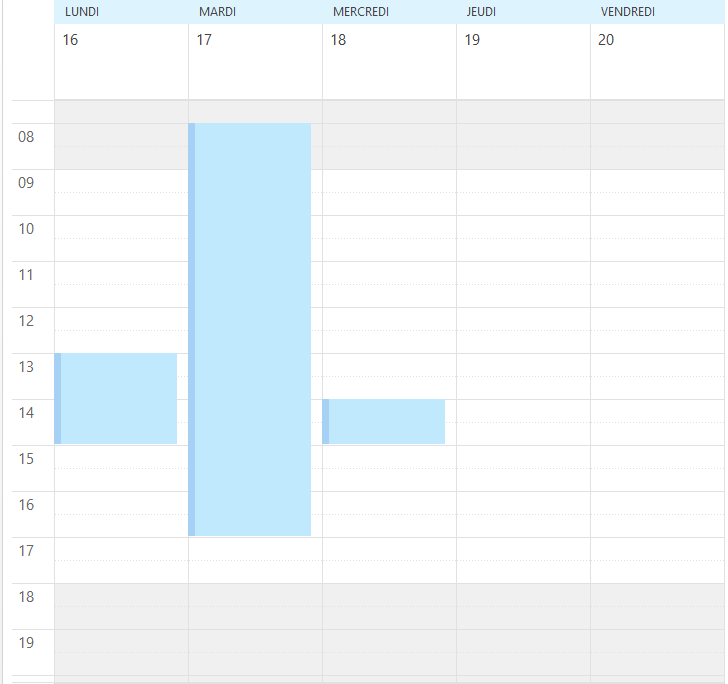
Thank you
-
Hi Guys!
I hope you can help me. ;-)
I’m looking for a way to hide the column “KW”.
So the first column should be the “Monday (Mo)” column - at the " weeks" view.(Hide the red marked column)
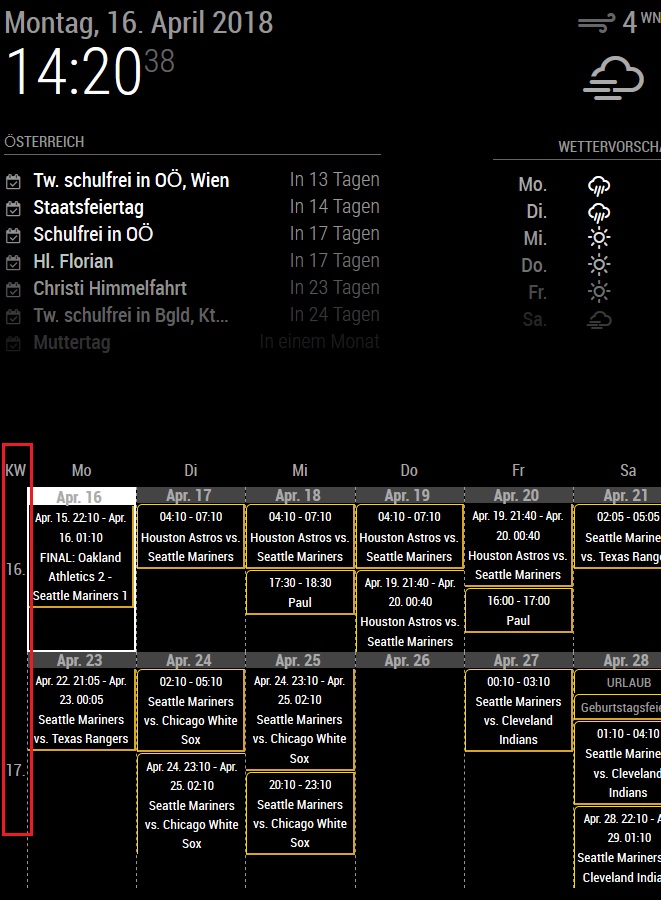
Is that possible?!



Hello! It looks like you're interested in this conversation, but you don't have an account yet.
Getting fed up of having to scroll through the same posts each visit? When you register for an account, you'll always come back to exactly where you were before, and choose to be notified of new replies (either via email, or push notification). You'll also be able to save bookmarks and upvote posts to show your appreciation to other community members.
With your input, this post could be even better 💗
Register Login