Read the statement by Michael Teeuw here.
MMM-MyWink - Display status of smart home devices connected to a Wink hub
-
[card:jclarke0000/MMM-MyWink]
This displays the status of smart home devices connected to your Wink Hub.
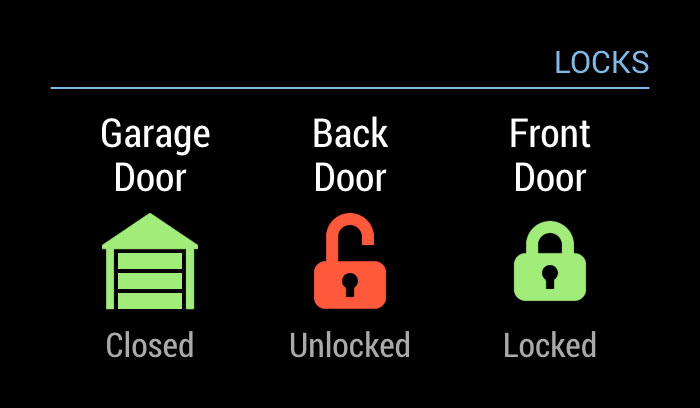
Currently it only supports Locks and Garage Doors, but I plan to add support for more devices soon. I’ll also be adding a configuration to change the display to something that saves a bit more space in case you want to display the status of many items. But for now I want to have this running for a few days to iron out any problems that arise in how devices are monitored.
If you’re interested, give it a shot and let me know if anything doesn’t seem right…
-
I would love to use this module, but I don’t see a sample configuration to use. I’m at somewhat of a loss. I currently use several of your modules (listed below) with great success, they’re all beautiful by the way! But I just can’t get MyWink working. I got a “Client Secret” and “Client ID” within a few minutes of making the request, so maybe that’s not right as you said it should take a few days (EDIT: I checked just now and it does indeed say “Approved”).
MMM-MyCalendar
MMM-MyCommute
MMM-MyScoreboard
MMM-MyWastePickup
MMM-MyNotes
MMM-MyWordOfTheDayHere’s what I’m using for now, but it just says “Loading…”
{ module: 'MMM-MyWink', position: 'top_right', config: { client_id: 'ENTERED', client_secret: 'ENTERED', username: 'ENTERED', password: 'ENTERED', } }, -
@twosquirrels Your config looks good. This was mine, maybe there’s something we missed?
    {
      module: "MMM-MyWink",
      header: "Locks",
      disabled: true,
      position: "top_right",
      classes: "default everyone",
      config: {
        client_id: "MY_CLIENT_ID",
        client_secret: "MY_CLIENT_SECRET",
        username: "MY_WINK_ACCOUNT_LOGIN_USERNAME",
        password: "MY_WINK_ACCOUNT_LOGIN_PASSWORD"
      }
    }
Keep in mind that this will only work with door locks and garage doors. I never programmed it to do anything else, and now that I’ve moved overseas, I no longer have the Wink hub – I sold it with my house back in Toronto.
I’ve also not tested this with a Wink Hub 2, as I only had the original version 1 of the hub, nor have I tested it with the latest version of MagicMirror. So lots of things could go wrong…
And I’m assuming you ran
npm installin theMMM-MyWinkdirectory? -
Ah, darn! I did run npm install in MMM-MyWink. I tried using your config verbatim (except I had to change disabled: true to disabled: false), and entered my id/secret/username/password. No dice. It still just says “Loading…”. I do have a Wink Hub 2 (with garage doors and a lock) so I’ll have to assume this isn’t going to work. Such a shame as your modules are the best I’ve seen!
-
@twosquirrels you’re welcome to fork my repository and try to get it working on the Wink 2. Happy to answer any questions you have along the way.

Hello! It looks like you're interested in this conversation, but you don't have an account yet.
Getting fed up of having to scroll through the same posts each visit? When you register for an account, you'll always come back to exactly where you were before, and choose to be notified of new replies (either via email, or push notification). You'll also be able to save bookmarks and upvote posts to show your appreciation to other community members.
With your input, this post could be even better 💗
Register Login