MagicMirror Forum
    • Recent
    • Tags
    • Unsolved
    • Solved
    • MagicMirror² Repository
    • Documentation
    • 3rd-Party-Modules
    • Donate
    • Discord
    • Register
    • Login
    A New Chapter for MagicMirror: The Community Takes the Lead
    Read the statement by Michael Teeuw here.

    Ecobee

    Scheduled Pinned Locked Moved Requests
    50 Posts 19 Posters 36.8k Views 20 Watching
    Loading More Posts
    • Oldest to Newest
    • Newest to Oldest
    • Most Votes
    Reply
    • Reply as topic
    Log in to reply
    This topic has been deleted. Only users with topic management privileges can see it.
    • L Offline
      Les
      last edited by

      Second the ecobee module :)

      1 Reply Last reply Reply Quote 3
      • R Offline
        rpataca
        last edited by

        I’d love to see this!

        1 Reply Last reply Reply Quote 0
        • cowboysdudeC Offline
          cowboysdude Module Developer
          last edited by

          Anything is possible… npm has a few modules for ecobee so it’s doable… however I am VERY new to programming with js and this is above my pay grade LOL

          I’m thinking that this: homebridge-ecobee3-sensors from npm would work…

          1 Reply Last reply Reply Quote 0
          • F Offline
            fabbr
            last edited by

            Coming soon !!!

            Who wants to help me BETA test this?

            alt text

            S E G 3 Replies Last reply Reply Quote 3
            • E Offline
              E3V3A
              last edited by

              @TheDireOne said in Ecobee:

              Ecobee

              https://support.ecobee.com/hc/en-us/articles/115006260748-How-do-I-enable-Amazon-Alexa-Voice-Service-on-my-ecobee4-

              rpi3 inside??

              "Everything I do (here) is for free – altruism is the way!"
              MMM-FlightsAbove, MMM-Tabulator, MMM-Assistant (co-maintainer)

              F 1 Reply Last reply Reply Quote 0
              • F Offline
                fabbr @E3V3A
                last edited by

                @E3V3A ecobee4 has Alexa in it.

                1 Reply Last reply Reply Quote 0
                • S Offline
                  stephenmelody @fabbr
                  last edited by

                  @fabbr count me in! Would love to add this!!

                  1 Reply Last reply Reply Quote 0
                  • E Offline
                    E3V3A @fabbr
                    last edited by

                    @fabbr said in Ecobee:

                    Who wants to help me BETA test this?

                    Me too, where;s your repo?

                    "Everything I do (here) is for free – altruism is the way!"
                    MMM-FlightsAbove, MMM-Tabulator, MMM-Assistant (co-maintainer)

                    1 Reply Last reply Reply Quote 0
                    • G Offline
                      getsarcasm @fabbr
                      last edited by

                      @fabbr I’ll help with the beta - much appreciated!

                      1 Reply Last reply Reply Quote 0
                      • F Offline
                        fabbr
                        last edited by

                        @stephenmelody @E3V3A @getsarcasm I will PM you this week as soon as a fix the registration process. I tested this whole weekend and it’s working beautifully!

                        Thank you for helping

                        M 1 Reply Last reply Reply Quote 2
                        • M Offline
                          majik655 @fabbr
                          last edited by

                          @fabbr I am new to magicmirror but have it working with motion activation so I at least have gotten that far. I have also been able to install and use facial recognition but it being problematic I am currently not using it.

                          I would love to test this with my ecobee 3 if it helps you any because having an ecobee module would be awesome!

                          Thank you!

                          1 Reply Last reply Reply Quote 0
                          • F Offline
                            fabbr
                            last edited by

                            @stephenmelody @E3V3A @getsarcasm @majik655

                            Here is the git repo for you to download the module.

                            https://github.com/fabbr/MMM-Ecobee

                            Code is very messy because I haven’t cleaned up anything yet, but it’s working.

                            Please report any problems, ideas, suggestions, configuration, question, etc. etc. to me (PM or at gitHub) so I can improve this. Also if you can help in any way, please let me know.

                            This is my first module, I have spent way too many hours on it but I am proud to give something back to this amazing community.

                            1 Reply Last reply Reply Quote 1
                            • S Offline
                              stephenmelody
                              last edited by

                              Where do I find the code to enter on the ecobee portal??

                              M 1 Reply Last reply Reply Quote 0
                              • M Offline
                                majik655 @stephenmelody
                                last edited by

                                @stephenmelody I will be installing this tonight but in theory the code should be given to you on the device you are trying to connect…

                                So start the module and it should give a code on the screen…then you can put that in on the portal at ecobee.com

                                Again sorry I am answering without actually installing it but the way ecobee works is the code is given from the device connecting to ecobee.

                                I will update tonight when I get it installed.

                                F 1 Reply Last reply Reply Quote 0
                                • F Offline
                                  fabbr @majik655
                                  last edited by

                                  @majik655 @stephenmelody That is correct. you will get the code after you do the git clone and added the module to the config.js

                                  Code refresh every 5min so you need to be quick on adding it to your account :)

                                  1 Reply Last reply Reply Quote 0
                                  • S Offline
                                    stephenmelody
                                    last edited by

                                    Got it… I had it hidden due to some other module, my bad…

                                    Quick question, can it show Celsius instead of Fahrenheit?

                                    F 1 Reply Last reply Reply Quote 0
                                    • F Offline
                                      fabbr @stephenmelody
                                      last edited by

                                      @stephenmelody Yes, but not correctly. I added this suggestion for the next release. Let me know if you have more :)

                                      1 Reply Last reply Reply Quote 0
                                      • S Offline
                                        stephenmelody
                                        last edited by

                                        Ok, I can do that, although you might regret it!!

                                        Some questions that might turn into requests… but these all seem to be minor tweaks

                                        Does the heat symbol change colour depending on whether the system is heating or cooling, like it does on the app? (orange flame for heating, blue snowflake for cooling). In the example below, it’s currently 68, targeting 71. The app shows the flame in orange, that would be nice to quickly visualise if the system is running.

                                        Can the order in which the sensors are presented be set? For example, I’d like my Thermostat to be at the top, not the bottom

                                        It would be nice to be able to toggle what you see, for example, on my thermostat, I’m not too bothered about the humidity, so it would be nice to toggle that off - that would make the module smaller on my screen.

                                        Great work by the way, I’m happy this is a new module, I’ve been hoping for this one for a while!!!

                                        Here’s what I see
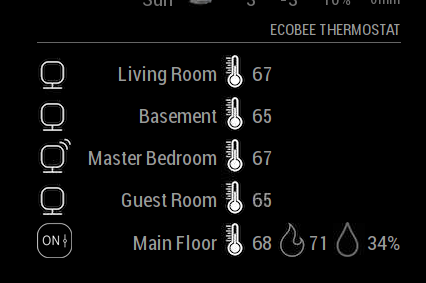
                                        0_1523024153290_b0516a38-9826-4ed3-b76c-109af2429247-image.png

                                        F 1 Reply Last reply Reply Quote 0
                                        • F Offline
                                          fabbr @stephenmelody
                                          last edited by

                                          @stephenmelody said in Ecobee:

                                          Does the heat symbol change colour depending on whether the system is heating or cooling, like it does on the app? (orange flame for heating, blue snowflake for cooling). In the example below, it’s currently 68, targeting 71. The app shows the flame in orange, that would be nice to quickly visualise if the system is running.

                                          Currently No. I could add that tho. Currently the way you can check if the system is running or not is by checking the icon of the thermostat. It will change depending on the running status. I did that because a lot of people don’t like to have colors on their Mirrors. However, if you think this would make it better, elaborate on the different status and what should be displayed and I will work on having that as an option!

                                          If you haven’t notice, when there’s motion the icon of the sensor also changes :)

                                          Can the order in which the sensors are presented be set? For example, I’d like my Thermostat to be at the top, not the bottom

                                          Not currently. The results of the API will always give the Thermostat as the last “device” I can have that as an option also. Any other order change that you think should happen?

                                          It would be nice to be able to toggle what you see, for example, on my thermostat, I’m not too bothered about the humidity, so it would be nice to toggle that off - that would make the module smaller on my screen.

                                          I will add that an option, keep in mind that you won’t save any space on the module, you only will see less information.

                                          Great work by the way, I’m happy this is a new module, I’ve been hoping for this one for a while!!!

                                          Here’s what I see
                                          0_1523024153290_b0516a38-9826-4ed3-b76c-109af2429247-image.png

                                          I am happy that it’s working! I have spend countless hours working on it.

                                          1 Reply Last reply Reply Quote 0
                                          • S Offline
                                            stephenmelody
                                            last edited by

                                            Checking the icon of the thermostat - what are the options here? mine says ON, but the system is in idle (neither heating nor cooling). Is that what you meant? I have noticed the motion icon - I like that!

                                            If you could toggle the displayed info, wouldn’t all the icons shift over to the right, if there was less on the line?

                                            Elaboration, I think these would be the options, to be honest, I think it would just be System Heat Mode and System Cool Mode that I would be intereted in, I don’t have the capabilities for the other icons. I know a number of modules that I have allow for the toggle of colour on / off:
                                            alt text

                                            F 1 Reply Last reply Reply Quote 0

                                            Hello! It looks like you're interested in this conversation, but you don't have an account yet.

                                            Getting fed up of having to scroll through the same posts each visit? When you register for an account, you'll always come back to exactly where you were before, and choose to be notified of new replies (either via email, or push notification). You'll also be able to save bookmarks and upvote posts to show your appreciation to other community members.

                                            With your input, this post could be even better 💗

                                            Register Login

                                            • 1
                                            • 2
                                            • 3
                                            • 1 / 3
                                            • First post
                                              Last post
                                            Enjoying MagicMirror? Please consider a donation!
                                            MagicMirror created by Michael Teeuw.
                                            Forum managed by Sam, technical setup by Karsten.
                                            This forum is using NodeBB as its core | Contributors
                                            Contact | Privacy Policy