MagicMirror Forum
    • Recent
    • Tags
    • Unsolved
    • Solved
    • MagicMirror² Repository
    • Documentation
    • 3rd-Party-Modules
    • Donate
    • Discord
    • Register
    • Login
    A New Chapter for MagicMirror: The Community Takes the Lead
    Read the statement by Michael Teeuw here.

    Home Assistant Module

    Scheduled Pinned Locked Moved Requests
    22 Posts 12 Posters 26.3k Views 18 Watching
    Loading More Posts
    • Oldest to Newest
    • Newest to Oldest
    • Most Votes
    Reply
    • Reply as topic
    Log in to reply
    This topic has been deleted. Only users with topic management privileges can see it.
    • T Offline
      tkoeberl
      last edited by

      Hi,

      take a look @:
      https://github.com/tkoeberl/MMM-homeassistant-sensors

      1 Reply Last reply Reply Quote 0
      • D Offline
        danielgr
        last edited by

        @tkoeberl Hi, looks awesome. Cant get mine to work though.
        Did git clone https://github.com/tkoeberl/MMM-homeassistant-sensors.git in the modules folder. I can see a folder called MMM-homeassistant-sensors in the modules folder.

        The config looks like this

        {
          module: 'MMM-homeassistant-feed',
          position: 'top_left',
          config: {
            url: 'http://URL:8123/api/states?api_password=mypassword',
            title: 'HA',
            prettyName: 'true',
            stripName: 'true',
            values: ["sensor.olkyl_temperature"]
          }
        },
        

        And it’s nothing there. Like the module is not there at all.

        If i change

            module: 'MMM-homeassistant-feed',
        

        to

            module: 'MMM-homeassistant-sensors',
        

        I loads and i just get “Error fetching stats”.

        Any idea what i might have done wrong?

        T 1 Reply Last reply Reply Quote 0
        • T Offline
          tkoeberl @danielgr
          last edited by

          @danielgr sorry, the first one was a mistake by me. Updated the readme accordingly.

          About the “Error fetching stats”:
          Just set a password for my API an it works like a charm. You have some special chars in your password?
          If you point your browser to the url you can find the string?

           "entity_id": "sensor.olkyl_temperature"
          
          D 1 Reply Last reply Reply Quote 0
          • D Offline
            danielgr @tkoeberl
            last edited by danielgr

            @tkoeberl
            Wierd. Nope, just small letters and numbers. Yeah if i use the URL and go to http://URL:8123/api/states?api_password=mypassword i can see everything.

            EDIT. Also, http://URL:8123/api/states/sensor.olkyl_temperature?api_password=password is working fine from my browser.

            T 1 Reply Last reply Reply Quote 0
            • T Offline
              tkoeberl @danielgr
              last edited by tkoeberl

              @danielgr https instead of http? Are you able to wget the page from your Mirror?

              D 1 Reply Last reply Reply Quote 0
              • D Offline
                danielgr @tkoeberl
                last edited by

                @tkoeberl Doh. DNS issues on the MM. Solved.

                Thanks!

                M 1 Reply Last reply Reply Quote 0
                • M Offline
                  MrEdOne @danielgr
                  last edited by

                  @danielgr
                  Hi. I have same problem with “Error fetching stats”.
                  Can you show your DNS config on MM?

                  F D 2 Replies Last reply Reply Quote 0
                  • G Offline
                    goprojojo
                    last edited by

                    Is it possible to run Hassio on the same Magicmirror image? I just want to be able to run Hassio in the background.

                    1 Reply Last reply Reply Quote 0
                    • F Offline
                      FreddanB @MrEdOne
                      last edited by

                      @MrEdOne said in Home Assistant Module:

                      @danielgr
                      Hi. I have same problem with “Error fetching stats”.
                      Can you show your DNS config on MM?

                      Me too.

                      1 Reply Last reply Reply Quote 0
                      • D Offline
                        danielgr @MrEdOne
                        last edited by

                        @MrEdOne said in Home Assistant Module:

                        @danielgr
                        Hi. I have same problem with “Error fetching stats”.
                        Can you show your DNS config on MM?

                        @FreddanB said in Home Assistant Module:

                        @MrEdOne said in Home Assistant Module:

                        @danielgr
                        Hi. I have same problem with “Error fetching stats”.
                        Can you show your DNS config on MM?

                        Me too.

                        I had no DNS-server at all. Changed to my domain controllers IP who’s the DNS-server in my network and it worked. Can your MM resolve the address to your Home Assistant?

                        1 Reply Last reply Reply Quote 0
                        • F Offline
                          FreddanB
                          last edited by

                          I change from https to http and the problem solved for me. Thanks for a great module

                          1 Reply Last reply Reply Quote 0
                          • S Offline
                            skippy_oz
                            last edited by

                            Hi, I have it working below is the code and a screenshot. It’s taking to an AM2302 Temp/Humidity Sensor connected to a NodeMCU running Tasmota and using MQTT to talk to HomeAssistant. See Dr Zzs video for the NodeMCU/D1mini setup.

                            Dr Zzs Tasmota + D1mini (or Sonoff) - Temp & Humidity, ws2812 LEDs, and Motion Detection

                             {
                              module: 'MMM-homeassistant-sensors',
                              position: 'bottom_right',
                              config: {
                                  		url: 'http://hassio:8123/api/states',
                                  		prettyName : 'true',
                                  		stripName: 'true',
                                  		values: ["sensor.humidity", "sensor.temperature"]
                                		}
                              },
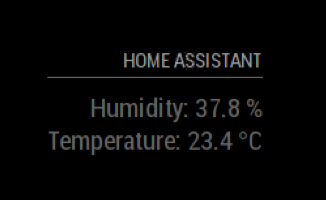
                            

                            0_1526186367464_Screen Shot 2018-05-12 at 4.05.25 pm.png

                            Regards
                            skippy_oz

                            A 1 Reply Last reply Reply Quote 0
                            • A Offline
                              Aaron19953 @skippy_oz
                              last edited by

                              Any chance this will work with https ?
                              I’m receive the same error “Error fetching stats”

                              I can see the attributes if I browse to
                              https://IP:8123/api/states/sensor.name?api_password=PASSWORD

                              1 Reply Last reply Reply Quote 0
                              • S Offline
                                skippy_oz
                                last edited by

                                I have it working with HTTPS :grinning_face:

                                Change the url to match what you have for HA

                                {
                                    module: 'MMM-homeassistant-sensors',
                                    position: 'bottom_right',
                                    config: {
                                          url: 'https://username.duckdns.org:8123/api/states',
                                          prettyName : 'true',
                                          stripName: 'true',
                                          values: ["sensor.humidity", "sensor.temperature"]
                                        }
                                  },
                                

                                You will need to modify the node_help.js file for this module change the below line of code /MagicMirror/modules/MMM-homeassistant-sensors/node_helper.js

                                request({ url: url, method: 'GET' }, function (error, response, body) {
                                

                                To the following and change the api-password to what you have set in HA it’s about line 12.

                                  request({ url: url, headers: {'x-ha-access': 'api-password'}, method: 'GET' }, function (error, response, body) {
                                

                                It’s working it looks like it takes a bit longer to get the data as I think the atentication takes some time.

                                Regards
                                skippy_oz

                                1 Reply Last reply Reply Quote 0

                                Hello! It looks like you're interested in this conversation, but you don't have an account yet.

                                Getting fed up of having to scroll through the same posts each visit? When you register for an account, you'll always come back to exactly where you were before, and choose to be notified of new replies (either via email, or push notification). You'll also be able to save bookmarks and upvote posts to show your appreciation to other community members.

                                With your input, this post could be even better 💗

                                Register Login

                                • 1
                                • 2
                                • 1 / 2
                                • First post
                                  Last post
                                Enjoying MagicMirror? Please consider a donation!
                                MagicMirror created by Michael Teeuw.
                                Forum managed by Sam, technical setup by Karsten.
                                This forum is using NodeBB as its core | Contributors
                                Contact | Privacy Policy