MagicMirror Forum
    • Recent
    • Tags
    • Unsolved
    • Solved
    • MagicMirror² Repository
    • Documentation
    • 3rd-Party-Modules
    • Donate
    • Discord
    • Register
    • Login
    A New Chapter for MagicMirror: The Community Takes the Lead
    Read the statement by Michael Teeuw here.

    run Linux command from a mm2 module

    Scheduled Pinned Locked Moved Development
    20 Posts 5 Posters 6.8k Views 5 Watching
    Loading More Posts
    • Oldest to Newest
    • Newest to Oldest
    • Most Votes
    Reply
    • Reply as topic
    Log in to reply
    This topic has been deleted. Only users with topic management privileges can see it.
    • S Offline
      sdetweil @Mykle1
      last edited by sdetweil

      @mykle1 you didn’t need to do this

      var results = stdout;
      

      Just use stdout as the variable name in the console log and sendsocketnotification

      Every wasted instruction adds to the pgm size, and CPU cycles used, which could be applied somewhere else.

      Also makes maintenance harder cause u might not remember why you did something.

      Sam

      How to add modules

      learning how to use browser developers window for css changes

      Mykle1M 1 Reply Last reply Reply Quote 1
      • Mykle1M Offline
        Mykle1 Project Sponsor Module Developer @sdetweil
        last edited by

        @sdetweil

        Yes sir. Duly noted. And thanks for the instruction. I try to retain all the tidbits that are given but I find myself having to relearn much of what I thought I already knew. Can you say, “Alzheimers?” :-)

        Thanks again.

        Create a working config
        How to add modules

        1 Reply Last reply Reply Quote 0
        • Mykle1M Offline
          Mykle1 Project Sponsor Module Developer
          last edited by Mykle1

          I guess I celebrated a little prematurely. Yes, I can see the data in the terminal and send it to the module.js file. However, I am unable to convert it into usable data, such as an array of objects. I’ve tried all evening with no luck. The closest I’ve gotten is single object that contains all the data:

          0:
          stdout:"nouveau-pci-0100↵Adapter: PCI adapter↵fan1:        1170 RPM↵temp1:        +43.0°C  (high = +95.0°C, hyst =  +3.0°C)↵                       (crit = +105.0°C, hyst =  +5.0°C)↵                       (emerg = +135.0°C, hyst =  +5.0°C)↵↵coretemp-isa-0000↵Adapter: ISA adapter↵Core 0:       +46.0°C  (high = +83.0°C, crit = +99.0°C)↵Core 1:       +41.0°C  (high = +83.0°C, crit = +99.0°C)↵Core 2:       +46.0°C  (high = +83.0°C, crit = +99.0°C)↵Core 3:       +38.0°C  (high = +83.0°C, crit = +99.0°C)↵↵f71858fg-isa-0a00↵Adapter: ISA adapter↵+3.3V:        +3.31 V  ↵3VSB:         +3.30 V  ↵Vbat:         +3.20 V  ↵fan1:        1910 RPM↵fan2:        1069 RPM↵fan3:           0 RPM  ALARM↵temp1:        +34.5°C  (high = +70.0°C, hyst = +60.0°C)↵temp2:        +29.5°C  (high = +100.0°C, hyst = +85.0°C)↵temp3:        +36.4°C  (high = +100.0°C, hyst = +85.0°C)↵↵"
          

          Using this:

          getTerminal: function(url) {
                var self= this;
          //      exec("sensors", (err, stdout, stderr) => console.log(stdout));
                exec("sensors").stdout.on('data', function(stdout) {
                //console.log(JsonConvert.SerializeObject(stdout));
          
              var s = stdout;
             var parts = s.split(':');
             var jobj = {};
             for(i=0;i < parts.length;i+=2)
             {
                jobj[parts[i]]=parts[i+1];
             }
             console.log(JSON.stringify(jobj));
          

          I’m stuck. haha. I am grateful for any advice.

          Peace!

          Create a working config
          How to add modules

          S ? 2 Replies Last reply Reply Quote 0
          • S Offline
            sdetweil @Mykle1
            last edited by

            @mykle1 let me see what I can do.
            Will be tomorrow.

            Sam

            How to add modules

            learning how to use browser developers window for css changes

            Mykle1M 1 Reply Last reply Reply Quote 0
            • ? Offline
              A Former User @Mykle1
              last edited by A Former User

              @mykle1
              You can use Regular Expression for getting matched text with pattern.

              var s = stdout
              var fan1 = new RegExp("fan1\:\s+([0-9]+ RPM)")
              var fan1_found = s.match(fan1)
              console.log(fan1_found, fan1_found[1])
              

              Not tested in real PC, so there could be a mistake.

              Mykle1M 1 Reply Last reply Reply Quote 0
              • Mykle1M Offline
                Mykle1 Project Sponsor Module Developer @Guest
                last edited by

                @sean

                First, thank you for your input. I do appreciate it.

                1. Adding your suggestion results in an uncaught exception. . . TypeError: Cannot read property ‘1’ of null

                2. Using your suggestion and taking out the “[1]” results in an array with a single object

                Create a working config
                How to add modules

                ? 1 Reply Last reply Reply Quote 0
                • ? Offline
                  A Former User @Mykle1
                  last edited by

                  @mykle1
                  null means not found. Maybe my regular espression pattern was wrong. As I wrote, it was not tested.
                  However if you find proper expression pattern, it will return matched string. Google it about regular expression. That is a standard way to search or replace text by pattern in most of program languages.

                  Mykle1M 1 Reply Last reply Reply Quote 1
                  • Mykle1M Offline
                    Mykle1 Project Sponsor Module Developer @Guest
                    last edited by Mykle1

                    @sean

                    ok thank you. This seems like a good place to start.

                    https://www.regular-expressions.info/

                    Create a working config
                    How to add modules

                    ? 1 Reply Last reply Reply Quote 0
                    • ? Offline
                      A Former User @Mykle1
                      last edited by A Former User

                      @mykle1

                      • https://www.w3schools.com/jsref/jsref_obj_regexp.asp
                      • https://www.w3schools.com/jsref/jsref_match.asp
                        See these also.
                      Mykle1M 1 Reply Last reply Reply Quote 1
                      • Mykle1M Offline
                        Mykle1 Project Sponsor Module Developer @Guest
                        last edited by

                        @sean

                        See these also.

                        Thanks!

                        Create a working config
                        How to add modules

                        1 Reply Last reply Reply Quote 0
                        • Mykle1M Offline
                          Mykle1 Project Sponsor Module Developer @sdetweil
                          last edited by

                          @sdetweil said in run Linux command from a mm2 module:

                          let me see what I can do.
                          Will be tomorrow.

                          Thanks! Anything you can offer will be much appreciated.

                          This what I have, and sent to the module.js
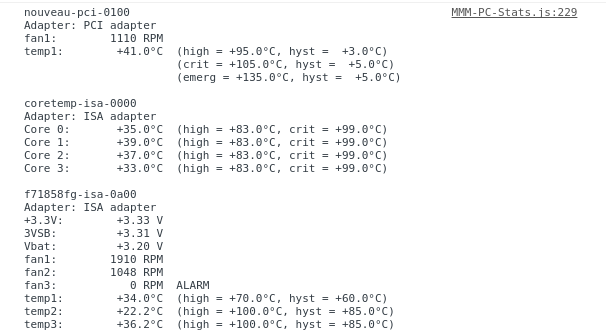
                          0_1543457816014_Screenshot from 2018-11-28 21-11-58.png

                          Create a working config
                          How to add modules

                          ? 1 Reply Last reply Reply Quote 0
                          • ? Offline
                            A Former User @Mykle1
                            last edited by

                            @mykle1
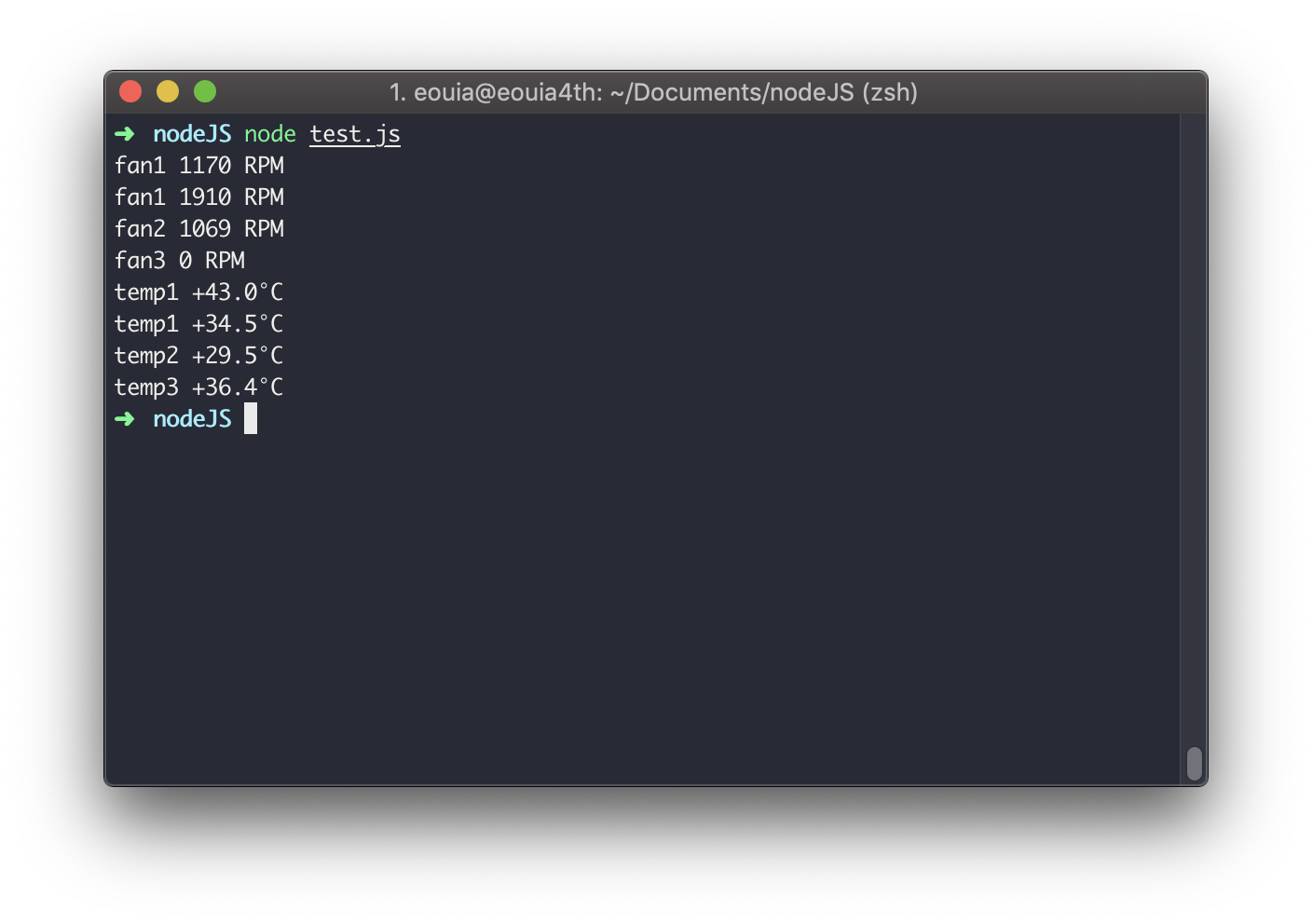
                            test.js

                            var str = `nouveau-pci-0100↵Adapter: PCI adapter↵fan1:        1170 RPM↵temp1:        +43.0°C  (high = +95.0°C, hyst =  +3.0°C)↵                       (crit = +105.0°C, hyst =  +5.0°C)↵                       (emerg = +135.0°C, hyst =  +5.0°C)↵↵coretemp-isa-0000↵Adapter: ISA adapter↵Core 0:       +46.0°C  (high = +83.0°C, crit = +99.0°C)↵Core 1:       +41.0°C  (high = +83.0°C, crit = +99.0°C)↵Core 2:       +46.0°C  (high = +83.0°C, crit = +99.0°C)↵Core 3:       +38.0°C  (high = +83.0°C, crit = +99.0°C)↵↵f71858fg-isa-0a00↵Adapter: ISA adapter↵+3.3V:        +3.31 V  ↵3VSB:         +3.30 V  ↵Vbat:         +3.20 V  ↵fan1:        1910 RPM↵fan2:        1069 RPM↵fan3:           0 RPM  ALARM↵temp1:        +34.5°C  (high = +70.0°C, hyst = +60.0°C)↵temp2:        +29.5°C  (high = +100.0°C, hyst = +85.0°C)↵temp3:        +36.4°C  (high = +100.0°C, hyst = +85.0°C)↵↵`
                            
                            var pattern = [
                              "(fan[0-9]):[\\s]+([0-9]+ RPM)",
                              "(temp[0-9]):[\\s]+(\\+[0-9\\.]+°C)",
                            ]
                            for (i = 0; i < pattern.length; i++) {
                              var rx = new RegExp(pattern[i], "g")
                              var found
                              do {
                                found = rx.exec(str)
                                if (found) console.log(found[1], found[2])
                              } while(found)
                            }
                            

                            RESULT
                            0_1543487861366_test1.png

                            Mykle1M 1 Reply Last reply Reply Quote 1
                            • Mykle1M Offline
                              Mykle1 Project Sponsor Module Developer @Guest
                              last edited by Mykle1

                              @sean said in run Linux command from a mm2 module:

                              RESULT

                              Excellent sean! Working here as well. You have my eternal gratitude. :thumbsup:

                              EDIT

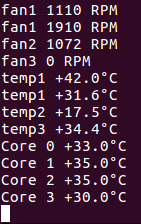
                              Using your example above as a guide I was able to add to the pattern array successfully.

                              My addition
                              "(Core [0-9]):[\\s]+(\\+[0-9\\.]+°C)"

                              Result
                              0_1543544648175_Screenshot from 2018-11-29 21-19-19.png

                              Now I’ll do the ones I want. Thank you again, sean. This is awesome!

                              Create a working config
                              How to add modules

                              S 1 Reply Last reply Reply Quote 0
                              • S Offline
                                sdetweil @Mykle1
                                last edited by

                                @mykle1 @sean nice work. Sorry I ran out of time.

                                Sam

                                How to add modules

                                learning how to use browser developers window for css changes

                                Mykle1M 1 Reply Last reply Reply Quote 0
                                • Mykle1M Offline
                                  Mykle1 Project Sponsor Module Developer @sdetweil
                                  last edited by

                                  @sdetweil

                                  No worries, bro. I appreciate your interest and concern. I’m sure I’ll need help in the future. You can get in on that. :-)

                                  Create a working config
                                  How to add modules

                                  1 Reply Last reply Reply Quote 0

                                  Hello! It looks like you're interested in this conversation, but you don't have an account yet.

                                  Getting fed up of having to scroll through the same posts each visit? When you register for an account, you'll always come back to exactly where you were before, and choose to be notified of new replies (either via email, or push notification). You'll also be able to save bookmarks and upvote posts to show your appreciation to other community members.

                                  With your input, this post could be even better 💗

                                  Register Login

                                  • 1 / 1
                                  • First post
                                    Last post
                                  Enjoying MagicMirror? Please consider a donation!
                                  MagicMirror created by Michael Teeuw.
                                  Forum managed by Sam, technical setup by Karsten.
                                  This forum is using NodeBB as its core | Contributors
                                  Contact | Privacy Policy