Read the statement by Michael Teeuw here.
MMM-Strava
-
@ctatos said in MMM-Strava:
@zerodegree79 I temporarily solved the problem with an external python script found at https://github.com/hozn/stravalib . The script retrieves a newly generated access token every 4-5h and find/replaces it in the config.js file. I then have a crontab that recycles the Magic Mirror.
There must be a better way, but I can’t complain for now…
That’s way over my head, but great effort. Maybe @ianperrin can implement this.
-
@zerodegree79 Any news about New Strava API integration ?
-
@val07300 no, waiting for @ianperrin and @ctatos giving a response
-
Not as yet I’m afraid.
Hoping to work on it in the coming weeks - work and other commitments permitting.
PRs welcome from those who might have the know how 😉
“Live as if you were to die tomorrow. Learn as if you were to live forever.” - Mahatma Gandhi
-
@ianperrin said in MMM-Strava:
No as yet I’m afraid.
Hoping to work on it in the coming weeks - work and other commitments permitting.
PRs welcome from those who might have the know how 😉
No worries, take your time. Meanwhile i just update manually
-
@zerodegree79 , @Val07300, @ctatos (and others I may have missed).
A new (beta) version of the module with support for Strava’s new authentication flow is available.
Much of the code for the module has been re-written/re-factored and includes a number of changes to the original module including
- Support for multiple instances of the module
- The table and chart and now generated via templates (rather than javascript)
- A helper is included to simplify the initial authentication with Strava
chartmode now supports either therecentandytdvalues in theperiodoption- The stats displayed in
tablemode are configurable via thestatsoption - To support the new authentication flow, the
client_idandclient_secretmust be included in the config in place of the deprecatedstrava_idandaccess_tokenoptions. The legacy options can still be used, but will trigger an alert on the mirror when the module is loaded and it is recommended they are removed.
Please note - the module no longer supports multiple athlete id’s in one module instance. Multiple instances can be added to the config file to achieve similar results.
Notes for beta testers
This functionality is only available in the develop branch of the github repository at this time. Once any issues have been fixed, the master branch will be updated.
To test the refresh token functionality and the new authentication flow in the Magic Mirror, you need to update the module using the following steps:
- stop the Magic Mirror
- switch to the develop branch and install the new dependencies
cd ~/MagicMirror/modules/MMM-Strava git checkout develop && git pull npm install --production - edit the MMM-Strava configuration in config.js and
- remove
strava_idandaccess_tokenoptions - add
client_idandclient_secretoptions. The values for these options should be copied from the My API Application page in your Strava profile
- remove
- restart the Magic Mirror
When updated correctly, the module should display a Client id unauthorised message. The module can be authorised using the following steps:
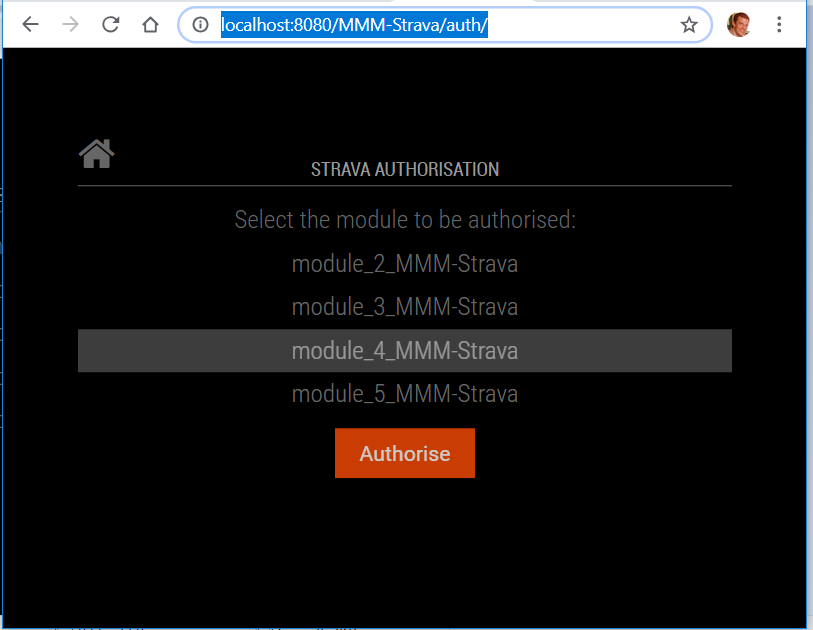
- Browse to http://localhost:8080/MMM-Strava/auth/ on the Magic Mirror. This can be done remotely if you have setup the
ipWhitelistin the Magic Mirror - Select module and click Authorise
- If prompted, log in to Strava
- On the Strava Authorisation page, click Authorize
- Once the successful authorisation message appears, restart your Magic Mirror.
“Live as if you were to die tomorrow. Learn as if you were to live forever.” - Mahatma Gandhi
-
@ianperrin
From the new authorization process I’m getting a bad request from Strava:{ "message": "Bad Request", "errors": [ { "resource": "Application", "field": "redirect_uri", "code": "invalid" } ] }I have the feeling that I have an error in my Strava API config.
There is a “website” and a “Callback domain” that I need to put in. Does this have to do anything with the address I’m using for the authentication process via /MMM-Strava/auth?EDIT: Can it be because I’m currently accessing the mirror through a ddns service, so the address is not localhost:8080 but something else?
-
@lavolp3 are you browsing to http://localhost:8080/MMM-Strava/auth/ and using the authorisation process there? If so, where is the bad request being displayed?
It should look something like this:
“Live as if you were to die tomorrow. Learn as if you were to live forever.” - Mahatma Gandhi
-
@ianperrin No I’m browsing from a laptop like always. So it’s http://magicmirror:8080/MMM-Strava/auth/.
Do you think that makes a difference? -
@lavolp3 I’ve updated the comment above with clearer notes for beta testers.
Everything you need should be done from the Magic Mirror, so if you can follow these steps again and let me know where the error occurs or your experience differs that would be great.
“Live as if you were to die tomorrow. Learn as if you were to live forever.” - Mahatma Gandhi
-
@ianperrin Did it again as described, but still a “Bad Request” Message. Maybe I’m doing something wrong: Error message says invalid redirect_uri, so I guess I need to play around with it a bit more.
-
@ianperrin OK now it works.
I set my ddns domain “xxxx.ddns.net” as callback domain in the Authentication profile.
Then it works. The link for the authorisation inquires that the request is being sent from inside that domain. I had set localhost as the callback domain and made the request from the ddns which in that specific case did not work.Maybe you could include a description for anyone trying to do the authentication from a browser not on the RasPi itself. You would need to set the callback domain appropriately.
-
@lavolp3 that makes sense, I understand your issue now. Good pick up and we’ll done for finding that solution. I’ll look to update the read me with notes for creating the application as well as authorising the modules.
In the meantime, let me know how the token refresh works, or if any other errors appear.
“Live as if you were to die tomorrow. Learn as if you were to live forever.” - Mahatma Gandhi
-
@ianperrin Table mode doesn’t seem to rotate the actual data into monthly data for me. I have done a run of 6.4 km on Tuesday. But much more in Jan and Feb :-)
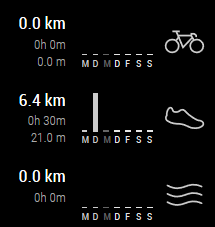
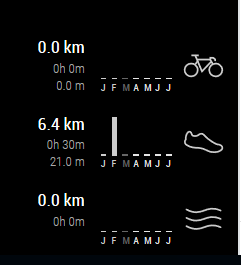
Can you confirm that?
-
@lavolp3 said in MMM-Strava:
@ianperrin Table mode doesn’t seem to rotate the actual data into monthly data for me. I have done a run of 6.4 km on Tuesday. But much more in Jan and Feb :-)
Can you confirm that?Hi @lavolp3 - can you post your config for the module and if possible the output from the log?
“Live as if you were to die tomorrow. Learn as if you were to live forever.” - Mahatma Gandhi
-
@ianperrin said in MMM-Strava:
rom the log?
My config:
        //disabled: true,
        module: 'MMM-Strava',
        position: 'bottom_right',
        config: {
            client_id: "2xxxx",
            client_secret: "9bdxxxxxxxxxxxxxxxxxxxxxxxxxxxxx",
            // strava_id: '23128899',
            // access_token: 'af1a3e4xxxxxxxxxxxxxxxxxxxxxxxxxxxx',
            // period: 'recent',
            auto_rotate: true,
            animationSpeed: 0,
            mode: "chart",
            debug: true
        }
Regarding logs: This comes from the developer’s tab:
Load script: modules/MMM-Strava//MMM-Strava.js loader.js:182:4
Check MagicMirror version for module 'MMM-Strava' - Minimum version:  2.2.0 - Current version: 2.6.0 module.js:469:3
Module registered: MMM-Strava module.js:477:2
Bootstrapping module: MMM-Strava loader.js:152:3
Scripts loaded for: MMM-Strava loader.js:157:4
Load stylesheet: modules/MMM-Strava/MMM-Strava.css loader.js:197:4
Styles loaded for: MMM-Strava loader.js:159:5
MMM-Strava - Load translation: translations/de.json translator.js:172:5
MMM-Strava - Load translation fallback: translations/en.json translator.js:174:5
Translations loaded for: MMM-Strava loader.js:161:6
Starting module: MMM-Strava MMM-Strava.js:114:9
MMM-Strava received a system notification: ALL_MODULES_STARTED module.js:156:4
MMM-Strava received a system notification: MODULE_DOM_CREATED module.js:156:4
MMM-Strava received a system notification: DOM_OBJECTS_CREATED module.js:156:4
MMM-Strava: "Receiving notification: DATA for module_25_MMM-Strava" MMM-Strava.js:201:13
MMM-Strava received a module notification: DARK_SKY_FORECAST_WEATHER_UPDATE from sender: MMM-DarkSkyForecast
npm start dev does only give me:
MMM-Strava: "Received notification: SET_CONFIG" -
@lavolp3 - thanks and good spot. Currently rotation is only supported for
tablemode. I’ve pushed a fix to the develop branch to enforce this behaviour. Please usegit pullto get and test the changes.“Live as if you were to die tomorrow. Learn as if you were to live forever.” - Mahatma Gandhi
-
@ianperrin Confirmed! Chart is not rotating anymore.
However it might be worth to think about several rotating charts. Like for weekdays and a range of several months? -
@lavolp3 said in MMM-Strava:
@ianperrin … it might be worth to think about several rotating charts. Like for weekdays and a range of several months?
Good idea, could you add it as an issue in the Github repository so I don’t forget it?
-
@ianperrin I too am stuck on the authorization; I am not sure where to get a valid “web address” and “call back domain “ from to complete the API Application on the strava site To obtain my client ID and client secret numbers The local Host:8080/MMM-Strava/auto does bring up the same screen you posted, but the authorization process fails, I presume because I don’t have the correct client information.


Hello! It looks like you're interested in this conversation, but you don't have an account yet.
Getting fed up of having to scroll through the same posts each visit? When you register for an account, you'll always come back to exactly where you were before, and choose to be notified of new replies (either via email, or push notification). You'll also be able to save bookmarks and upvote posts to show your appreciation to other community members.
With your input, this post could be even better 💗
Register Login