Read the statement by Michael Teeuw here.
Total Beginner - MM2 with MacMini
-
Hey guys, am a total noob… I have a spare MacMini (pretty recent) and a smaller LCD screen - no camera on either. I wanted to know where should I begin to start working on this pls? I don’t exactly understand github either - yup! But with little direction, I will push my way through… I just want some help to start me off… could someone give me a nudge pls? Thanks vm!
Edit: I do know basic Python and Javascript.
-
Take a look at this thread: https://forum.magicmirror.builders/topic/548/building-mirror-without-programing
It is for Microsoft Windows but I bet you can adapt the instructions to make it work on your Mac. There is a node.js installation package for Mac available, the download link is in the instructions.
-
It works perfectly fine on a Mac. To be honest: this was one of the goals during the development (because of this project: http://michaelteeuw.nl/post/150349424992/mirror-mirror-on-the-wall-who-has-the-biggest-of).
To install it, make sure you have the latest version of node installed. You can download the installer here: https://nodejs.org/dist/v6.8.0/node-v6.8.0.pkg
Next, open your terminal, and clone the MagicMirror² repository:
git clone https://github.com/MichMich/MagicMirror.gitThen, go to the MagicMirror folder and run the installer.
cd MagicMirror
npm install
Make a copy of the sample config to your custom config:
cp config/config.js.sample config/config.jsRun MagicMirror to see if it works:
npm startIf everything works fine, you can modify your config to match your preferences …
If you want to run it full screen on a mac, you might want to enable the kiosk mode in the config. (See documentation: https://github.com/MichMich/MagicMirror#configuration)Enjoy!
-
@MichMich Hey man! thank you so much for your reply (and your awesome creation :) )
That’s pretty detailed and straightforward. Am in the process of trying it out on my macbook before I start working on the hardware aspects. Currently getting stuck the $PATH stage, when I do cd MagicMirror, it says not found… let me fix this piece and will surely come back with final outcome… thanks again!
EDIT: Ok don’t think I had to d anything there… and we are in business!
Saw this one error: npm WARN grunt-yamllint@0.2.0 requires a peer of grunt@~0.4.0 but none was installed.
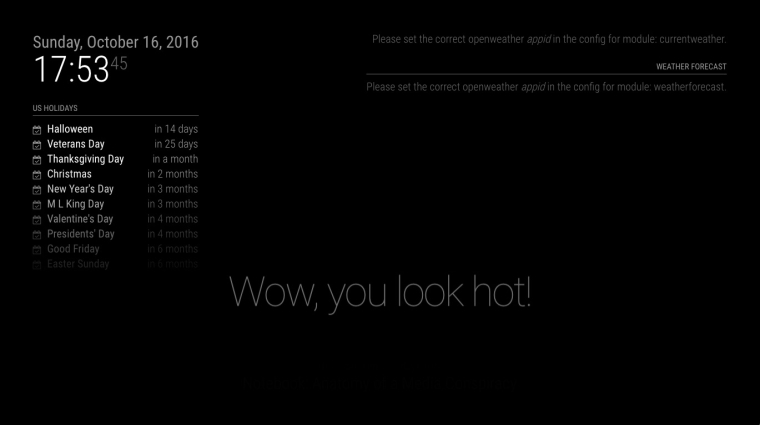
Uploading the screenshot of how it looks like right now… So i need to do some work in config.js I suppose?
-
You can ignore the grunt issue. Grunt is only used in the development process of the mirror. Indeed, next up is modifying your config. If the mirror stays black after reboot, you know you made a mistake in the config file. ;)
-
UPDATE: THIS IS WORKING FINE… NOTED MY ERROR
@MichMich Right… so… I started slow… just changed one thing… calendar position from top_left to bottom_left
/* Magic Mirror Config Sample
 *
 * By Michael Teeuw http://michaelteeuw.nl
 * MIT Licensed.
 */

var config = {
	port: 8080,

	language: 'en',
	timeFormat: 24,
	units: 'metric',

	modules: [
		{
			module: 'alert',
		},
		{
			module: 'clock',
			position: 'top_left'
		},
		{
			module: 'calendar',
			header: 'US Holidays',
			position: ‘bottom_left',
			config: {
				calendars: [
					{
						symbol: 'calendar-check-o ',
						url: 'webcal://www.calendarlabs.com/templates/ical/US-Holidays.ics'
					}
				]
			}
		},
		{
			module: 'compliments',
			position: 'lower_third'
		},
		{
			module: 'currentweather',
			position: 'top_right',
			config: {
				location: 'New York',
				locationID: '',  //ID from http://www.openweathermap.org
				appid: 'YOUR_OPENWEATHER_API_KEY'
			}
		},
		{
			module: 'weatherforecast',
			position: 'top_right',
			header: 'Weather Forecast',
			config: {
	            location: 'New York',
				locationID: '5128581',  //ID from http://www.openweathermap.org
	            appid: 'YOUR_OPENWEATHER_API_KEY'
			}
		},
		{
			module: 'newsfeed',
			position: 'bottom_bar',
			config: {
				feeds: [
					{
						title: "New York Times",
						url: "http://www.nytimes.com/services/xml/rss/nyt/HomePage.xml"
					}
				],
				showSourceTitle: true,
				showPublishDate: true
			}
		},
	]

};

/*************** DO NOT EDIT THE LINE BELOW ***************/
if (typeof module !== 'undefined') {module.exports = config;}
save it… close it… run npm start again… Doesn’'t like it…
Edit: changed it back to top_left, still didn’t like it… let me do some more reading up if there is anything more to be done than just these bits am doing
Ninja Edit: It was my mistake - the ’ (single quote) which is being used is different and hence js doesn’t like it… have changed that and it is working now!! off to adding modules now
-
@MichiMich @all others ;0)… I want to use my Mac Mini also for my MM. Is there a way to implement motion detection with a cam and disable HDMI or monitor if no motion is capturing? I have this on my raspberry with motion and it works perfectly… this is for my one of the most important things for me!
-
Hi, do you have pm2 installed on your Mac?
Is pm2 working?
Did you installed pm2 in MagicMirror directory? -
@trividar there is a module that uses camera,
https://github.com/dmcinnes/MMM-Motion-DetectionI also have one, that allows configurable ways to sleep… pi, hdmi off, or blanking screen
https://github.com/sdetweil/MMM-SleepWakemine depends on the github motion project for camera interface
https://motion-project.github.io/I have not tried mine on mac. but motion project is supported on mac.
-
@trividaryou can do this with the harmony hub (Logitech) and a motion sensor…all that works with Alexa… Turn tv on or off with motion sensor…or voice
-
Must pm2 be installt in Magic Mirror directory?
-
install pm2 on Mac is my biggest problem 😭
-
@sdetweil Thank you for your reply and sorry for my late reply. I’m not able to get it to work with my Mac mini ;o) I have a USB Camera and a mac mini 2012. Would it be possible for you to write a step by step instruction? Many thanks in advance!!
-
@Stoffbeuteluwe good point! But I will use a camera behind the mirror to have a clean build.
-
@trividar the motion project installs a new program that runs in the background, and uses the camera.
it can record video, take pictures, and notify of those kinds of events. in general, it has nothing to do with MagicMirror.
but I had used it for another mirror runtime, and wanted the same capability here…
in the motion.conf, you set the notifier for motion start and stop to execute the script i provide in the MMM-SleepWake module.
on my odroid system that looks like this
(on pi it would be /home/pi/, on mac it would be /Users/??? where ??? is the user where MagicMirror is installed)# Command to be executed when an event starts. (default: none) # An event starts at first motion detected after a period of no motion defined by event_gap on_event_start /home/odroid/MagicMirror/modules/MMM-SleepWake/external_motion start # Command to be executed when an event ends after a period of no motion # (default: none). The period of no motion is defined by option event_gap. on_event_end /home/odroid/MagicMirror/modules/MMM-SleepWake/external_motion endi just tested the motion detection script on mac and it needed work, thanks!
I have updated the repo on github…
just do agit pullfrom the MMM-SleepWake folder, to get the update
-
@sdetweil thanks! I will try it later this week!
-
@sdetweil So I have tried to get your module to work, but unfortunately without success. Could you please help me?
So what I have done:-
Cloned motion-project into my folder Mirror (there are now two folder, MagicMirror and motion)
-
Created motion.conf and made those changes:
# Command to be executed when an event starts. (default: none) # An event starts at first motion detected after a period of no motion defined by event_gap ; on_event_start /Users/..../Mirror/MagicMirror/modules/MMM-SleepWake/external_motion start # Command to be executed when an event ends after a period of no motion # (default: none). The period of no motion is defined by option event_gap. ; on_event_end /Users/..../Mirror/MagicMirror/modules/MMM-SleepWake/external_motion end- Configured my ~/MagicMirror/config/config.js file:
{ module: 'MMM-SleepWake', delay: 1, // default (one minute just for testing) source: 'external' },- Started my MM without error, but SleepWake don’t do anything my MM just shows everything without going to sleep!
So did I miss something? (My hardware: Mac Mini (late 2012) Monitor over HDMI connected.
Thank you! -
-
@trividar I need to know how to turn off display,
So we need mode:See the readme
I have only three modes at the moment, hide ( hide all modules, don’t turn off display), dpms (use the dpms commands), and pi( which uses the pi only tvservice command)
I would try mode: ‘hide’ first.
I don’t know how to turn off/andon the Mac display.
-
researching, i found supposedly
pmset displaysleepnowshould work
it does not on my mac virtual machine…
does it work on real mac?
man pmsetshould show the help for this
displaysleepnow - causes display to go to sleep immediately. -
using MMM-SleepWake with mode: ‘Hide’ works (any case is allowed)
executing the external script wakes up
/Users/.../MagicMirror/modules/MMM-SleepWake/external_motion startthat is like what u have configured.
you should see the camera motion events in /var/log/motion/motion.log
(motion has to be running of course)


Hello! It looks like you're interested in this conversation, but you don't have an account yet.
Getting fed up of having to scroll through the same posts each visit? When you register for an account, you'll always come back to exactly where you were before, and choose to be notified of new replies (either via email, or push notification). You'll also be able to save bookmarks and upvote posts to show your appreciation to other community members.
With your input, this post could be even better 💗
Register Login