MagicMirror Forum
    • Recent
    • Tags
    • Unsolved
    • Solved
    • MagicMirror² Repository
    • Documentation
    • 3rd-Party-Modules
    • Donate
    • Discord
    • Register
    • Login
    A New Chapter for MagicMirror: The Community Takes the Lead
    Read the statement by Michael Teeuw here.

    MMM-Lunartic

    Scheduled Pinned Locked Moved Education
    266 Posts 30 Posters 476.5k Views 29 Watching
    Loading More Posts
    • Oldest to Newest
    • Newest to Oldest
    • Most Votes
    Reply
    • Reply as topic
    Log in to reply
    This topic has been deleted. Only users with topic management privileges can see it.
    • S Offline
      sdetweil @BD0G
      last edited by

      @BD0G said in MMM-Lunartic:

      MMM-Lunartic .header {
      missing the dot in front of MMM-Lunartic

      Sam

      How to add modules

      learning how to use browser developers window for css changes

      B 1 Reply Last reply Reply Quote 1
      • B Offline
        BD0G @sdetweil
        last edited by

        @sdetweil Strangely the line is still there and I just copied and pasted from @Mykle1 post above and since it was missing the period thats how it landed in my custom.css.

        Mykle1M 1 Reply Last reply Reply Quote 0
        • Mykle1M Offline
          Mykle1 Project Sponsor Module Developer @BD0G
          last edited by

          @BD0G

          My bad. Sorry about that missing dot. Thanks to @sdetweil for spotting the mistake.

          Create a working config
          How to add modules

          B 1 Reply Last reply Reply Quote 0
          • B Offline
            BD0G @Mykle1
            last edited by

            @Mykle1 I guess Im stuck with the line…

            Mykle1M 1 Reply Last reply Reply Quote 0
            • Mykle1M Offline
              Mykle1 Project Sponsor Module Developer @BD0G
              last edited by

              @BD0G said in MMM-Lunartic:

              I guess Im stuck with the line…

              No, here it is. I just tested it. I’m sorry if I gave you bad info earlier. Forgive me? :-)

              Goes into your custom.css file, exactly as written. NO DOT BEFORE “header”. Guaranteed!

              .MMM-Lunartic header {
                border-bottom: none;
                text-align: center;
                color: cyan;
              }
              

              Proof!
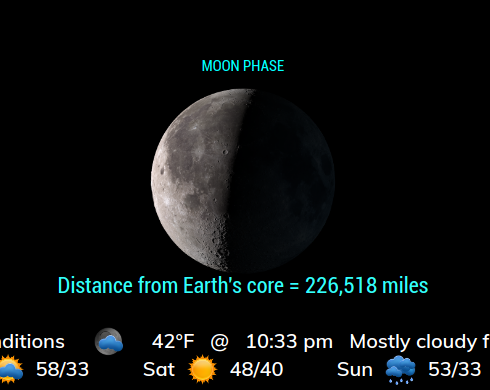
              0_1574221010114_Screenshot from 2019-11-19 22-33-28.png

              Again, I apologize for error.

              Create a working config
              How to add modules

              B 1 Reply Last reply Reply Quote 1
              • B Offline
                BD0G @Mykle1
                last edited by

                @Mykle1 I forgive you. LOL! Actually I praise your willingness to respond with such a helpfulness! I just copied and pasted directly from your code to my custom.css and …
                Drumroll please…

                Nope! No change?

                Its as if the custom.css file is not being recognized.

                Here is the entire contents of my custom.css file

                /*****************************************************
                 * Magic Mirror                                      *
                 * Custom CSS                                        *
                 *                                                   *
                 * By Michael Teeuw http://michaelteeuw.nl           *
                 * MIT Licensed.                                     *
                 *                                                   *
                 * Add any custom CSS below.                         *
                 * Changes to this files will be ignored by GIT. *
                 *****************************************************/
                
                 body {
                 	.MMM-Lunartic .xsmall.bright {
                  font-size:28px;
                }
                
                .MMM-Lunartic img.photo {
                /*  display: none;              uncomment if you don't want an image */
                  width: 100%;                /* adjust size of moon picture */
                  margin-left: 0px;          /* Precisely align moon picture with these */
                  margin-right: 0px;
                  margin-top: 0px;         /* -41px for current. -21px for animation or static. */
                  margin-bottom: -11px;      /* -51px for current. -21px for animation or static. */
                
                  .MMM-Lunartic header {
                  border-bottom: none;
                  text-align: center;
                  color: cyan;
                }
                .module.MMM-AlexaControl{
                .img{
                height: 30px;
                width: 30px;
                }
                }
                
                Mykle1M 2 Replies Last reply Reply Quote 0
                • Mykle1M Offline
                  Mykle1 Project Sponsor Module Developer @BD0G
                  last edited by Mykle1

                  Wait, let me fix this.

                  Ok, those entries must be made OUTSIDE the body. I’ve corrected it for you.

                  /*****************************************************
                   * Magic Mirror                                      *
                   * Custom CSS                                        *
                   *                                                   *
                   * By Michael Teeuw http://michaelteeuw.nl           *
                   * MIT Licensed.                                     *
                   *                                                   *
                   * Add any custom CSS below.                         *
                   * Changes to this files will be ignored by GIT. *
                   *****************************************************/
                  
                   body {
                  
                   }
                  
                  .MMM-Lunartic .xsmall.bright {
                     font-size:28px;
                  }
                  
                  .MMM-Lunartic img.photo {
                  /*  display: none;              uncomment if you don't want an image */
                    width: 100%;                /* adjust size of moon picture */
                    margin-left: 0px;          /* Precisely align moon picture with these */
                    margin-right: 0px;
                    margin-top: 0px;         /* -41px for current. -21px for animation or static. */
                    margin-bottom: -11px;      /* -51px for current. -21px for animation or static. */
                  }
                  
                  .MMM-Lunartic header {
                    border-bottom: none;
                    text-align: center;
                    color: cyan;
                  }
                  
                  .MMM-AlexaControl .img { 
                    height: 30px;
                    width: 30px;
                  }


                  Next step, I come to your house and fix it for you. :-)

                  Create a working config
                  How to add modules

                  B 1 Reply Last reply Reply Quote 1
                  • Mykle1M Offline
                    Mykle1 Project Sponsor Module Developer @BD0G
                    last edited by

                    @BD0G said in MMM-Lunartic:

                    I praise your willingness to respond with such a helpfulness!

                    I started on this forum with no knowledge of coding at all. There were people willing to help me then. I still ask for help when I need it. So, this is my way of thanking the people that help(ed) me. :thumbsup:

                    Create a working config
                    How to add modules

                    B 1 Reply Last reply Reply Quote 2
                    • B Offline
                      BD0G @Mykle1
                      last edited by

                      @Mykle1 When can you be here? LOL.

                      Mykle1M 1 Reply Last reply Reply Quote 0
                      • B Offline
                        BD0G @Mykle1
                        last edited by

                        @Mykle1 If I get stuck I always ask for assistance and realize that we all cannot know everything about anything. We are all learning. I appreciate your willingness to help ! I am sure you will see lots mode posts by me. :)

                        1 Reply Last reply Reply Quote 0
                        • Mykle1M Offline
                          Mykle1 Project Sponsor Module Developer @BD0G
                          last edited by

                          @BD0G

                          I’m here. I’ll send you a private message

                          Create a working config
                          How to add modules

                          1 Reply Last reply Reply Quote 1
                          • cowboysdudeC Offline
                            cowboysdude Module Developer
                            last edited by

                            We are all here…

                            Mykle1M 1 Reply Last reply Reply Quote 1
                            • Mykle1M Offline
                              Mykle1 Project Sponsor Module Developer @cowboysdude
                              last edited by

                              @cowboysdude said in MMM-Lunartic:

                              We are all here…

                              Now I’m here. Now I’m there.

                              Create a working config
                              How to add modules

                              1 Reply Last reply Reply Quote 0
                              • cowboysdudeC Offline
                                cowboysdude Module Developer
                                last edited by

                                You are truly an International man of mystery.

                                B 1 Reply Last reply Reply Quote 0
                                • B Offline
                                  BD0G @cowboysdude
                                  last edited by

                                  @cowboysdude He helped me resolve the issue so its looking goooooooood!

                                  1 Reply Last reply Reply Quote 1
                                  • V Offline
                                    Vauxdvihl
                                    last edited by

                                    Unfortunately no image is shown
                                    And i am not able to reach the linked homepage here (location germany)
                                    Is there a workaround?
                                    Thanks a lot

                                    Mykle1M 1 Reply Last reply Reply Quote 0
                                    • Mykle1M Offline
                                      Mykle1 Project Sponsor Module Developer @Vauxdvihl
                                      last edited by Mykle1

                                      @Vauxdvihl said in MMM-Lunartic:

                                      Unfortunately no image is shown
                                      And i am not able to reach the linked homepage here (location germany)
                                      Is there a workaround?

                                      Yes, the API is down. However, there is a workaround. (temporary fix)

                                      1. Do a “git pull” in the MMM-Lunartic directory to make sure the module is up to date
                                      2. Rename your current MMM-Lunartic.js file to MMM-Lunartic.bak
                                      3. You will now notice a folder named “temporary fix” inside the module folder. Inside the “temporary fix” folder is another MMM-Lunartic.js file. Copy and paste that to the root of the MMM-Lunartic folder.
                                      4. Restart MM

                                      Create a working config
                                      How to add modules

                                      E 1 Reply Last reply Reply Quote 0
                                      • V Offline
                                        Vauxdvihl
                                        last edited by

                                        @Mykle1
                                        :thumbs_up:
                                        Thanks a lot
                                        it works

                                        Mykle1M 1 Reply Last reply Reply Quote 0
                                        • Mykle1M Offline
                                          Mykle1 Project Sponsor Module Developer @Vauxdvihl
                                          last edited by

                                          @Vauxdvihl said in MMM-Lunartic:

                                          Thanks a lot

                                          You’re welcome. :thumbsup:

                                          it works

                                          A minor miracle. :-)

                                          Create a working config
                                          How to add modules

                                          1 Reply Last reply Reply Quote 0
                                          • E Offline
                                            Egnos @Mykle1
                                            last edited by

                                            @Mykle1 said in MMM-Lunartic:

                                            @Vauxdvihl said in MMM-Lunartic:

                                            Unfortunately no image is shown
                                            And i am not able to reach the linked homepage here (location germany)
                                            Is there a workaround?

                                            Yes, the API is down. However, there is a workaround. (temporary fix)

                                            1. Do a “git pull” in the MMM-Lunartic directory to make sure the module is up to date
                                            2. Rename your current MMM-Lunartic.js file to MMM-Lunartic.bak
                                            3. You will now notice a folder named “temporary fix” inside the module folder. Inside the “temporary fix” folder is another MMM-Lunartic.js file. Copy and paste that to the root of the MMM-Lunartic folder.
                                            4. Restart MM

                                            Hi @Mykle1,
                                            I tried to do your work around but I only see this writing: “When the Moon hits your eye…”

                                            This is my configuration:

                                            {
                                            			disabled: false,
                                            			module: 'MMM-Lunartic',
                                            			//position: 'bottom_center', // Best in left, center, or right regions
                                            			pages: {Prova: "top_left"},
                                            			config: {
                                            				mode: "rotating", // rotating or static
                                            				image: "current", // animation, current, DayNight or static
                                            				distance: "miles", // miles or km
                                            				sounds: "yes", // howling wolf, only on a full moon
                                            				useHeader: false, // true if you want a header
                                            				header: "The Lunartic is in my head", // Any text you want
                                            				maxWidth: "300px",
                                            				animationSpeed: 0,
                                            				rotateInterval: 15000,
                                            					}
                                            		},
                                            

                                            Could you help me?

                                            Many thanks!

                                            My Mirror https://forum.magicmirror.builders/topic/17262/the-raspimirror-was-born/7

                                            Mykle1M 1 Reply Last reply Reply Quote 0

                                            Hello! It looks like you're interested in this conversation, but you don't have an account yet.

                                            Getting fed up of having to scroll through the same posts each visit? When you register for an account, you'll always come back to exactly where you were before, and choose to be notified of new replies (either via email, or push notification). You'll also be able to save bookmarks and upvote posts to show your appreciation to other community members.

                                            With your input, this post could be even better 💗

                                            Register Login

                                            • 1
                                            • 2
                                            • 8
                                            • 9
                                            • 10
                                            • 11
                                            • 12
                                            • 13
                                            • 14
                                            • 10 / 14
                                            • First post
                                              Last post
                                            Enjoying MagicMirror? Please consider a donation!
                                            MagicMirror created by Michael Teeuw.
                                            Forum managed by Sam, technical setup by Karsten.
                                            This forum is using NodeBB as its core | Contributors
                                            Contact | Privacy Policy
