Read the statement by Michael Teeuw here.
[MMM-RTSPStream] - Video Streaming from Live Feeds & Security Cameras
-
Just wanted to cross-post this in case people are looking in this thread for a way to monitor and restart streams that have stopped:
-
hello, I have a problem with this module, I have the displays which are truncated and this since the update.
bonjour, j’ai un probleme avec ce module, j’ai les affichages qui sont tronqué et ce depuis la mise a jour.
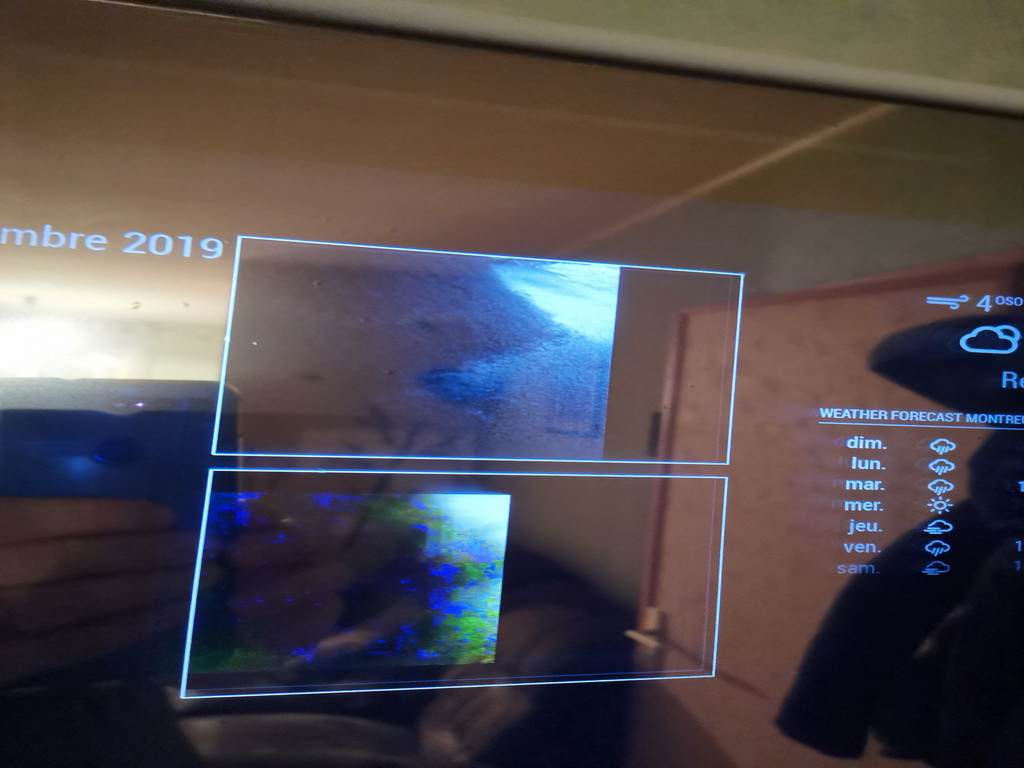
Merci.
-
nobody to tell me how to solve my cut image problem? Thank you
-
Perhaps you can share the config.js part for MMM-RTSPStream with us?
The pm2 log output for this module is useful too.
The part where it shows the applied coordinates. -
@evroom said in [MMM-RTSPStream] - Video Streaming from Live Feeds & Security Cameras:
Perhaps you can share the config.js part for MMM-RTSPStream with us?
The pm2 log output for this module is useful too.
The part where it shows the applied coordinates.Thank you for your response, could you tell me the file I need to post to you?
{
module: “MMM-RTSPStream”,
position: “top_center”,
config: {
rotateStreamTimeout: 20, // Seconds
stream1: {
name: “Portail”,
url: “rtsp://MDP@192.168.1.16/MediaInput/h264”
},
stream2: {
name: “Dome”,
url: “rtsp://MDP@192.168.1.17/12”
},
}
}, -
Hi, bonjour, to be honest I do not see the problem right away. With truncated you mean you expect to see more? Of the top stream or the bottom stream, or both? What resolution(s) do you expect to see?
I suppose you followed the instructions from this repository:
https://github.com/shbatm/MMM-RTSPStream
Including the “To use this module, use the configuration builder tool included.” part to produce a recommended config for your stream(s).I think your config defaults to the vlc player. Could you please do:
ps -eaf | grep -v grep | egrep 'omxplayer|vlc'If you (re)start MagicMirror (or mm), then you will find some MMM-RTSPStream module related info.
pm2 logs --lines 200It will start with something like this:
Starting stream stream1 with args:I personally use omxplayer, but standalone, without using MMM-RTSPStream. Since it is an overlay anyway, I feel I can control it more.
Good luck gathering the information.
-
@evroom said in [MMM-RTSPStream] - Video Streaming from Live Feeds & Security Cameras:
ps -eaf | grep -v grep | egrep ‘omxplayer|vlc’
0|mm | Whoops! There was an uncaught exception…
0|mm | TypeError: Cannot convert undefined or null to object
0|mm | at Function.keys ()
0|mm | at stopProcs (/home/pi/MagicMirror/modules/MMM-RTSPStream/node_helper.js:469:32)
0|mm | at pm2.list (/home/pi/MagicMirror/modules/MMM-RTSPStream/node_helper.js:498:17)
0|mm | at /home/pi/MagicMirror/modules/MMM-RTSPStream/node_modules/pm2/lib/API.js:606:19
0|mm | at /home/pi/MagicMirror/modules/MMM-RTSPStream/node_modules/pm2-axon-rpc/lib/client.js:45:10
0|mm | at Parser. (/home/pi/MagicMirror/modules/MMM-RTSPStream/node_modules/pm2-axon/lib/sockets/req.js:67:8)
0|mm | at Parser.emit (events.js:182:13)
0|mm | at Parser._write (/home/pi/MagicMirror/modules/MMM-RTSPStream/node_modules/amp/lib/stream.js:91:16)
0|mm | at doWrite (_stream_writable.js:410:12)
0|mm | at writeOrBuffer (_stream_writable.js:394:5)
0|mm | MagicMirror will not quit, but it might be a good idea to check why this happened. Maybe no internet connection?
0|mm | If you think this really is an issue, please open an issue on GitHub: https://github.com/MichMich/MagicMirror/issues
0|mm | ATTENTION: default value of option force_s3tc_enable overridden by environment.
0|mm | Create new news fetcher for url: https://www.bfmtv.com/rss/info/flux-rss/flux-toutes-les-actualites/ - Interval: 300000
0|mm | Starting stream stream1 using VLC with args --width 352 --height 242 -I dummy --video-on-top --no-video-deco --no-embedded-video --video-title=stream1 rtsp://MDP@192.168.1.16/MediaInput/h264…
0|mm | Starting stream stream2 using VLC with args --width 352 --height 242 -I dummy --video-on-top --no-video-deco --no-embedded-video --video-title=stream2 rtsp://MDP@192.168.1.17/12…
0|mm | DP2: Running window resizers…
0|mm | DP2: Running window resizers…0|mm | TypeError: Cannot convert undefined or null to object
0|mm | at Function.keys ()
0|mm | at stopProcs (/home/pi/MagicMirror/modules/MMM-RTSPStream/node_ helper.js:469:32)
0|mm | at pm2.list (/home/pi/MagicMirror/modules/MMM-RTSPStream/node_h elper.js:498:17)
0|mm | at /home/pi/MagicMirror/modules/MMM-RTSPStream/node_modules/pm2 /lib/API.js:606:19
0|mm | at /home/pi/MagicMirror/modules/MMM-RTSPStream/node_modules/pm2 -axon-rpc/lib/client.js:45:10
0|mm | at Parser. (/home/pi/MagicMirror/modules/MMM-RTSPStr eam/node_modules/pm2-axon/lib/sockets/req.js:67:8)
0|mm | at Parser.emit (events.js:182:13)
0|mm | at Parser._write (/home/pi/MagicMirror/modules/MMM-RTSPStream/n ode_modules/amp/lib/stream.js:91:16)
0|mm | at doWrite (_stream_writable.js:410:12)
0|mm | at writeOrBuffer (_stream_writable.js:394:5)
0|mm | ATTENTION: default value of option force_s3tc_enable overridden by environment.
0|mm | npm ERR! code ELIFECYCLE
0|mm | npm ERR! errno 1
0|mm | npm ERR! magicmirror@2.9.0 start:sh run-start.sh
0|mm | npm ERR! Exit status 1
0|mm | npm ERR!
0|mm | npm ERR! Failed at the magicmirror@2.9.0 start script.
0|mm | npm ERR! This is probably not a problem with npm. There is likely a dditional logging output above.
0|mm |
0|mm | npm ERR! A complete log of this run can be found in:
0|mm | npm ERR! /home/pi/.npm/logs/2019-12-27T19_17_29_282Z-debug.log
0|mm | getrandom indicates that the entropy pool has not been initialized. Rather than continue with poor entropy, this process will block until entropy i s available.
0|mm | TypeError: Cannot convert undefined or null to object
0|mm | at Function.keys ()
0|mm | at stopProcs (/home/pi/MagicMirror/modules/MMM-RTSPStream/node helper.js:469:32)
0|mm | at pm2.list (/home/pi/MagicMirror/modules/MMM-RTSPStream/node_h elper.js:498:17)
0|mm | at /home/pi/MagicMirror/modules/MMM-RTSPStream/node_modules/pm2 /lib/API.js:606:19
0|mm | at /home/pi/MagicMirror/modules/MMM-RTSPStream/node_modules/pm2 -axon-rpc/lib/client.js:45:10
0|mm | at Parser. (/home/pi/MagicMirror/modules/MMM-RTSPStr eam/node_modules/pm2-axon/lib/sockets/req.js:67:8)
0|mm | at Parser.emit (events.js:182:13)
0|mm | at Parser._write (/home/pi/MagicMirror/modules/MMM-RTSPStream/n ode_modules/amp/lib/stream.js:91:16)
0|mm | at doWrite (_stream_writable.js:410:12)
0|mm | at writeOrBuffer (stream_writable.js:394:5)
0|mm | ATTENTION: default value of option force_s3tc_enable overridden by environment.
0|mm | TypeError: Cannot convert undefined or null to object
0|mm | at Function.keys ()
0|mm | at stopProcs (/home/pi/MagicMirror/modules/MMM-RTSPStream/node helper.js:469:32)
0|mm | at pm2.list (/home/pi/MagicMirror/modules/MMM-RTSPStream/node_h elper.js:498:17)
0|mm | at /home/pi/MagicMirror/modules/MMM-RTSPStream/node_modules/pm2 /lib/API.js:606:19
0|mm | at /home/pi/MagicMirror/modules/MMM-RTSPStream/node_modules/pm2 -axon-rpc/lib/client.js:45:10
0|mm | at Parser. (/home/pi/MagicMirror/modules/MMM-RTSPStr eam/node_modules/pm2-axon/lib/sockets/req.js:67:8)
0|mm | at Parser.emit (events.js:182:13)
0|mm | at Parser._write (/home/pi/MagicMirror/modules/MMM-RTSPStream/n ode_modules/amp/lib/stream.js:91:16)
0|mm | at doWrite (_stream_writable.js:410:12)
0|mm | at writeOrBuffer (_stream_writable.js:394:5)
0|mm | ATTENTION: default value of option force_s3tc_enable overridden by environment.
0|mm | fatal: unable to access ‘https://github.com/shbatm/MMM-RTSPStream.g it/’: Could not resolve host: github.com
0|mm |
0|mm | fatal: unable to access ‘https://github.com/prysme01/MMM-Jeedom.git /’: Could not resolve host: github.comhere is what i found. before it worked well, I think the best is to delete the plugin properly but I do not know how?
-
Okay, this looks like a bit more than a “truncated stream” issue.
That you see something at all is a miracle, I would say :-)First of all, please use the </> button when providing output or pieces of config.
Select the text and press on the </> button.
Makes it a bit easier to read.You can disable the module by putting ‘disabled: true’ in the config.js.
With the value false you can enable it again later.module: "MMM-RTSPStream", disabled: true,Or remove the whole module entry, but this is not necessary when there are no syntax errors.
Then restart mm.
I always usepm2 restart mmprovided mm is the pm2 app name.
Seepm2 statusTo remove the module completely you can simply remove or disable it from the config.js and then delete the structure
rm -rf ~/MagicMirror/modules/MMM-RTSPStreamOr move it out of the way when you want to attempt a second try:
mv ~/MagicMirror/modules/MMM-RTSPStream ~/MagicMirror/modules/MMM-RTSPStream.old -
OK, it’s appearing more and more like the author of this module is MIA, and the module isn’t working well enough anymore to get a consistent stream (ffmpeg is the only thing that works at all in my installs, and even that will crash and burn every 3-6 hours, or get corrupted) - is there anything out there to replace this module?
The “E” in “Javascript” stands for “Easy”
-
@BKeyport said in [MMM-RTSPStream] - Video Streaming from Live Feeds & Security Cameras:
OK, it’s appearing more and more like the author of this module is MIA, and the module isn’t working well enough anymore to get a consistent stream (ffmpeg is the only thing that works at all in my installs, and even that will crash and burn every 3-6 hours, or get corrupted) - is there anything out there to replace this module?
I redid an installation of the module but it is the same, the display is partial. Do you have another module to advise me? Thank you
-
@BKeyport
Depends on what you want to stream and with what you want to stream it with.
I, for example, am streaming a single Axis IP cam (supposing it is h.264) using omxplayer. Standalone, controlled by pm2.
The MMM-RTSPStream does work, but I was having problems placing the stream on the screen to my likings.
You may need to check this list if there is a module that suites your needs:
https://github.com/MichMich/MagicMirror/wiki/3rd-party-modules#utility--iot--3rd-party--integration -
@kris1208 said in [MMM-RTSPStream] - Video Streaming from Live Feeds & Security Cameras:
I redid an installation of the module but it is the same, the display is partial. Do you have another module to advise me?
So you got rid of the errors in the pm2 log?
pm2 flush
pm2 restart mm
pm2 logs --lines 200
Do you see an entry like this?
Starting stream stream1 with args:If yes, what are the arguments?
Using vlc or omxplayer?
ps -eaf | grep -v grep | egrep 'omxplayer|vlc'Still difficult to determine what you mean by partial.
I think it is looking good.
Perhaps you want to get rid of the white frame?vi ~/MagicMirror/css/custom.cssAdd:
.MMM-RTSPStream .innerWrapper { border-style: none; //border: 1px solid red; } -
Merci de votre aide,
J’ai mis quelques post plus avant le resultat du log pm2.
Pareil pour l’affichage on vois sur les copies ecran qu’il manque une partie de l’image sur la droite.
C’est VLC qui est utilisé mais j’ai mis omx et c’est pareil. -
Dear, I need help!
I am experiencing the following error while trying to start module configuration. When adding the line in config.js:
{
                    module: 'MMM-RTSPStream',
                    position: 'middle_center',
                    config: {
                        initialSetup: true
                   }
                },
I have the following error
[14:14:56.732] [ERROR] WARNING! Could not validate config file. Starting with default configuration. Please correct syntax errors at or above this line: /home/pi/MagicMirror/modules/MMM-RTSPStream/node_modules/semver/semver.js:1 (function (exports, require, module, __filename, __dirname, process, global, Buffer) { return function (exports, require, module, __filename, __dirname) { ! ^ SyntaxError: Invalid or unexpected token at new Script (vm.js:74:7) at createScript (vm.js:246:10) at Object.runInThisContext (vm.js:298:10) at Module._compile (internal/modules/cjs/loader.js:678:28) at Object.Module._extensions..js (internal/modules/cjs/loader.js:722:10) at Module.load (internal/modules/cjs/loader.js:620:32) at tryModuleLoad (internal/modules/cjs/loader.js:559:12) at Function.Module._load (internal/modules/cjs/loader.js:551:3) at Module.require (internal/modules/cjs/loader.js:658:17) at require (internal/modules/cjs/helpers.js:20:18) [14:14:56.735] [LOG] Loading module helpers ... -
@iorifly said in [MMM-RTSPStream] - Video Streaming from Live Feeds & Security Cameras:
'MMM-RTSPStream
Hi,
what do you expect to happen with this particular config?
Did you execute all the steps from the “Using the module” paragraph in
https://github.com/shbatm/MMM-RTSPStream
?
I would suggest to read the instructions once more and then let us know the result.Success.
-
@evroom Hello, how are you ?
Thanks for answering me.
So if I didn’t have the error. I was hoping to be able to access the URL:
http: // your-mirror-ip: 8080 / MMM-RTSPStream / config.html
and proceed with the setup. However, the server does not go up. I can’t access the url. I believe the error I described is preventing it.
If you can, help me.
-
@iorifly
Okay, that makes sense.
Has been a while since I set it up myself, but I will take a look.
Cannot promise anything :-)What are you trying / hoping to stream?
-
@evroom Thanks for trying to help me.
My intention is to stream the video stream from my UBIQUITI cameras. In particular I would like to call a camera.
-
Hi,
had troubles opening that config.html myself.
Try this:1/ Install the module using:
sh -c "$(curl -s https://raw.githubusercontent.com/shbatm/MMM-RTSPStream/develop/scripts/installer.sh)"2/ Add the module to the config.js:
vi ~/MagicMirror/config/config.js{ module: 'MMM-RTSPStream', disabled: false, position: 'middle_center', config: { initialSetup: true, } }3/ Restart mm:
pm2 restart mm4/ Start Chromium Web Browser on Pi (direct or using VNC).
Use URL:http://localhost:8080/MMM-RTSPStream/config.html5/ Follow the instructions and save the config.
6/ Add the module to the config.js (replace the initial one):
vi ~/MagicMirror/config/config.js7/ Flush the logs:
pm2 flush8/ Restart mm:
pm2 restart mm9/ Check the logs:
pm2 logs --lines 20010/ Look for this line (when there are no blocking errors):
Starting stream stream1 using: -
You can try this config for testing:
{
    module: "MMM-RTSPStream",
    position: "middle_center",
    header: "MMM-RTSPStream Test",
        config: {
        autoStart: true,
        rotateStreams: false,
        rotateStreamTimeout: 10,
        moduleWidth: 640,
        moduleHeight: 360,
        localPlayer: 'omxplayer',
        remotePlayer: 'none',
        showSnapWhenPaused: true,
        remoteSnaps: true,
        stream1: {
            name: 'Buck Bunny',
            url: 'rtsp://wowzaec2demo.streamlock.net/vod/mp4:BigBuckBunny_115k.mov',
            frameRate: 'undefined',
            snapshotType: 'url',
            snapshotRefresh: 10,
            width: 640,
            height: 360,
            },
        }
},


Hello! It looks like you're interested in this conversation, but you don't have an account yet.
Getting fed up of having to scroll through the same posts each visit? When you register for an account, you'll always come back to exactly where you were before, and choose to be notified of new replies (either via email, or push notification). You'll also be able to save bookmarks and upvote posts to show your appreciation to other community members.
With your input, this post could be even better 💗
Register Login