Read the statement by Michael Teeuw here.
So ... to update MagicMirror I would ... ??
-
@MichMich said in So ... to update MagicMirror I would ... ??:
@Richard238 Please share the steps you took to upgrade and the log files which shows errors.
I followed the usual update routine.
I don’t have any logs, as I’ve restored MM from an earlier SD card backup.MM working OK everywhere, it’s just telling me I’m 150 commits out-of-date.
I’ll live with that until the electron black screen issue is resolved. -
I’ll live with that until the electron black screen issue is resolved.
It is resolved in V2.3.1
-
Hello,
I can’t get it to work anymore. :-(
have meanwhile updated the Raspi including firmware. MagicMirror directory renamed and reinstalled.
After booting only a black screen.Does that mean anything to anyone?
pi@ftpi:~/MagicMirror $ npm start > magicmirror@2.3.1 start /home/pi/MagicMirror > sh run-start.sh npm ERR! Linux 4.14.32-v7+ npm ERR! argv "/usr/bin/node" "/usr/bin/npm" "start" npm ERR! node v6.14.1 npm ERR! npm v3.10.10 npm ERR! code ELIFECYCLE npm ERR! magicmirror@2.3.1 start: `sh run-start.sh` npm ERR! Exit status 1 npm ERR! npm ERR! Failed at the magicmirror@2.3.1 start script 'sh run-start.sh'. npm ERR! Make sure you have the latest version of node.js and npm installed. npm ERR! If you do, this is most likely a problem with the magicmirror package, npm ERR! not with npm itself. npm ERR! Tell the author that this fails on your system: npm ERR! sh run-start.sh npm ERR! You can get information on how to open an issue for this project with: npm ERR! npm bugs magicmirror npm ERR! Or if that isn't available, you can get their info via: npm ERR! npm owner ls magicmirror npm ERR! There is likely additional logging output above. npm ERR! Please include the following file with any support request: npm ERR! /home/pi/MagicMirror/npm-debug.log pi@ftpi:~/MagicMirror $ -
@surger13 Did you read the text?
Make sure you have the latest version of node.js and npm installed.
– That’s exactly what it means. -
@E3V3A
I thought I tried both. But it doesn’t matter now, I’ve redone everything. It’s back on now. Thanks for your help. -
@richard238 said in So ... to update MagicMirror I would ... ??:
@MichMich said in So ... to update MagicMirror I would ... ??:
@Richard238 Please share the steps you took to upgrade and the log files which shows errors.
I followed the usual update routine.
I don’t have any logs, as I’ve restored MM from an earlier SD card backup.MM working OK everywhere, it’s just telling me I’m 150 commits out-of-date.
I’ll live with that until the electron black screen issue is resolved.Found the error logs from a backup I forgot I’d taken:
[TAILING] Tailing last 15 lines for [mm] process (change the value with --lines option)
/home/pi/.pm2/logs/mm-error-0.log last 15 lines:
0|mm       |     at Function.Module._load (module.js:424:3)
0|mm       |     at Module.require (module.js:483:17)
0|mm       |     at require (internal/module.js:20:19)
0|mm       |     at bindings (/home/pi/MagicMirror/modules/MMM-PIR-Sensor/node_modules/bindings/bindings.js:81:44)
0|mm       | Error: Module version mismatch. Expected 50, got 57.
0|mm       |     at Error (native)
0|mm       |     at process.module.(anonymous function) [as dlopen] (ELECTRON_ASAR.js:173:20)
0|mm       |     at Object.Module._extensions..node (module.js:583:18)
0|mm       |     at Object.module.(anonymous function) [as .node] (ELECTRON_ASAR.js:173:20)
0|mm       |     at Module.load (module.js:473:32)
0|mm       |     at tryModuleLoad (module.js:432:12)
0|mm       |     at Function.Module._load (module.js:424:3)
0|mm       |     at Module.require (module.js:483:17)
0|mm       |     at require (internal/module.js:20:19)
0|mm       |     at bindings (/home/pi/MagicMirror/modules/MMM-PIR-Sensor/node_modules/bindings/bindings.js:81:44)


/home/pi/.pm2/logs/mm-out-0.log last 15 lines:
0|mm       | Initializing new module helper ...
0|mm       | Module helper loaded: MMM-MyTemps
0|mm       | Initializing new module helper ...
0|mm       | Module helper loaded: updatenotification
0|mm       | No helper found for module: clock.
0|mm       | Initializing new module helper ...
0|mm       | Module helper loaded: calendar
0|mm       | No helper found for module: compliments.
0|mm       | No helper found for module: currentweather.
0|mm       | No helper found for module: weatherforecast.
0|mm       | No helper found for module: MMM-doomsDay.
0|mm       | Whoops! There was an uncaught exception...
0|mm       | MagicMirror will not quit, but it might be a good idea to check why this happened. Maybe no internet connection?
0|mm       | If you think this really is an issue, please open an issue on GitHub: https://github.com/MichMich/MagicMirror/issues
0|mm       | Launching application.
I hope that helps find what’s wrong, and how to fix it.
Thanks!
-
Dude -
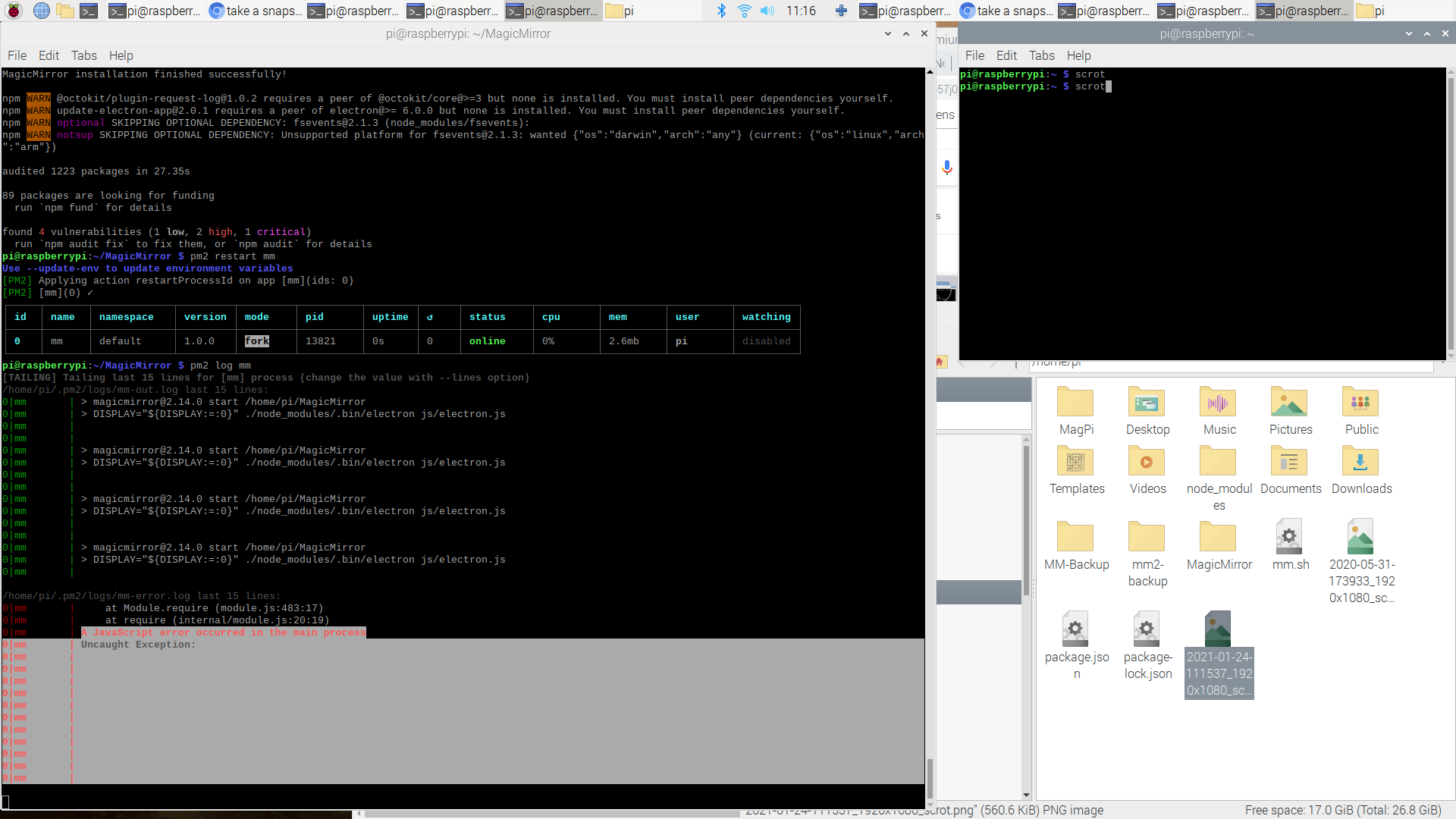
My magicmirrior is DEAD !!! HELP !!! HELP !!!
This is STILL an issue … had the BLACK SCREEN after the npm pull && install npm
Now the mirror does not even start and I get a Javascript error !!!
I also got the 4 vulnerabilities (1 low, 2 high, 1 critical) after the install
-
@chef use my upgrade script
see here -
U da man!!! I’m back on the playground :) Thanks.
-
Must be some of my modules but with your default config mirror works but with my config I get a BLACK SCREEN.
BTW, I did not upgrade (was a bit worried)… not sure if should do that !
-
@bitfit2020 it gives u that control
but glad u got it working
-
@bitfit2020 i dont have a config in any of my scripts
i used the sample doing install,
config.js for upgrade
and no confug for the screen saver and pm2 scripts at the endupgrade does what u are supposed to do manually, but breaks running systems with lots of none-base modules
upgrade tries to detect and fix the breakage
run 1st time it will just check if its possible upgrade would work
second time with ‘apply’ parm will do the upgrade process. a log is kept of the process

Hello! It looks like you're interested in this conversation, but you don't have an account yet.
Getting fed up of having to scroll through the same posts each visit? When you register for an account, you'll always come back to exactly where you were before, and choose to be notified of new replies (either via email, or push notification). You'll also be able to save bookmarks and upvote posts to show your appreciation to other community members.
With your input, this post could be even better 💗
Register Login