MagicMirror Forum
    • Recent
    • Tags
    • Unsolved
    • Solved
    • MagicMirror² Repository
    • Documentation
    • 3rd-Party-Modules
    • Donate
    • Discord
    • Register
    • Login
    A New Chapter for MagicMirror: The Community Takes the Lead
    Read the statement by Michael Teeuw here.

    Compliments module external file

    Scheduled Pinned Locked Moved Troubleshooting
    18 Posts 3 Posters 4.2k Views 3 Watching
    Loading More Posts
    • Oldest to Newest
    • Newest to Oldest
    • Most Votes
    Reply
    • Reply as topic
    Log in to reply
    This topic has been deleted. Only users with topic management privileges can see it.
    • S Do not disturb
      sdetweil @HanaO00
      last edited by

      @hanao00 it either has to be IN the compliments folder and you use JUST the name, OR its http://someserver…/path_tofile

      so, in your case, just use the filename

      also, the path is wrong
      you coded

      {
      module: 'compliments',
      

      but then coded this for the path (no mmm and capital letters matter on PI )

      modules/MMM-Compliments
      

      the module folder name is compliments
      this is where the file should be…

      modules/default/compliments
      

      Sam

      How to add modules

      learning how to use browser developers window for css changes

      H 1 Reply Last reply Reply Quote 0
      • H Offline
        HanaO00 @sdetweil
        last edited by

        @sdetweil Thanks for your reply, MMM-Compliments was a folder that i make for customs compliments, but now the path for compliments is :

        /home/pi/MagicMirror/modules/default/compliments/
        

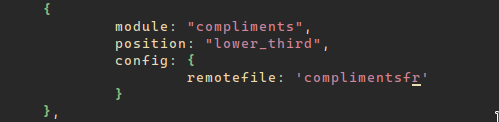
        A screen of my config for compliments, but doesn’t work
        Screenshot-2021-04-19_22-43-53.png

        S 1 Reply Last reply Reply Quote 0
        • S Do not disturb
          sdetweil @HanaO00
          last edited by

          @hanao00 every letter matters

          its

          remoteFile
          

          not

          remotefile
          

          on linux things are case sensitive
          javascript is case sensitive on all platforms…

          Sam

          How to add modules

          learning how to use browser developers window for css changes

          H 1 Reply Last reply Reply Quote 0
          • H Offline
            HanaO00 @sdetweil
            last edited by

            @sdetweil Thank you I hadn’t paid attention, I corrected the case but it still uses the default compliments

            S 1 Reply Last reply Reply Quote 0
            • S Do not disturb
              sdetweil @HanaO00
              last edited by

              @hanao00

              if the file upload fails, the defaults are used…

              open the developers window, ctrl-shift-i on the pi keyboard,
              select the console tab, and scroll up, or enter some unique part of the module name in the filter field
              to slim down messages to the module

              make sure the name is exact…

              Sam

              How to add modules

              learning how to use browser developers window for css changes

              1 Reply Last reply Reply Quote 0
              • H Offline
                HanaO00
                last edited by

                Oh perfect, thanks ! He needs the extension of the file

                S 1 Reply Last reply Reply Quote 0
                • S Do not disturb
                  sdetweil @HanaO00
                  last edited by sdetweil

                  @hanao00 said in Compliments module external file:

                  He needs the extension of the file

                  yes, exact name

                  and for this module, the extension MUST be .json

                  Sam

                  How to add modules

                  learning how to use browser developers window for css changes

                  H 1 Reply Last reply Reply Quote 0
                  • H Offline
                    HanaO00 @sdetweil
                    last edited by

                    @sdetweil Thank you

                    1 Reply Last reply Reply Quote 0
                    • C Offline
                      CheapDad
                      last edited by

                      May I ask a follow on question? Is the source of the core compliments editable? Meaning, not the source code, but the source of the sayings that appear on the screen. I like the existing compliments but would like to customize what actually appears on the screen.

                      S 1 Reply Last reply Reply Quote 0
                      • S Do not disturb
                        sdetweil @CheapDad
                        last edited by

                        @cheapdad you should not edit THAT content

                        you can copy into your own file and edit from there, OR add it to the config.js

                        general rule… unless there is bug u are fixing short term, or a feature u are adding,
                        do NOT edit the module content (any file) in the defaults folder…

                        and overall should never edit the installed module files at all…

                        config.js is designed to allow to override the settings defined by the modules

                        Sam

                        How to add modules

                        learning how to use browser developers window for css changes

                        1 Reply Last reply Reply Quote 0
                        • C Offline
                          CheapDad
                          last edited by

                          Understood, but the entry in my config.js for just the line that says “compliments.” There’s no indication in config.js where that pulls from. The add-on compliments modules have extra lines with a website address, etc., but I don’t see where the core module is getting what it puts on the screen.

                          S 1 Reply Last reply Reply Quote 0
                          • S Do not disturb
                            sdetweil @CheapDad
                            last edited by

                            @cheapdad

                            in the core compliments.js file is the default setting

                            defaults: {
                            		compliments: {
                            			anytime: ["Hey there sexy!"],
                            			morning: ["Good morning, handsome!", "Enjoy your day!", "How was your sleep?"],
                            			afternoon: ["Hello, beauty!", "You look sexy!", "Looking good today!"],
                            			evening: ["Wow, you look hot!", "You look nice!", "Hi, sexy!"],
                            			"....-01-01": ["Happy new year!"]
                            		},
                            

                            Sam

                            How to add modules

                            learning how to use browser developers window for css changes

                            C 1 Reply Last reply Reply Quote 0
                            • C Offline
                              CheapDad @sdetweil
                              last edited by

                              @sdetweil Thanks, that’s very helpful. I imagine I can simply edit that compliments.js file, since I can always download another one if I want to return to default.

                              Alternatively, I could copy/paste a second set of those lines, edit them, and “no comment” the defaults. (I think that’s the correct term.) However, that would add/leave in unnecessary lines of code, which strikes me as inefficient.

                              S 1 Reply Last reply Reply Quote 0
                              • S Do not disturb
                                sdetweil @CheapDad
                                last edited by sdetweil

                                @cheapdad i don’t understand

                                in config.js

                                { 
                                 module:"compliments",
                                position:".....",
                                config: { 
                                
                                		compliments: {
                                			anytime: ["Hey there sexy!"],
                                			morning: ["Good morning, handsome!", "Enjoy your day!", "How was your sleep?"],
                                			afternoon: ["Hello, beauty!", "You look sexy!", "Looking good today!"],
                                			evening: ["Wow, you look hot!", "You look nice!", "Hi, sexy!"],
                                			"....-01-01": ["Happy new year!"]
                                		},
                                }
                                }
                                

                                edit away

                                never touch the source file…

                                this is the MM model,
                                what ever is in a modules defaults:{} section
                                can be overridden in config.js
                                usually that is all in the module README.md file as part of the instructions

                                Sam

                                How to add modules

                                learning how to use browser developers window for css changes

                                C 1 Reply Last reply Reply Quote 0
                                • C Offline
                                  CheapDad @sdetweil
                                  last edited by

                                  @sdetweil I’m not logged into my pi ATM so I can’t post code, but that’s not what’s in my config.js. My config.js has only two lines for “compliments” - that it exists and position.

                                  This is not my actual file, but it looks essentially like this:

                                  {
                                  		module: "compliments",
                                  		position: "lower_third",	
                                  		}
                                  

                                  In having this conversation, it looks like I have to add the config header and lines to do what I want and then edit that.

                                  S 2 Replies Last reply Reply Quote 0
                                  • S Do not disturb
                                    sdetweil @CheapDad
                                    last edited by

                                    @cheapdad right…

                                    if you DON’T add things to config.js then the DEFAULTS apply
                                    (whatever is in the module)

                                    Sam

                                    How to add modules

                                    learning how to use browser developers window for css changes

                                    1 Reply Last reply Reply Quote 0
                                    • S Do not disturb
                                      sdetweil @CheapDad
                                      last edited by

                                      @cheapdad read the links in my signature below

                                      Sam

                                      How to add modules

                                      learning how to use browser developers window for css changes

                                      1 Reply Last reply Reply Quote 1

                                      Hello! It looks like you're interested in this conversation, but you don't have an account yet.

                                      Getting fed up of having to scroll through the same posts each visit? When you register for an account, you'll always come back to exactly where you were before, and choose to be notified of new replies (either via email, or push notification). You'll also be able to save bookmarks and upvote posts to show your appreciation to other community members.

                                      With your input, this post could be even better 💗

                                      Register Login

                                      • 1 / 1
                                      • First post
                                        Last post
                                      Enjoying MagicMirror? Please consider a donation!
                                      MagicMirror created by Michael Teeuw.
                                      Forum managed by Sam, technical setup by Karsten.
                                      This forum is using NodeBB as its core | Contributors
                                      Contact | Privacy Policy