MagicMirror Forum
    • Recent
    • Tags
    • Unsolved
    • Solved
    • MagicMirror² Repository
    • Documentation
    • 3rd-Party-Modules
    • Donate
    • Discord
    • Register
    • Login
    A New Chapter for MagicMirror: The Community Takes the Lead
    Read the statement by Michael Teeuw here.

    MMM-Fitbit2 PythonShell is not a constructor

    Scheduled Pinned Locked Moved Troubleshooting
    14 Posts 6 Posters 5.0k Views 6 Watching
    Loading More Posts
    • Oldest to Newest
    • Newest to Oldest
    • Most Votes
    Reply
    • Reply as topic
    Log in to reply
    This topic has been deleted. Only users with topic management privileges can see it.
    • TipponT Offline
      Tippon
      last edited by

      I set up MMM-Fitbit2 recently, and have gone through the setup and authorisation. It seemed to go ok, but now it stops at loading. There’s a PythonShell error in the logs, which seems to be affecting a few other modules.

      I’ve tried to use the fixes for some of the other modules, but I don’t know enough to get them to work.

      I’ve attached the error below. Does anyone know how to fix it please?

      [05.04.2021 01:04.45.169] [ERROR] Whoops! There was an uncaught exception...
      [05.04.2021 01:04.45.169] [ERROR] SyntaxError: Unexpected end of JSON input
          at JSON.parse (<anonymous>)
          at /home/pi/MagicMirror2/modules/MMM-Remote-Control/node_helper.js:1018:33
          at FSReqWrap.readFileAfterClose [as oncomplete] (internal/fs/read_file_context.js:53:3)
      [05.04.2021 01:04.45.169] [ERROR] MagicMirror will not quit, but it might be a good idea to check why this happened. Maybe no internet connection?
      [05.04.2021 01:04.45.169] [ERROR] If you think this really is an issue, please open an issue on GitHub: https://github.com/MichMich/MagicMirror/issues
      [05.04.2021 01:07.33.662] [ERROR] Whoops! There was an uncaught exception...
      [05.04.2021 01:07.33.662] [ERROR] TypeError: PythonShell is not a constructor
          at Class.getData (/home/pi/MagicMirror2/modules/MMM-Fitbit2/node_helper.js:54:25)
          at Class.socketNotificationReceived (/home/pi/MagicMirror2/modules/MMM-Fitbit2/node_helper.js:17:9)
          at Socket.<anonymous> (/home/pi/MagicMirror2/js/node_helper.js:112:11)
          at Socket.emit (events.js:198:13)
          at process.nextTick (/home/pi/MagicMirror2/node_modules/socket.io/dist/socket.js:435:32)
          at process._tickCallback (internal/process/next_tick.js:61:11)
      [05.04.2021 01:07.33.662] [ERROR] MagicMirror will not quit, but it might be a good idea to check why this happened. Maybe no internet connection?
      [05.04.2021 01:07.33.662] [ERROR] If you think this really is an issue, please open an issue on GitHub: https://github.com/MichMich/MagicMirror/issues
      

      Please forgive me if I'm slow to reply, I'm currently experiencing memory issues, and sometimes forget that I've asked a question >.<

      S 1 Reply Last reply Reply Quote 0
      • S Offline
        sdetweil @Tippon
        last edited by sdetweil

        @tippon as I recall the node_helper.js code has to change the require statement to look like this

        const {PythonShell} = require( 'python-shell');
        

        just add the braces around the word
        PythonShell

        Sam

        How to add modules

        learning how to use browser developers window for css changes

        TipponT 1 Reply Last reply Reply Quote 1
        • TipponT Offline
          Tippon @sdetweil
          last edited by

          @sdetweil Once again, you are a superstar. It’s working, thank you :)

          I thought I’d tried that the other night, but for some reason it didn’t work. I don’t know if I typed it in wrong, or if I messed it up when I tried to do it remotely through my phone. Either way, it’s working now, and I’m a happy bunny :D

          Please forgive me if I'm slow to reply, I'm currently experiencing memory issues, and sometimes forget that I've asked a question >.<

          1 Reply Last reply Reply Quote 0
          • V Offline
            Vizulize Module Developer
            last edited by

            Hi - I have just committed this fix: https://github.com/m-roberts/MMM-Fitbit2/commit/e958665dcf63900d38f5405961a1a176d5ba2fcf

            TipponT 1 Reply Last reply Reply Quote 0
            • TipponT Offline
              Tippon @Vizulize
              last edited by

              @vizulize That’s great, thank you :)

              Please forgive me if I'm slow to reply, I'm currently experiencing memory issues, and sometimes forget that I've asked a question >.<

              1 Reply Last reply Reply Quote 0
              • F Offline
                frosty_snow
                last edited by

                @Tippon
                Hello - just wanted to inquire about this problem as I’m encountering the same thing but even with the mentioned change to the require statement it is continuing to occur.
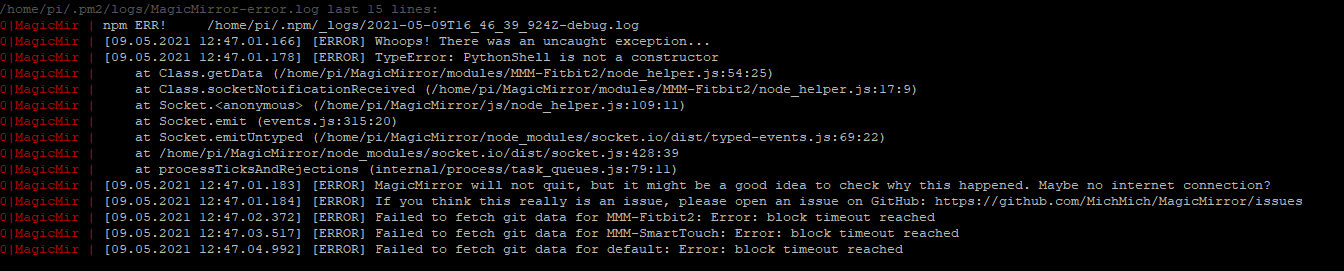
                923d909b-45ce-47b4-bd85-90f896e5050a-image.png

                2470bac0-33e3-4b0c-936a-b68b59bda2ba-image.png

                Did you need to make any other changes or corrections to any of the files?
                Thank you!

                S 1 Reply Last reply Reply Quote 0
                • S Offline
                  sdetweil @frosty_snow
                  last edited by

                  @frosty_snow can us do , from the module folder

                  grep version   node_modules/python_shell/package.json
                  

                  Sam

                  How to add modules

                  learning how to use browser developers window for css changes

                  F 1 Reply Last reply Reply Quote 0
                  • F Offline
                    frosty_snow @sdetweil
                    last edited by

                    @sdetweil
                    Looks like I’m on 3.0.0
                    cbdc27ce-78ed-4ec4-93bf-d735e2c8e10c-image.png

                    1 Reply Last reply Reply Quote 0
                    • D Offline
                      dmolony
                      last edited by

                      @frosty_snow Not sure if helpful but I’m using python-shell 0.5.0 and removing the brackets around PythonShell fixed the same error for me.

                      1 Reply Last reply Reply Quote 0
                      • StoffbeuteluweS Offline
                        Stoffbeuteluwe Project Sponsor
                        last edited by

                        var NodeHelper = require("node_helper");
                        const PythonShell = require("python-shell");
                        

                        this is working for me

                        1 Reply Last reply Reply Quote 0
                        • V Offline
                          Vizulize Module Developer
                          last edited by

                          I have updated the module: https://github.com/m-roberts/MMM-Fitbit2/commit/27706ea0a9ab13b8d12a020f7234adf361d108ae

                          S 1 Reply Last reply Reply Quote 0
                          • S Offline
                            sdetweil @Vizulize
                            last edited by sdetweil

                            @vizulize i think it depends on what version of python-shell you are running…

                            https://github.com/extrabacon/python-shell/issues/154

                            your package.json says

                            "python-shell": "^0.5.0"
                            

                            which means 0.5.0 OR ABOVE (technically ‘at minimum’)

                            if u want ONLY 0.5.0, take the ^ off the front…
                            else sometimes u will get 1.x

                            Sam

                            How to add modules

                            learning how to use browser developers window for css changes

                            V 1 Reply Last reply Reply Quote 0
                            • V Offline
                              Vizulize Module Developer @sdetweil
                              last edited by

                              @sdetweil It is defined as 0.5.0 in the dependencies.

                              To be honest, the Python should be rewritten in JS anyway. Perhaps I will get around to doing that in the near future :thinking_face:

                              Then this issue goes away!

                              S 1 Reply Last reply Reply Quote 0
                              • S Offline
                                sdetweil @Vizulize
                                last edited by

                                @vizulize yeh, i don’t know whay there is a python_shell lib… as exec and spawn are so easy…

                                Sam

                                How to add modules

                                learning how to use browser developers window for css changes

                                1 Reply Last reply Reply Quote 0

                                Hello! It looks like you're interested in this conversation, but you don't have an account yet.

                                Getting fed up of having to scroll through the same posts each visit? When you register for an account, you'll always come back to exactly where you were before, and choose to be notified of new replies (either via email, or push notification). You'll also be able to save bookmarks and upvote posts to show your appreciation to other community members.

                                With your input, this post could be even better 💗

                                Register Login

                                • 1 / 1
                                • First post
                                  Last post
                                Enjoying MagicMirror? Please consider a donation!
                                MagicMirror created by Michael Teeuw.
                                Forum managed by Sam, technical setup by Karsten.
                                This forum is using NodeBB as its core | Contributors
                                Contact | Privacy Policy


