MagicMirror Forum
    • Recent
    • Tags
    • Unsolved
    • Solved
    • MagicMirror² Repository
    • Documentation
    • 3rd-Party-Modules
    • Donate
    • Discord
    • Register
    • Login
    A New Chapter for MagicMirror: The Community Takes the Lead
    Read the statement by Michael Teeuw here.

    MMM-Fitbit2

    Scheduled Pinned Locked Moved Health
    fitbithealthfitnesshealthywaterfoodtrackingactivity tracker
    98 Posts 21 Posters 156.2k Views 19 Watching
    Loading More Posts
    • Oldest to Newest
    • Newest to Oldest
    • Most Votes
    Reply
    • Reply as topic
    Log in to reply
    This topic has been deleted. Only users with topic management privileges can see it.
    • S Offline
      sdetweil @JJW
      last edited by sdetweil

      @jjw looks like npm v7…

      Sam

      How to add modules

      learning how to use browser developers window for css changes

      J 1 Reply Last reply Reply Quote 0
      • J Offline
        JJW @sdetweil
        last edited by

        @sdetweil sorry for the lack of knowledge, but what does that mean/what do I have to change.

        S 1 Reply Last reply Reply Quote 0
        • S Offline
          sdetweil @JJW
          last edited by

          @jjw from the commandline do

          npm install -g npm@6.14.10
          

          MAY need sudo in front if it fails for permissions error

          after then check
          npm -v

          then redo the steps u were trying to do before

          Sam

          How to add modules

          learning how to use browser developers window for css changes

          J 2 Replies Last reply Reply Quote 0
          • J Offline
            JJW @sdetweil
            last edited by

            @sdetweil said in MMM-Fitbit2:

            npm install -g npm@6.14.10

            Will try now, thank you very much.

            1 Reply Last reply Reply Quote 0
            • J Offline
              JJW @sdetweil
              last edited by

              @sdetweil Thank you for your help, have the Fitbit module displaying on the monitor now, however, just says loading.:grinning_squinting_face:

              S 1 Reply Last reply Reply Quote 0
              • S Offline
                sdetweil @JJW
                last edited by sdetweil

                @jjw now we need to look for messages in the place u start MM

                npm start or pm2, if pm2, then the pm2 logs --lines=100 command will show

                and the developers window on the MM screen

                ctrl-shift-i, select the console tab, and add part of the module name to the filter field , fit
                

                Sam

                How to add modules

                learning how to use browser developers window for css changes

                J 2 Replies Last reply Reply Quote 0
                • J Offline
                  JJW @sdetweil
                  last edited by

                  @sdetweil I ran “pm2 logs --lines=100” in the command line and the only returns I got were for the calendar.

                  0|MagicMir | [05.06.2021 18:31.09.798] [INFO] Calendar-Fetcher: Broadcasting 10 events.

                  I’m sorry I don’t know what you mean by developer window, but when I use ctrl+shift+i out of the cmd I take a screenshot and then when I’m in the cmd I just rename the box.

                  S 1 Reply Last reply Reply Quote 0
                  • J Offline
                    JJW @sdetweil
                    last edited by

                    @sdetweil I ran another test for 1000 line and the only mention of Fit is:

                    0|MagicMir | [05.06.2021 18:22.00.914] [INFO] Checking git for module: MMM-Fitbit2

                    After that, it moves onto multicast.

                    1 Reply Last reply Reply Quote 0
                    • S Offline
                      sdetweil @JJW
                      last edited by

                      @jjw on the magicmirror screen, not commandline

                      press ctrl-shift-i together
                      a new window will open 1/2 the Mm screen
                      in that window there is a tabbed interface,

                      here showing error from one of my modules, part of name in filter field
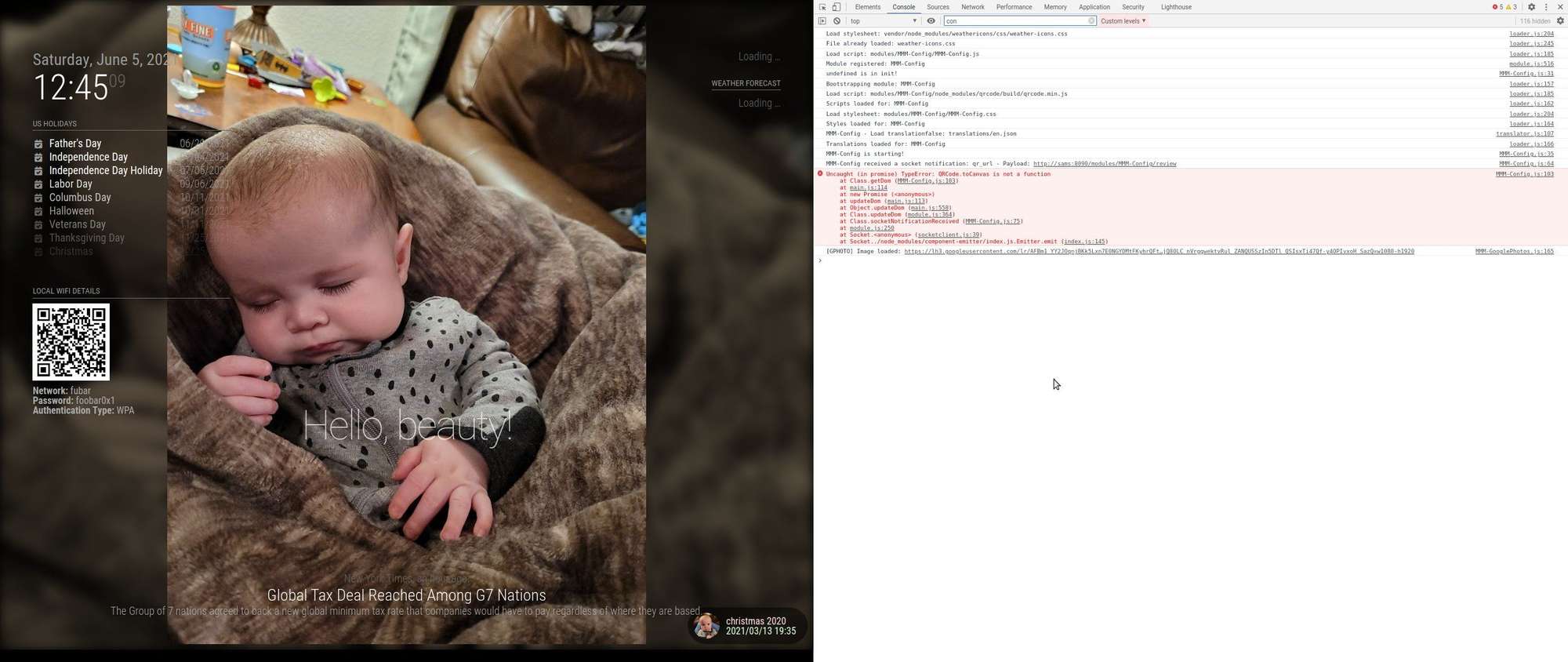
                      Screenshot at 2021-06-05 12-45-09.jpg

                      Sam

                      How to add modules

                      learning how to use browser developers window for css changes

                      J 2 Replies Last reply Reply Quote 0
                      • J Offline
                        JJW @sdetweil
                        last edited by

                        @sdetweil Ah, I think because I’m accessing my Pi via VNC viewer, that’s what makes it take a screenshot instead of opening that menu, even when on the MM screen, is there another way to access this? If not work directly through the Pi.

                        S 1 Reply Last reply Reply Quote 0
                        • S Offline
                          sdetweil @JJW
                          last edited by

                          @jjw well, you could access from your pc, if the address/ipWhitelist settings in config.js allow it
                          then use chrome to view and open the dev window

                          Sam

                          How to add modules

                          learning how to use browser developers window for css changes

                          1 Reply Last reply Reply Quote 0
                          • J Offline
                            JJW @sdetweil
                            last edited by

                            @sdetweil This is what comes up when I filter by fit
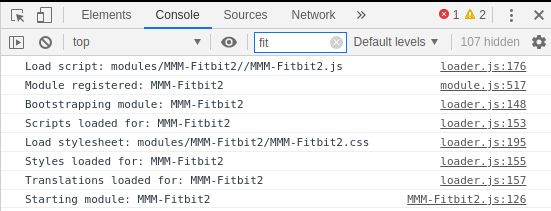
                            39653410-d113-4a7c-a273-b39481fb068d-image.png

                            S 1 Reply Last reply Reply Quote 0
                            • S Offline
                              sdetweil @JJW
                              last edited by

                              @jjw ok, now you know everything I know.

                              no errors were reported.

                              Sam

                              How to add modules

                              learning how to use browser developers window for css changes

                              J 1 Reply Last reply Reply Quote 0
                              • J Offline
                                JJW @sdetweil
                                last edited by

                                @sdetweil Thank you for the continued help, really appreciate you taking the time. One last thought, I’ve gone through the processes again, and one of the dependencies, “python-fitbit” requires you to run

                                sudo pip install -r requirements/base.txt

                                When I run this code, I get the error message

                                Could not open requirements file: [Errno 2] No such file or directory: ‘requirements/base.txt’

                                S V 2 Replies Last reply Reply Quote 0
                                • S Offline
                                  sdetweil @JJW
                                  last edited by

                                  @jjw what folder are u supposed to be in when u run that command?

                                  Sam

                                  How to add modules

                                  learning how to use browser developers window for css changes

                                  J 1 Reply Last reply Reply Quote 0
                                  • J Offline
                                    JJW @sdetweil
                                    last edited by

                                    @sdetweil Unfortunately it doesn’t say so I’ve just tried running in and out of the Fitbit directory.

                                    https://github.com/m-roberts/MMM-Fitbit2

                                    redirects you to this webpage

                                    https://pypi.org/project/fitbit/0.3.1/

                                    and I can’t see anywhere it says what folder to install it into.

                                    1 Reply Last reply Reply Quote 0
                                    • V Offline
                                      Vizulize Module Developer @JJW
                                      last edited by

                                      @jjw Running init.sh inside the MMM-Fitbit2 folder should take care of installing the dependencies for you.

                                      J 1 Reply Last reply Reply Quote 0
                                      • J Offline
                                        JJW @Vizulize
                                        last edited by

                                        @vizulize I’ve done that, unfortunately still just have loading.

                                        1 Reply Last reply Reply Quote 0
                                        • D Offline
                                          Dresch360 Project Sponsor
                                          last edited by

                                          Entered all of the required information in the Fitbit application registry.
                                          At the ./auth.sh process, entered correct “Client ID” and “Client Secret” and I get the following after Allowing full access during authentication process:

                                          **Fitbit
                                          The app you’re trying to connect did not provide valid information to Fitbit. Please report this issue to them.

                                          Developer information: invalid_request - Missing parameters: client_id**

                                          Any help would be greatly appreciated!

                                          1 Reply Last reply Reply Quote 0
                                          • D Offline
                                            Dresch360 Project Sponsor
                                            last edited by

                                            Also - attempted to authorize and obtain token directly from the Fitbit site using their token authenticator from the “OAuth 2.0 tutorial page” and I received the error message below:

                                            404 Not Found
                                            Missing parameters: state

                                            Traceback (most recent call last):
                                            File “/usr/local/lib/python3.7/dist-packages/cherrypy/_cpdispatch.py”, line 54, in call
                                            return self.callable(*self.args, **self.kwargs)
                                            TypeError: index() missing 1 required positional argument: ‘state’

                                            During handling of the above exception, another exception occurred:

                                            Traceback (most recent call last):
                                            File “/usr/local/lib/python3.7/dist-packages/cherrypy/_cprequest.py”, line 628, in respond
                                            self._do_respond(path_info)
                                            File “/usr/local/lib/python3.7/dist-packages/cherrypy/_cprequest.py”, line 687, in _do_respond
                                            response.body = self.handler()
                                            File “/usr/local/lib/python3.7/dist-packages/cherrypy/lib/encoding.py”, line 219, in call
                                            self.body = self.oldhandler(*args, **kwargs)
                                            File “/usr/local/lib/python3.7/dist-packages/cherrypy/_cpdispatch.py”, line 60, in call
                                            raise sys.exc_info()[1]
                                            File “/usr/local/lib/python3.7/dist-packages/cherrypy/_cpdispatch.py”, line 58, in call
                                            test_callable_spec(self.callable, self.args, self.kwargs)
                                            File “/usr/local/lib/python3.7/dist-packages/cherrypy/_cpdispatch.py”, line 157, in test_callable_spec
                                            raise cherrypy.HTTPError(404, message=message)
                                            cherrypy._cperror.HTTPError: (404, ‘Missing parameters: state’)

                                            S 1 Reply Last reply Reply Quote 0

                                            Hello! It looks like you're interested in this conversation, but you don't have an account yet.

                                            Getting fed up of having to scroll through the same posts each visit? When you register for an account, you'll always come back to exactly where you were before, and choose to be notified of new replies (either via email, or push notification). You'll also be able to save bookmarks and upvote posts to show your appreciation to other community members.

                                            With your input, this post could be even better 💗

                                            Register Login

                                            • 1
                                            • 2
                                            • 3
                                            • 4
                                            • 5
                                            • 4 / 5
                                            • First post
                                              Last post
                                            Enjoying MagicMirror? Please consider a donation!
                                            MagicMirror created by Michael Teeuw.
                                            Forum managed by Sam, technical setup by Karsten.
                                            This forum is using NodeBB as its core | Contributors
                                            Contact | Privacy Policy