Read the statement by Michael Teeuw here.
Display monthly calendar and entries
-
In my MM, I’d like to display a current monthly calendar and then the entries below. I added the “calendar monthly” module but it does not display. Here’s my code"
{
        module: "calendar",
        header: "US Holidays",
        position: "top_left",
        config: {
          maximumEntries: 6,
          maximumNumberOfDays: 90,
          limitDays: 0,
          displaySymbol: true,
          defaultSymbol: "calendar",
          maxTitleLength: 25,
          maxLocationTitleLength: 25,
          maxTitleLines: 3,
          maxEventTitleLines: 3,
          fetchInterval: 300000,
          animationSpeed: 2000,
          fade: true,
          urgency: 7,
          timeFormat: "relative",
          dateFormat: "MMM Do",
          dateEndFormat: "LT",
          fullDayEventDateFormat: "MMM Do",
          getRelative: 6,
          fadePoint: 0.25,
          tableClass: "small",
          calendars: [
            {
              symbol: "calendar-check",
              url: "webcal://www.calendarlabs.com/ical-calendar/ics/76/US_Holidays.ics"
            }
          ],
          titleReplace: {
            "De verjaardag van ": "",
            "'s birthday": ""
          },
          locationTitleReplace: {
            "street ": ""
          },
          symbol: 'birthday-cake',
          url: 'http://localhost:8080/MMM-iCloud-Client/birthdays',
          broadcastEvents: true,
          showLocation: false,
          displayRepeatingCountTitle: false,
          wrapEvents: false,
          wrapLocationEvents: false,
          showEnd: false,
          hidePrivate: false,
          hideOngoing: false,
          hideTime: false,
          colored: false,
          coloredSymbolOnly: false,
          sliceMultiDayEvents: false,
          broadcastPastEvents: false,
          nextDaysRelative: false,
          selfSignedCert: false,
          customEvents: [],
          excludedEvents: []
        },
        order: "3"
      },
      {
        module: "calendar-monthly",
        order: "2",
        position: "top_left",
        config: {
          initialLoadDelay: 0,
          fadeSpeed: 2,
          showHeader: true,
          cssStyle: "block",
          tableClass: "small",
          updateDelay: 5,
          debugging: false
        },
        disabled: false
      },
#2, I added this code, but can’t remember what it’s for and it’s not in my language:
          titleReplace: {
            "De verjaardag van ": "",
            "'s birthday": ""
          },
          locationTitleReplace: {
            "street ": ""
          },
Can anyone give some insight into what it is/does?
Lastly, I’ve reviewed several of threads on adding calendars and, frankly, I’m confused. In the “events” portion of the default calendar, I’d like to display the contents of an Iphone (ical?) calendar and a calendar that would populate from a website. Both would obviously need a username/password to access. Could someone please provide me an example of config lines to do so?
CheapDad
-
@cheapdad said in Display monthly calendar and entries:
        {
          symbol: "calendar-check",
          url: "webcal://www.calendarlabs.com/ical-calendar/ics/76/US_Holidays.ics"
        }
By way of update, I’ve continued to work on this and think I’ve figured out that if I change the above URL to the one I want to populate from a website, it solves my problem. I still need to figure out how to add the second Iphone calendar and the monthly.
-
@cheapdad adding a second calendar is replicate that block
// list of calendars
calendars: [
  // calendar 1
   {
    ...
    url:...
    },
 // calendar 2
    {
    ...
    url:...
    }
]  // end of list of calendars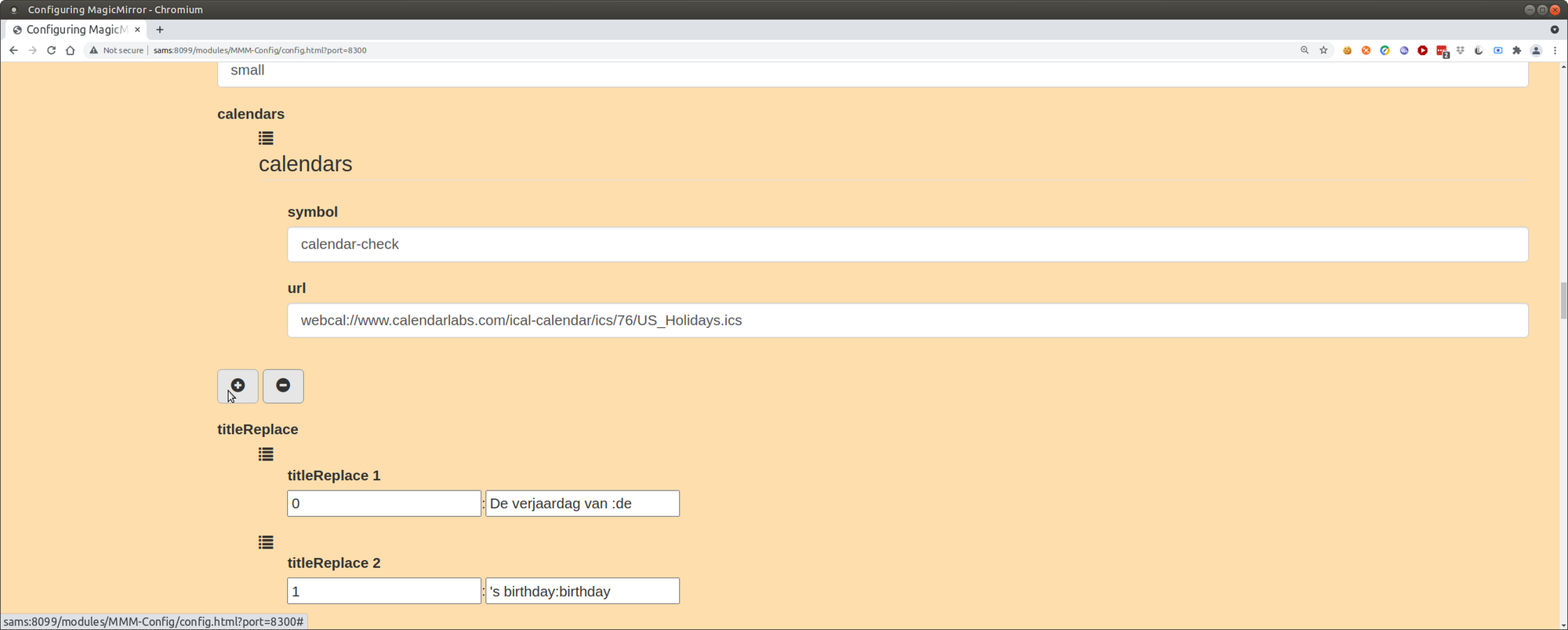
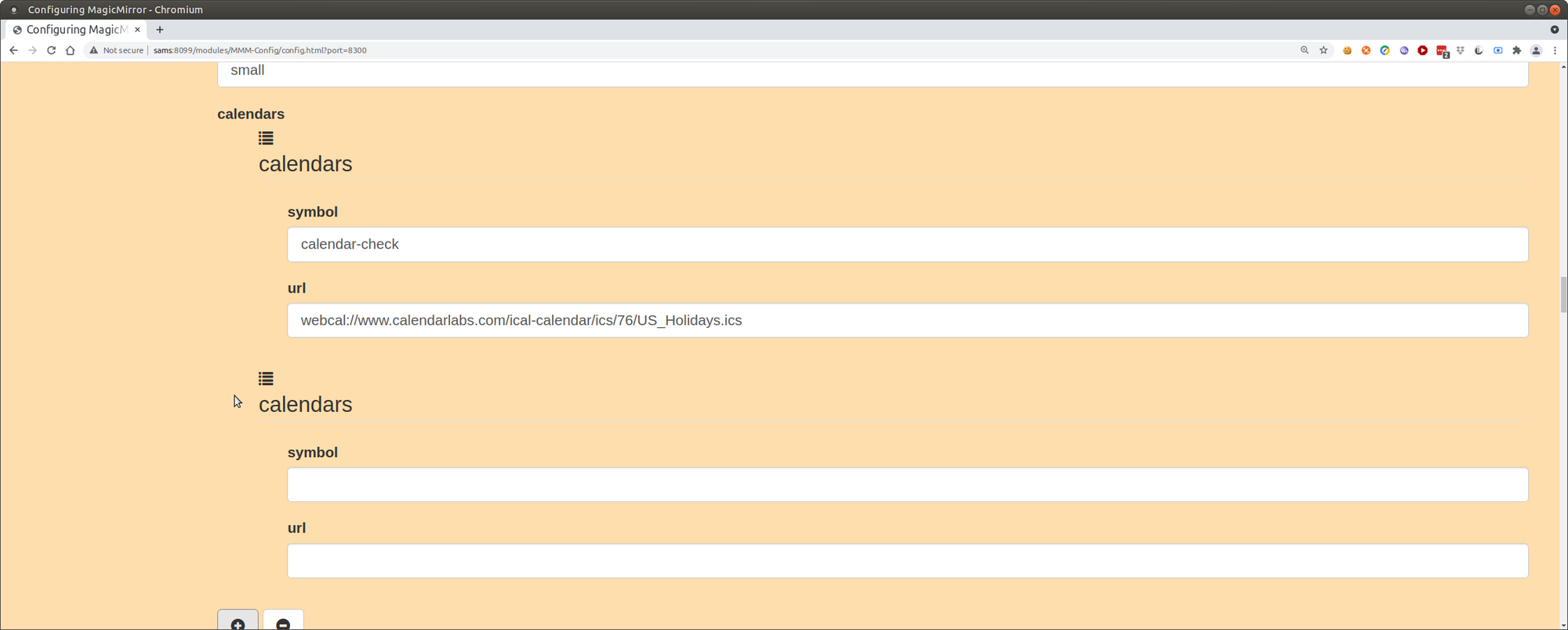
in mmm-config, just hit the plus button under calendars
the titlereplace is an entry editing tool.
replace the string on the left w the string in the right in the event titlecan’t help with monthly, but its a seaprate module, and will require a whole new entry in config,
which u had in the 1st pastebut like all other modules, look in the two logs, and check for a debug option on the module
-
@cheapdad populate from a website… yes, google is a website.
the url needs to download an ICS file, which is what the calendar module reads to get the events
as for calendar-monthly
https://github.com/KirAsh4/calendar_monthly
that one appears JUST to draw the rectangular calendar box. no actual entries
-
@sdetweil said in Display monthly calendar and entries:
@cheapdad populate from a website… yes, google is a website.
the url needs to download an ICS file, which is what the calendar module reads to get the events
as for calendar-monthly
https://github.com/KirAsh4/calendar_monthly
that one appears JUST to draw the rectangular calendar box. no actual entries
That’s interesting because I thought I had it working in a long lost iteration of my config.js. All I’m looking for is the current month’s calendar, not any entries, i.e., the 4th is a thursday, etc. Any suggestion on how to accomplish that?
-
@cheapdad u want the grid?
then that module should do it… it has a debug mode
its pretty simple -
How do I run it in debug mode? I don’t see that on github page.
-
@cheapdad add
debugging: true
to the module config section
in mmm-config, check the box for debugging
sorry, used wrong word, recheck code
-
@sdetweil said in Display monthly calendar and entries:
debug: true
So, I may be stuck on stupid. I enabled debug and ran MM. The monthly calendar didn’t load and I didn’t see anything different that would help me debug it.
-
-
@sdetweil Sorry, definitely stuck on stupid. F12 didn’t work when MM was running, but “developer tools” did. I got this from the console log:
Failed to load resource - 404
This is where the script is looking:
http://0.0.0.0:8080/modules/calendar-monthly/calendar-monthly.js
-
@cheapdad yes, as it should be…
I installed and copy/pasted his sample, and got this
did u git clone in the right place?

-
I did, but I’ll do so again to make sure that I’ve got all the correct files.
-
@cheapdad just look in the modules folder
is it there or not? -
It’s there. I completely restarted the pi and that seemed to do it. Perhaps I made too many config changes without a restart and confused the pi.
-
I have the same issue described above, but the solution above does not work for me.
The Smart List is one I’ve set up to only show tasks which are due up to the current time - I don’t want to see all my tasks for later today on it. Using “Scheduled - within 1 day” clutters up my Smart List.
I’m sure this used to work as intended, but now, as far as I can tell, I can either have lots of (irrelevant) tasks which are not yet due, or I can have lots of (irrelevant) calendar events which are in the past.
-
@betinaj what module are you trying to use?
not clear from your post
-
I solved the problem with this, I needed a monthly template, and I would go there.
-
@betinaj FWIW, that module is where I got the inspiration to start MMM-Multimonth (I needed 3 months at a time, one forward, one back).
If you don’t care about events on the calendar, you could use my module and set it to one month (although, I’m playing with adding events from calendar).
If you do, there’s a much more elegant solution in MMRize’s MMM-CalendarExt3Agenda - it’ll take over display of both the built in calendar and a month of data in a mini calendar form, and is much more configurable.
Both of these are fully functional, will remain so, and are fully supported.

Hello! It looks like you're interested in this conversation, but you don't have an account yet.
Getting fed up of having to scroll through the same posts each visit? When you register for an account, you'll always come back to exactly where you were before, and choose to be notified of new replies (either via email, or push notification). You'll also be able to save bookmarks and upvote posts to show your appreciation to other community members.
With your input, this post could be even better 💗
Register Login