MagicMirror Forum
    • Recent
    • Tags
    • Unsolved
    • Solved
    • MagicMirror² Repository
    • Documentation
    • 3rd-Party-Modules
    • Donate
    • Discord
    • Register
    • Login
    A New Chapter for MagicMirror: The Community Takes the Lead
    Read the statement by Michael Teeuw here.

    MMM-Buienalarm

    Scheduled Pinned Locked Moved Utilities
    10 Posts 4 Posters 3.1k Views 4 Watching
    Loading More Posts
    • Oldest to Newest
    • Newest to Oldest
    • Most Votes
    Reply
    • Reply as topic
    Log in to reply
    This topic has been deleted. Only users with topic management privileges can see it.
    • lavolp3L Offline
      lavolp3 Module Developer
      last edited by lavolp3

      Description:

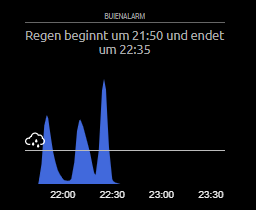
      For all you dutch and german people out there, I have created a module that is inspired by the app Buienalarm. It is based on the modules MMM-rainfc and MMM-rain-forecast. Thanks to @cirdan and @spoturdeal for their groundwork.
      I have created this since I wanted the rain forecast to be more prominent on the mirror.
      This module implements chart.js for a nicer graph and

      Screenshots:

      Download:

      [card:lavolp3/MMM-Buienalarm]

      Features:

      • uses Buienradar API, works in Netherlands and parts of Western Germany
      • line or bar graph possible
      • rain icons for light, medium, heavy rain as orientation help
      • flexible sizes, color

      Any ideas or corrections welcome and appreciated!


      Version 1.0

      Initial release

      How to troubleshoot modules
      MMM-soccer v2, MMM-AVStock

      1 Reply Last reply Reply Quote 1
      • M Offline
        MajorC Project Sponsor
        last edited by MajorC

        Hi,

        I tried the module today with the default confit and it only shows “no data” / “Keine Daten!”.

        I use: lat: 52.15 and lon: 5.55.

        Any ideas?

        Update: Sorry, I took a while, but now I see some data.

        Christian

        1 Reply Last reply Reply Quote 0
        • M Offline
          MajorC Project Sponsor
          last edited by

          Update 2:

          I changed lat and lon from default to my coordinates

          lat: 52.55,
          lon: 13.45,
          

          and get no data anymore.

          lavolp3L 1 Reply Last reply Reply Quote 0
          • lavolp3L Offline
            lavolp3 Module Developer @MajorC
            last edited by

            @MajorC said in MMM-Buienalarm:

            lat: 52.55,
            lon: 13.45,

            Is that Berlin?
            The current master branch uses Buienradar (NL) and does not work east of, let’s say Dortmund.
            You could try to switch to the ‘climacell’ branch

            git fetch --all
            git checkout climacell
            git pull
            

            You’d need a climacell api key.
            https://www.climacell.co/weather-api/
            I have not completed the Readme yet in that branch. Will do over the next days.

            How to troubleshoot modules
            MMM-soccer v2, MMM-AVStock

            1 Reply Last reply Reply Quote 0
            • M Offline
              MajorC Project Sponsor
              last edited by

              Yes, that is Berlin.

              I am happy to give cimacell a test if the readme file is online and I know what to do.

              Thank you

              lavolp3L 1 Reply Last reply Reply Quote 0
              • lavolp3L Offline
                lavolp3 Module Developer @MajorC
                last edited by

                @MajorC Then you can just wait.
                I guess I’ll push the climacell change to the master branch later since there are already some modules out there that use Buienradar.

                How to troubleshoot modules
                MMM-soccer v2, MMM-AVStock

                1 Reply Last reply Reply Quote 1
                • T Offline
                  Tinus
                  last edited by Tinus

                  Hi all,

                  Unfortunately, the module no longer seems to work. If I enable it in my config, the dashboard is not loaded anymore. Same yields for the MMM-rainfc module. I really liked their simplicity.
                  But after updating npm, Node and Magicmirror I can not use these modules anymore.

                  Any ideas on why this happens?

                  MagicMirror 2.18.0
                  Node v16.13.2
                  npm v8.4.0

                  S 1 Reply Last reply Reply Quote 0
                  • S Do not disturb
                    sdetweil @Tinus
                    last edited by

                    @tinus see this
                    https://forum.magicmirror.builders/topic/15778/fix-for-black-screen-in-2-16-and-later

                    Sam

                    How to add modules

                    learning how to use browser developers window for css changes

                    T 1 Reply Last reply Reply Quote 0
                    • T Offline
                      Tinus @sdetweil
                      last edited by

                      @sdetweil Thanks Sam, output confirms that it is missing ‘request’.
                      Tried to install it through npm, but as with many other npm installations I get stuck at:

                      5b886eab-132c-45d7-9253-b7158b5b82b5-image.png .
                      If I interrupt this installation by ctrl+c I get some output that things went wrong at Node.js playwright… Unfortunately, I can not reproduce that because after several tries it somehow succeeded.
                      Any idea where this ‘playwright’ error comes from? Can not find anything about it on the forums.

                      S 1 Reply Last reply Reply Quote 0
                      • S Do not disturb
                        sdetweil @Tinus
                        last edited by

                        @tinus playwrite is for mm testing.

                        but you used the wrong command

                        in the module folder do

                        npm install request --save
                        

                        all the other stuff is things u can’t do anything about ( and we can’t suppress the messages)

                        to redo the mm npm insta with developer tools do

                        npm install --only=prod
                        

                        in the MagicMirror folder

                        Sam

                        How to add modules

                        learning how to use browser developers window for css changes

                        1 Reply Last reply Reply Quote 1

                        Hello! It looks like you're interested in this conversation, but you don't have an account yet.

                        Getting fed up of having to scroll through the same posts each visit? When you register for an account, you'll always come back to exactly where you were before, and choose to be notified of new replies (either via email, or push notification). You'll also be able to save bookmarks and upvote posts to show your appreciation to other community members.

                        With your input, this post could be even better 💗

                        Register Login

                        • 1 / 1
                        • First post
                          Last post
                        Enjoying MagicMirror? Please consider a donation!
                        MagicMirror created by Michael Teeuw.
                        Forum managed by Sam, technical setup by Karsten.
                        This forum is using NodeBB as its core | Contributors
                        Contact | Privacy Policy