Read the statement by Michael Teeuw here.
MMM-Spotify
-
@Bugsounet, thanks for fixing it. From the changelog, should I expect that many requests again when not on idle?
-
I will try to improve it…
actually i’m working arround another bug …
multi account and connected / disconnected notification …with one account it’s works correctly but not with multi :(
bouah !
it’s horrible, in multi-account mode, MMM-Spotify tries to connect to all accounts to send news live
I really wonder if the multi-account mode is really a good feature
and of course … wow it spam like it can not connect to the account that we do not use
humm, how to manage this mess !?
i will impect …Note:
- with multi account, I think It can crash the RPI … (so so so so … more loop)
- in my dev platform (desktop with debian linux):
- in idle: CPU 3%
- with buggy playing multi-account : CPU 36%
It’s very very high !!!
-
So…
I propose this (and i have already coded a part of it in other dev) :
- a single account checking and displaying (default account in config)
- Changing account is by vocal (like
Jarvis ... Spotify account name)
name is the USERNAME defined in the spotify.config.json file
Of course, i will add this function in AMk2 Spotify recipeResult:
Less CPU time, Less DNS request, Less Loop for Checking … More Free Memory and RPI will be betterwhat do you think about this ?
-
v1.4.0 (2020-05-16)
- Added & Modified: Multi-account management by notification SPOTIFY_ACCOUNT
- Fixed: Loop CONNECTED/DISCONNECTED on multi-account
- Fixed: Less CPU time, Less DNS request
- Fixed: Maybe RPI crashed when using multi-account (memory leaks)
-
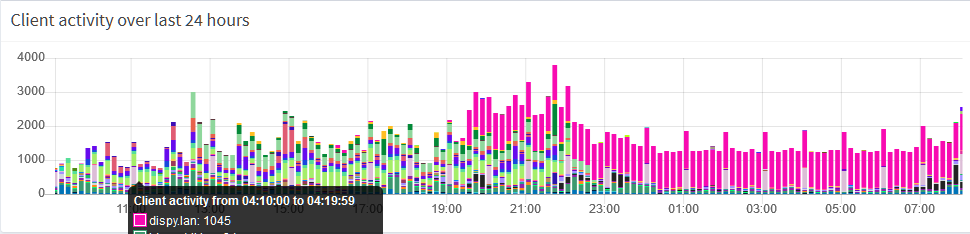
Regrettably, DNS requests are still too many. I see 1000 in 10 minutes (purple is a fresh install of MagicMirror with just the clock and the Spotify module):
-
I think the best solution is Don’t use it
(like my other modules) -
Sorry for bothering you guys with my kinky ex-module.
The problem is; There is no server-pushed way to get current playback in RPI with spotify api.
So to get current playing data, frequent api callings are needed.Possible solution under current condition is; removing some features - like progress bar, displaying playtime… So then too many requests are not needed.
In other platforms like desktop PC, Google Chrome has widevine/DRM so we can use “web playback api”, it can make direct playing spotify on browser level, and get playback data directly. But not possible in rpi natively.
Some hacks for widevine exist for RPI chromium, but our MM’s electron still miss that feature.
But! I’ve heard newest Electron(9.0) has a new Chromium(80? 83?) and it might have widevine supported (I haven’t tested yet, or never…)
I’m not sure it would be supported in rpi or not but if who has interest, worthy to try. If supported, you can build a new module which can play spotify directly without raspotify instead this poor module. -
@Sean Thank you for chiming in and for providing a more elaborate response. I thought that the constant polling might be the reason. If I may comment, for other users it may be helpful to put it in the documentation that using the module leads to increased network traffic.
I for one would be happy with a display of the static per-title information and the controls, I will observe what happens when I crank the refresh rate up to 30000 milliseconds.
-
@Sean I hacked together a simple bash script (dnssaver.sh) that fetches IPs and stores them in the hosts file. If I call it with ‘api.spotify.com’ as argument and put it in my crontab it should take a load of the dns server. I’ll keep an eye on it.
-
@Bugsounet either I am doing something wrong or there’s a bug.
I added
onStart: null,in the module config, but the big Spotify logo keeps displaying all the time. -
if Soptify logo not hidden after start, it’s means :
token missing or token erroryou should have in console something like that :
[SPOTIFY:ERROR] USERNAME: [your username]
[SPOTIFY:ERROR] Token Error ! ./[token name].json
if you have set a token … verify the exact name
and report it to your account username specified inspotify.config.json-> “TOKEN” field -
when ok It display :
-
default style
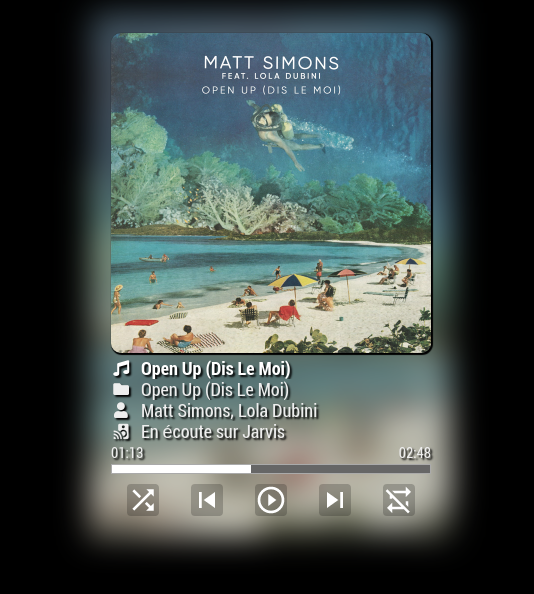
-
mini style
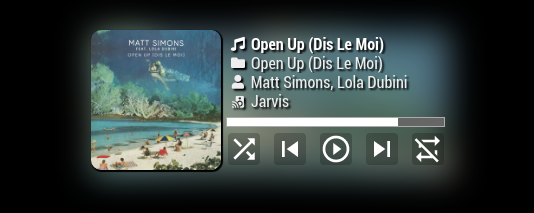
-
when bottom_bar position is set

-
-
@mmmmh :
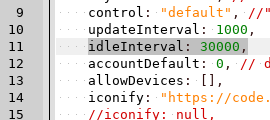
now
idleIntervalis set to 30000 (scan is Spotify is playing every 30 sec)
if playing :updateIntervalis set by default to 1000 (1sec)Attention it’s means that with idleInterval : when Spotify is playing to take 30 sec to display it in mirror !by default !
-
@Bugsounet Thanks. Do I understand this correctly. As long as the module is idle it will only check for updates every 30 seconds and when it is active (music is being played) it updates every second?
-
Right,
I hope this suits you, because it starts to take head ;)
-
Somehow the authorization process does not work.
...node first auth.js
[SPOTIFY] Initialized
Browser opened and the log in was succesful as well as accepting the app, but then instead of creating the token.js I receive an error:
[SPOTIFY] Error in authentication flow!
[SPOTIFY] ERROR: undefined
[SPOTIFY] Authorization process finished!
In spotify I can see that I have the mirror app available in approved apps, but there is not token in the modules folder. Therefore the connection does not work.
Does anybody have an idea?
Thanks -
@sbonn13 there will be a message popup on the browser with a code (press the copy icon)
then return to the terminal window and paste the code in at the little app prompt, and hit enter
(make sure u don’t hit enter on that window before the browser opens, as the little app will take you enter key as the ‘token’ and not wait)you run the node auth… app
and seeOpening OAuth URL. Return here with your code. Paste your code:then the browser opens, you pick your userid, then it asks for allow, then presents this screen
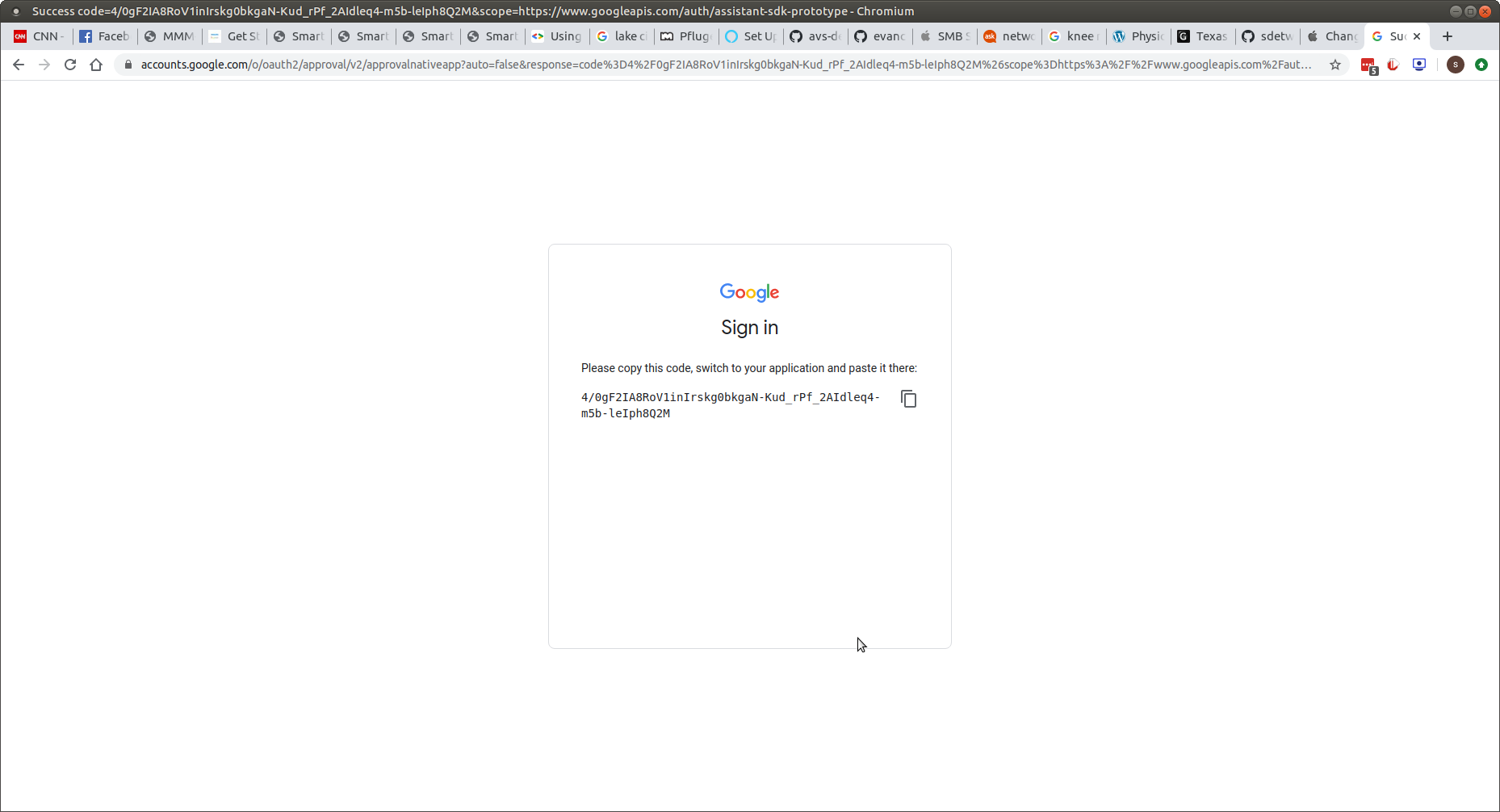
where u need to copy that and then return to app
-
@sdetweil
Thanks unfortunately probably I do it completely wrong, I do not get it. Is there any instruction? OAuth was working fine for google services, but not with this Spotify solution :-(
My procedure:
1.) node first_auth.js as described in MMM-Spotify instruction.
-> [SPOTIFY] Initialized appeared in terminal window
2.) Browser opens with Spotify login, after having entered, spotify requesting access
-> No code yet, no additional terminal window, also no change in existing terminal window
3.) Click on accept access in browser (spotify)
-> callback localhost:8888 appeared in domain and shows ?code=**** in parameter.
But in the meantime the mentioned error has appeared immediately in the terminal window. No time or place to paste the code somewhere else. Where shall I put this code and at what point in the procedure? -
@sbonn13 said in MMM-Spotify:
callback localhost:8888 appeared in domain
what does ‘appeared in domain’ mean?? sorry
-
@sdetweil
Following address is opened in browser: https://accounts.spotify.com/de/authorize?response_type=code&client_id=XXXXX&scope=user…-> Press Agree button in Browser in order to agree access to spotify
Afterwards address in browser is changed to:
http://localhost:8888/callback?code=XXXXX&state=XXXXX…I assume the code (anonymized XXXXX) in this address is the relevant one. But how to proceed with that? Because at the time I have received this code I already have the errors in my terminal window.

Hello! It looks like you're interested in this conversation, but you don't have an account yet.
Getting fed up of having to scroll through the same posts each visit? When you register for an account, you'll always come back to exactly where you were before, and choose to be notified of new replies (either via email, or push notification). You'll also be able to save bookmarks and upvote posts to show your appreciation to other community members.
With your input, this post could be even better 💗
Register Login