MagicMirror Forum
    • Recent
    • Tags
    • Unsolved
    • Solved
    • MagicMirror² Repository
    • Documentation
    • 3rd-Party-Modules
    • Donate
    • Discord
    • Register
    • Login
    A New Chapter for MagicMirror: The Community Takes the Lead
    Read the statement by Michael Teeuw here.

    Multiple instances of MMM-DarkSkyForecast with MMM-pages

    Scheduled Pinned Locked Moved Solved Troubleshooting
    18 Posts 5 Posters 6.8k Views 5 Watching
    Loading More Posts
    • Oldest to Newest
    • Newest to Oldest
    • Most Votes
    Reply
    • Reply as topic
    Log in to reply
    This topic has been deleted. Only users with topic management privileges can see it.
    • P Offline
      popeofmope
      last edited by

      I have a 4" 800x480 screen, there’s not much real estate so I have MMM-pages set up. I want to have MMM-DarkSkyForecast on a few pages with different options, ie hourly forecast one page 1 and daily on page 2, and set MMM-pages auto scroll.

      {
        module: 'MMM-pages',
        config: { modules: [ ["calendar", "MMM-DarkSkyForecast"],
                              ["calendar", "MMM-DarkSkyForecast"] ],
                  fixed: ["clock", "MMM-page-indicator"]}
                }
      },
      

      I’ve tried to clone to a different folder and rename MMM-DarkSkyForecast.js to match

      ...
         ["calendar", "MMM-dsf"],
      ...
      

      I have 2 configurations in config.js but in both instances the 2nd page doesn’t show the MMM-DarkSkyForecast module. Is what I’m trying to do possible?

      justjim1220J 1 Reply Last reply Reply Quote 0
      • justjim1220J Offline
        justjim1220 Module Developer @popeofmope
        last edited by

        @popeofmope

        OK…

        I think I got pretty close to what you are asking for…
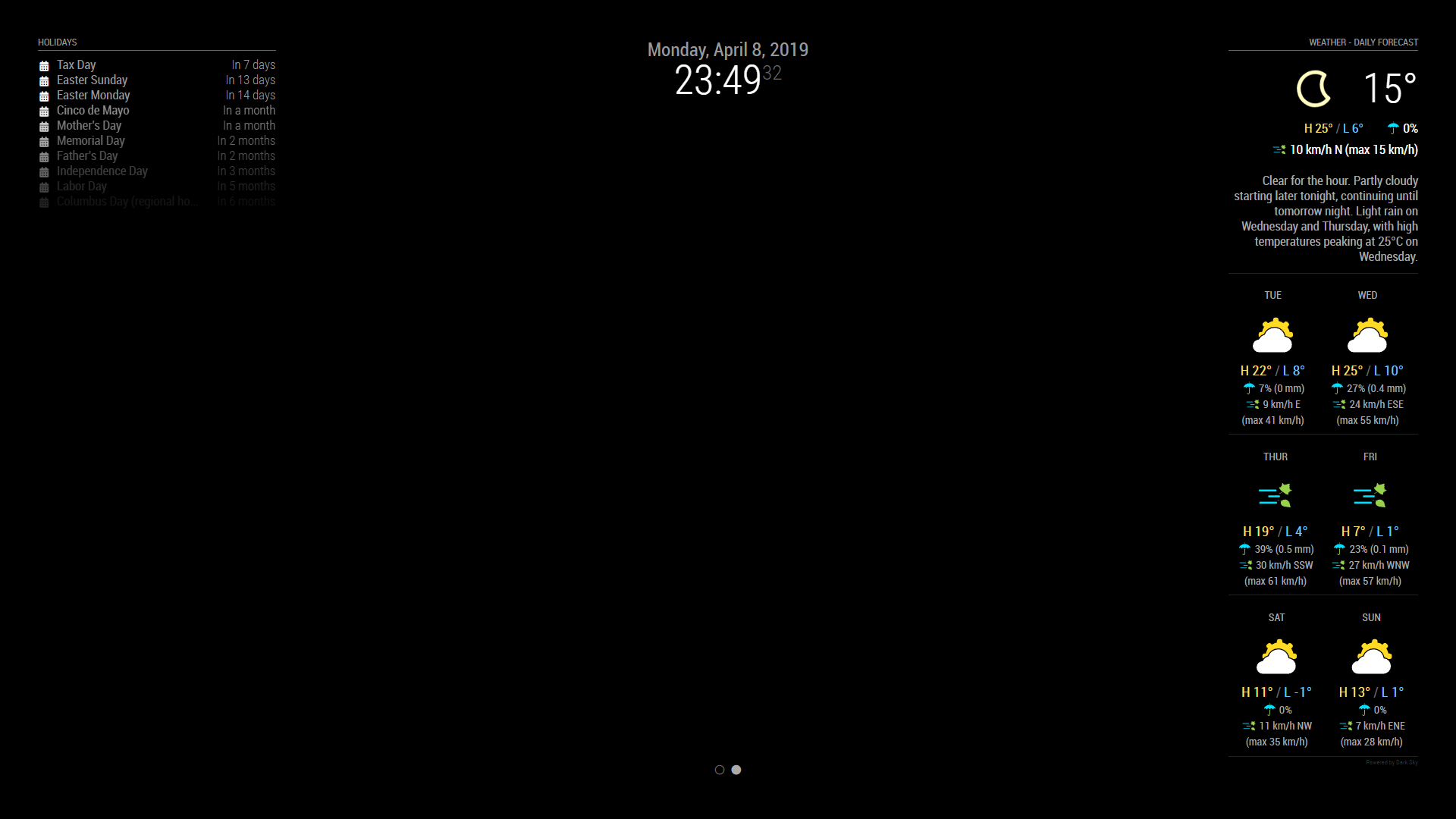
        Page 1
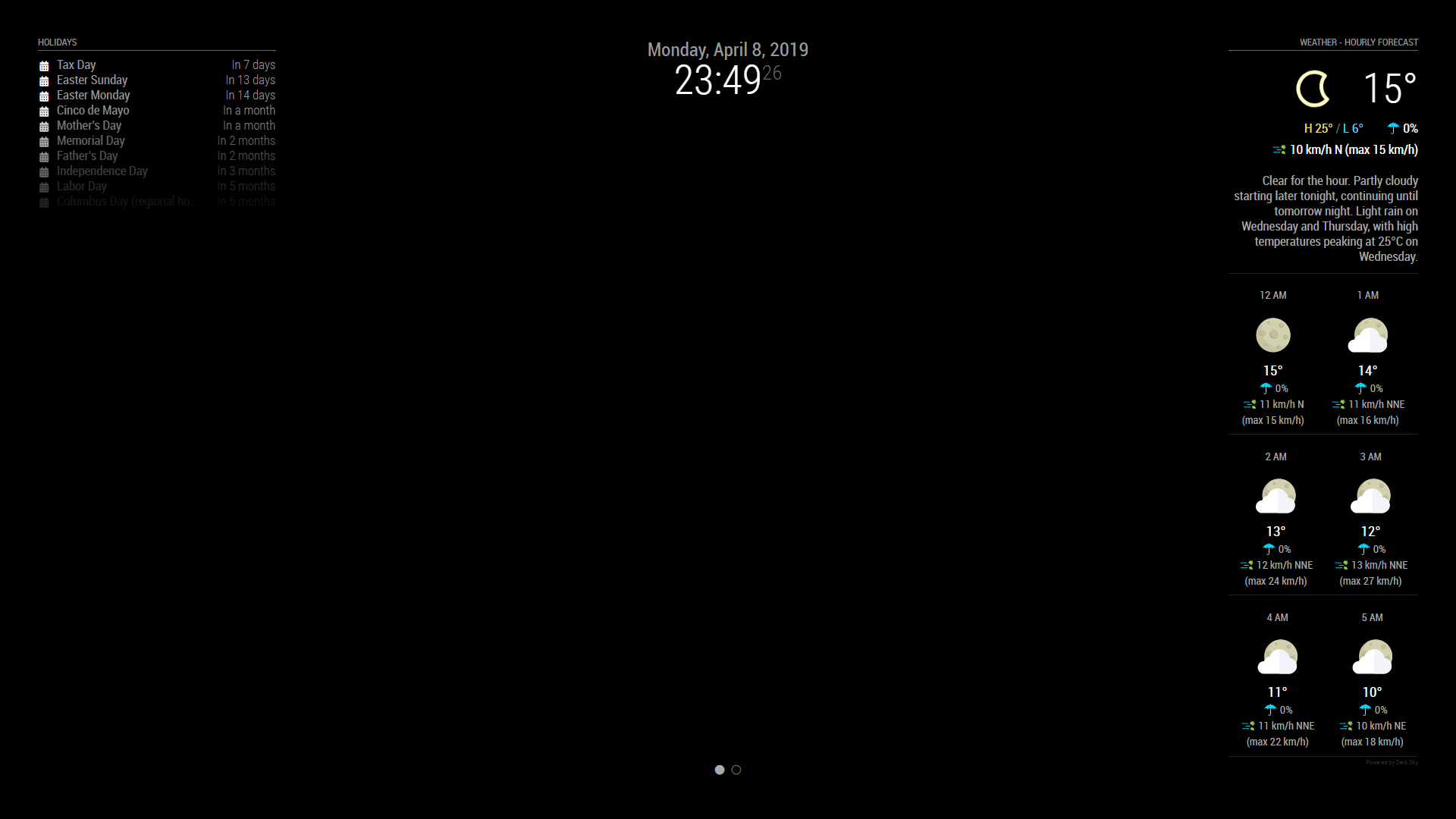
        0_1554785446100_Screenshot (60).png

        Page 2
        0_1554785469498_Screenshot (61).png

        modules: [{
                    module: "alert",
                },
                {
                    module: "updatenotification",
                    position: "top_bar"
                },
                {
                    module: 'MMM-Cursor',
                    config: {
                        timeout: 1000
                    }
                },
                {
                    module: 'MMM-pages',
                    config: {
                        modules: [
                            ["calendar", "MMM-DarkSkyForecast"],
                            ["calendar", "MMM-DarkSkyForecast2"]
                        ],
                        fixed: ["clock", "MMM-page-indicator"],
                        animationTime: 1000,
                        rotationTime: 3 * 60 * 1000, // this is to change the page every 3 minutes, 
                        rotationDelay: 500
                    }
                },
                {
                    module: 'MMM-page-indicator',
                    position: 'bottom_bar',
                    config: {
                        pages: 2
                    }
                },
                {
                    module: "clock",
                    position: "top_center"
                },
                {
                    module: "calendar",
                    header: "Holidays",
                    position: "top_left",
                    config: {
                        colored: true,
                        coloredSymbolOnly: true,
                        calendars: [{
                            url: 'https://calendar.google.com/calendar/ical/en.usa%23holiday%40group.v.calendar.google.com/public/basic.ics',
                            symbol: 'calendar',
                            auth: {
                                user: 'justjim1220@gmail.com',
                                pass: 'abcde12345',
                                method: 'basic'
                            }
                        }, ],
                    }
                },
                {
                    disabled: false,
                    module: "MMM-DarkSkyForecast", // HOURLY
                    header: "Weather - Hourly Forecast",
                    position: "top_right",
                    config: {
                        apikey: "abcde12345abcde12345abcde12345ab",
                        latitude: "40.26189",
                        longitude: "-94.03534",
                        iconset: "4c",
                        concise: false,
                        showHourlyForecast: true,
                        hourlyForecastInterval: 1,
                        maxHourliesToShow: 6,
                        showDailyForecast: false,
                        maxDailiesToShow: 3,
                        forecastLayout: "tiled"
                    }
                },
                {
                    disabled: false,
                    module: "MMM-DarkSkyForecast2", // DAILY
                    header: "Weather - Daily Forecast",
                    position: "top_right",
                    config: {
                        apikey: "abcde12345abcde12345abcde12345ab",
                        latitude: "40.26189",
                        longitude: "-94.03534",
                        iconset: "5c",
                        concise: false,
                        showHourlyForecast: false,
                        hourlyForecastInterval: 3,
                        maxHourliesToShow: 3,
                        showDailyForecast: true,
                        maxDailiesToShow: 6,
                        forecastLayout: "tiled"
                    }
                },
        

        I hope this helps! ;)

        "Life's Too Short To Dance With Ugly People"
        Jim Hallock - 1995

        P C 2 Replies Last reply Reply Quote 0
        • justjim1220J Offline
          justjim1220 Module Developer @popeofmope
          last edited by

          @popeofmope

          you have both modules (calendar & DarkSkyForecast) on both pages…

          try it like this:

          {
              module: 'MMM-pages',
              config: {
                  modules: [ 
                      ["calendar"],
                      ["MMM-DarkSkyForecast"]
                  ],
                  fixed: ["clock", "MMM-page-indicator"]
              }
          },
          

          hope this helps

          "Life's Too Short To Dance With Ugly People"
          Jim Hallock - 1995

          P 1 Reply Last reply Reply Quote 0
          • P Offline
            popeofmope @justjim1220
            last edited by

            @justjim1220
            I’m trying to get 2 instances of MMM-DarkSkyForecast on 2 separate pages. Page 1 would display hourly forecast, page 2 would show daily forecast.

            I tried to clone a 2nd copy of the module to a separate folder ../modules/MMM-dsf and then rename the ../MMM-dsf/MMM-DarkSkyForecast.js to ../MMM-dsf/MMM-dsf.js and then configure the pages module as follows

            {
              module: 'MMM-pages',
              config: { modules: [ ["calendar", "MMM-DarkSkyForecast"],
                                    ["calendar", "MMM-dsf"] ],
                        fixed: ["clock", "MMM-page-indicator"]}
                      }
            },
            
            S justjim1220J 3 Replies Last reply Reply Quote 0
            • S Offline
              sdetweil @popeofmope
              last edited by

              @popeofmope and u had a { module : …}, block for each instance, right? so before using pages, you should see two on the screen

              Sam

              How to add modules

              learning how to use browser developers window for css changes

              1 Reply Last reply Reply Quote 0
              • justjim1220J Offline
                justjim1220 Module Developer @popeofmope
                last edited by justjim1220

                @popeofmope

                OK, sorry, I understand now…

                I am not too sure you can have more than one instance of that module shown on your MM at the same time. At least, I am not able to get it to work anyways.

                But, since you are wanting one to show the HOURLY and the other to show the DAILY, I would use MMM-darksky–hourly (https://github.com/jacquesCedric/MMM-darksky-hourly), then set MMM-DarkSkyForecast to only show the DAILY.

                EDIT: you are able to show 2 different instances of MMM-DarkSkyForecast, using the following code in your config.js…

                {
                            disabled: false,
                            module: "MMM-DarkSkyForecast", // HOURLY
                            header: "Weather",
                            position: "top_right",
                            config: {
                                apikey: "Super_Secret_API",
                                latitude: "40.26189",
                                longitude: "-94.03534",
                                iconset: "4c",
                                concise: false,
                                showHourlyForecast: true,
                                hourlyForecastInterval: 3,
                                maxHourliesToShow: 3,
                                showDailyForecast: false,
                                maxDailiesToShow: 3,
                                forecastLayout: "tiled"
                            }
                        },
                        {
                            disabled: false,
                            module: "MMM-DarkSkyForecast", // DAILY
                            header: "Weather",
                            position: "top_left",
                            config: {
                                apikey: "Super_Secret_API",
                                latitude: "40.26189",
                                longitude: "-94.03534",
                                iconset: "5c",
                                concise: false,
                                showHourlyForecast: false,
                                hourlyForecastInterval: 3,
                                maxHourliesToShow: 3,
                                showDailyForecast: true,
                                maxDailiesToShow: 3,
                                forecastLayout: "tiled"
                            }
                        },
                

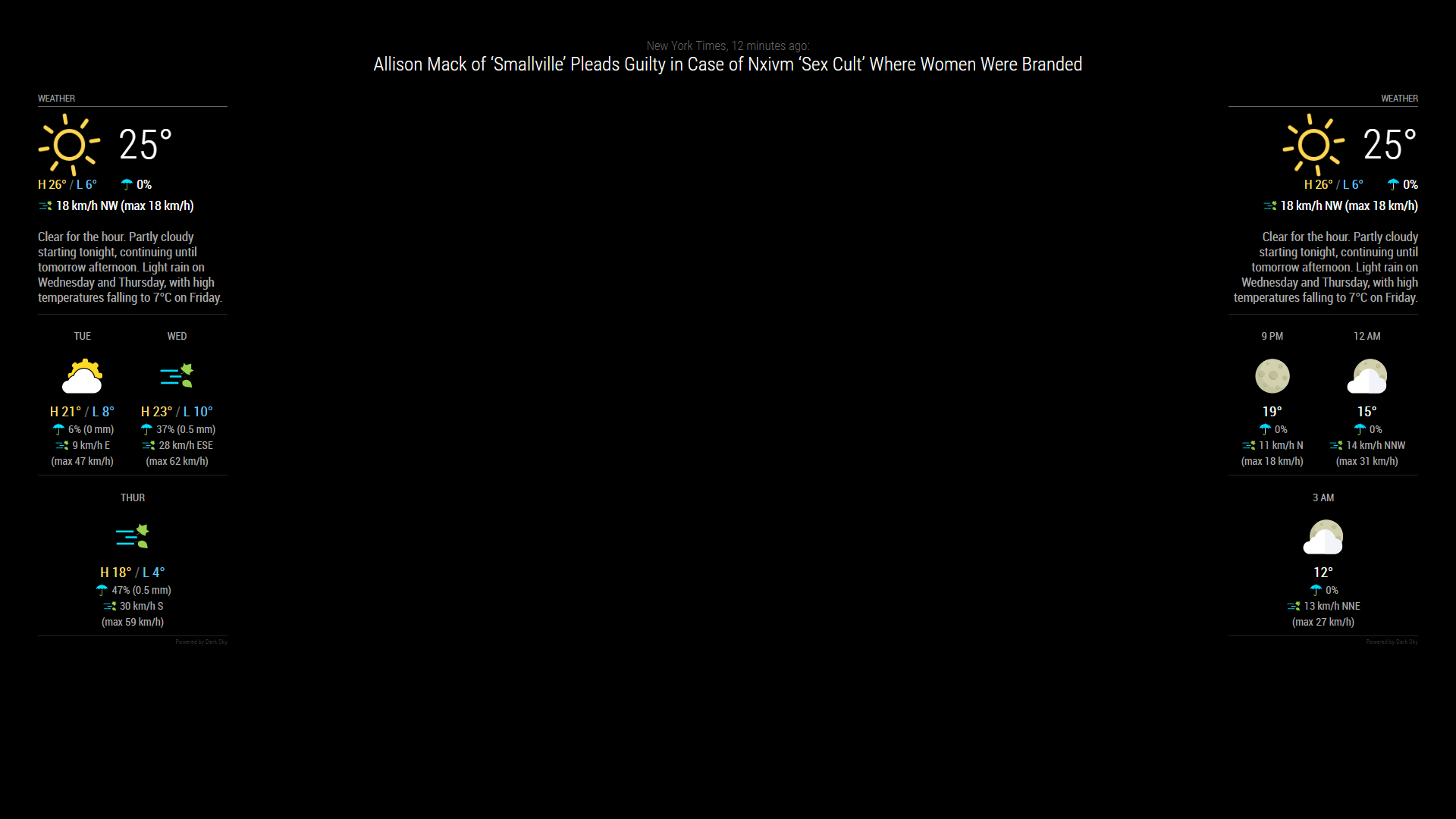
                this is the result I have with it…
                0_1554765905870_Screenshot (57).png

                "Life's Too Short To Dance With Ugly People"
                Jim Hallock - 1995

                P 1 Reply Last reply Reply Quote 0
                • S Offline
                  sdetweil
                  last edited by

                  he copied the model to a new name MMM-dsf

                  and then put two modules into config… well… not sure… cause I don’t see the config info only the pages info

                  {
                    module: 'MMM-pages',
                    config: { modules: [ ["calendar", "MMM-DarkSkyForecast"],
                                          ["calendar", "MMM-dsf"] ],
                              fixed: ["clock", "MMM-page-indicator"]}
                            }
                  },
                  

                  Sam

                  How to add modules

                  learning how to use browser developers window for css changes

                  1 Reply Last reply Reply Quote 0
                  • justjim1220J Offline
                    justjim1220 Module Developer @popeofmope
                    last edited by justjim1220

                    @popeofmope

                    you need to add this to your pages module to get it to auto scroll:

                    animationTime: 1000,
                    rotationTime: 30 * 60 * 1000,
                    rotationDelay: 500
                    

                    like so…

                    {
                      module: 'MMM-pages',
                      config: {
                        modules:
                        [ 
                          ["calendar", "MMM-DarkSkyForecast"],
                          ["calendar", "MMM-DarkSkyForecast"]
                        ],
                          fixed: ["clock", "MMM-page-indicator"],
                          animationTime: 1000,
                          rotationTime: 30 * 60 * 1000, // this is to change the page every 30 minutes, 
                          rotationDelay: 500
                      }
                    },
                    

                    "Life's Too Short To Dance With Ugly People"
                    Jim Hallock - 1995

                    1 Reply Last reply Reply Quote 0
                    • P Offline
                      popeofmope @justjim1220
                      last edited by

                      @justjim1220 Since I have such small screen real estate I wanted page 1 to exactly mirror page 2 except for the hourly vs daily forecast display, and then have MMM-Pages auto rotate the pages. Seems this might not be possible…

                      justjim1220J 2 Replies Last reply Reply Quote 0
                      • justjim1220J Offline
                        justjim1220 Module Developer @popeofmope
                        last edited by

                        @popeofmope
                        what time frame between rotations?
                        You can also use https://github.com/edward-shen/MMM-page-indicator to manually change the pages
                        I use both so if I want to see a different page and not have to wait the 30 minutes between rotations, I can just click on the page indicator to show the page I want to see

                        What you are asking is doable ;)

                        "Life's Too Short To Dance With Ugly People"
                        Jim Hallock - 1995

                        1 Reply Last reply Reply Quote 0
                        • justjim1220J Offline
                          justjim1220 Module Developer @popeofmope
                          last edited by

                          @popeofmope

                          OK…

                          I think I got pretty close to what you are asking for…
                          Page 1
                          0_1554785446100_Screenshot (60).png

                          Page 2
                          0_1554785469498_Screenshot (61).png

                          modules: [{
                                      module: "alert",
                                  },
                                  {
                                      module: "updatenotification",
                                      position: "top_bar"
                                  },
                                  {
                                      module: 'MMM-Cursor',
                                      config: {
                                          timeout: 1000
                                      }
                                  },
                                  {
                                      module: 'MMM-pages',
                                      config: {
                                          modules: [
                                              ["calendar", "MMM-DarkSkyForecast"],
                                              ["calendar", "MMM-DarkSkyForecast2"]
                                          ],
                                          fixed: ["clock", "MMM-page-indicator"],
                                          animationTime: 1000,
                                          rotationTime: 3 * 60 * 1000, // this is to change the page every 3 minutes, 
                                          rotationDelay: 500
                                      }
                                  },
                                  {
                                      module: 'MMM-page-indicator',
                                      position: 'bottom_bar',
                                      config: {
                                          pages: 2
                                      }
                                  },
                                  {
                                      module: "clock",
                                      position: "top_center"
                                  },
                                  {
                                      module: "calendar",
                                      header: "Holidays",
                                      position: "top_left",
                                      config: {
                                          colored: true,
                                          coloredSymbolOnly: true,
                                          calendars: [{
                                              url: 'https://calendar.google.com/calendar/ical/en.usa%23holiday%40group.v.calendar.google.com/public/basic.ics',
                                              symbol: 'calendar',
                                              auth: {
                                                  user: 'justjim1220@gmail.com',
                                                  pass: 'abcde12345',
                                                  method: 'basic'
                                              }
                                          }, ],
                                      }
                                  },
                                  {
                                      disabled: false,
                                      module: "MMM-DarkSkyForecast", // HOURLY
                                      header: "Weather - Hourly Forecast",
                                      position: "top_right",
                                      config: {
                                          apikey: "abcde12345abcde12345abcde12345ab",
                                          latitude: "40.26189",
                                          longitude: "-94.03534",
                                          iconset: "4c",
                                          concise: false,
                                          showHourlyForecast: true,
                                          hourlyForecastInterval: 1,
                                          maxHourliesToShow: 6,
                                          showDailyForecast: false,
                                          maxDailiesToShow: 3,
                                          forecastLayout: "tiled"
                                      }
                                  },
                                  {
                                      disabled: false,
                                      module: "MMM-DarkSkyForecast2", // DAILY
                                      header: "Weather - Daily Forecast",
                                      position: "top_right",
                                      config: {
                                          apikey: "abcde12345abcde12345abcde12345ab",
                                          latitude: "40.26189",
                                          longitude: "-94.03534",
                                          iconset: "5c",
                                          concise: false,
                                          showHourlyForecast: false,
                                          hourlyForecastInterval: 3,
                                          maxHourliesToShow: 3,
                                          showDailyForecast: true,
                                          maxDailiesToShow: 6,
                                          forecastLayout: "tiled"
                                      }
                                  },
                          

                          I hope this helps! ;)

                          "Life's Too Short To Dance With Ugly People"
                          Jim Hallock - 1995

                          P C 2 Replies Last reply Reply Quote 0
                          • P Offline
                            popeofmope @justjim1220
                            last edited by

                            @justjim1220 Yes! This is what I was after! Thank you! Your repo, https://github.com/justjim1220/MMM-DarkSkyForecast2, doesn’t include the icons directory so I had to copy from MMM-DarkSkyForecast, symlink didn’t work.

                            1 Reply Last reply Reply Quote 1
                            • C Offline
                              Clubjack @justjim1220
                              last edited by

                              @justjim1220
                              I want Do this with different calendar on different pages.
                              Can You Tell me, how You copy a module and rename it?

                              FoziF 1 Reply Last reply Reply Quote 0
                              • FoziF Offline
                                Fozi Project Sponsor @Clubjack
                                last edited by

                                @Clubjack I had recently exactly the same issue with MMM-ioBroker, where I needed 2 instances of that module running. Finally, after some research I found the solution and documented in my private Wiki. Here is the documentation I wrote. After setting up that 2nd instance you can configure each instance separately and declare it in MMM-pages.
                                Here we go:

                                Problem
                                In some cases you may need to run 2 or more instances of the same module in MM, e.g. for public transportation. Some MMMs can then be put into config.js just on a different position and parameterized as needed. Unfortunatelly, not all MMMs support that.
                                The reason is that all those instances will share the same node_helper and therefore get the same socketnotifications.

                                Solution
                                To solve this problem you can try to duplicate the MMM with a different name and call it in the config.js. There is no guarantee that it works, but worth to try.

                                Following steps have to be done:

                                1. Go to the modules folder and copy the whole module with a different name (in this example I’ll refer to MMM-ioBroker)
                                $ cd ~/MagicMirror/modules
                                $ cp -a MMM-ioBroker/ MMM-ioBroker2
                                
                                1. Go to ./MMM-ioBroker2 and change the .js of the module script accordingly
                                $ mv MMM-ioBroker.js MMM-ioBroker2.js
                                
                                1. Edit in MMM-ioBroker2.js the string to
                                Module.register('MMM-ioBroker2', {
                                …
                                
                                1. In some cases it might also be necessary to change the .css file name, too, incl. any reference to the instance name in the file.
                                $ mv MMM-ioBroker.css MMM-ioBroker2.css
                                

                                And then edit or replace all occurences of ‘MMM-ioBroker’ with ‘MMM-ioBroker2’ in MMM-ioBroker2.css.

                                HowTo: Replace PIR Sensor with a RCWL-0516 Microwave Sensor

                                C 2 Replies Last reply Reply Quote 1
                                • C Offline
                                  Clubjack @Fozi
                                  last edited by

                                  @Fozi
                                  Thank You guy.
                                  I will test it at the weekend.
                                  That sounds good. 👍🏽

                                  1 Reply Last reply Reply Quote 0
                                  • C Offline
                                    Clubjack @Fozi
                                    last edited by

                                    @Fozi
                                    Tryed your way, but get some issues with the modules. Is it right that i must use mv and not cp for the namechange from the. js?

                                    S FoziF 2 Replies Last reply Reply Quote 0
                                    • S Offline
                                      sdetweil @Clubjack
                                      last edited by

                                      @Clubjack said in Multiple instances of MMM-DarkSkyForecast with MMM-pages:

                                      mv and not cp

                                      correct…

                                      mv is the rename

                                      Sam

                                      How to add modules

                                      learning how to use browser developers window for css changes

                                      1 Reply Last reply Reply Quote 1
                                      • FoziF Offline
                                        Fozi Project Sponsor @Clubjack
                                        last edited by Fozi

                                        @Clubjack if you use ‘cp’ then the file is really copied under a new name. The original file will still exist.
                                        If you use ‘mv’ then the file will be renamed, there will no copy of that file.

                                        Thus use ‘mv’ to rename the files. Otherwise you’ll have two .js files in your module.

                                        Edit: @sdetweil was 10 sec. quicker than me:face_with_tears_of_joy:

                                        HowTo: Replace PIR Sensor with a RCWL-0516 Microwave Sensor

                                        1 Reply Last reply Reply Quote 0
                                        • C Offline
                                          Clubjack
                                          last edited by

                                          Thanks. But i think it dosnt work with this Module.

                                          1 Reply Last reply Reply Quote 0

                                          Hello! It looks like you're interested in this conversation, but you don't have an account yet.

                                          Getting fed up of having to scroll through the same posts each visit? When you register for an account, you'll always come back to exactly where you were before, and choose to be notified of new replies (either via email, or push notification). You'll also be able to save bookmarks and upvote posts to show your appreciation to other community members.

                                          With your input, this post could be even better 💗

                                          Register Login

                                          • 1 / 1
                                          • First post
                                            Last post
                                          Enjoying MagicMirror? Please consider a donation!
                                          MagicMirror created by Michael Teeuw.
                                          Forum managed by Sam, technical setup by Karsten.
                                          This forum is using NodeBB as its core | Contributors
                                          Contact | Privacy Policy