Read the statement by Michael Teeuw here.
Black screen instead of desktop after installing PIR sensor
-
@Fozi MagicMirror framework is installed, yes.
-
@Fozi I can’t reinstall Raspbian because this is for a science fair project, due in two weeks, and I put too much work into it for me to be able to finish on time if I reinstall. There has to be a way to get my desktop back without reinstalling.
-
@09succotash As said, copy the whole MM-folder, eg. via scp to another PC and then reinstall Raspbian.
I’m sorry that I can’t provide a more satisfying solution:disappointed_face: -
This post is deleted! -
@Fozi Ahh, its ok. Thanks for your help, I’ll figure something out.
-
@09succotash can u ssh into the machine?
is MM running on pm2? do pm2 status, and if not stopped do pm2 stop for each line (use number or name)
-
@sdetweil I cannot ssh into it. I am able to access the terminal though. MM is running on pm2, I just setup an autostart script for it. I don’t think MM is causing the issue, because the issue started just when I was setting up the PIR sensor.
-
@09succotash but it can’t hurt to stop it…
if you can get to terminal, then its not a desktop problem…
-
@sdetweil I could only get to terminal, by right clicking somewhere on the screen. I tried stopping MM using pm2, didn’t have any effect.
-
@09succotash said in Black screen instead of desktop after installing PIR sensor:
by right clicking somewhere on the screen
ok, so desktop is running, even tho u might not be able to see it…
-
@sdetweil Exactly. It seems to be running, but my wallpaper, taskbar, and icons are gone. Black screen shows in its place.
-
@09succotash this is stretch or???
lsb_release -a in the terminal window
-
@sdetweil This is Raspbian Stretch, yep.
-
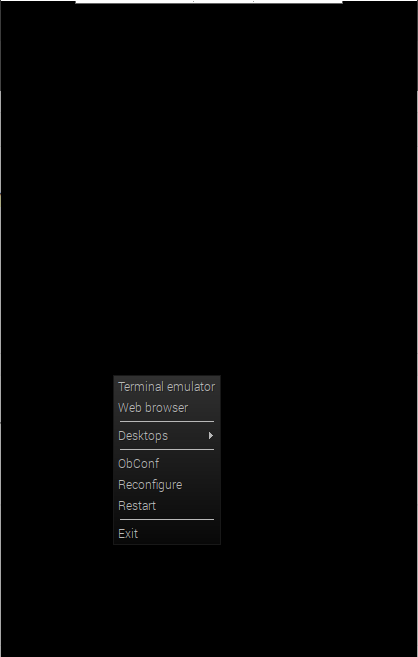
@09succotash if u right click, does the popup menu have desktop preferences?
is should -
@sdetweil This is what mine looks like. The white bar at the top of the screen is vnc viewer, not the screen. I’m using vnc viewer on my laptop.
-
@09succotash ok, select Desktops or reconfigure
-
@sdetweil Clicked reconfigure, nothing shows up. Clicked desktop, just shows a list of desktops. Shows 4 desktops. I’ve been through them all, shows the same black screen.
-
@09succotash in the terminal window, if u run sudo raspi-config
and look at boot options…beyond that there are 1 few (hundred) posts about problems like this if u search google
-
@sdetweil Boot options, and then what?
-
@09succotash I might try to change desktop with login

Hello! It looks like you're interested in this conversation, but you don't have an account yet.
Getting fed up of having to scroll through the same posts each visit? When you register for an account, you'll always come back to exactly where you were before, and choose to be notified of new replies (either via email, or push notification). You'll also be able to save bookmarks and upvote posts to show your appreciation to other community members.
With your input, this post could be even better 💗
Register Login