Read the statement by Michael Teeuw here.
MMM-Netatmo updated
-
This update looks great, thank you! What should be changed to have it display the temps in fahrenheit ?
-
@frogywill To show Fahrenheit, change your default settings of MagicMirror units to “imperial”
Or set units: “imperial” in MMM-Netatmo config
-
@zdenek
The AQI font class is inherited from the default .small class of MM.To override this, add the following to the CSS
.MMM-netatmo .displayAQI .small {
  font-size: 10px;
  line-height: 15px;
}
To override all the .small classes in MMM-Netatmo
.MMM-netatmo .small {
  font-size: 10px;
  line-height: 15px;
}
The same goes for the Temperature, this Uses the default .large font class
to override add:.MMM-netatmo .large { font-size: 40px; }The .x-medium is only applied to .secondary.displayWindAngle.WindAgle
The other icons is the normal .medium which comes from MMSo you can override
.x-medium {

  font-size:100%;
}
and
.MMM-netatmo .medium { font-size: 70%; } -
@Miller that’s perfect, thanks
-
Hi Miller,
First of all, I want to tell you that you have built a great module. It looks awesome.
However, I have a problem with the display of the air quality.
What do I have to enter if I want to take this place?
e.g .:
https://aqicn.org/city/austria/laschoberstrasse--ostlich-kreisverkehr-ruster-strasse/I only see “wait”.
-
I cannot take credit for building the module, I only redesigned it a bit.
As for the Air Quality, took me some figuring out as well.
However, as a location, put the string in behind city, so in your case it would be:
location: "austria/laschoberstrasse--ostlich-kreisverkehr-ruster-strasse", -
@Miller thanks for your help and the great design. ;)
-
Just came across this post and tried out your fork immediatelly …and it is fantastic. It’s just the way I always wanted! Thanks a lot!
-
Hello
Is it possible to remove Air Quality completely?
-
Thanks for all the great work with this module!
Is there is a way to add some air between the different elements?
Its a lot of information in a small space.I made this example in ps:
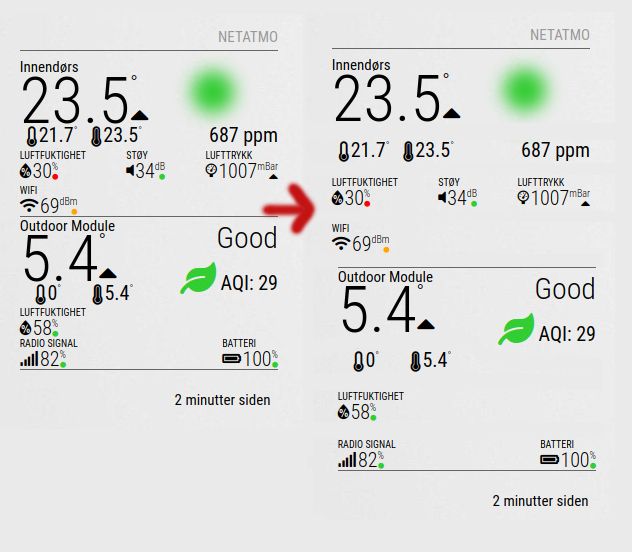
Also, is there a way to remove the update interval text at the bottom?
I could not find this in the description.
Tried the “hideLoadTimer: true,” with no success. -
@miller
Hi, I happen to have 3 base stations (home and two cabins) and I wonder if its possible to differentiate between the base station, so I can choose which one to display? It looks to me as if Netatmo have a “hierarchy” on the base stations, where the station you first added will have priority no.1 and the one showing in this module. Removing all base stations and shuffle the hierarchy isnt an option as I have 3 mirrors where I want to display each of the 3 base stations separately.Any thoughts anyone?
-
@aardal1 is there a good custom-css style available, to get more space between all the data, like shown in the picture?
-
@kj3rra I’m a bit late to the party but I found a fork of the MMM-Netatmo module which allows to differentiate between several base stations. I recently had the same problem and I solved it that way.
https://github.com/MariusEng/MMM-Netatmo
There is an option called
deviceNumberwhich you can adress in your config. Works flawlessly!
-
I think, this will effect the MMM-Netatmo?
Dear Netatmo developer, To improve the security of our products, we inform you that the Client Credentials grant type method will be completely removed. It will no longer be possible to authenticate with the username and password of the user. The effective date of this update is October 2022. How can you authenticate with Netatmo API ? From this date, the OAuth2 authorization code flow must be followed for authentication. You can find details on this method on our website: Netatmo Connect | Authentication For tests, you can also get an Access Token from our developper portal. Netatmo Developer Portal Log in Go on your account Select the application for your test Click on "Generate a Token" You can now use this Access Token for 3 hours. -
Good afternoon! I am from Russia, so the translator works.
I set up the CFenner author’s Netatmo module. Created an application on the Netatmo website and received an ID and key.
Everything works, but the author does not have English everywhere.
I liked your module more.
I tried to set it up. Unfortunately, I could not get the token through the cURL command line (I inserted my login, password, ID and key into the line. But an error is issued. Then I made a token on the application page. I inserted it into your module, but unfortunately the module does not show anything… ((I have the names of the sensors in the station settings in Russian. I entered them in config.js. -
@Laz The module CFenner stopped working, apparently the problem is authorization (Netatmo developers have changed the method of authorization). How to log in now?
-
-
@kasperinline Have you tried to create new credentials via the Netatmo web portal?
https://dev.netatmo.com/ I am using a fork of this module and have clientId,
clientSecret, accessToken, new
created. With this, the query of the Netatmo data works again. -
@Tribun
Are you using a module from CFenner?
There is no accessToken input in this module. Only clientId and clientSecret are entered.
Have you made regenerate your client id and client secret in your application on the Netatmo website?
And entered new data into the module settings and everything worked?(In addition to the problem with authorization in the Netatmo module in the Magic mirror, I have the same problem with authorization in the RainMachine auto-watering device. There, too, the login\password and client id and client secret are entered. Creating a new application on the Netatmo website and entering new data in the RainMachine settings did not help with authorization…)
-
@Laz Sorry, I got the module wrong, I used RaymondMolenaar’s module. There it was enough to recreate the module data on the Netatmo developer homepage and to exchange the data in config.js. A few months ago I recreated the access data because the module was no longer working properly, something was probably wrong with the API at the time Netatmo changed.
I have the new data "clientId: "
"clientSecret: "
“refreshToken:”
“accessToken:”
inserted into the config and the module works again.


Hello! It looks like you're interested in this conversation, but you don't have an account yet.
Getting fed up of having to scroll through the same posts each visit? When you register for an account, you'll always come back to exactly where you were before, and choose to be notified of new replies (either via email, or push notification). You'll also be able to save bookmarks and upvote posts to show your appreciation to other community members.
With your input, this post could be even better 💗
Register Login