Read the statement by Michael Teeuw here.
MMM-Netatmo updated
-
@kj3rra I’m a bit late to the party but I found a fork of the MMM-Netatmo module which allows to differentiate between several base stations. I recently had the same problem and I solved it that way.
https://github.com/MariusEng/MMM-Netatmo
There is an option called
deviceNumberwhich you can adress in your config. Works flawlessly!
-
I think, this will effect the MMM-Netatmo?
Dear Netatmo developer, To improve the security of our products, we inform you that the Client Credentials grant type method will be completely removed. It will no longer be possible to authenticate with the username and password of the user. The effective date of this update is October 2022. How can you authenticate with Netatmo API ? From this date, the OAuth2 authorization code flow must be followed for authentication. You can find details on this method on our website: Netatmo Connect | Authentication For tests, you can also get an Access Token from our developper portal. Netatmo Developer Portal Log in Go on your account Select the application for your test Click on "Generate a Token" You can now use this Access Token for 3 hours. -
Good afternoon! I am from Russia, so the translator works.
I set up the CFenner author’s Netatmo module. Created an application on the Netatmo website and received an ID and key.
Everything works, but the author does not have English everywhere.
I liked your module more.
I tried to set it up. Unfortunately, I could not get the token through the cURL command line (I inserted my login, password, ID and key into the line. But an error is issued. Then I made a token on the application page. I inserted it into your module, but unfortunately the module does not show anything… ((I have the names of the sensors in the station settings in Russian. I entered them in config.js. -
@Laz The module CFenner stopped working, apparently the problem is authorization (Netatmo developers have changed the method of authorization). How to log in now?
-
-
@kasperinline Have you tried to create new credentials via the Netatmo web portal?
https://dev.netatmo.com/ I am using a fork of this module and have clientId,
clientSecret, accessToken, new
created. With this, the query of the Netatmo data works again. -
@Tribun
Are you using a module from CFenner?
There is no accessToken input in this module. Only clientId and clientSecret are entered.
Have you made regenerate your client id and client secret in your application on the Netatmo website?
And entered new data into the module settings and everything worked?(In addition to the problem with authorization in the Netatmo module in the Magic mirror, I have the same problem with authorization in the RainMachine auto-watering device. There, too, the login\password and client id and client secret are entered. Creating a new application on the Netatmo website and entering new data in the RainMachine settings did not help with authorization…)
-
@Laz Sorry, I got the module wrong, I used RaymondMolenaar’s module. There it was enough to recreate the module data on the Netatmo developer homepage and to exchange the data in config.js. A few months ago I recreated the access data because the module was no longer working properly, something was probably wrong with the API at the time Netatmo changed.
I have the new data "clientId: "
"clientSecret: "
“refreshToken:”
“accessToken:”
inserted into the config and the module works again. -
@Tribun
Thank you
Did you create an app on the https://dev.netatmo.com/apps/ website?I tried to put the RaymondMolenaar module once.
Here above (September 27, 2022) I wrote about my problem…
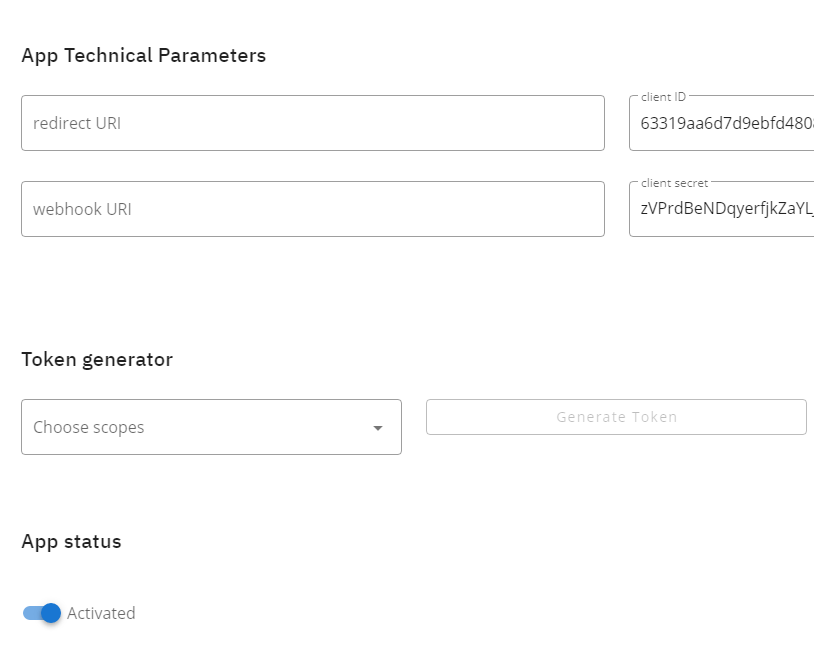
How did you get token ?
On the Netatmo application page, it is not clear which token should be used… ((
-
@Laz
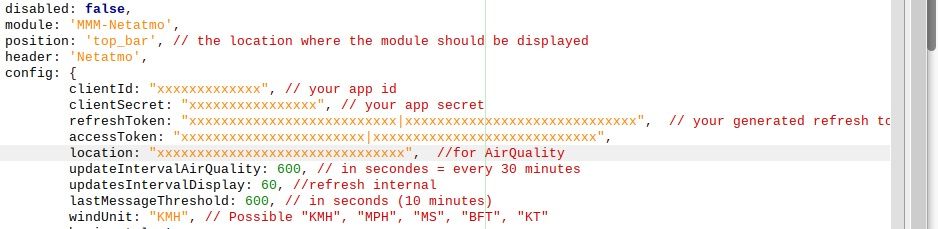
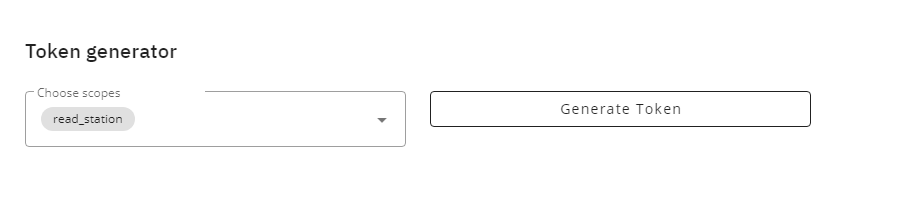
At choose scopes: select “read station” and press generate token, you will get the “refreshToken:” and
“accessToken:”Enter all newly created values in config.js after that it should work again.
-
-
Hi All, thanks for the support provided in this forum here. Awesome!
I’m following all what is said here: got “refreshToken”, “accessToken” via the Netatmo page, entered it in the config.js exactly as stated here. Nevertheless, the module won’t show up on the mirror - just a small circle beneath the header.
Am I missing “something”, a specific setting for the mirror? The RBpi is not publicly accessible from the internet, no web hook URI, no direct URI configured.
Any help appreciated! The Netatmo module is the feature why we have the MM2!
-
@Mitch_66 I found the solution to my problem: once I inserted the moduleOrder parameter, the module showed up. As it isn’t marked as “required”, I didn’t put it in the first place.
Maybe helps somebody having the same issue
-
@Mitch_66
Good afternoon!
Please show your config in this module. I also prescribed this parameter, but my Netatmo module does not appear… ((( -
@Laz
Will do but you’ll need to wait a bit. Currently far away from home, back in a week -
@Laz
Here’s my config that works. The name for the rooms in Netatmo are as specified in the Netatmo App. It’s a quite ‘old’ Netatmo module, talking about 8 years or so hence for sure not the latest hardware.{ module: 'MMM-Netatmo', disabled: false, position: 'bottom_bar', // the location where the module should be displayed header: 'Netatmo', config: { clientId: 'clientID', // your app id clientSecret: 'clientSecret', // your app secret refreshToken: 'refresh|token', // your generated refresh token accessToken: 'access|token', location: "germany/badenwurttemberg/stuttgart-arnulf-klett-platz", //for AirQuality updateIntervalAirQuality: 300, // in secondes = every 30 minutes updatesIntervalDisplay: 60, //refresh internal lastMessageThreshold: 600, // in seconds (10 minutes) horizontal: true, horizontalOverflow: false, windUnit: "KMH", showLastMessage: true, showDataIcon: true, showDataHeader: true, showModuleStatus: true, showModuleFirmware: true, refreshInterval: 3, moduleOrder: ["Wohnzimmer", "Schlafzimmer", "Terrasse" ], } }, -
@Mitch_66
Thank you!
I’ll try to check. Unfortunately, I have already left the city where my MM is standing. I will try through VNC access. -
@Mitch_66
Good afternoon!
Do you use what module of Netatmo of the author?
I use the module from CFenner
In July the module ceased to become authorized. In August the author finished it, but after completion (some files were replaced), at restart of a mirror all modules ceased to be started. If to rename the folder of the module of Netatmo, then other modules are started.I tried to return the kept folder of the module of their archive, with the old version of this module all other modules are started. Except the module of Netatmo. I tried also your config (with my data), but all the same the module isn’t started… (((
-
@Laz
Nope, using this one: https://github.com/RaymondMolenaar/MMM-Netatmo/blob/master/README.mdCouldn‘t make the Renner module work again. Good luck!
-
@Mitch_66 said in MMM-Netatmo updated:
Couldn‘t make the Renner module work again. Good luck!
And what is this “Rener module”?

Hello! It looks like you're interested in this conversation, but you don't have an account yet.
Getting fed up of having to scroll through the same posts each visit? When you register for an account, you'll always come back to exactly where you were before, and choose to be notified of new replies (either via email, or push notification). You'll also be able to save bookmarks and upvote posts to show your appreciation to other community members.
With your input, this post could be even better 💗
Register Login