Read the statement by Michael Teeuw here.
[MMM-JaST] Just another Stock Ticker (new: version 2.x)
-
@Dracarys I updated nearly everything I could find.
Could you tell me what you exactly updated? -
@Dracarys Nevermind i fixed it
-
Hi Jan @Jalibu
Thank you very much for this great Stocks module. The beer is already on the way. It’s best to choose Bavarian! :-)
I have contributed a bit to the MMM-AVStock module (https://github.com/lavolp3/MMM-AVStock). Unfortunately TypeScript is not one of my languages, so I can help less there.
You have already recorded the number of existing stocks. If we could add the purchase price, then a display like in MMM-AVStock would be possible. In addition to the current prices and their development, the own portfolio is then also shown in the development.
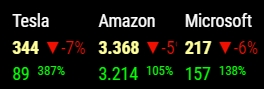
If I can help you in any way, please let me know.
And another suggestion. I would like to have the representation like the horizontal ticker, only without ticker. So the display would be shown horizontally. But there is nothing running through.
Thanks again
Many greetings
Sepp
-
Hi @Jalibu - first, thanks for the great module and all the effort to help.
I was playing with the Depot feature and added all the quantities. It functions correctly, providing me with the current value based on the current market price of the stock. Now I’m wondering if is there a way to calculate the price gain since purchase, similar to the example provided?
Is it possible to add the purchase price next to the quantity, so that the price gain or loss can be automatically calculated based on the current price?
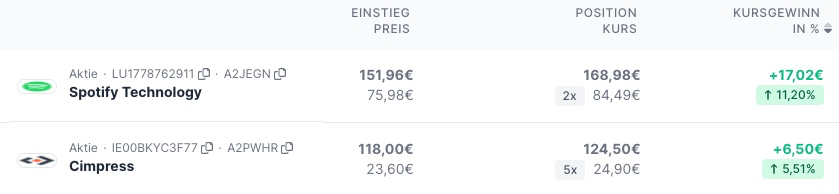
Best regards from Berlin
-Manuel
-
@MZ-BER thanks for your feedback. Also @spitzlbergerj asked for such a feature.
Technically, the implementation (and calculation) should be very easy. The tricky part is to get this fitting into the different display modes/styles (e.g. horizontal, vertical scrolling). The horizontal scrolling values for example are hard to understand without any caption for what they stand for.
In a table view like your’s, that’s easy and I’ve been thinking for a long time to introduce an additional table mode (like MMM-AVStock for example). The reason why I haven’t so far implemented this is, that I want to avoid that some features are only visible in a subset of modes/styles.But since several people have already expressed their wish and one shouldn’t hold back improvements because one could theoretically make it even better, I’ll try to implement that soon.
-
Hi @Jalibu
I don’t think it’s really a problem to understand the values even without appropriate tags. It’s not like there are hundreds of unknown and untrained people looking at such a MagicMirror. It is rather family or smaller teams that look at the displays. And those who are interested in shares quickly know what means what. That’s how it is in my proposal. On MagicMirror, the color of the values is usually enough for me to decide whether to trade. Everything else happens on the trading platform.I use many models in different views on my different MagicMirrors. With almost all modules, the different views also offer different functionalities. That’s kind of the point of a view - a different look at the same raw data. so I wouldn’t have a problem with that.
And as already said, I would like to help. Unfortunately I lack the knowledge of the programming language used and the appropriate development environment.
Many greetings and happy coding
Sepp -
@spitzlbergerj @MZ-BER
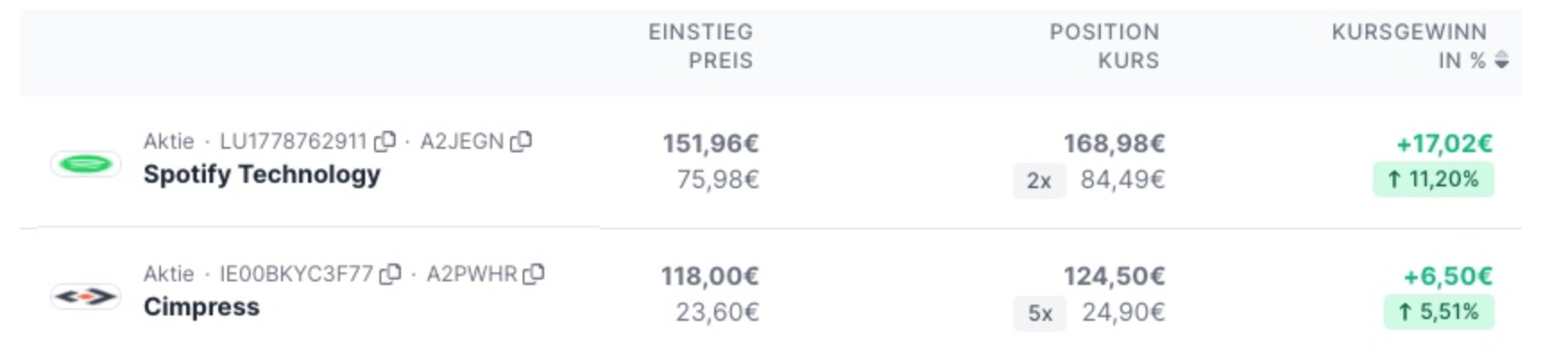
I added some options to calculate the stock’s and the portfolio’s performance based on the purchase price.
You can test it in the module’s development branch: https://github.com/jalibu/MMM-Jast/tree/developmentIt currently looks like this which is not very pretty, imho. Please share your feedback and thoughts for further improvement.

PS: Inspired by this, I thought of a new display mode with a table with sticky header and alternating body in the future.
-
@spitzlbergerj @MZ-BER
I introduced a first draft for a table view. You can select a “page size” for stock rotation.Please share your feedback.

-
@Jalibu - fantastic Job! I just pulled the dev version and added the
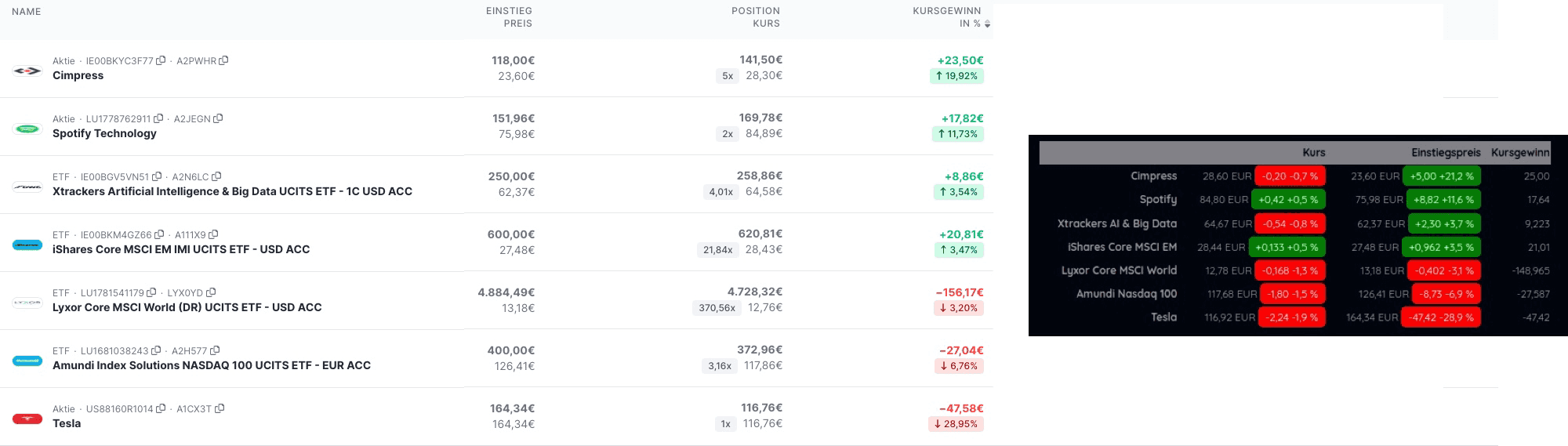
purchasePricenext to the quantity. The calculation is functioning properly. There is a slight discrepancy in the total amount, which is likely due to the exchange where I obtained my information. (The screenshot is from Parquet and they are utilizing Xetra as their exchange.Overall the first iteration is really good.
Here some feedback (will share more as soon as I have time):
- Some of my stocks/ETFs have three decimal places for the prices (Column Kursgewinn)
- By adding more options like value increase % or total ect. new columns with header should be created. Otherwise it is confusing to understand where the number refers to.
- Kursgewinn could be colored with green or red
-
@Jalibu
Thank you very much for these variants. I’m on the road and unfortunately won’t be able to test live in the next days.I don’t really have much room for the stocks on the mirror unfortunately. Three lines at the bottom is all I can use. So the Views I posted initially was my very favorite.
Suggestion 1: expand the ticker format to show each stock in two lines
Share 1                                 Share 2                               Share 3 ...
current price  current performace       current price current performace      current price current performace ...
purchase price purchase performace      purchase price purchase performace    purchase price purchase performace ...
Suggestion 2: Ticker to switch off
Suggestion 3: gladly also your new ticker view, then however options whether the respective values are to be faded in.
regards
Josef -
@Jalibu
Please forgive me for not getting back to you in so long. I just have too many projects in parallel and the MagicMirror had to wait for a while now :-)I wanted to try the new display now. Unfortunately I am a github and git layman. Therefore I need your help.
How can I switch from the master branch to the development branch and then do a git pull to get the new version?
Unfortunately google didn’t really get me anywhere. I have tried many things, unfortunately without success so farThanks a lot!
Greetings
Sepp -
@spitzlbergerj
from within the MMM-Jast directory, executegit checkout developmentUnfortunately, I really don’t find the time to continue working on this project.
Community, I would be very grateful for help.
-
@Jalibu
thank you very much. For me it works now -
Some may have noticed, that this module stopped working in the past days due to a change in Yahoo’s finance API.
Today, I published an update for MMM-Jast which should fix that. -
@Jalibu - Hey mate, would you please also do the fix for the dev branch?
-
@MZ-BER done
-
@Jalibu - Thanks for the update of the development branch . Unfortunately I can’t manage to update to the new version. I have already tried
git pullThis updated 7 files and so on …
Von https://github.com/jalibu/MMM-Jast
   0412891..463571c  development -> origin/development
Aktualisiere 0412891..463571c
Fast-forward
 MMM-Jast.js                       |  2 +-
 README.md                         | 12 ++++++------
 package.json                      |  2 +-
 src/frontend/JastFrontendUtils.ts |  7 +++++--
 templates/TableStockList.njk      | 14 +++++++-------
 translations/de.json              |  5 ++++-
 translations/en.json              |  5 ++++-
 7 files changed, 28 insertions(+), 19 deletions(-)
afterwards I executed
- npm install --only=production
- npm install
without success. The stock values are no longer displayed
git checkout developmentreturns:
Already on 'development' Your branch is at the same level as 'origin/development'.I am grateful for any help
-
@Jalibu - A reboot of the Raspberry brought success. Everything is OK again. Sorry that I was too impatient.
Greetings and thanks for your work! -
@Jalibu , Thanks for providing this! I have been using it for a few days. I have switched to the development branch as you describe here and updated everything, but the display looks the same as before and not like the one in your screen shot. Is that something special or am I missing a step?
Harry -
@Harry in the config you need to set the value for „scroll“ to „table“.




Hello! It looks like you're interested in this conversation, but you don't have an account yet.
Getting fed up of having to scroll through the same posts each visit? When you register for an account, you'll always come back to exactly where you were before, and choose to be notified of new replies (either via email, or push notification). You'll also be able to save bookmarks and upvote posts to show your appreciation to other community members.
With your input, this post could be even better 💗
Register Login