Read the statement by Michael Teeuw here.
read csv-data and put it in an array
-
@Perlchamp ok, this was just to give you ideas on how to access the data… in a useful way
-
… and I’m very grateful to you for that. I learn from your messages every time. I think it’s great that there are people like you. that also costs time (apart from health, the most important thing in life). Thanks again for that!
-
hi sam,
i have a major problem, that i don’t understand. this is my code in node_helper.js:var NodeHelper = require("node_helper"); var moment = require("moment"); // add require of other javascripot components here // var xxx = require('yyy'); here const csv = require("csvtojson"); var birthdaysArray = []; module.exports = NodeHelper.create({ init(){ console.log("init module helper perlchamp"); }, start() { console.log("Starting module helper: " + this.name); // console.log("Pfad zur csv-Datei: " + this.path + "/data/birthdays.csv"); const csvFilePath = this.path + '/data/birthdays.csv'; csv() .fromFile(csvFilePath) .then((jsonObj)=>{ birthdaysArray = JSON.stringify(jsonObj); console.log("birthdaysArray: " + birthdaysArray); var today_day_month = moment().format("DD.MM"); var today_month = moment().format("MM"); }) console.log("birthdaysArray #2: " + birthdaysArray); // moment.js moment.locale(config.language); // set locale console.log("aktuelle Zeit: " + moment().format('Do MMMM YYYY, hh:mm:ss')); console.log("aktueller Monat(Zahl): " + moment().format('MM')); console.log("aktueller Monat(Text): " + moment().format('MMM')); console.log("aktueller Tag(Zahl mit führender Null): " + moment().format('DD')); console.log("aktueller Tag(Text): " + moment().format('dddd')); console.log("aktueller Tag(Abkürzung): " + moment().format('dd')); console.log("aktuelles Jahr(Zahl): " + moment().format('YYYY')); }, stop(){ console.log("Stopping module helper: " + this.name); }, // handle messages from our module// each notification indicates a different messages // payload is a data structure that is different per message.. up to you to design this socketNotificationReceived(notification, payload) { // console.log(this.name + " received a socket notification: " + notification + " - Payload: " + payload); console.log(this.name + " received a socket notification: " + birthdays); // if config message from module if (notification === "CONFIG") { // save payload config info this.config=payload // wait 15 seconds, send a message back to module setTimeout(()=> { this.sendSocketNotification("message_from_helper"," this is a test_message")}, 15000) } else if(notification === "????2") { } }, });why returns
console.log("birthdaysArray #2: " + birthdaysArray);nothing.
many thanks in advance
-
console.log(this.name + " received a socket notification: " + birthdays);should be
console.log(this.name + " received a socket notification: " + birthdaysArray);of course. couldn’t edit it, because of spam-message from board …
-
@Perlchamp said in read csv-data and put it in an array:
> 	const csvFilePath = this.path + '/data/birthdays.csv';
> 		csv()
> 		.fromFile(csvFilePath)
> 		.then((jsonObj)=>{
> 			birthdaysArray = JSON.stringify(jsonObj);
> 			console.log("birthdaysArray: " + birthdaysArray);
>
> 			var today_day_month = moment().format("DD.MM");
> 			var today_month = moment().format("MM");
> 		})
>
> 		console.log("birthdaysArray #2: " + birthdaysArray);
welcome to programming with a asyncronous libraries
csv().fromFile(csvFilePath) starts a ‘long’ operation,
going out to disk, reading in the data, and converting it to json from spreadsheet… (long is milliseconds)the processor should not wait, so it does not, and the next instruction AFTER the start of the fromFile()
is console.log("birthdaysArray #2: " + birthdaysArray);// moment.js moment.locale(config.language); // set locale console.log("aktuelle Zeit: " + moment().format('Do MMMM YYYY, hh:mm:ss')); console.log("aktueller Monat(Zahl): " + moment().format('MM')); console.log("aktueller Monat(Text): " + moment().format('MMM')); console.log("aktueller Tag(Zahl mit führender Null): " + moment().format('DD')); console.log("aktueller Tag(Text): " + moment().format('dddd')); console.log("aktueller Tag(Abkürzung): " + moment().format('dd')); console.log("aktuelles Jahr(Zahl): " + moment().format('YYYY'));and the start function runs out of things to do and returns back to MM…
sometime later , the fromFile() will complete, and call the .then() routine with the data
(jsonObj)=>{
			birthdaysArray = JSON.stringify(jsonObj);
			console.log("birthdaysArray: " + birthdaysArray);

			var today_day_month = moment().format("DD.MM");
			var today_month = moment().format("MM");
		}
so, if you need to wait for the data(to prints is content) , then the operations would be inside the .then() handler.
-
ok, thanks. to move the code is not heavy ;-) … i’ve found a snippte to sort my birthdaysArray, but that doesn’t match :
		const csvFilePath = this.path + '/data/birthdays.csv';
		csv()
		.fromFile(csvFilePath)
		.then((jsonObj)=>{
			birthdaysArray = JSON.stringify(jsonObj);
			console.log("birthdaysArray: " + birthdaysArray);

		var result = Object.entries(birthdaysArray.reduce((a, {birth, name}) => {
			const day = +birth.split('.')[0];
			a[day] = [...(a[day] || []), name];
			return a
		}, {})).map(([day, name]) => ({day, name})).sort((a, b) => +a.day - b.day)
		console.log("sorted birthdays : " + result);

		var today_day_month = moment().format("DD.MM");
		var today_month = moment().format("MM");
		})
now i’m looking for another one. is the birthdaysArray a json-Array or a javascript-array or … someone told me, it’s an object-Array and that this has nothing to do witch json … but: csvtojson, so …
-
so i’m bloody happy :
var NodeHelper = require("node_helper");
var moment = require("moment");

// add require of other javascripot components here
// var xxx = require('yyy'); here
const csv = require("csvtojson");
var birthdaysArray = [];


module.exports = NodeHelper.create({

	init(){
		console.log("init module helper perlchamp");
	},

	start() {
		console.log("Starting module helper: " + this.name);
		console.log("Pfad zur csv-Datei: ", this.path + "/data/birthdays.csv");

		const csvFilePath = this.path + '/data/birthdays.csv';
		csv()
		.fromFile(csvFilePath)
		.then((jsonObj)=>{
			birthdaysArray = JSON.stringify(jsonObj);
			console.log("birthdaysArray: ", birthdaysArray);

		var result = Object.entries(jsonObj.reduce((a, {birth, name}) => {
			const day = +birth.split('.')[0];
			a[day] = [...(a[day] || []), name];
			return a
		}, {})).map(([day, name]) => ({day, name})).sort((a, b) => +a.day - b.day)
		console.log("sorted birthdays : ", result);

		var today_day_month = moment().format("DD.MM");
		var today_month = moment().format("MM");
		})

	},

	stop(){
		console.log("Stopping module helper: " + this.name);
	},

	// handle messages from our module// each notification indicates a different messages
	// payload is a data structure that is different per message.. up to you to design this
	socketNotificationReceived(notification, payload) {
		//	console.log(this.name + " received a socket notification: " + notification + " - Payload: " + payload);
		console.log(this.name + " received a socket notification: " + birthdaysArray);
		// if config message from module
		if (notification === "CONFIG") {
			// save payload config info
			this.config=payload
			// wait 15 seconds, send a message back to module
			setTimeout(()=> { this.sendSocketNotification("message_from_helper"," this is a test_message")}, 15000)
		}
		else if(notification === "????2") {
		}

	},
});
so now I just have to manage to filter out the people from the complete csv-file who have their birthday in the current month …
-
if i run :
		for(var birthday of birthdaysArray) {
			if(birthday.birth.startsWith(today_day_month)) {
				// this birthday is for today
				console.log(" birthday on "+ today_day_month+" is for "+birthday.name);
			}
		}
than i get the following error-messages:
 Unhandled rejection TypeError: Cannot read property 'startsWith' of undefined
    at /home/dirk/MagicMirror/modules/perlchamp/node_helper.js:33:22
    at Object.onfulfilled (/home/dirk/MagicMirror/node_modules/csvtojson/v2/Converter.js:112:33)
    at Result.endProcess (/home/dirk/MagicMirror/node_modules/csvtojson/v2/Result.js:83:50)
    at Converter.processEnd (/home/dirk/MagicMirror/node_modules/csvtojson/v2/Converter.js:179:21)
    at /home/dirk/MagicMirror/node_modules/csvtojson/v2/Converter.js:172:19
    at tryCatcher (/home/dirk/MagicMirror/node_modules/bluebird/js/release/util.js:16:23)
    at Promise._settlePromiseFromHandler (/home/dirk/MagicMirror/node_modules/bluebird/js/release/promise.js:547:31)
    at Promise._settlePromise (/home/dirk/MagicMirror/node_modules/bluebird/js/release/promise.js:604:18)
    at Promise._settlePromise0 (/home/dirk/MagicMirror/node_modules/bluebird/js/release/promise.js:649:10)
    at Promise._settlePromises (/home/dirk/MagicMirror/node_modules/bluebird/js/release/promise.js:729:18)
    at _drainQueueStep (/home/dirk/MagicMirror/node_modules/bluebird/js/release/async.js:93:12)
    at _drainQueue (/home/dirk/MagicMirror/node_modules/bluebird/js/release/async.js:86:9)
    at Async._drainQueues (/home/dirk/MagicMirror/node_modules/bluebird/js/release/async.js:102:5)
    at Immediate.Async.drainQueues [as _onImmediate] (/home/dirk/MagicMirror/node_modules/bluebird/js/release/async.js:15:14)
    at processImmediate (internal/timers.js:439:21)
I was probably happy too early ;-( … shit happens.
-
@Perlchamp you converted the array to text format, so now its just one big string…
birthdaysArray = JSON.stringify(jsonObj);to print it out do this
                        birthdaysArray = jsonObj;
			console.log("birthdaysArray: "+JSON.stringify(jsonObj););
why do you need to sort them?
as you go thru you can just not save the ones not for today, plus/minus some lookaheadonce you get to the today list you can sort the names if you need to.
-
@Perlchamp said in read csv-data and put it in an array:
now i’m looking for another one. is the birthdaysArray a json-Array or a javascript-array or … someone told me, it’s an object-Array and that this has nothing to do witch json … but: csvtojson, so …
json is a TEXT structure…
but it just so happens that javascript represents objects the same way… so the JSON library provides utilities to convert in both directions.
json text to object JSON.parse(text)
object to json text JSON.stringify(object)text is text and has no meaning (its called opaque because u cannot tell what it is)
no reason to split the birthdate, as u won’t do anything with the individual parts
don’t do work if u don’t need the resultsyou do NOT Need to do this data reformatting IN the node helper… you can do it all in the modulename.js file, which would let you use the code debugger in the dev console.
in the .then of the node_helper csvtojson, just send the data to the module
self.sendsocketNotification(“have data”, jsonObj)
and the helper is doneon the modulename.js side
socketNotificationReceived(notification, payload){
if(notification =='have data'){

var now = moment()
var active_birthdays={}
for( var birthday of payload) {
// get 1st 5 chars of birthdate, thru month
// we will use this as the key in the hash
var birth_date=birthday.birth.subString(0,4)

// get the birthday as a moment in this year, for comparing
var birth_date_moment = moment(birth_date+now.getYear(),"DD.MMYYYY")


// u can add days to a moment object and then compare if the birthdate is before that date (and after now)
// so within the next xx days

  // if the date is the same or later, don't use time of day
   if(birth_date.startOf('day').isSame(now.startOf('day')){

       // birthday is in this month
      // check the hash if we've seen anything for today yet
      // if we haven't see this date yet
      if(active_birthdays[birth_date] == undefined){
           //  create the holder for its info (array of names) in the hash
           active_birthdays[birth_date]=[]
      }
      // save the persons name on the list
      active_birthdays[birth_date].push(birthday.name)

   }
}
     // tell MM to call and get our content
     self. updateDom()
}
at the end, you will have just birthdays in this month and for people with the same day
a list of people on that dayin the hash reader (getDom(), Object.keys(active_birthdays) will get you back an array of the
DD.MM strings that are presentbut you can probably do without that… u know what today is, so if there is an object with todays DD.MM
then u have the list of people for todayif u want to allow (in the next 5 days,matching what the node_helper did), using moment, u can add a day, extract the DD.MM, check the hash,
repeat 4 more times -
ok, thank you sam.
Now I have to process the whole thing first, otherwise my head will burst ;-) … -
this is the actual node_helper.js:
var NodeHelper = require("node_helper");
var moment = require("moment");

// add require of other javascripot components here
// var xxx = require('yyy'); here
const csv = require("csvtojson");

var birthdaysArray = [];


module.exports = NodeHelper.create({

	init(){
		console.log("init module helper perlchamp");
	},

	start() {
		console.log("Starting module helper: " + this.name);
		//console.log("Pfad zur csv-Datei: ", this.path + "/data/birthdays.csv");

		moment.locale(config.language);  // set locale

		// convert the csv-file into a JSON-String
		const csvFilePath = this.path + '/data/birthdays.csv';
		csv()
		.fromFile(csvFilePath)
		.then((jsonObj)=>{
			birthdaysArray = JSON.stringify(jsonObj);

			// for debugging only
			//console.log("birthdaysArray: ", birthdaysArray);

			// send data to [modulname].js
			self.sendsocketNotification("have data", birthdaysArray)

			// loop thru the array of birthday_info from file (jsonObj),
			// one 'row' per birthday

		})
	},


	stop(){
		console.log("Stopping module helper: " + this.name);
	},

	// handle messages from our module// each notification indicates a different messages
	// payload is a data structure that is different per message.. up to you to design this
	socketNotificationReceived(notification, payload) {
		// if config message from module
		if (notification === "CONFIG") {
			// save payload config info
			this.config=payload
			// wait 15 seconds, send a message back to module
			setTimeout(()=> { this.sendSocketNotification("message_from_helper"," this is a test_message")}, 15000)
		}
		else if(notification === "????2") {
		}
	},
});
i got an error-message :
[2020-05-01 23:21:12.072] [WARN]   Unhandled rejection ReferenceError: self is not defined
    at /home/dirk/MagicMirror/modules/perlchamp/node_helper.js:34:4
i think this could be the problem:
// send data to [modulname].js
self.sendsocketNotification("have data", birthdaysArray)
i tried “this.” and without “self.” and “this.” but nothing changed. now i’m searching in the web, maybe i will found some answers ;-)
-
// send data to [modulname].js
self.sendsocketNotification("have data", birthdaysArray)
i have found a typing error. Socket instead socket. if i than change self. to this. no errror messages will displayed. but still black screen.
maybe i did not understand how to handle the getDom-section … i will still try …
but:
i see no notification in the terminal. ‘have data’ should actually appear there, shouldn’t it ? -
do this, you need self
start() {
		var self = this
		console.log("Starting module helper: " + this.name);
the use self
self.sendsocketNotification("have data", jsonObj)u need to send the obj, not the string
as for black screen , that means the modulename side died…
f12 on the keyboard or ctrl-shift-i, select the console tab, and look for red text … usually a syntax error…
-
i see no notification in the terminal. ‘have data’ should actually appear there, shouldn’t it ?
no, the message is sent to the modulename.js side of your module…
using my sample code , right here// messages received from from your node helper (NOT other modules or the system) // payload is a notification dependent data structure, up to you to design between module and node_helper socketNotificationReceived: function(notification, payload) { -
the two parts look like this
-------------------------------------------------------------------------------------------------- | browser side | | modulename.js (SampleModule.js) | | | | receive (socketNotificationReceived) send ( sendSocketNotification) | -------------------------------------------------------------------------------------------------- ^ | | | -------------------------------------------------------------------------------------------------- | | | V -------------------------------------------------------------------------------------------------- | send ( sendSocketNotification) receive (socketNotificationReceived) | | | | node_helper.js | | server side | -------------------------------------------------------------------------------------------------- -
yes, i understood. here’s my perlchamp.js (only socketNitificationReceived)
// messages received from from your node helper (NOT other modules or the system) // payload is a notification dependent data structure, up to you to design between module and node_helper socketNotificationReceived: function(notification, payload) { Log.log(this.name + " received a socket notification: " + notification + " - Payload: " + payload); if(notification === "message_from_helper"){ this.config.message = payload; // tell mirror runtime that our data has changed, // we will be called back at GetDom() to provide the updated content this.updateDom(1000) } if(notification === "have data"){ Log.log(this.name + " received a socket notification: " + notification + " - Payload: " + payload); var now = moment() var active_birthdays={} for( var birthday of payload) { // get 1st 5 chars of birthdate, thru month // we will use this as the key in the hash var birth_date = birthday.birth.subString(0,4) // for debugging only Log.log("Tag.Monat :", birth_date) // get the birthday as a moment in this year, for comparing var birth_date_moment = moment(birth_date + now.getYear(),"DD.MMYYYY") // u can add days to a moment object and then compare // if the birthdate is before that date (and after now) // so within the next xx days // if the date is the same or later, don't use time of day if(birth_date.startOf('day').isSame(now.startOf('day')){ // birthday is in this month // check the hash if we've seen anything for today yet // if we haven't see this date yet if(active_birthdays[birth_date] == undefined){ // create the holder for its info (array of // names) in the hash active_birthdays[birth_date] = [] } // save the persons name on the list active_birthdays[birth_date].push(birthday.name) } } // tell MM to call and get our content self.updateDom(); } }, -
@Perlchamp very good… now, I didn’t test the code I wrote, so there are a couple errors…
but you should be able to see that code in the developers window, sources tab,
navigate on the left tree, modules, your module_name (which has to be perchamp,
folder, filename and the register at the top) all have to match) -
i can’t find … so everything’s right ?

-
@Perlchamp you should
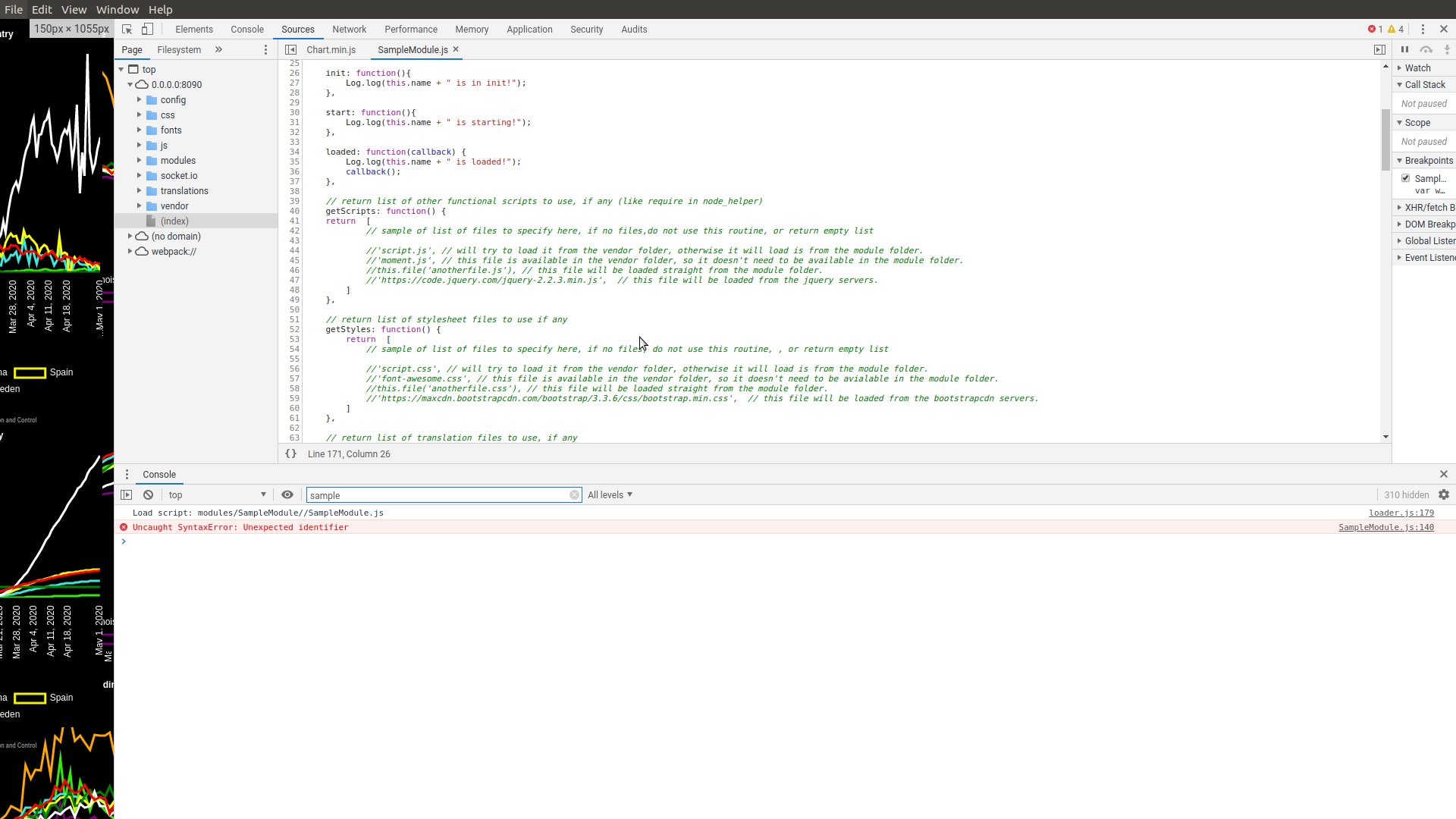 see an error like this
note that I put part of the module name in the filter field

Hello! It looks like you're interested in this conversation, but you don't have an account yet.
Getting fed up of having to scroll through the same posts each visit? When you register for an account, you'll always come back to exactly where you were before, and choose to be notified of new replies (either via email, or push notification). You'll also be able to save bookmarks and upvote posts to show your appreciation to other community members.
With your input, this post could be even better 💗
Register Login