MagicMirror Forum
    • Recent
    • Tags
    • Unsolved
    • Solved
    • MagicMirror² Repository
    • Documentation
    • 3rd-Party-Modules
    • Donate
    • Discord
    • Register
    • Login
    A New Chapter for MagicMirror: The Community Takes the Lead
    Read the statement by Michael Teeuw here.

    Weatherunderground - currently - hourly - daily - configurable

    Scheduled Pinned Locked Moved Utilities
    182 Posts 47 Posters 389.6k Views 51 Watching
    Loading More Posts
    • Oldest to Newest
    • Newest to Oldest
    • Most Votes
    Reply
    • Reply as topic
    Log in to reply
    This topic has been deleted. Only users with topic management privileges can see it.
    • M Offline
      maestro82
      last edited by

      Myke1

      Can’t seem to figure out what controls font size of the forecasted precipitation % field. Any hints?

      Thanks

      Mykle1M 1 Reply Last reply Reply Quote 0
      • Mykle1M Offline
        Mykle1 Project Sponsor Module Developer @maestro82
        last edited by

        @maestro82 said in Weatherunderground - currently - hourly - daily - configurable:

        Any hints?
        You can play with these in your custom.css file. GO crazy!

        .MMM-WunderGround .weathericon {
          font-size: 45%;
          line-height: 5px;
          display: inline-block;
          -ms-transform: translate(0, -3px); /* IE 9 */
          -webkit-transform: translate(0, -3px); /* Safari */
          transform: translate(0, -3px);
        } 
        .MMM-WunderGround .day {
          padding-left: 0;
        #  padding-right: 10px;
        }
        
        .MMM-WunderGround .vcen {
           vertical-align: top;
        }
        
        .MMM-WunderGround .weather-icon {
          padding-left: 0px;
          text-align: center;
          width:50px; 
        }
        
        .MMM-WunderGround .max-temp {
          padding-left: 0px;
          padding-right: 0;
        }
        
        .MMM-WunderGround .min-temp {
        #  padding-left: 10px;
        #  padding-right: 0;
        }
        
        .MMM-WunderGround .forecastText {
        # padding-left: 10px;
        #  padding-right: 0;
        #  word-wrap: break-word;
        #  text-align: right;
        #  rowspan: 0;
        }
        
        .MMM-WunderGround .tableheader {
          font-size: 75%;
          text-align: center;
        } 
        
        .MMM-WunderGround .hour {
          font-size: 75%;
          text-align: center;
         } 
        
        .MMM-WunderGround .pop {
          font-size: 86%;
        } 
        .MMM-WunderGround .mm {
          font-size: 75%;
        } 
        
        .MMM-WunderGround .green {
          color: #83FFB3;
        }
        
        .MMM-WunderGround .yellow {
          color: yellow;
        }
        
        .MMM-WunderGround .red {
          color: #FF4C4C;
        }
        
        .MMM-WunderGround .center {
        	text-align: center;
        	padding-right: 10px; 
        }
        	
        .MMM-WunderGround .left {
        	text-align: left;
        }
        
        .MMM-WunderGround .lpad {
        	padding-left: 10px; 
        }
        
        .MMM-WunderGround .currentWeatherIcon {
          font-size: 75%;
          line-height: 45px;
          display: inline-block;
          -ms-transform: translate(0, -3px); /* IE 9 */
          -webkit-transform: translate(0, -3px); /* Safari */
          transform: translate(0, -3px);
          width: 40%;
          height: 40%;
        } 
        
        .MMM-WunderGround .forecastWeatherIcon {
          font-size: 75%;
          line-height: 65px;
          display: inline-block;
          -ms-transform: translate(0, -3px); /* IE 9 */
          -webkit-transform: translate(0, -3px); /* Safari */
          transform: translate(0, -3px);
          width: 50%;
        } 
        
        .MMM-WunderGround .moonPhaseIcon {
          height: 34px;
          vertical-align: middle;
        } 
        
        .MMM-WunderGround .hrDivider {
                font-size: 10px;
        }
        
        .MMM-WunderGround .sub {
            vertical-align: sub;
            font-size: smaller;
        }
        
        .MMM-WunderGround .smaller {
            font-size: 60%;
        }


        Create a working config
        How to add modules

        M 1 Reply Last reply Reply Quote 0
        • M Offline
          maestro82 @Mykle1
          last edited by

          @Mykle1 thanx

          1 Reply Last reply Reply Quote 0
          • M Offline
            maestro82
            last edited by

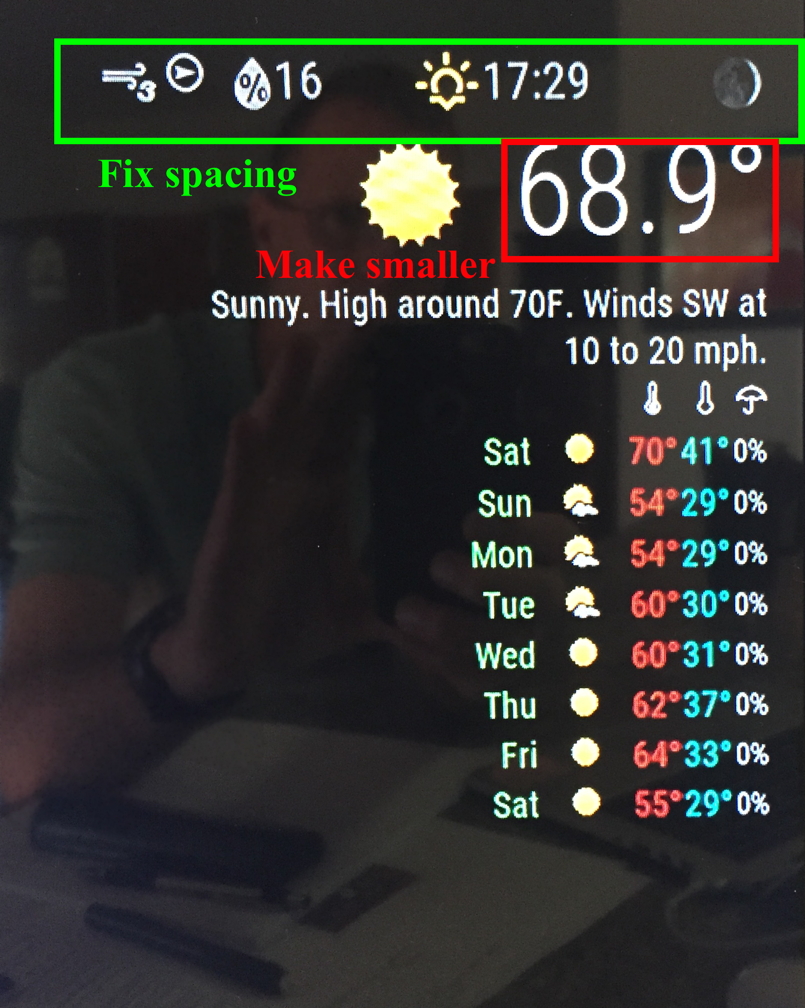
            Trying to tighten up my weather module.
            See picture.

            Any hints on changing those areas/fonts?

            Thanks0_1516485078813_IMG_6169.JPG

            A 1 Reply Last reply Reply Quote 0
            • M Offline
              MrRodz
              last edited by

              Hi, I’m new to this but am trying to increase the number of icons on the horizontal view from 4 to 5. any help would be appreciated.

              regards

              1 Reply Last reply Reply Quote 0
              • S Offline
                sek_is_back
                last edited by

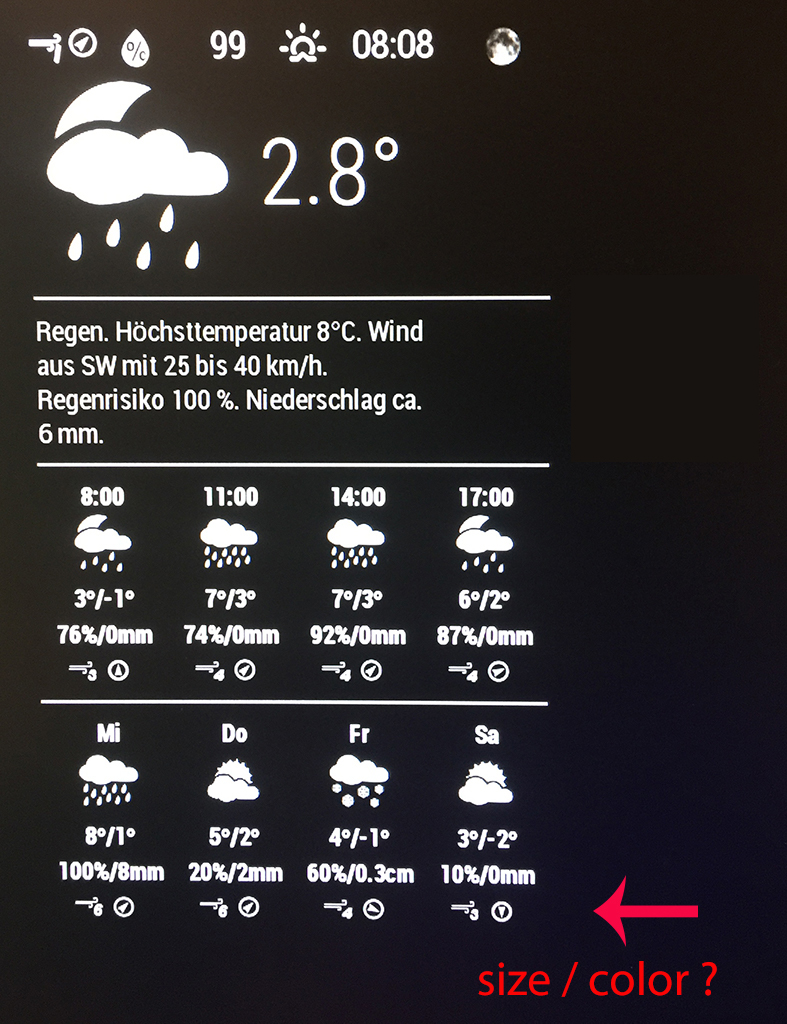
                0_1517383419416_IMG_0862.JPG

                And at the end I need help.
                In the last 3days i learned a lot about css in this forum.
                But i didn’t find how to change the size for the Icons wind direction and speed.
                I found in the MMM-WunderGround.js that there should be a weather-icons-wind.css
                but I can’t find it.

                Can anyone help me how to change the size and maybe the color?

                A 1 Reply Last reply Reply Quote 0
                • A Offline
                  AliAS @maestro82
                  last edited by

                  @maestro82 The top row is .MMM-WunderGround .pop
                  This will also affect the row pertaining to rain chance percentage. I’m trying to find a way to address them separately if anyone knows how.

                  1 Reply Last reply Reply Quote 0
                  • A Offline
                    AliAS @sek_is_back
                    last edited by

                    @sek_is_back add it into your custom.css file. It is referred to as

                    .MMM-WunderGround .tableheader

                    You can change
                    font-size:
                    and
                    color:

                    Sorry I don’t know how to post the code for you.

                    Mykle1M S 2 Replies Last reply Reply Quote 0
                    • Mykle1M Offline
                      Mykle1 Project Sponsor Module Developer @AliAS
                      last edited by

                      @AliAS said in Weatherunderground - currently - hourly - daily - configurable:

                      Sorry I don’t know how to post the code for you.

                      https://forum.magicmirror.builders/topic/4247/how-to-post-code-on-the-forum-for-absolute-beginners

                      Create a working config
                      How to add modules

                      1 Reply Last reply Reply Quote 2
                      • S Offline
                        sek_is_back @AliAS
                        last edited by sek_is_back

                        @AliAS thank you for your help, .MMM-WunderGround .tableheader dosn’t work for me. But Mykle1 wrote a post called “How to find and use key commands in MM” and with ctr + shift + i it opens the dev tool and i played around a little. So it was easy to find that the one that I missed, in my case it was .MMM-WunderGround .center

                        I like to learn new stuff, thanks a lot guys for your help

                        1 Reply Last reply Reply Quote 1
                        • S Offline
                          sebfas
                          last edited by

                          This post is deleted!
                          1 Reply Last reply Reply Quote 0
                          • D Offline
                            D90
                            last edited by

                            In a sad turn of events WeatherUnderground is no longer issuing free API keys :(

                            https://apicommunity.wunderground.com/weatherapi/topics/weather-underground-api-changes
                            https://www.wunderground.com/weather/api/

                            Mykle1M 1 Reply Last reply Reply Quote 0
                            • Mykle1M Offline
                              Mykle1 Project Sponsor Module Developer @D90
                              last edited by Mykle1

                              @d90

                              That has been for some time, I think. Older API keys still seem to work, unless that changes, too.

                              See weather in bottom bar.
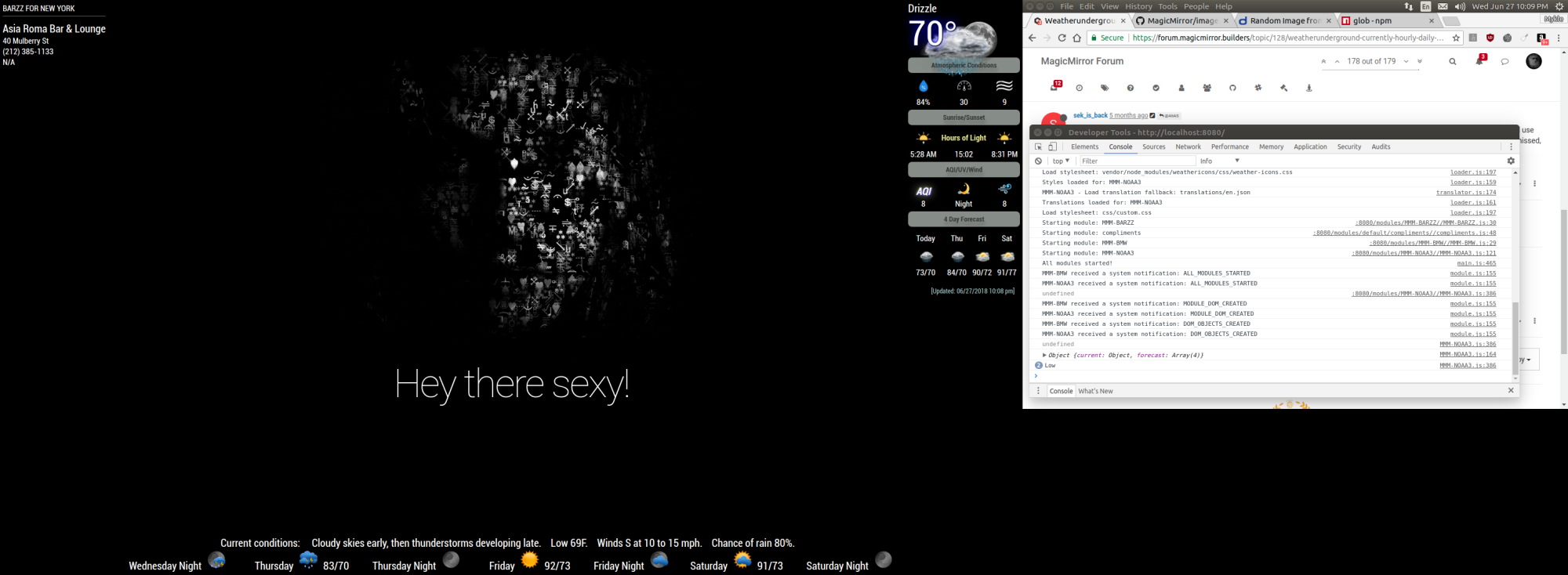
                              0_1530151941745_1.png

                              Create a working config
                              How to add modules

                              1 Reply Last reply Reply Quote 0
                              • T Offline
                                teegray1124
                                last edited by

                                so how can we use wuground without any api, since they longer offer it. i dont even have an old api key

                                Mykle1M 1 Reply Last reply Reply Quote 0
                                • Mykle1M Offline
                                  Mykle1 Project Sponsor Module Developer @teegray1124
                                  last edited by

                                  @teegray1124

                                  You can’t use wunderground without a wunderground api key.

                                  You can try other weather modules that don’t use the Wunderground API. There are quite a few, the most popular being @cowboysdude’s MMM-NOAA

                                  Create a working config
                                  How to add modules

                                  1 Reply Last reply Reply Quote 0

                                  Hello! It looks like you're interested in this conversation, but you don't have an account yet.

                                  Getting fed up of having to scroll through the same posts each visit? When you register for an account, you'll always come back to exactly where you were before, and choose to be notified of new replies (either via email, or push notification). You'll also be able to save bookmarks and upvote posts to show your appreciation to other community members.

                                  With your input, this post could be even better 💗

                                  Register Login

                                  • 1
                                  • 2
                                  • 5
                                  • 6
                                  • 7
                                  • 8
                                  • 9
                                  • 10
                                  • 7 / 10
                                  • First post
                                    Last post
                                  Enjoying MagicMirror? Please consider a donation!
                                  MagicMirror created by Michael Teeuw.
                                  Forum managed by Sam, technical setup by Karsten.
                                  This forum is using NodeBB as its core | Contributors
                                  Contact | Privacy Policy