MagicMirror Forum
    • Recent
    • Tags
    • Unsolved
    • Solved
    • MagicMirror² Repository
    • Documentation
    • 3rd-Party-Modules
    • Donate
    • Discord
    • Register
    • Login
    A New Chapter for MagicMirror: The Community Takes the Lead
    Read the statement by Michael Teeuw here.

    mmm assistant mk2

    Scheduled Pinned Locked Moved Troubleshooting
    112 Posts 12 Posters 55.3k Views 11 Watching
    Loading More Posts
    • Oldest to Newest
    • Newest to Oldest
    • Most Votes
    Reply
    • Reply as topic
    Log in to reply
    This topic has been deleted. Only users with topic management privileges can see it.
    • ChrisC Offline
      Chris @Guest
      last edited by

      Small feedback after installation and use:

      it works very well.

      • I find it more fluid than the previous version. when invoked, it responds almost instantly. Before I used MMM-Hotword. I went on the integrated snowboy. Perhaps the speed of response comes from there.

      • I have multi task. I can play a youtube clip on the mirror and at the same time ask the assistant for a home automation or other command. Before that did not work.

      • I go through the Sony PS3 eye for the listening part. I did not have a problem with this one after the update.

      In short, that happiness.

      @Bugsounet
      The work you have done is truly superb. Congratulations to you all.

      Regards,

      D 1 Reply Last reply Reply Quote 0
      • ? Offline
        A Former User
        last edited by

        I have optimized a maximum
        my personal npm library help to do this, and deleted some bad code and recode new.

        And … only few file in the git hub repo ! (my new install method)

        for a final result less RAM used and less CPU time (in idle: CPU 4% // approx 300 MB Ram)

        1 Reply Last reply Reply Quote 0
        • D Offline
          dvbit @sdmydbr9
          last edited by dvbit

          @sdmydbr9 this happened to me too. It’s just that the error that is happening has a side effect the deletion of the index file. repull it.
          After fixing the main problem this will not happen anymore

          1 Reply Last reply Reply Quote 0
          • D Offline
            dvbit @Chris
            last edited by

            @Chris said in mmm assistant mk2:

            Small feedback after installation and use:

            it works very well.

            • I find it more fluid than the previous version. when invoked, it responds almost instantly. Before I used MMM-Hotword. I went on the integrated snowboy. Perhaps the speed of response comes from there.

            • I have multi task. I can play a youtube clip on the mirror and at the same time ask the assistant for a home automation or other command. Before that did not work.

            • I go through the Sony PS3 eye for the listening part. I did not have a problem with this one after the update.

            In short, that happiness.

            @Bugsounet
            The work you have done is truly superb. Congratulations to you all.

            Regards,

            Hi One question: were you successful with the sound wizard setup?
            Could you share the asoundrc file (hidden file located in your home directory)?
            I agree the plugin is just perfect (had it working but then I broke something)

            1 Reply Last reply Reply Quote 0
            • ? Offline
              A Former User
              last edited by A Former User

              to regenerate it:

              go to desktop of the RPI

              • Right click in the sound icon
                -> select your prefered Output device
                -> select your prefered Input device

              Maybe reboot is needed after this (for MagicMirror app)

              D 1 Reply Last reply Reply Quote 0
              • ? Offline
                A Former User
                last edited by A Former User

                Tips For all

                Don’t Forget to activate hardware acceleration of rpi in raspi-config (OPEN GL)
                needed for YT video / cast / weblinks in fullscreen and for have more reactive mirror

                1 Reply Last reply Reply Quote 0
                • D Offline
                  dvbit @Guest
                  last edited by dvbit

                  @Bugsounet So I have "Output Device Settings " item greyed out in desktop sound menu.
                  entries:

                  • Analog
                  • HDMI
                  • USB Kinect Audio
                  • Output Audio Device Settings : Greyed out

                  Edit:
                  Before sending Firmware to Kinect after boot (to enable it) the Ouput Device Settings Option is NOT there (also no Kinect Audio available)
                  After sending it both Kinect and Output Deive Settings Appear

                  trying to play the response using cvlc works but there is a PulseAudio error:

                  VLC media player 3.0.8 Vetinari (revision 3.0.8-0-gf350b6b5a7)
                  [01cb1d60] vlcpulse audio output error: PulseAudio server connection failure: Connection refused
                  [01cd0fc8] dummy interface: using the dummy interface module...


                  Now rebooting and trying the plugin without uploading kinect audio firmware.

                  By the way the Pulseaudio refuse seems to me consistent with the failed audio for the plugin

                  DOH! I cannot try the plugin without the kinect audio firmware pushed (no other mic is attacched)

                  D 1 Reply Last reply Reply Quote 0
                  • D Offline
                    dvbit @dvbit
                    last edited by dvbit

                    @dvbit said in mmm assistant mk2:

                    HDMI

                    One little Step ahead.
                    Disabling Audio Output gives no audio feedback but then the mirrorr goes back into waiting state.
                    So it get’s stuck in “Spinning State” because the audio fails.
                    Maybe it’s obvious but I think it is interesting.

                    and this from the log is also useful:

                    [2020-06-01 19:27:11.533] [LOG]    [SNOWBOY] Retry restarting...
                    [2020-06-01 19:27:13.588] [LOG]    [LPCM16] WARN: arecord: main:828: audio open error: Device or resource busy
                    
                    [2020-06-01 19:27:13.589] [LOG]    [SNOWBOY] Retry restarting...


                    So my audio ouput device is "owned " by some other process I guess

                    aplay -l gives:

                    pi@MagicMirror:~/MagicMirror $ aplay -l
                    **** List of PLAYBACK Hardware Devices ****
                    card 0: b1 [bcm2835 HDMI 1], device 0: bcm2835 HDMI 1 [bcm2835 HDMI 1]
                      Subdevices: 4/4
                      Subdevice #0: subdevice #0
                      Subdevice #1: subdevice #1
                      Subdevice #2: subdevice #2
                      Subdevice #3: subdevice #3
                    card 1: Headphones [bcm2835 Headphones], device 0: bcm2835 Headphones [bcm2835 Headphones]
                      Subdevices: 4/4
                      Subdevice #0: subdevice #0
                      Subdevice #1: subdevice #1
                      Subdevice #2: subdevice #2
                      Subdevice #3: subdevice #3
                    
                    
                    S 1 Reply Last reply Reply Quote 0
                    • S Offline
                      sdetweil @dvbit
                      last edited by

                      @dvbit do

                      ps -ef | grep aplay
                      

                      and see if its still running…

                      Sam

                      How to add modules

                      learning how to use browser developers window for css changes

                      D 1 Reply Last reply Reply Quote 0
                      • D Offline
                        dvbit @sdetweil
                        last edited by

                        @sdetweil nope I just grep my grep :-D

                        1 Reply Last reply Reply Quote 0
                        • R Offline
                          reddyman
                          last edited by reddyman

                          Hmmm sorry to go a bit off topic but has anyone tried the new Assistant2Display module with the new GoogleAssistant? I can’t get it to work but I suspect I am missing something very obvious. I just don’t know what.

                          I can’t get the screen, briefToday, or Pir to work. I don’t get any errors, just nothing happens.

                          Config file:

                          {
                            module: "MMM-GoogleAssistant",
                            position: "fullscreen_above",
                            config: {
                             A2DServer: {
                                useA2D: true,
                                }, 
                              assistantConfig: {
                                //latitude: 51.508530,
                                //longitude: -0.076132,
                                },
                              micConfig: { // put there configuration generated by auto-installer
                                recorder: "arecord",
                                device: "plughw:2",
                                },
                              snowboy: {
                                Model: "smart_mirror", 	
                          	},
                              }
                          },
                          {
                            module: "MMM-Assistant2Display",
                            position: "top_left",
                            config: {
                              debug:true,
                            },
                            pir: {
                                usePir: true,
                                pin: 4,
                                reverseValue: false
                            },
                            screen: {
                            useScreen: true,
                            delay: 1 * 60 * 1000,
                            turnOffDisplay: true,
                            ecoMode: true,
                            displayCounter: true,
                            text: "Auto Turn Off Screen:",
                            detectorSleeping: false,
                            governorSleeping: false,
                            rpi4: false
                          },
                          
                          briefToday: {
                                useBriefToday: true,
                                welcome: "brief Today"
                              },
                          
                          },


                          I don’t see the debug working either? Nothing generated on the terminal while the mirror is running at least.

                          [2020-06-01 16:51:49.870] [LOG]    [ASSISTANT] MMM-GoogleAssistant Version: 2.0.0
                          [2020-06-01 16:51:49.885] [LOG]    [SNOWBOY] Model selected: smart_mirror
                          [2020-06-01 16:51:49.893] [LOG]    [SNOWBOY] snowboy v1.5.0 Initialized...
                          [2020-06-01 16:51:49.902] [LOG]    [ASSISTANT] Assistant2Display Server Started
                          [2020-06-01 16:51:49.908] [LOG]    [ASSISTANT] Google Assistant is initialized.
                          [2020-06-01 16:51:49.916] [LOG]    [A2D] MMM-Assistant2Display Version: 2.0.0
                          [2020-06-01 16:51:49.928] [LOG]    [A2D] Assistant2Display is initialized.


                          Anyone see what I’m missing? I suspect it’s something super simple but I can’t figure out what.

                          1 Reply Last reply Reply Quote 0
                          • S Offline
                            sdetweil
                            last edited by

                            well, I though i’d give it a try… see what all the fuss is about!

                            1. on the install y/n prompts, the protocol is the Uppercased letter is the default, so whn you hit enter is does the default
                              it doesn’t do anything, have to enter Y or N (and then it takes off without waiting??)
                            2. audio doesn’t work for me…
                              and none of the choices match the system config (and none of them work)
                              system config, sounds fine, music, web sounds, system sounds.
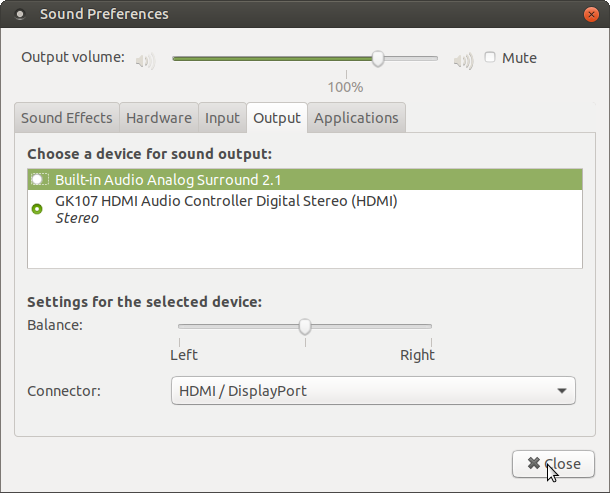
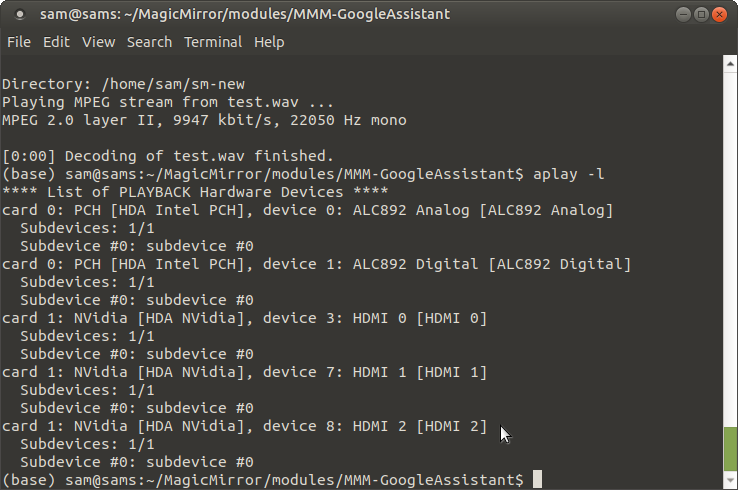
                              Screenshot at 2020-06-01 16-54-20.png

                            aplay -l info
                            Screenshot at 2020-06-01 16-54-32.png

                            Sam

                            How to add modules

                            learning how to use browser developers window for css changes

                            1 Reply Last reply Reply Quote 0
                            • D Offline
                              dvbit
                              last edited by

                              A big thank You to @Bugsounet for his help in troubleshooting.
                              It was nothing to do with the modules but with my asoundrc config.
                              the ouput card/device were not correct.
                              Thanks again!

                              1 Reply Last reply Reply Quote 0
                              • ? Offline
                                A Former User
                                last edited by

                                @dvbit: no problem ! with pleasure ;)

                                1 Reply Last reply Reply Quote 0
                                • ? Offline
                                  A Former User
                                  last edited by A Former User

                                  @reddyman : turn on modules. just YouTube by default is turn on
                                  link / photo is disabled by default

                                   config: {
                                      debug:true,
                                      // make you config there !
                                    },
                                   // not there
                                  ....
                                  
                                  R 1 Reply Last reply Reply Quote 1
                                  • R Offline
                                    reddyman @Guest
                                    last edited by reddyman

                                    @Bugsounet said in mmm assistant mk2:

                                     config: {
                                        debug:true,
                                        // make you config there !
                                      },
                                     // not there
                                    ....
                                    

                                    …I am an idiot. Hahaha, I knew it was something super simple. Smh, thanks for putting up with idiots like me :p

                                    1 Reply Last reply Reply Quote 0
                                    • ? Offline
                                      A Former User
                                      last edited by

                                      @reddyman : don’t worry, it’s arrive to me too sometime !

                                      1 Reply Last reply Reply Quote 1
                                      • J Offline
                                        James Farmer
                                        last edited by

                                        First, I say thanks to @Bugsounet , I only started my mirror a few weeks and have had Assistant working. Upgraded to GoogleAssistant and it is much quicker.

                                        Unfortunately I have a few problems with it now, one is sound, but im 99.99% sure because i have sound config wrong. Nothing to do with module. !
                                        The only other issue i have is i use pages and when googleAssisatnt comes on screen part of it is still hidden by the modules on screen.
                                        Just wondering if anyone have this problem. ?
                                        Ive set it to fullscreen_above in GoogleAssistant so thought this wouldnt be a problem. it worked ok with AssistantMK.

                                        Thankyou

                                        1 Reply Last reply Reply Quote 0
                                        • ? Offline
                                          A Former User
                                          last edited by

                                          hi,

                                          1. what the problem ?

                                          2. for pages:
                                            I don’t know what this developer means …
                                            edit pages.css
                                            change it to:

                                          .fullscreen.above {
                                              z-index: 9999
                                           }
                                          

                                          page should now works correctly

                                          J 1 Reply Last reply Reply Quote 1
                                          • J Offline
                                            James Farmer @Guest
                                            last edited by

                                            @Bugsounet Thanks that has fixed it, I need to have another go at learning css to try and sort out all the positions.

                                            Ill get back to trying to sort out sound.

                                            Thanks again

                                            1 Reply Last reply Reply Quote 0

                                            Hello! It looks like you're interested in this conversation, but you don't have an account yet.

                                            Getting fed up of having to scroll through the same posts each visit? When you register for an account, you'll always come back to exactly where you were before, and choose to be notified of new replies (either via email, or push notification). You'll also be able to save bookmarks and upvote posts to show your appreciation to other community members.

                                            With your input, this post could be even better 💗

                                            Register Login

                                            • 1
                                            • 2
                                            • 3
                                            • 4
                                            • 5
                                            • 6
                                            • 5 / 6
                                            • First post
                                              Last post
                                            Enjoying MagicMirror? Please consider a donation!
                                            MagicMirror created by Michael Teeuw.
                                            Forum managed by Sam, technical setup by Karsten.
                                            This forum is using NodeBB as its core | Contributors
                                            Contact | Privacy Policy