Read the statement by Michael Teeuw here.
MMM-Tado wrong units
-
actually there is a bug in the code
change MMM-Tado.jsstart: function () { var self = this // add this line ----------------------- if (this.config.updateInterval < this.defaults.updateInterval){ this.config.updateInterval = this.defaults.updateInterval; } this.config.units = self.config.units; // ----------- otherwise this wipes out the config setting this.sendSocketNotification('CONFIG', this.config); }, -
@sdetweil Thanks Sam works …:folded_hands_medium-light_skin_tone:
-
@Stoffbeuteluwe I posted an issue to his repo
https://github.com/WouterEekhout/MMM-Tado/issues/9 -
I cannot reproduce the problem. In my case the
self.config.unitsreads out the units from the config.js correctly. If I addvar self = this, then it will read out the defaults set in the MMM-Tado.js and not from the config.js.My config.js looks like the following:
var config = { ... units: "metric", ... modules: [ ... { module: 'MMM-Tado', position: 'top_right', header: 'My Home', config: { username: 'X', password: 'X', updateInterval: 300000, } }, ... ] }; -
@WouterEekhout that is not how it works…
at module startup time, before init is called, the MM module loader will take the module supplied defaults and merge on top the config.js config:{} section for the module. using Object.assign ({}, default, config())
and CREATE and item in the module namespace called config… it is a replace config =
Object.assign() is a replace operation, whatever was there before is replace with the same object from the// MM/js/module.js setConfig: function (config) { this.config = Object.assign({}, this.defaults, config); },the statement above creates an empty object {}, then assigns on top the module defaults section,
then assigns values from the config.js config object on top of those (replacing any same named items)your module does not HAVE a config object defined… it has a defaults object, which is not touched…
the problem is at start time in your module
self has not been explicitly set. so, you have NO idea where it is pointing, but this IS set,
and this.config is the merged result from the setConfig function above…
so, you stomp on (replace, not merge) the this.config object with whatever is pointed to by self.config.AFTER getDom() is called once (long after start) then self is set
/// MMM-Tado.js // Override dom generator. getDom: function () { let self = this;now this and self point to the same thing, the instance of module which is MMM-Tado.js AND including the dynamically created (and over written in start) config object.
-
@sdetweil I don’t think we are on the same page. Your solution is not working for me, therefor I cannot reproduce it.
I tested it by setting my
unitsin the config.js as following:var config = { ... units: 'lipsum', ... }I add your recommendation and debug it:
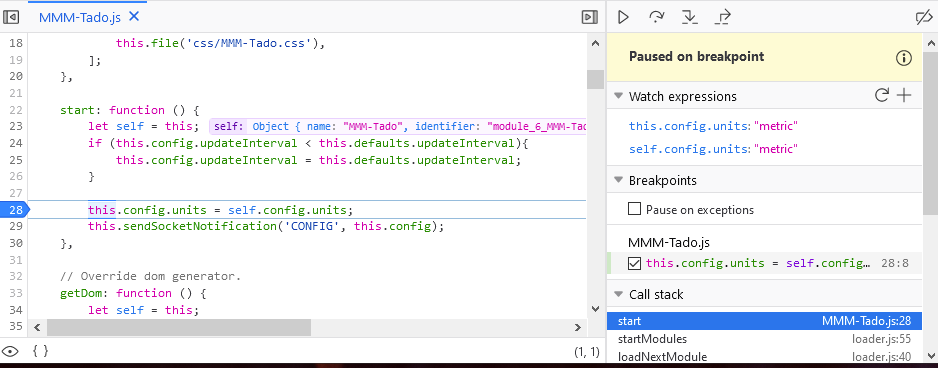
As you can see, the
self.config.unitsis not ‘lipsum’.If I keep my code like it is now:
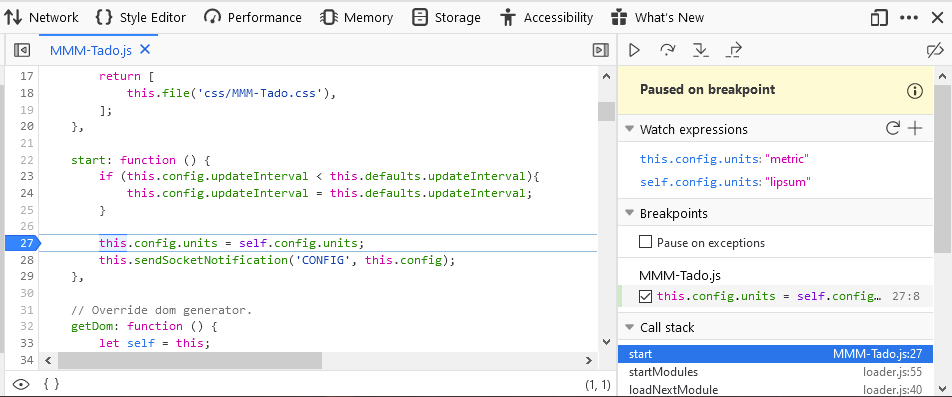
As you can see now
self.config.unitscontains ‘lipsum’. Also the output on the screen is correct (It shows the temp in fahrenheit, because it is not equal to ‘metric’).I might be overlooking something. But as far as I am seeing, it works correctly.
-
@WouterEekhout according to the doc
this.config Boolean The configuration of the module instance as set in the user's config.js file. This config will also contain the module's defaults if these properties are not over-written by the user config.and my experience matches this and depends on it.
from my 2.11 system with your latest module installed
config{ module: 'MMM-Tado', position: 'top_right', // This can be any of the regions. config: { username: 'your_tado_username', password: 'your_tado_password', updateInterval: 300000, units:"freddy" } }this.config
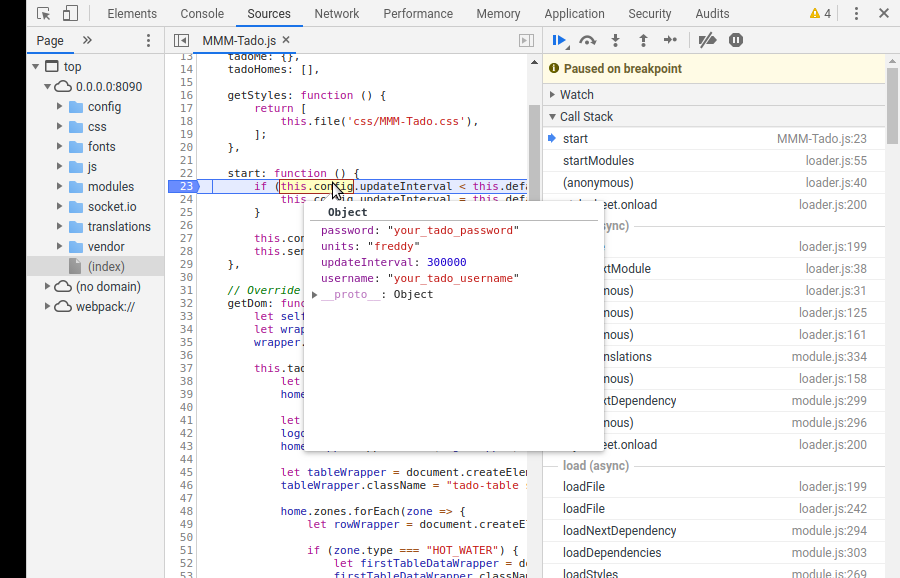
self.config
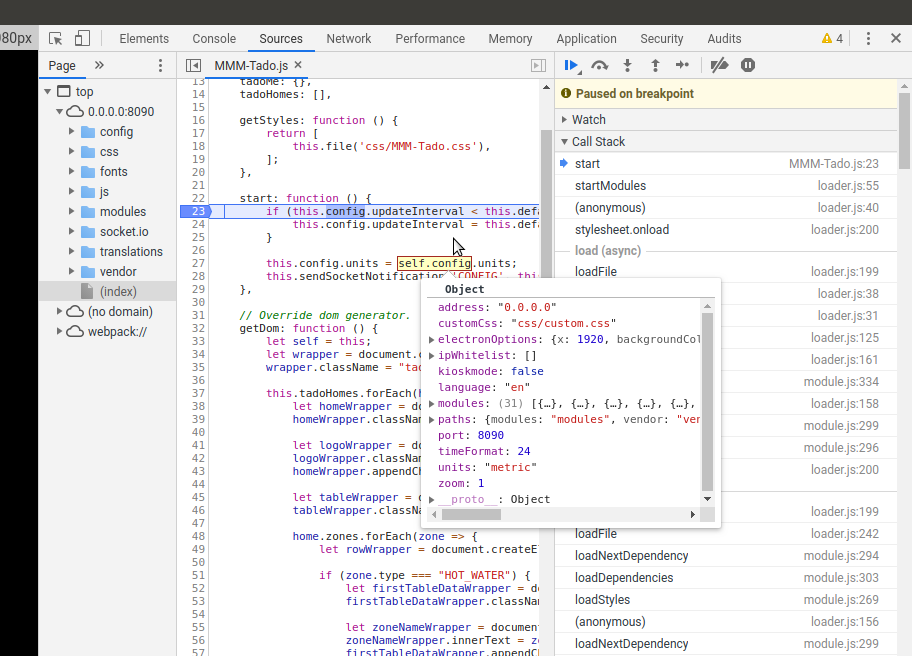
notice that self.config is THE mm config.js in object form and it HAS a ‘units’ value, so when the assignment happens
this.config.units=self.config.units
units will change from ‘freddy’ to ‘metric’ -
@sdetweil Thank you for the clarification. Now it is clear why there is miscommunication. I use the
unitsfrom the general config settings: https://docs.magicmirror.builders/getting-started/configuration.html#general .To clarify my config looks like this:
var config = { address: "localhost", port: 8080, ipWhitelist: ["127.0.0.1", "::ffff:127.0.0.1", "::1"], language: "en", timeFormat: 24, units: "metric", modules: [ { module: 'MMM-Tado', position: 'top_right', header: 'My Home', config: { username: 'x', password: 'x', updateInterval: 300000, } }, ] };Notice that the
units-config is outsidemodules-config. And not in the module-config. I think this makes more sense. Because of thisself.config.unitsdoes contain the correct value. I will update the readme about theunits-config, so it will be more clear. -
@WouterEekhout ok, but… i don’t think that is what the USER wanted… their system is in metric, but they wanted your module display to be Fahrenheit, so I would use some other varname, and check to see if they specified that, and use IT over the system value…
or because u have it as a default, if u set it to some invalid value, then check if its what you allow,
then if invalid, use system, otherwise allow users value… -
@sdetweil I disagree, it is unclear if the current config is not working or if he wanted a custom units setting for the app. @Stoffbeuteluwe Can you clarify if you wanted to set a different unit for the app?
-
@WouterEekhout I am from Germany and I need metric unit but Sam helped me to fix and now it’s working for me.
It would be cool to have the choice in module config. Metric or imperial
Thanks to you guys -
@Stoffbeuteluwe what is your main config.js units set to? up near address:
-
@sdetweil it is metric
-
@Stoffbeuteluwe so, the original code should have worked…
-
@sdetweil without your fix it does not work in my case
-
-
@sdetweil Hello, after module update same problem
and your fix don’t work anymore…can you help me again?var config = { address: "0.0.0.0", // Address to listen on, can be: // - "0.0.0.0", "127.0.0.1", "::1" to listen on loopback interface // - another specific IPv4/6 to listen on a specific interface // - "", "0.0.0.0", "::" to listen on any interface // Default, when address config is left out, is "0.0.0.0" port: 8080, ipWhitelist: [], // Set [] to allow all IP addresses // or add a specific IPv4 of 192.168.1.5 : // ["127.0.0.1", "::ffff:127.0.0.1", "::1", "::ffff:192.168.1.5"], // or IPv4 range of 192.168.3.0 --> 192.168.3.15 use CIDR format : // ["127.0.0.1", "::ffff:127.0.0.1", "::1", "::ffff:192.168.3.0/28"], language: "de", timeFormat: 24, units: "metric", modules: [ -
@Stoffbeuteluwe ok, need an editor for this…
line 26 of MMM-Tado.js, leave alone
change all the other this.config.units to self.config.units
change them all, then change line 26 back to this.
I have opened issue 11
https://github.com/WouterEekhout/MMM-Tado/issues/11 -

@sdetweil no luck…sorry, I have changed 4x this into self
but I am not sure with the line 26/** * Created by Wouter Eekhout on 06/01/2017. */ Module.register("MMM-Tado", { // Default module config. defaults: { username: '', password: '', updateInterval: 300000, }, tadoMe: {}, tadoHomes: [], getStyles: function () { return [ this.file('css/MMM-Tado.css'), ]; }, start: function () { if (this.config.updateInterval < this.defaults.updateInterval){ this.config.updateInterval = this.defaults.updateInterval; } this.config.units = self.config.units; this.sendSocketNotification('CONFIG', this.config); }, // Override dom generator. getDom: function () { let self = this; let wrapper = document.createElement("div"); wrapper.className = "tado-info"; this.tadoHomes.forEach(home => { let homeWrapper = document.createElement("div"); homeWrapper.className = "tado-home"; let logoWrapper = document.createElement("i"); logoWrapper.className = "tado-icon-tado_logo tado-logo"; homeWrapper.appendChild(logoWrapper); let tableWrapper = document.createElement("table"); tableWrapper.className = "tado-table small"; home.zones.forEach(zone => { let rowWrapper = document.createElement("tr"); if (zone.type === "HOT_WATER") { let firstTableDataWrapper = document.createElement("td"); firstTableDataWrapper.className = "tado-table-name"; let zoneNameWrapper = document.createElement("span"); zoneNameWrapper.innerText = zone.name; firstTableDataWrapper.appendChild(zoneNameWrapper); rowWrapper.appendChild(firstTableDataWrapper); let secondTableDateWrapper = document.createElement("td"); secondTableDateWrapper.className = "tado-table-data"; let temperatureWrapper = document.createElement("span"); let temperatureIconWrapper = document.createElement("i"); temperatureIconWrapper.className = "fa fa-thermometer-half"; temperatureWrapper.appendChild(temperatureIconWrapper); if (zone.state.setting.temperature == null) { var temperatureTextWrapper = document.createTextNode(zone.state.setting.power); } else { if (self.config.units === "metric") { var temperatureTextWrapper = document.createTextNode(zone.state.setting.temperature.celsius + "°"); } else { var temperatureTextWrapper = document.createTextNode(zone.state.setting.temperature.fahrenheit + "°"); } } temperatureWrapper.appendChild(temperatureTextWrapper); secondTableDateWrapper.appendChild(temperatureWrapper); rowWrapper.appendChild(secondTableDateWrapper); } else if (zone.type === "HEATING") { let firstTableDataWrapper = document.createElement("td"); firstTableDataWrapper.className = "tado-table-name"; let zoneNameWrapper = document.createElement("span"); zoneNameWrapper.innerText = zone.name; firstTableDataWrapper.appendChild(zoneNameWrapper); rowWrapper.appendChild(firstTableDataWrapper); let secondTableDateWrapper = document.createElement("td"); secondTableDateWrapper.className = "tado-table-data"; //current temperature let temperatureWrapper = document.createElement("span"); temperatureWrapper.className = "bright"; let temperatureIconWrapper = document.createElement("i"); temperatureIconWrapper.className = "fa fa-thermometer-half"; temperatureWrapper.appendChild(temperatureIconWrapper); if (self.config.units === "metric") { var temperatureTextWrapper = document.createTextNode(zone.state.sensorDataPoints.insideTemperature.celsius + "°"); } else { var temperatureTextWrapper = document.createTextNode(zone.state.sensorDataPoints.insideTemperature.fahrenheit + "°"); } temperatureWrapper.appendChild(temperatureTextWrapper); if (zone.state.activityDataPoints.heatingPower.percentage > 0) { //The zone is heating let heatingWrapper = document.createElement("i"); heatingWrapper.className = "fa fa-fire bright"; temperatureWrapper.appendChild(heatingWrapper); } secondTableDateWrapper.appendChild(temperatureWrapper); //target temperature let temperatureTargetWrapper = document.createElement("span"); temperatureTargetWrapper.className = "xsmall"; let temperatureTargetIconWrapper = document.createElement("i"); temperatureTargetIconWrapper.className = "fa fa-thermometer-half"; temperatureTargetWrapper.appendChild(temperatureTargetIconWrapper); if (zone.state.setting.temperature == null) { var temperatureTargetTextWrapper = document.createTextNode(zone.state.setting.power); } else { if (self.config.units === "metric") { var temperatureTargetTextWrapper = document.createTextNode(zone.state.setting.temperature.celsius + "°"); } else { var temperatureTargetTextWrapper = document.createTextNode(zone.state.setting.temperature.fahrenheit + "°"); } } temperatureTargetWrapper.appendChild(temperatureTargetTextWrapper); secondTableDateWrapper.appendChild(temperatureTargetWrapper); let breakLine = document.createElement("br"); secondTableDateWrapper.appendChild(breakLine); let humidityWrapper = document.createElement("span"); let humidityIconWrapper = document.createElement("i"); humidityIconWrapper.className = "fa fa-tint"; humidityWrapper.appendChild(humidityIconWrapper); let humidityTextWrapper = document.createTextNode(zone.state.sensorDataPoints.humidity.percentage + "%"); humidityWrapper.appendChild(humidityTextWrapper); secondTableDateWrapper.appendChild(humidityWrapper); rowWrapper.appendChild(secondTableDateWrapper); } else if (zone.type === "AIR_CONDITIONING") { let firstTableDataWrapper = document.createElement("td"); firstTableDataWrapper.className = "tado-table-name"; let zoneNameWrapper = document.createElement("span"); zoneNameWrapper.innerText = zone.name; firstTableDataWrapper.appendChild(zoneNameWrapper); rowWrapper.appendChild(firstTableDataWrapper); let secondTableDateWrapper = document.createElement("td"); secondTableDateWrapper.className = "tado-table-data"; //current temperature let temperatureWrapper = document.createElement("span"); temperatureWrapper.className = "bright"; let temperatureIconWrapper = document.createElement("i"); temperatureIconWrapper.className = "fa fa-thermometer-half"; temperatureWrapper.appendChild(temperatureIconWrapper); if (self.config.units === "metric") { var temperatureTextWrapper = document.createTextNode(zone.state.sensorDataPoints.insideTemperature.celsius + "°"); } else { var temperatureTextWrapper = document.createTextNode(zone.state.sensorDataPoints.insideTemperature.fahrenheit + "°"); } temperatureWrapper.appendChild(temperatureTextWrapper); if (zone.state.setting.mode === "HEAT") { //The zone is heating let heatingWrapper = document.createElement("i"); heatingWrapper.className = "fa fa-fire bright"; temperatureWrapper.appendChild(heatingWrapper); } else if (zone.state.setting.mode === "COOL") { //The zone is cooling let coolingWrapper = document.createElement("i"); coolingWrapper.className = "fa fa-snowflake bright"; temperatureWrapper.appendChild(coolingWrapper); } secondTableDateWrapper.appendChild(temperatureWrapper); //target temperature let temperatureTargetWrapper = document.createElement("span"); temperatureTargetWrapper.className = "xsmall"; let temperatureTargetIconWrapper = document.createElement("i"); temperatureTargetIconWrapper.className = "fa fa-thermometer-half"; temperatureTargetWrapper.appendChild(temperatureTargetIconWrapper); if (zone.state.setting.temperature == null) { var temperatureTargetTextWrapper = document.createTextNode(zone.state.setting.power); } else { if (self.config.units === "metric") { var temperatureTargetTextWrapper = document.createTextNode(zone.state.setting.temperature.celsius + "°"); } else { var temperatureTargetTextWrapper = document.createTextNode(zone.state.setting.temperature.fahrenheit + "°"); } } temperatureTargetWrapper.appendChild(temperatureTargetTextWrapper); secondTableDateWrapper.appendChild(temperatureTargetWrapper); let breakLine = document.createElement("br"); secondTableDateWrapper.appendChild(breakLine); let humidityWrapper = document.createElement("span"); let humidityIconWrapper = document.createElement("i"); humidityIconWrapper.className = "fa fa-tint"; humidityWrapper.appendChild(humidityIconWrapper); let humidityTextWrapper = document.createTextNode(zone.state.sensorDataPoints.humidity.percentage + "%"); humidityWrapper.appendChild(humidityTextWrapper); secondTableDateWrapper.appendChild(humidityWrapper); rowWrapper.appendChild(secondTableDateWrapper); } else { //don't add it return; } tableWrapper.appendChild(rowWrapper); }); homeWrapper.appendChild(tableWrapper); wrapper.appendChild(homeWrapper); }); return wrapper; }, socketNotificationReceived: function(notification, payload) { if (notification === 'NEW_DATA') { this.tadoMe = payload.tadoMe; this.tadoHomes = payload.tadoHomes; this.updateDom(); } } }); -
@Stoffbeuteluwe weird… i’ll be back on in about 6 hours, do you know how to use the debugger?
ctrl-shift-i on teh keyboard, select the sources tab, navigate the left tree to find the module and filename, click
shows in middle windowscroll down to one of the if (self.config.units lines (make sure u have that type unit in the tado data)
click the number on the start of the line, it should turn bluehit refresh
the code will stop there
mouse over the self and a box will pop up showing what self points to, then config
same… units should say metric
Hello! It looks like you're interested in this conversation, but you don't have an account yet.
Getting fed up of having to scroll through the same posts each visit? When you register for an account, you'll always come back to exactly where you were before, and choose to be notified of new replies (either via email, or push notification). You'll also be able to save bookmarks and upvote posts to show your appreciation to other community members.
With your input, this post could be even better 💗
Register Login
