Read the statement by Michael Teeuw here.
Send existing Notifications from a script
-
Hey :)
I want to re-write the “MMM-SmartTouch” Module to have an “App-Dock-Bar”. I was able to change the CSS file to have this look now: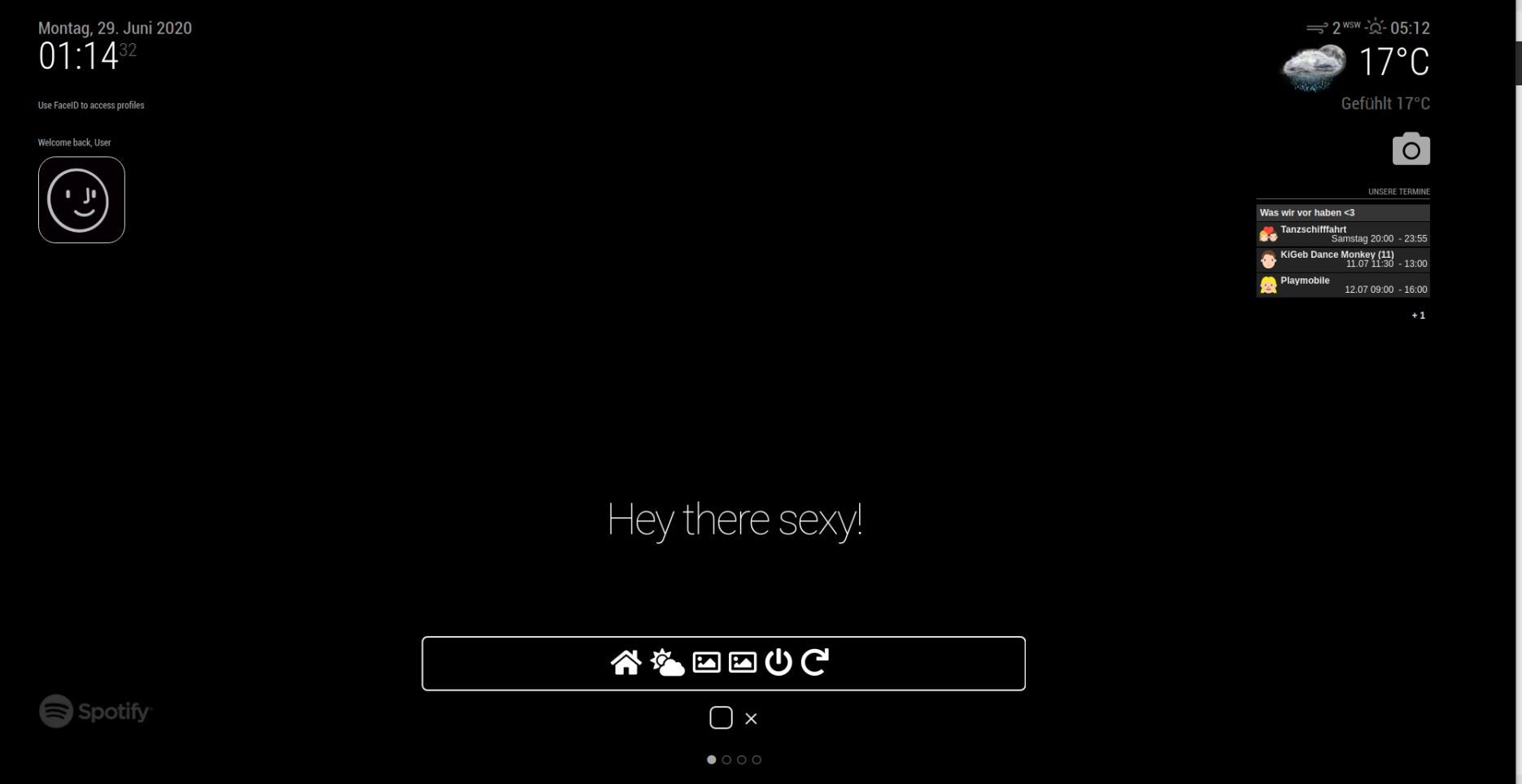
I also was able to add the first 4 buttons with costom icons. I want to have these icons to change the pages with “MMM-pages”.
The pages module listens on these Notifications: PAGE_CHANGED, pageNumberBut I cant get it to work. This is my smartTouch.js and my nodeHelper:
MMM-smartTouch.js :
//Main Menu Bar var main_menu = document.createElement("div"); main_menu.className = "main-menu" main_menu.id = "navbar" home_div.appendChild(main_menu) var main_menu_ul = document.createElement("ul"); main_menu_ul.className = "navbar-nav" main_menu.appendChild(main_menu_ul) //Page 1 (Home Screen) var main_menu_li_restart = document.createElement("span"); main_menu_li_restart.innerHTML = "<span class='fas fa-home fa-3x'></span>" + " " + " " + " " + " "; main_menu_li_restart.className = "li-t" main_menu_ul.appendChild(main_menu_li_restart) main_menu_li_restart.addEventListener("click", () => this.sendSocketNotification("PAGEONE", {})); //Page 2 (Wetter) var main_menu_li_restart = document.createElement("span"); main_menu_li_restart.innerHTML = "<span class='fas fa-cloud-sun fa-3x'></span>" + " " + " " + " " + " "; main_menu_li_restart.className = "li-t" main_menu_ul.appendChild(main_menu_li_restart) main_menu_li_restart.addEventListener("click", () => this.sendSocketNotification("SHUTDOWN", {})); //Page 3 (Drive Bilder) var main_menu_li_restart = document.createElement("span"); main_menu_li_restart.innerHTML = "<span class='far fa-image fa-3x'></span>" + " " + " " + " " + " "; main_menu_li_restart.className = "li-t" main_menu_ul.appendChild(main_menu_li_restart) main_menu_li_restart.addEventListener("click", () => this.sendSocketNotification("SHUTDOWN", {})); //Page 4 (Party Bilder) var main_menu_li_restart = document.createElement("span"); main_menu_li_restart.innerHTML = "<span class='far fa-image fa-3x'></span>" + " " + " " + " " + " "; main_menu_li_restart.className = "li-t" main_menu_ul.appendChild(main_menu_li_restart) main_menu_li_restart.addEventListener("click", () => this.sendSocketNotification("SHUTDOWN", {})); //Power Off Button var main_menu_li_shutdown = document.createElement("span"); main_menu_li_shutdown.innerHTML = "<span class='fa fa-power-off fa-3x'></span>" + " " + " " + " " + " "; main_menu_li_shutdown.className = "li-t" main_menu_ul.appendChild(main_menu_li_shutdown) //Onclick event to send shutdown notification main_menu_li_shutdown.addEventListener("click", () => this.sendSocketNotification("SHUTDOWN", {})); //Restart Button var main_menu_li_restart = document.createElement("span"); main_menu_li_restart.innerHTML = "<span class='fa fa-repeat fa-3x'></span>" + " " + " " + " " + " "; main_menu_li_restart.className = "li-t" main_menu_ul.appendChild(main_menu_li_restart) main_menu_li_restart.addEventListener("click", () => this.sendSocketNotification("RESTART", {}));and my nodeHelper.js:
if (notification === "PAGEONE") {
              console.log("Page1!")
              require('child_process').this.sendSocketNotification("PAGE_CHANGED", 1);
          }

	  if (notification === "SHUTDOWN") {
              console.log("Shutting Down!")
              require('child_process').exec('shutdown -h now', console.log)
          }

          if (notification === "RESTART") {
              console.log("Restarting Magic Mirror!")
              require('child_process').exec('sudo reboot', console.log)
          }
nothing happens when i touch the first (Page1) icon…
Thx for help! :) Toby
-
@thetobyde in your click handlers, ‘this’ points to the button causing the click.
this is why we do
var self=this
and use self. in handlers and callbacks
instead of this.you should see the error reported in the developers window console
-
@sdetweil thx for the fast answer. I change „this.send…“ to „self.send…“ but did not work sadly… i also changed the payload from 1 to 0, because the notifications from MMM-pages are zero-based. So page 1 is PAGE_CHANGED, 0…
The var self = this is written by the Developer of MMM-SmartTouch
-
@thetobyde did step thru the code w the developers window source tab?
-
u changed the code here from this. to self.
=> this.sendSocketNotification("SHUTDOWN
and all similar -
@sdetweil i changed the code in the nodeHelper from this. to self.
-
Like this :)
-
@thetobyde and the module code with the buttons?
-
@sdetweil didt change that because it worked for the pre-existing Shutdown and Reboot button from the developer of MMM-smartTouch… isnt it right?
-
@thetobyde said in Send existing Notifications from a script:
require('child_process').this.sendSocketNotification("PAGE_CHANGED", 1);well, you are not launching a program to chnage the page, and don’t need to send this down to the node_helper
as he has to send it back up to the module to send the notfication,just do the sendNotification from the module (note its not sendsocketNotification(to my node helper) , just sendNotification(to other modules)
-
@thetobyde if you haven’t figured it out yet, have a look at my module https://github.com/lavolp3/MMM-NavigationBar which kind of does what you want. This one is using MMM-pages as well.
ALl that I needed for this to work out is this:
getDom: function() { var container = document.createElement("div"); container.className = "naviContainer"; self = this; for (var i = 0; i < this.config.sections.length; i++) { var buttonDiv = document.createElement("div"); buttonDiv.className = "naviButton fas fa-"+this.config.sectionIcons[this.config.sections[i]]; buttonDiv.style.fontSize = this.config.iconSize + "px"; button.addEventListener("click", function() { self.sendNotification("PAGE_CHANGED", i); }); //this.log(buttonDiv.className); container.appendChild(buttonDiv); } return container; }, -
@thetobyde I think you should avoid the node_helper and directly send a broadcast notification via
self.sendNotification()to to the MMM-pages module.button.addEventListener("click", function() { self.sendNotification("PAGE_CHANGED", i); }); -
@lavolp3 which is what I said 3 posts back
-
@sdetweil sorry read thorugh it too fast
-
It‘s working! Thx u!!


Hello! It looks like you're interested in this conversation, but you don't have an account yet.
Getting fed up of having to scroll through the same posts each visit? When you register for an account, you'll always come back to exactly where you were before, and choose to be notified of new replies (either via email, or push notification). You'll also be able to save bookmarks and upvote posts to show your appreciation to other community members.
With your input, this post could be even better 💗
Register Login