Read the statement by Michael Teeuw here.
MMM-DHT22 : Temperature and Humidity : Undefined
-
Hello,
I just installed the MMM-DHT22 module
here is my installation with a RasberryPi and DTH 22 (not 11) :
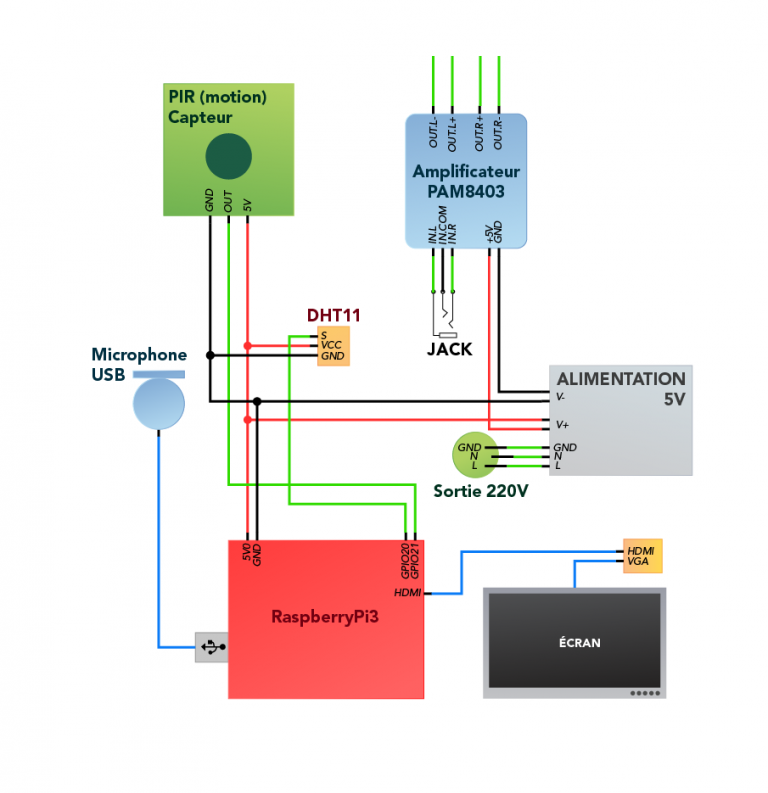
I modified in my config.js and in MMM-DTH22.js:
sensorPIN: 20,,
but the temperature is displayed in Undefined and I have nothing in humidity. I tried withsensorPIN: 38,while leaving my DTH22 connected to GPIO 20 but that does not change anything.
Thank you for your help. -
I found that module isn’t working for me, either. ended up using MMM-DHT-Sensor
-
thank you for the info, it worked with MMM-DHT-Sensor by plugging it into the GPIO 2 as a prerequisite then rebooting it does not work anymore it displays all the time “loading sensor data”
-
-
My MMM-DHT-Sensor.js :
Module.register("MMM-DHT-Sensor", {

	defaults: {
		updateInterval: 60 * 60 * 1000, // Every hour.
		initialLoadDelay: 0, // No delay/
		animationSpeed: 1000, // One second.
		units: config.units, // Celsius
		relativeScale: 30,
		debug: false,
		sensorPin: 2,
		sensorType: 22
My config.js :
{ module: "MMM-DHT-Sensor", position: "top_right", header: "Upstairs", config: { sensorPin: 2, sensorType: 22, updateInterval: 60 * 60 * 1000, initialLoadDelay: 0, animationSpeed: 1000, units: "metric", relativeScale: 35, debug: false } }, -
The following config.js snippet would match your graphic allowing for DHT-22 rather than DHT-11,
{ module: "MMM-DHT-Sensor", position: "top_right", header: "Upstairs", config: { sensorPin: 20, // use BCM/GPIO numbering, not physical Pin # or wiringPi. sensorType: 22, updateInterval: 60 * 60 * 1000, initialLoadDelay: 0, animationSpeed: 1000, units: "metric", relativeScale: 35, debug: false } }, -
I do this in first and i retry now but it’s always display “loading sensor data”, then i modify
sensorPin: 20,in the MMM-DHT-Sensor.js because it stayedcode_sensorPin: 20,but the problem stay here…
I even connected DHT22 directly to my raspi (GND in pin 6 and VCC in pin 4)
it’s annoying because it sounds simple …my DHT22 would it be broken, how to know it …
-
@RIKKO14 First things first.
- Check your pinout according to http://pinout.xyz
- make sure you installed exactly to their instructions.
- reboot after install.
-
I remove MMM-DHT Sensor, MMM-DHT22 and MMM-dht22, I did not removel node-dht-sensor because I don’t know how to remove, I reinstall MMM-DHT Sensor, I left in GPIO 2 (3) not to change the config.js and the MMM-DHT-Sensor.js, it does not work either, after several relaunch of MM, it worked one time but after a relaunch again it does not work anymore. .
It’s crazy, I ordered a new DHT22 because it may be defective …

Hello! It looks like you're interested in this conversation, but you don't have an account yet.
Getting fed up of having to scroll through the same posts each visit? When you register for an account, you'll always come back to exactly where you were before, and choose to be notified of new replies (either via email, or push notification). You'll also be able to save bookmarks and upvote posts to show your appreciation to other community members.
With your input, this post could be even better 💗
Register Login