MagicMirror Forum
    • Recent
    • Tags
    • Unsolved
    • Solved
    • MagicMirror² Repository
    • Documentation
    • 3rd-Party-Modules
    • Donate
    • Discord
    • Register
    • Login
    A New Chapter for MagicMirror: The Community Takes the Lead
    Read the statement by Michael Teeuw here.

    mmm-suncalc - Text only display of sunrise, sunset and other sun events

    Scheduled Pinned Locked Moved Utilities
    29 Posts 8 Posters 15.4k Views 8 Watching
    Loading More Posts
    • Oldest to Newest
    • Newest to Oldest
    • Most Votes
    Reply
    • Reply as topic
    Log in to reply
    This topic has been deleted. Only users with topic management privileges can see it.
    • R Offline
      retroflex Project Sponsor Module Developer
      last edited by retroflex

      Just found this old module and added it to my mirror. With some unicode and html the result is pretty nice, so I thought I’d share it:
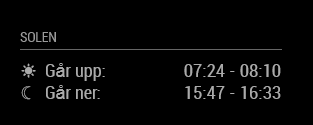
      0_1542831254681_5c57c520-df2b-48dd-b9b6-266a9d867d37-image.png

      Ok, in Swedish, but it basically says “The sun… rises: / sets:”. I used dawn-sunrise and sunset-dusk for the time intervals. This gives approximately the time from when it’s almost dark to full day and vice versa.

      Config:

      		{
      			module: 'mmm-suncalc',
      			position: 'top_left',
      			header: 'Solen',
      			config: {
      				latitude: xx.xxxx,
      				longitude: xx.xxxx,
      				text: '<table>' +
      								'<tr><td>& #9728;</td><td>Går upp:</td><td style="text-align: right">[dawn] - [sunrise]</td></tr>' +
      								'<tr><td>& #9790;</td><td>Går ner:</td><td style="text-align: right">[sunset] - [dusk]</td></tr>' +
      							 '</table>'
      			}
      		},
      

      Note that you need to remove the space between & and # in the config above. It was impossible to write the code in the forum otherwise. Also you need to change [ … ] to < … > for dawn, sunset etc.

      1 Reply Last reply Reply Quote 0
      • D Offline
        dankerthrone
        last edited by

        Hey, total newbie to everything coding- and mirror-related here. I tried to get suncalc to work while also trying @retroflex 's suggested layout, but whatever I do, nothing ever show’s up on my MM screen. The module just doesn’t do anything. Do I need to also clone the original suncalc repository? Where to, if so?

        So far, what I got is this:

        {
        			module: 'mmm-suncalc',
        			position: "lower_third",
        			//classes: "default everyone small dimmed",
        			header: "Sonne",
        			config: {
        				latitude: 51.03586,
        				longitude: 7.06379,
        				text: "Aufgang: <dawn> - <sunrise>. Untergang: <sunset> - <dusk>"
        				//'<table>' + 
        				//'<tr><td>&#9728;</td><td>Går upp:</td><td><dawn> - <sunrise></td></tr>' +
        				//'<tr><td>&#9790;</td><td>Går ner:</td><td><sunset> - <dusk></td></tr>' +
        				//'</table>'
        				},
        		},
        

        Does that look alright?

        S 1 Reply Last reply Reply Quote 0
        • S Offline
          sdetweil @dankerthrone
          last edited by

          @dankerthrone the module is on github

          https://github.com/janbanan007/mmm-suncalc

          the readme shows a simple start

          Sam

          How to add modules

          learning how to use browser developers window for css changes

          1 Reply Last reply Reply Quote 1
          • D Offline
            dankerthrone
            last edited by

            Thanks. I think in general people know to cd to the module folder to be installed and then run

            npm install
            

            but I didn’t get that from the readme, thus ran the install command from the ~/MagicMirror folder and as a result never installed anything. No wonder the thing doesn’t run :D

            It does now, though, so thanks again!

            1 Reply Last reply Reply Quote 0
            • LordyL Offline
              Lordy
              last edited by

              Hello,

              can sunrise and sunset be colored, if so, can you please tell me the line (command) for css?

              R 1 Reply Last reply Reply Quote 0
              • R Offline
                retroflex Project Sponsor Module Developer @Lordy
                last edited by

                @Lordy There are no css names to distinguish sunrise and sunset. But you can add html directly to the config instead. See my previous answer to this thread for an example. So something like:

                text: 'Sunrise < span style="color: #ffff00" >< sunrise >< /span >
                

                Remove the extra spaces next to the brackets. Had to include them or otherwise the forum would show nothing.

                LordyL 1 Reply Last reply Reply Quote 1
                • LordyL Offline
                  Lordy @retroflex
                  last edited by

                  @retroflex
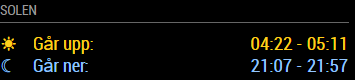
                  Where exactly? Here my config:

                  text: ‘

                  ’+‘’+‘’+‘
                  ☀Sonnenaufgang: -
                  ☾Sonnenuntergang: -
                  ’

                  LordyL 1 Reply Last reply Reply Quote 0
                  • LordyL Offline
                    Lordy @Lordy
                    last edited by Lordy

                    Sunrise.JPG

                    1 Reply Last reply Reply Quote 0
                    • R Offline
                      retroflex Project Sponsor Module Developer
                      last edited by

                      @Lordy Aha. Then change one of the < td > to < td style=“color: #ffff00” >

                      LordyL 1 Reply Last reply Reply Quote 1
                      • LordyL Offline
                        Lordy @retroflex
                        last edited by

                        @retroflex
                        Thank U,that’s it. :thumbs_up_light_skin_tone:

                        LordyL 1 Reply Last reply Reply Quote 0
                        • LordyL Offline
                          Lordy @Lordy
                          last edited by Lordy

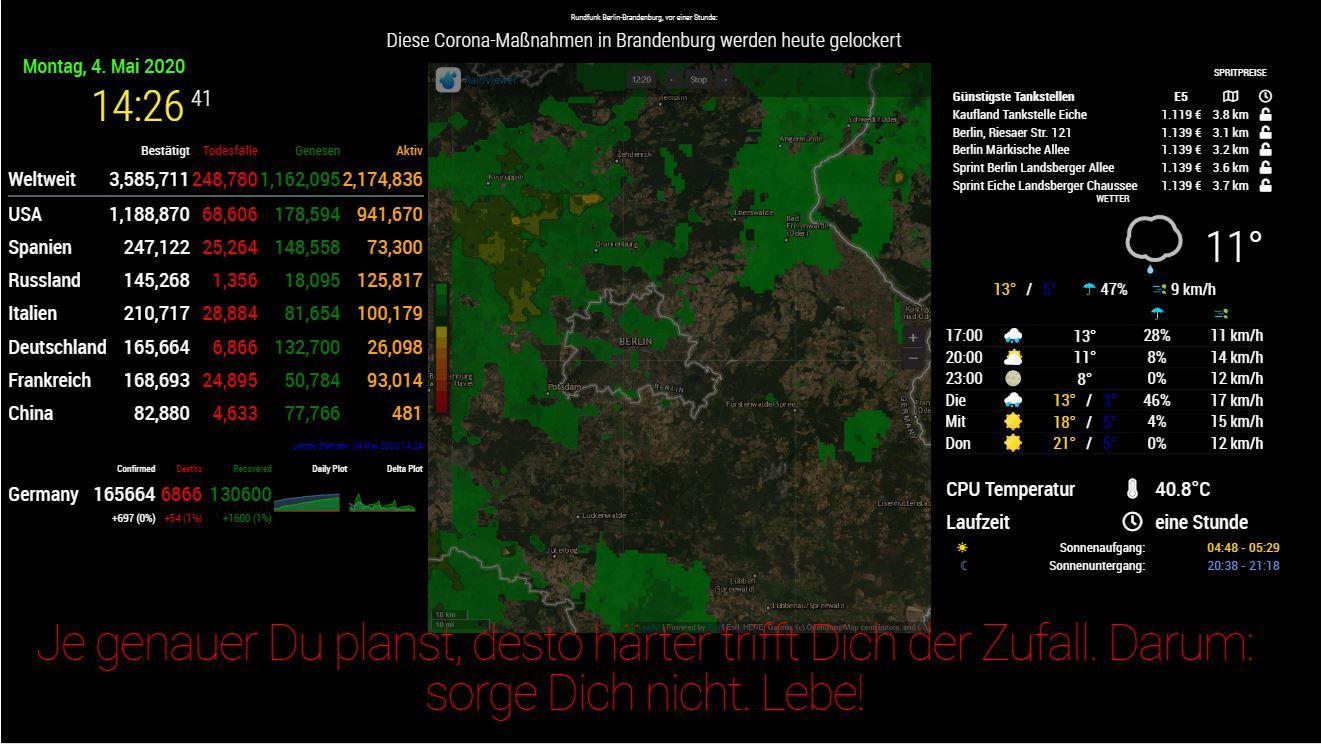
                          Corona Screen.JPG

                          R 1 Reply Last reply Reply Quote 1
                          • R Offline
                            retroflex Project Sponsor Module Developer @Lordy
                            last edited by

                            @Lordy Great that it worked out! I like the idea, I’ll colorize mine too now.

                            LordyL 1 Reply Last reply Reply Quote 0
                            • LordyL Offline
                              Lordy @retroflex
                              last edited by

                              @retroflex said in mmm-suncalc - Text only display of sunrise, sunset and other sun events:

                              Great that it worked out! I like the idea, I’ll colorize mine too now.

                              Enjoying working and i would like to see the results.:grinning_face_with_smiling_eyes:

                              R 1 Reply Last reply Reply Quote 0
                              • R Offline
                                retroflex Project Sponsor Module Developer @Lordy
                                last edited by

                                @Lordy b1274dcb-e80a-4904-adff-23b8f41dfdb6-image.png

                                LordyL 2 Replies Last reply Reply Quote 0
                                • LordyL Offline
                                  Lordy @retroflex
                                  last edited by

                                  @retroflex
                                  Nice:thumbs_up_light_skin_tone: That’s exactly how I put forward it.

                                  1 Reply Last reply Reply Quote 0
                                  • LordyL Offline
                                    Lordy @retroflex
                                    last edited by Lordy

                                    @retroflex
                                    I hope you can help me again?
                                    I try to change the font size, but I can’t get any further. Can you please tell me my mistake?
                                    At the moment the module is going under compared to the other modules.
                                    My css entry:

                                    .mmm-suncalc text {font-size: 30px}
                                    
                                    R S 2 Replies Last reply Reply Quote 0
                                    • R Offline
                                      retroflex Project Sponsor Module Developer @Lordy
                                      last edited by

                                      @Lordy Where does “text” come from? Try:

                                      .mmm-suncalc {
                                        font-size: 30px
                                      }
                                      
                                      LordyL 1 Reply Last reply Reply Quote 0
                                      • LordyL Offline
                                        Lordy @retroflex
                                        last edited by Lordy

                                        @retroflex said in mmm-suncalc - Text only display of sunrise, sunset and other sun events:

                                        .mmm-suncalc {
                                        font-size: 30px
                                        }

                                        I had tried that too. Unfortunately without success. “Text” appears in the config.
                                        Do you have another suggestion?

                                        R 1 Reply Last reply Reply Quote 0
                                        • R Offline
                                          retroflex Project Sponsor Module Developer @Lordy
                                          last edited by

                                          @Lordy Maybe this:

                                          .mmm-suncalc table {
                                            font-size: 30px
                                          }
                                          

                                          Tip: You can use developer tools in the browser to check elements and change styles.

                                          1 Reply Last reply Reply Quote 1
                                          • S Offline
                                            sdetweil @Lordy
                                            last edited by

                                            @Lordy said in mmm-suncalc - Text only display of sunrise, sunset and other sun events:
                                            how about

                                            .mmm-suncalc .text {font-size: 30px}
                                            

                                            notice the . in front of text (required to target prior element classes or element names)

                                            Sam

                                            How to add modules

                                            learning how to use browser developers window for css changes

                                            1 Reply Last reply Reply Quote 0

                                            Hello! It looks like you're interested in this conversation, but you don't have an account yet.

                                            Getting fed up of having to scroll through the same posts each visit? When you register for an account, you'll always come back to exactly where you were before, and choose to be notified of new replies (either via email, or push notification). You'll also be able to save bookmarks and upvote posts to show your appreciation to other community members.

                                            With your input, this post could be even better 💗

                                            Register Login

                                            • 1
                                            • 2
                                            • 1 / 2
                                            • First post
                                              Last post
                                            Enjoying MagicMirror? Please consider a donation!
                                            MagicMirror created by Michael Teeuw.
                                            Forum managed by Sam, technical setup by Karsten.
                                            This forum is using NodeBB as its core | Contributors
                                            Contact | Privacy Policy