Read the statement by Michael Teeuw here.
MMM-TouchNavigation, A Touch Activated Profile/Layout Changer
-
This Module adds a menu with buttons to change between different layouts. It works together with MMM-ProfileSwitcher. This module does the actual changing of layout. However if you do not want to use this module then you can make your own/use a different module for it aswell (if you change a bit of the code).
You can configure multiple buttons with either a symbol, some text or both. The button that is currently selected will light up a bit. Lastly you can also change the direction of the menu buttons and the placement of the symbol.Features
- Custom Text
- Custom Symbol or Own Image
- Customisable Button Size
- Customisable Direction
- Customisable Symbol/Image position
You can find it here.
[card:tosti007/MMM-TouchNavigation]If you have any questions or requests for future features, don’t hesitate to ask!
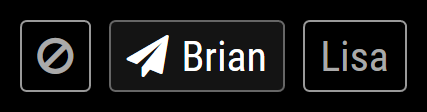
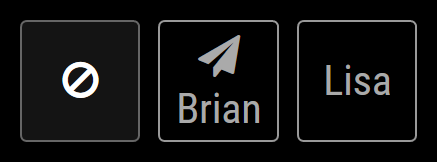
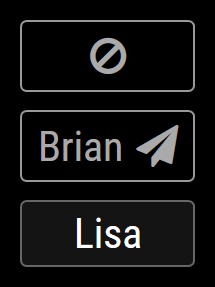
Some screenshots with different configurations:
Horizontal layout (row), symbol left, current “Brian”
Horizontal layout (row), symbol top, minimum width 65px, current “default” (no text set so only symbol shown)
Vertical layout (column), symbol right, current “Lisa” (no symbol set so only text shown)
Version 1
- First version and implementation
- Added config example
- Bug fixes
Version 2
- Added configurable images!
- Code cleanup/small optimisation
- Updated readme and config example
Important Note:
symbolPlacementis renamed topicturePlacementin the configuration options!
The css classnavigation-symbolis renamed tonavigation-picture
Version 2.1
After MagicMirror framework update 2.1.1
- Removed
fullscreenregion’sz-indexin the css - Fullscreen position works!
-
I saw some people around doing this and thought it would be a nice challange, so I gave it a go and this was the result. Hope it helps anyone since I don’t have a touch magic-mirror myself (I used my normal mouse for testing).
-
@tosti007 Hi, below is my config of touchnavigation, nothing gets displayed on the MM, please show the config steps on both classes ( everyone and user1)
{
  module: 'MMM-TouchNavigation',
    config: {
      buttons: {
        'default everyone': {
          text: 'text',
          symbol: 'ban'
        }
      }
    }
},
Note from admin: Please use Markdown on code snippets for easier reading!
-
@shashank you are currently using two one button for two profiles, that’s why it doesn’t do anything. If you want that as a feature I can implement it for you. One way to solve this currently would be to use the class
everyonefor the button and set theincludeEveryoneToDefaultin profileswitcher config to true. Or make a different profile name. -
@tosti007 I could not get this working, can you please give an example code for both profileSwitcher and touch Navigation with few modules , Thanks
-
@shashank Hmm odd, what did you see on your screen and what config did you use?
This should work just fine:modules: [ { module: "alert" }, { module: "MMM-ProfileSwitcher" }, { module: "MMM-TouchNavigation", position: "bottom_center", classes: "default everyone", config: { buttons: { "default": { symbol: "ban" }, "Brian": { text: " Brian", symbol: "paper-plane" }, "Lisa": { text: "Lisa" } } } }, { module: "clock", classes: "everyone", position: "top_left" }, { module: "clock", classes: "default", position: "middle_center", config: { analogShowDate: false, displayType: "analog" } }, { module: "helloworld", classes: "Lisa", position: "lower_third" }, { module: "helloworld", position: "top_right", classes: "Brian" } ]Edit: I added a ready-to-use config file in the repository. If you copy-paste and rename it it would work.
-
@tosti007 hi, i tried this example classes names are displayed with Analog and Digital clock , but not able to do profiile switching between Brain and lisa
{
module: “MMM-ProfileSwitcher”,
config: {
includeEveryoneToDefault: true,
}
}, -
@shashank and what is your config for the touchnavigation? I also uploaded an example config file that should work in the repository
-
@tosti007 This is my config.js
modules: [
{ module: ‘alert’,},{ module: "updatenotification", position: "top_bar" }, { module: "MMM-ProfileSwitcher", config: { includeEveryoneToDefault: true, } }, { module: "MMM-TouchNavigation", position: "bottom_center", classes: "default everyone", config: { buttons: { "default": { symbol: "ban" }, "Brian": { text: " Brian", symbol: "paper-plane" }, "Lisa": { text: "Lisa" } } } }, { module: "clock", classes: "everyone", position: "top_left" }, { module: "clock", classes: "default", position: "middle_center", config: { analogShowDate: false, displayType: "analog" } }, { module: "helloworld", classes: "Lisa", position: "lower_third" }, { module: "helloworld", position: "top_right", classes: "Brian" }, ] -
@shashank Oh damnit, I made a terrible mistake while testing. Turns out that I was using the developer branch while testing. In the developer branch they fixed pointer events from fullscreen region not passing down onto the underlaying modules. So when you used my module it did not send the pointer events to the buttons. I made a new commit to my module so it should be fixed if you pull the changes (goto MMM-TouchNavigation folder and do
git pull). However you cannot use this module in fullscreen mode now. If you desire to do so let me know and I will go more in depth on how to solve this issue. Thank you for letting me know! -
@all IMPORTANT NOTE: Unfortunatly setting this module to full screen does not work. The menu floats in the top left corner and you cannot press any buttons! I might be able to fix this, but since there is no audience currently wanting this feature I will wait for the new MagicMirror version (where this issue will be fixed). Let me know if you want to have it full screen aswell and I will see what i can do!
Edit: thanks to @broberg this issue was solved :)
-
@tosti007 add z-index: -1 or 0 to the region fullscreen above, it blocks everything beneath so it can’t be clicked ( or add z-index: 2 to the module div)
-
@broberg yea I thought that would work too, however when I set z-index to -1 on region fullscreen nothing much happened. I will try that z-index of 2 on the module dif aswell
-
@broberg Only setting region fullscreen to 0 worked. Not entirely sure tho. Anyways ty for the tip! Updated my module :)
-
@tosti007 hi, after git pull, module working great, Thanks for your quick response , keep rocking…
-
@tosti007 , Any possibility of using JPG photos of users instead of symbols in the TouchNavigation module, this will give a good interaction with the mirror
-
@shashank you are welcome :) and about the images: yes I think that would be most definitely possible. However then the button size might become a problem if it’s too big, but I can give it a try.
-
@tosti007 hi, other modules are ovelapping on to Touch Profile , how to move touch profile icons to extreme bottom or top
-
@shashank a way would be to change the
z-indexin teh css file to a higher number, I will have a look at itIf there is anything don’t hesitate to contact me!
ProfileSwitcher, TouchNotifications -
@tosti007 when you just change the zindex the modules are still overlapping
you could create a class left center and right and then classes for top middle bottom and let the user decide which position it has like bottom right

Hello! It looks like you're interested in this conversation, but you don't have an account yet.
Getting fed up of having to scroll through the same posts each visit? When you register for an account, you'll always come back to exactly where you were before, and choose to be notified of new replies (either via email, or push notification). You'll also be able to save bookmarks and upvote posts to show your appreciation to other community members.
With your input, this post could be even better 💗
Register Login