MagicMirror Forum
    • Recent
    • Tags
    • Unsolved
    • Solved
    • MagicMirror² Repository
    • Documentation
    • 3rd-Party-Modules
    • Donate
    • Discord
    • Register
    • Login
    A New Chapter for MagicMirror: The Community Takes the Lead
    Read the statement by Michael Teeuw here.

    MMM-aviationwx (Aviation weather)

    Scheduled Pinned Locked Moved Transport
    111 Posts 12 Posters 133.8k Views 11 Watching
    Loading More Posts
    • Oldest to Newest
    • Newest to Oldest
    • Most Votes
    Reply
    • Reply as topic
    Log in to reply
    This topic has been deleted. Only users with topic management privileges can see it.
    • S Offline
      stephenmelody @Mykle1
      last edited by

      @Mykle1 I don’t know what’s going on with it, I’m not Linuxy enough to work out how to find the problem. It’s basically ok for a day and then I come down stairs in the morning and it’s unresponsive, no ping, ssh, anything on the screen so I have to pull the power.

      I’m wondering if I’ve got it doing too much, it’s got MM, Alexa and Face recognition all going on. I’m also slightly suspect about the power supply to it being part of the issue.

      If you have any hints of where I could start, please let me know… I don’t fancy rebuilding it from scratch… :(

      Mykle1M 1 Reply Last reply Reply Quote 0
      • Mykle1M Offline
        Mykle1 Project Sponsor Module Developer @stephenmelody
        last edited by

        @stephenmelody said in MMM-aviationwx (Aviation weather):

        If you have any hints of where I could start, please let me know… I don’t fancy rebuilding it from scratch… :(

        Well, 2.0 amps minimum on the power supply although I think 2.5 is optimum.

        Hints? Well, suggestion.

        Disable all but the default modules and run that for a day and see what happens. If all is well then introduce one at a time and test again. See how that goes for starters

        Create a working config
        How to add modules

        1 Reply Last reply Reply Quote 0
        • X Offline
          XT16Johnny
          last edited by

          @mkyle1 - Great job on the module, it looks superb. I’ll be adding it to my mirror very soon.

          I understand you’re working on this on your own time, just a couple of config options for you if you’re in the mood to do anything more with the module ;-)

          • Most of Eur runs on KM for the viz. I wouldn’t have a clue what a Statue Mile looks like out of the window!
          • Typically winds reported at xxx degrees at yy kts and shorthand would be 260/05 rather than @.

          I would be happy enough to change this on my mirror but a config option would be (far) too advanced for me to try and implement!

          @stephenmelody - Ref the crashing:
          First thing I’d do is check the power supply, RPi are really picky!
          Check out the command ‘dmesg’ - very insightful for tracking down issues as it is timestamped. This will clear on reboot so it’d need to be checked before the crash.

          If this is fruitless,

          • /var/log/messages
          • /var/log/syslog
          • /var/log/kern.log

          Cheers lads,

          Johnny

          Mykle1M 3 Replies Last reply Reply Quote 0
          • Mykle1M Offline
            Mykle1 Project Sponsor Module Developer @XT16Johnny
            last edited by

            @XT16Johnny said in MMM-aviationwx (Aviation weather):

            @mkyle1 - Great job on the module, it looks superb. I’ll be adding it to my mirror very soon.

            Thanks, I appreciate that. I did it as a request from a user so forgive my lack of aviation understanding.

            Typically winds reported at xxx degrees at yy kts and shorthand would be 260/05 rather than @.

            That’s easy enough to fix. I’ll take care of that. Maybe even as soon as tonight.

            As far as the Statute Mile/KM situation is concerned. The API only provides Statute Mile (SM) in the data. I didn’t do any conversions because I was going to move to another API that provided both, making it easier to give you a config option and a whole lot less coding for me. However, I will look at it again and see what it involves. Worst case scenario you’d have to wait for my moving to the other API but I can’t tell you when that would be. :-)

            Create a working config
            How to add modules

            1 Reply Last reply Reply Quote 0
            • Mykle1M Offline
              Mykle1 Project Sponsor Module Developer @XT16Johnny
              last edited by

              @XT16Johnny

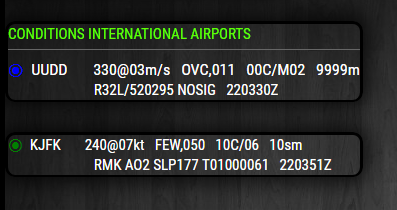
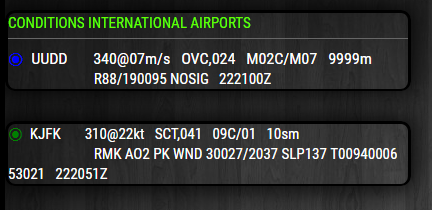
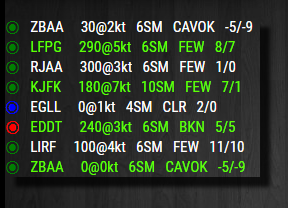
              Just in case others want the @ symbol as a separator between wind speed and direction I made it a config option.

              sym: "@",  // or sym: "/",
              

              Result:

              0_1512346379177_1.PNG 0_1512346388412_2.PNG

              So, for those interested, you can do a git pull in the MMM-PilotWX directory to update or download and install as usual.
              https://github.com/mykle1/MMM-PilotWX

              Create a working config
              How to add modules

              1 Reply Last reply Reply Quote 0
              • Mykle1M Offline
                Mykle1 Project Sponsor Module Developer @XT16Johnny
                last edited by

                @XT16Johnny

                I wouldn’t have a clue what a Statue Mile looks like out of the window!

                0_1512347800710_1.PNG

                Create a working config
                How to add modules

                1 Reply Last reply Reply Quote 0
                • cowboysdudeC Offline
                  cowboysdude Module Developer
                  last edited by cowboysdude

                  Can it do this? ¿

                  Mykle1M 1 Reply Last reply Reply Quote 0
                  • Mykle1M Offline
                    Mykle1 Project Sponsor Module Developer @cowboysdude
                    last edited by

                    @cowboysdude said in MMM-aviationwx (Aviation weather):

                    Can it do this? ¿

                    HAHA :-)

                    Create a working config
                    How to add modules

                    cowboysdudeC 1 Reply Last reply Reply Quote 0
                    • cowboysdudeC Offline
                      cowboysdude Module Developer @Mykle1
                      last edited by cowboysdude

                      @Mykle1 IN PURPLE? BUT just on Fridays and Wednesdays…the other days I want it blue. Well unless the wind is blowing from the west then I need it hot pink or orange…no wait orange is for the days it’s blowing from the east at 2.2mph…

                      Can you do that? Thanks! LOL

                      Mykle1M 1 Reply Last reply Reply Quote 0
                      • Mykle1M Offline
                        Mykle1 Project Sponsor Module Developer @cowboysdude
                        last edited by Mykle1

                        @cowboysdude said in MMM-aviationwx (Aviation weather):

                        Can you do that? Thanks! LOL

                        I can, but I didn’t. ;-)

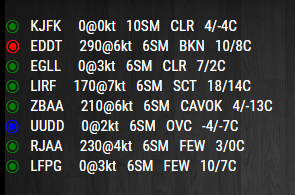
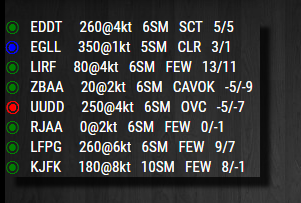
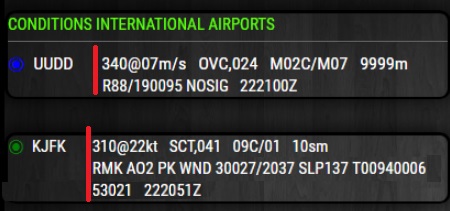
                        However, I did make a config option for Kilometers if you would rather that than Statute Miles for Visibility. :-)

                        So, for those interested, you can do another git pull in the MMM-PilotWX directory to update or download and install as usual.
                        https://github.com/mykle1/MMM-PilotWX

                        0_1512356887035_3.PNG 0_1512356894566_4.PNG

                        I don’t know what the standard for this type of display is but it seems to me that 260/6kt is easily readable, whereas 3KM for visibility is not. Would not 3/km be better? Or is that not what you pilots are used to? Please clarify. Thanks. :-)

                        Create a working config
                        How to add modules

                        cowboysdudeC 1 Reply Last reply Reply Quote 1
                        • cowboysdudeC Offline
                          cowboysdude Module Developer @Mykle1
                          last edited by

                          @Mykle1 Why Thanks!

                          1 Reply Last reply Reply Quote 1
                          • 3 Offline
                            320fan
                            last edited by 320fan

                            @Mykle1 Hi again.

                            As I can see you continue to improve your mode - thats fine, thanks. Now I’ve some time for tests of this updated module. My points are:

                            1. No possibility to set custom number of airports for the “Static” view: for example, line like:
                            ICAO: "UUDD,UUWW,UUEE,UUOO,UWKD,URMT,ULLI,UWWW",  // separated by comma only
                            

                            works fine (8 ICAO codes), but when I’m decrease/increase number of ICAO codes it doesn’t work: “Loading PilotWX…” and thats all.

                            1. My next proposal is to remove line “Station Conditions” for the Static view. It’s a little bit pointless ;)

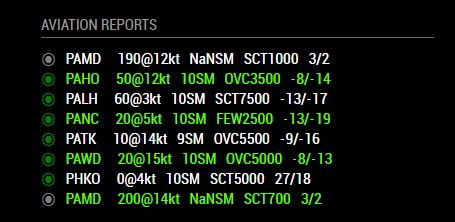
                            2. For the “Rotating” view: the whole text alltime yellow. How I can change that?
                              0_1512652922149_1.jpg

                            3.1) For the “Rotating” view: pressure must be like xx.xx (not like xx as it is). In aircraft you must use all four digits for all the time. But for me - pressure in hectopascals (like 1019, without digits after comma) better in any case. Hovewer, in any case 1 hg = 33.863886666667 hPa. hg used for US airports at all the time, for EU/RU airports - hectopascals are the standard.
                            3.2) And the last one regarding pressure - it’s nice to have it for a “Standard” view too - it’s a really important information.

                            1. About time, which I can observe in the end of the line (tt:tt): I would ask you to display a UTC (Zulu) time, not a local time. So, thats the standard of METAR/TAF ;) In that case you display it like (ttttZ) or (tt:ttZ), and Zulu will be a remider for that.

                            2. Thanks for visibility in KM, thats very usefull. And to have a same view - please, change speed in knots as “KT”, not a “kt”.

                            3. For the “Loading PilotWX…” message - I would like to propose next code:

                                    if (!this.loaded) {
                                        wrapper.classList.add("wrapper");
                            //            wrapper.innerHTML = "Loading PilotWX . .";
                            //            wrapper.className = "bright light small";
                                          wrapper.innerHTML = (this.loaded) ? this.translate("EMPTY") : this.translate("LOADING");
                                          wrapper.className = "small dimmed";
                            
                                        return wrapper;
                                    }
                            

                            In that case this module will take into account locale settings for correct displaying of “Loading” message.

                            1. In case of no cloudbase layer classification (like "BKN/OVC/etc.) you may see a OVX text:
                              0_1512653901717_2.jpg
                              Thats not correct; the reply from server in that case is: sky_condition sky_cover=“OVX” cloud_base_ft_agl=“0”

                            The right way - to display data directly from a string, as example:
                            raw_text> URMT 071330Z 32006MPS 0650 0550NE R25/0800N +SHSN VV002 M01/M01 Q1010 R25/290255 NOSIG RMK QBB080 OBST OBSC QFE719 raw_text>

                            • VV002 means vertical visibility in hundred of feets or QBB080 means vertical visibility in meters (this code not applicable for all airports).
                            1. And if case of aligment to the right:
                                           {
                                                    module: 'MMM-PilotWX',
                                                    header: 'Aviation weather',
                                                    position: 'bottom_right',
                                                    disabled: false,
                                                    config: {
                            

                            the whole layout is shifted to the right; Is it possible to align/to stretch all elements like for the “Weather forecast” plugin?

                            0_1512655063824_4.jpg

                            1. Is it possible to use a same font/font size, like for standart modules (like "calendars, “weather”, etc.) to keep a same view for the whole mirror? It’s not a big deal, but in that case we can make a mirror looks more “arranged”.

                            And last, but do not least: @Mykle1, thanks again for your job.

                            Mykle1M 1 Reply Last reply Reply Quote 0
                            • 3 Offline
                              320fan
                              last edited by

                              • one moew issue:
                                0_1512664940182_5.png

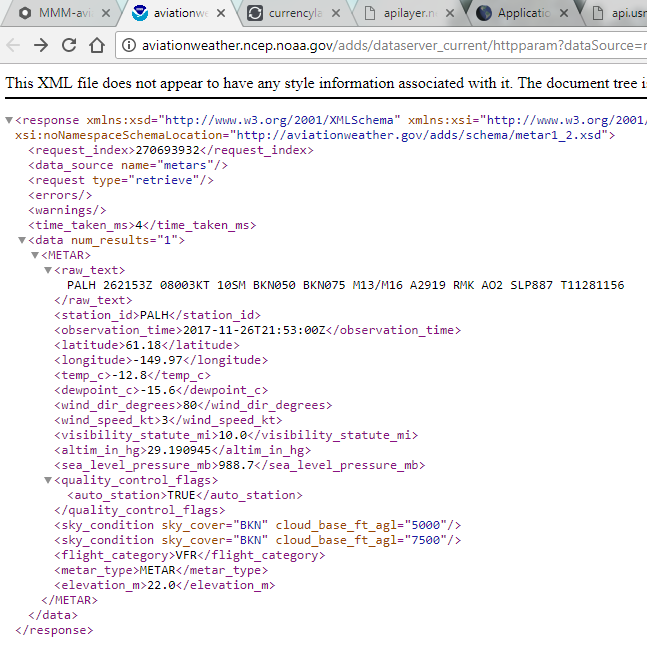
                              Datas from: https://aviationweather.gov/adds/dataserver_current/httpparam?dataSource=metars&requestType=retrieve&format=xml&stationString=UUDD&hoursBeforeNow=1

                              raw_text
                              UUDD 071630Z 34005MPS 9999 BKN022 M04/M08 Q1009 R88/520295 NOSIG
                              /raw_text
                              
                              sky_condition sky_cover="BKN" cloud_base_ft_agl="2200"
                              

                              It must be BKN022, not BKN2200.

                              1 Reply Last reply Reply Quote 0
                              • Mykle1M Offline
                                Mykle1 Project Sponsor Module Developer @320fan
                                last edited by

                                @320fan said in MMM-aviationwx (Aviation weather):

                                No possibility to set custom number of airports for the “Static” view

                                Yes, at the moment you MUST use 8. However, another user has graciously asked if he could modify some things and issue a PR that I will merge into the module. That is one of the changes.

                                My next proposal is to remove line “Station Conditions” for the Static view.

                                You mean the headers, “Station” and “Conditions”? Add this to your custom.css file and it will remove both

                                .MMM-PilotWX .station {
                                  display: none;
                                } 
                                

                                And this to change to any color for rotating

                                .MMM-PilotWX .bottom_bar {
                                  color: yellow;
                                }  
                                

                                pressure must be like xx.xx (not like xx as it is)

                                Tell that to the API. That’s the data being given. I just display it.

                                Is it possible to use a same font/font size, like for standart modules (like "calendars, “weather”, etc.

                                Use css to customize to your liking

                                Alignment will always be an issue because the module is not set in a table. I did mention above that I am not capable of using tables yet. SO, for the time being, left regions will be better suited to the module

                                Taking specific portions of the raw_text for display is beyond me.

                                Create a working config
                                How to add modules

                                3 1 Reply Last reply Reply Quote 0
                                • 3 Offline
                                  320fan @Mykle1
                                  last edited by

                                  @Mykle1 said in MMM-aviationwx (Aviation weather):

                                  pressure must be like xx.xx (not like xx as it is)

                                  Tell that to the API. That’s the data being given. I just display it.

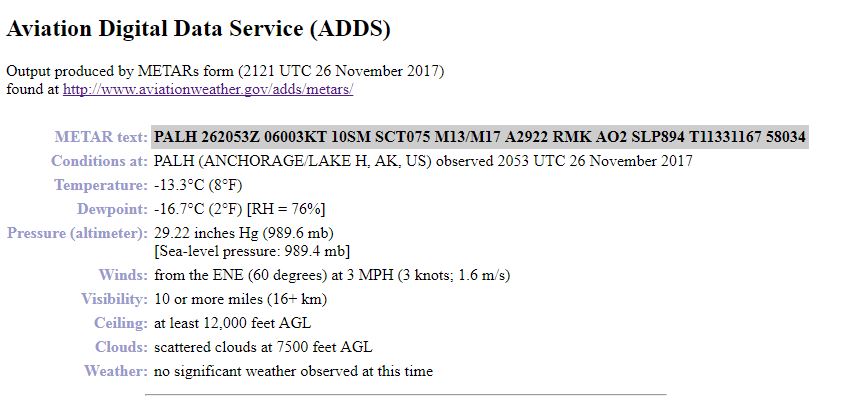
                                  For example:

                                  https://aviationweather.gov/adds/dataserver_current/httpparam?dataSource=metars&requestType=retrieve&format=xml&stationString=UUDD&hoursBeforeNow=1

                                  altim_in_hg 29.911417/altim_in_hg
                                  

                                  I think that this API converts pressure in hPa from raw_data (like Q1013) into hg by simply dividing by coefficient.

                                  Mykle1M 1 Reply Last reply Reply Quote 0
                                  • Mykle1M Offline
                                    Mykle1 Project Sponsor Module Developer @320fan
                                    last edited by

                                    @320fan said in MMM-aviationwx (Aviation weather):

                                    altim_in_hg 29.911417/altim_in_hg

                                    Forgot I rounded this. My bad. So this should be

                                    29.91/hg ?

                                    Create a working config
                                    How to add modules

                                    3 1 Reply Last reply Reply Quote 0
                                    • 3 Offline
                                      320fan @Mykle1
                                      last edited by

                                      @Mykle1 Hi again.

                                      Yea, 29.91Hg.

                                      Mykle1M 1 Reply Last reply Reply Quote 0
                                      • Mykle1M Offline
                                        Mykle1 Project Sponsor Module Developer @320fan
                                        last edited by

                                        @320fan

                                        Good morning

                                        29.91Hg . Ok, I can work on that later. I’m getting ready for my work day right now

                                        Create a working config
                                        How to add modules

                                        3 1 Reply Last reply Reply Quote 0
                                        • 3 Offline
                                          320fan @Mykle1
                                          last edited by

                                          @Mykle1 Okay, no problem. Thanks.

                                          Mykle1M 1 Reply Last reply Reply Quote 0
                                          • Mykle1M Offline
                                            Mykle1 Project Sponsor Module Developer @320fan
                                            last edited by Mykle1

                                            @320fan

                                            Wind speed now displays as such:
                                            310/4KT

                                            Pressure added to static view and formatted for both views as such:
                                            29.91Hg

                                            Config option added for time format, Zulu or Local in both views:
                                            time: "Zulu", = (19:10Z)
                                            time: "Local", = (14:10)

                                            https://github.com/mykle1/MMM-PilotWX

                                            git pull in your PilotWX directory for update or install as usual.

                                            Create a working config
                                            How to add modules

                                            1 Reply Last reply Reply Quote 0

                                            Hello! It looks like you're interested in this conversation, but you don't have an account yet.

                                            Getting fed up of having to scroll through the same posts each visit? When you register for an account, you'll always come back to exactly where you were before, and choose to be notified of new replies (either via email, or push notification). You'll also be able to save bookmarks and upvote posts to show your appreciation to other community members.

                                            With your input, this post could be even better 💗

                                            Register Login

                                            • 1
                                            • 2
                                            • 3
                                            • 4
                                            • 5
                                            • 6
                                            • 4 / 6
                                            • First post
                                              Last post
                                            Enjoying MagicMirror? Please consider a donation!
                                            MagicMirror created by Michael Teeuw.
                                            Forum managed by Sam, technical setup by Karsten.
                                            This forum is using NodeBB as its core | Contributors
                                            Contact | Privacy Policy