MagicMirror Forum
    • Recent
    • Tags
    • Unsolved
    • Solved
    • MagicMirror² Repository
    • Documentation
    • 3rd-Party-Modules
    • Donate
    • Discord
    • Register
    • Login
    A New Chapter for MagicMirror: The Community Takes the Lead
    Read the statement by Michael Teeuw here.

    MMM-Domoticz-ext: interact with Domoticz

    Scheduled Pinned Locked Moved Utilities
    121 Posts 14 Posters 101.5k Views 16 Watching
    Loading More Posts
    • Oldest to Newest
    • Newest to Oldest
    • Most Votes
    Reply
    • Reply as topic
    Log in to reply
    This topic has been deleted. Only users with topic management privileges can see it.
    • M Offline
      maxs @goedh452
      last edited by

      @goedh452

      Thanks, that would be nice. I really like your module.

      1 Reply Last reply Reply Quote 0
      • G Offline
        goedh452 @maxs
        last edited by

        @maxs

        I made some changes in the code. Can you download the latest version from GitHub and add the option enableReturn to the utility device? When set to false the return values are ignored and the correct value should be displayed. I’m unable to test properly since my device doesn’t generate this strange value.

        enableReturn: false,
        

        My config example looks like this:

        devices: [
                      {
                        idx: "304",
                        deviceHeader: "Elektriciteit",
                        useHeaderSymbol: true,
                        headerSymbol: "plug",
                        enableReturn: false,
                        counterTodayLabel: "Vandaag",
                        counterTodayAppendText: "kWh",
                        gaugeMinValue: -3000,
                        gaugeMaxValue: 3000,
                        gaugeAppendText: "watt",
                        gaugeWidth: 200,
                        lineWidth: 16,
                        markerWidth: 16,
                        markerColor: "#F4D03F"
                      },
        
        M 1 Reply Last reply Reply Quote 0
        • M Offline
          maxs @goedh452
          last edited by

          @goedh452

          Thanks for quick reply. Test it and works like a charm.
          :thumbs_up:
          Thanks.

          1 Reply Last reply Reply Quote 0
          • M Offline
            majsoft @goedh452
            last edited by

            @goedh452 said in MMM-Domoticz-ext: interact with Domoticz:

            You could create your own module based on the code and modify that css.

            I found that both mmm-domoticz-ext and mmm-domoticz-ext2 work separately for both modules

            If I enter them both at once in config.js it always works only the one that is written as the last one. Can anyone help please?

            1 Reply Last reply Reply Quote 0
            • M Offline
              Manu663
              last edited by Manu663

              Hi all, I’m an old geek who’s trying to keep up but learning by doing without initial training is long, difficult and the age of my brain cells doesn’t help me much.
              Could you please post some examples of your MMM-Domoticz-ext config? (from the simplest to the most elaborate, I’ll take anything that comes along!)
              It would help me to test different configurations and customize mine.
              Thanks in advance !

              G 1 Reply Last reply Reply Quote 0
              • G Offline
                goedh452 @Manu663
                last edited by

                @manu663

                Please see the GitHub-page for some examples: MMM-Domoticz-ext

                M 1 Reply Last reply Reply Quote 0
                • M Offline
                  Manu663 @goedh452
                  last edited by Manu663

                  @goedh452 Thank you for your quick reply, it’s much appreciated!
                  I have read the whole github unfortunately, I don’t manage to get a convincing result. It doesn’t matter, I’ll calm down and read the github again over a cup of coffee and start all over again.
                  But if others have examples, I’ll take them anyway ;-)

                  M 1 Reply Last reply Reply Quote 0
                  • M Offline
                    Manu663 @Manu663
                    last edited by Manu663

                    Once I calmed down and reread everything from the beginning I finally managed to get a nice result.
                    I feel ashamed that I called for help when it was just a silly syntax error. :sad_but_relieved_face:
                    Anyway, thank you for the marvelous job done there !

                    G 1 Reply Last reply Reply Quote 0
                    • G Offline
                      goedh452 @Manu663
                      last edited by

                      @manu663

                      No problem at all! The module became a bit complex during the build :-)

                      1 Reply Last reply Reply Quote 0
                      • S Offline
                        Shaitan
                        last edited by

                        Hi @goedh452,
                        Your mod is so great, but I think you already know that ;-).
                        Like the others, this is exactly what I was looking for.

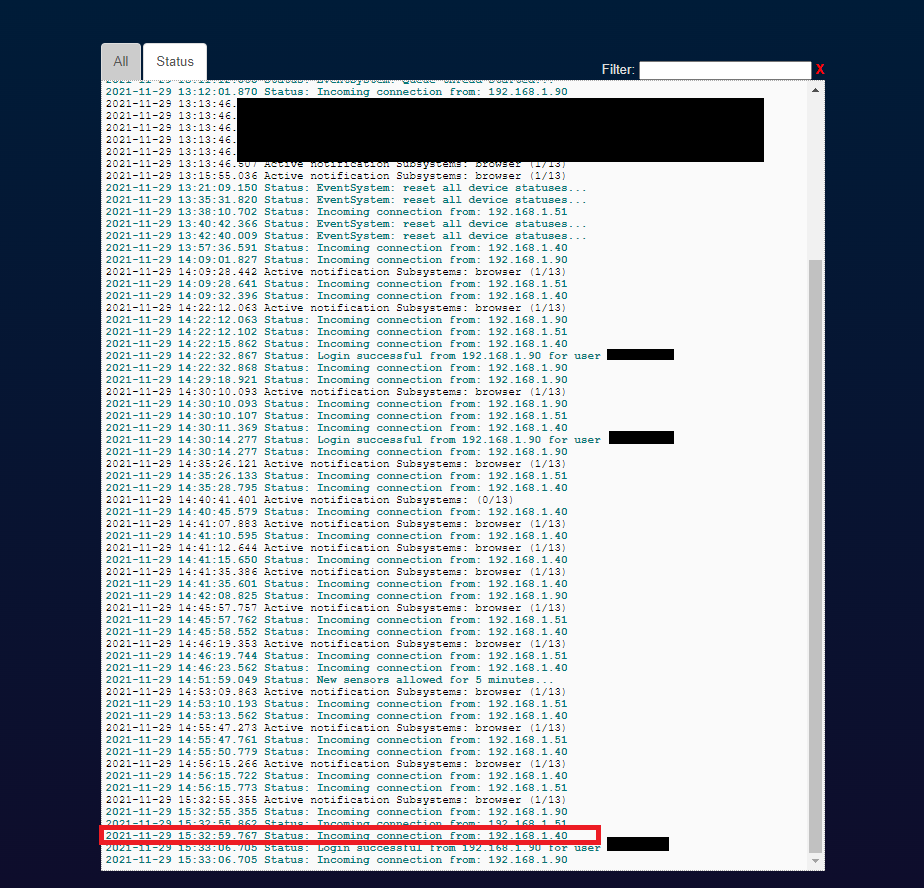
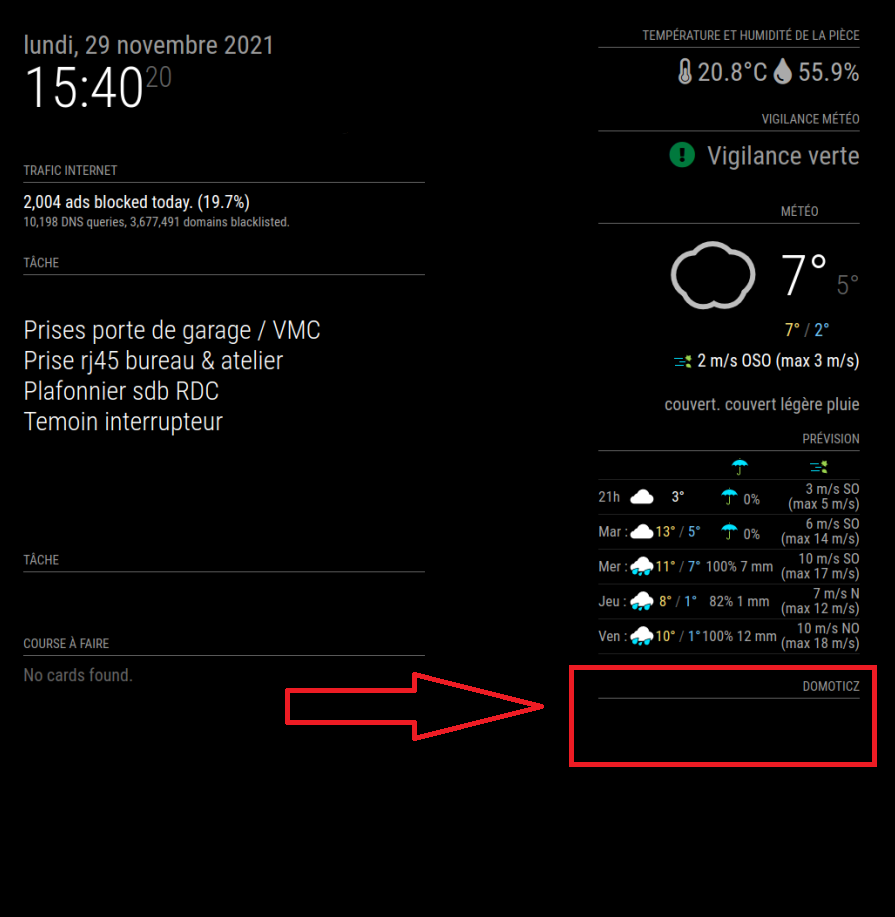
                        But after installing it, it doesn’t display anything, just the title on my MM. I notice in the domoticz log that he contacts him but I do not know if it is a problem of connection or reception of data…

                        Thank a lot for your help

                        Here are the informations and screenshots :

                        Domoticz ip : 192.168.1.3
                        MM’s ip : 192.168.1.40

                        My Config.js

                        		{
                        			module: "MMM-Domoticz-ext",
                        			header: "Domoticz",
                        			position: "top_right",
                        			config: {
                        			  apiBase: "192.168.1.3",
                        			  apiPort: "8080",
                        			  updateInterval: 5,
                        			  animationSpeed: 0,
                        			  displayType: "all",
                        			  horizontal: true,
                        			  dashboardColumnCount: 2,
                        			  showTotals: true,
                        			  dashboardRooms: [ "1", "2" ],
                        			}
                        		},
                        

                        My json for IDX 1

                        {
                        	"ActTime" : xxxxxx,
                        	"AstrTwilightEnd" : "xxxxx",
                        	"AstrTwilightStart" : "xxxxx",
                        	"CivTwilightEnd" : "xxxxxx",
                        	"CivTwilightStart" : "xxxxx",
                        	"DayLength" : "xxxxxx",
                        	"NautTwilightEnd" : "xxxxx",
                        	"NautTwilightStart" : "xxxxx",
                        	"ServerTime" : "xxxxxxxxx",
                        	"SunAtSouth" : "xxxxx",
                        	"Sunrise" : "xxxxx",
                        	"Sunset" : "xxxxx",
                        	"app_version" : "2021.1",
                        	"result" : 
                        	[
                        		{
                        			"AddjMulti" : 1.0,
                        			"AddjMulti2" : 1.0,
                        			"AddjValue" : 0.0,
                        			"AddjValue2" : 0.0,
                        			"BatteryLevel" : 255,
                        			"CustomImage" : 0,
                        			"Data" : "21.4 C, 56 %",
                        			"Description" : "",
                        			"DewPoint" : "12.26",
                        			"Favorite" : 0,
                        			"HardwareDisabled" : false,
                        			"HardwareID" : 2,
                        			"HardwareName" : "DHT 22 ext",
                        			"HardwareType" : "Dummy (Does nothing, use for virtual switches only)",
                        			"HardwareTypeVal" : 15,
                        			"HaveTimeout" : false,
                        			"Humidity" : 56,
                        			"HumidityStatus" : "Comfortable",
                        			"ID" : "14051",
                        			"LastUpdate" : "2021-11-29 15:03:03",
                        			"Name" : "DHT22 ext",
                        			"Notifications" : "false",
                        			"PlanID" : "0",
                        			"PlanIDs" : 
                        			[
                        				0
                        			],
                        			"Protected" : false,
                        			"ShowNotifications" : true,
                        			"SignalLevel" : 3,
                        			"SubType" : "THGN122/123/132, THGR122/228/238/268",
                        			"Temp" : 21.399999999999999,
                        			"Timers" : "false",
                        			"Type" : "Temp + Humidity",
                        			"TypeImg" : "temperature",
                        			"Unit" : 1,
                        			"Used" : 1,
                        			"XOffset" : "0",
                        			"YOffset" : "0",
                        			"idx" : "1",
                        			"trend" : 2
                        		}
                        	],
                        	"status" : "OK",
                        	"title" : "Devices"
                        }
                        

                        My Setting on Domoticz
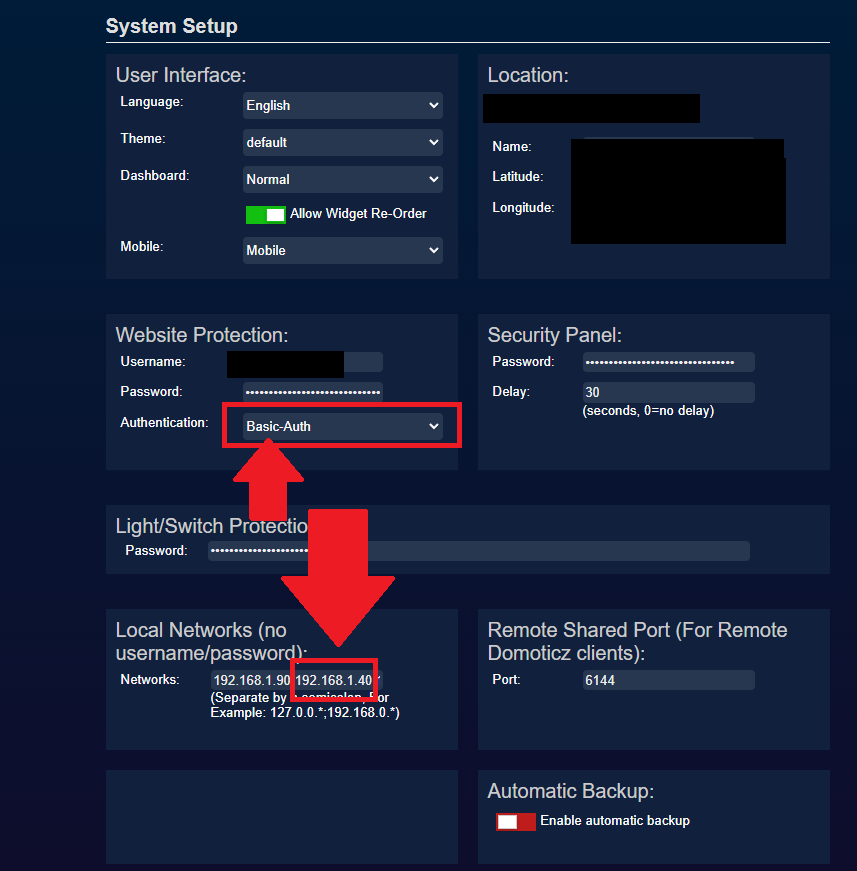
                        Domo.png

                        Log domoticz
                        Log domoticz.png

                        My MM
                        MM.png

                        G 1 Reply Last reply Reply Quote 0
                        • G Offline
                          goedh452 @Shaitan
                          last edited by goedh452

                          @shaitan

                          Hi, thanks for the compliment!

                          At first glance, I do not see any reason why it doesn’t work. Could you try opening the mirror in a browser on a computer: :8080.

                          Then open the monitor with F12 and see if the module generates error messages. Post the error messages here please.

                          1 Reply Last reply Reply Quote 0
                          • S Offline
                            Shaitan
                            last edited by Shaitan

                            This is what you want @goedh452 ? There are only these errors
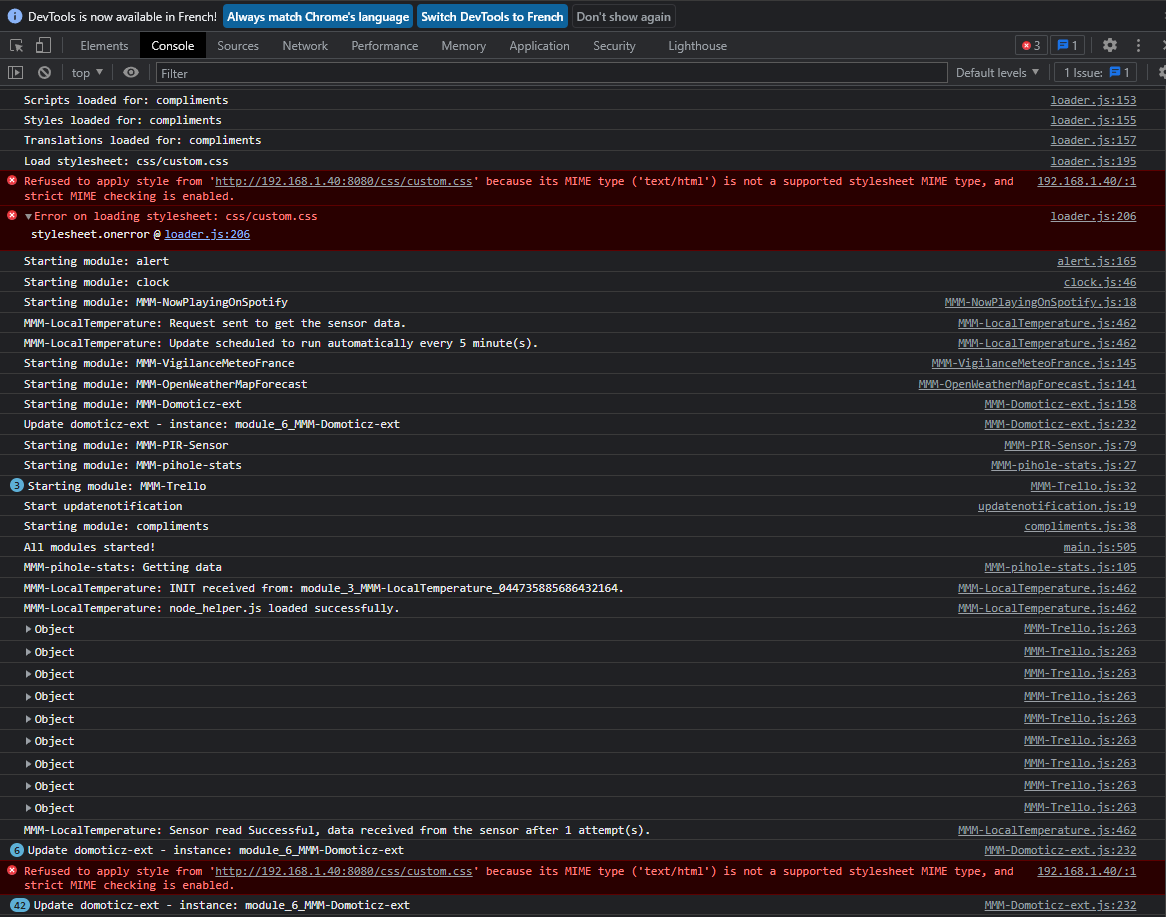
                            Nouvelle e bitmap.png

                            S G 2 Replies Last reply Reply Quote 0
                            • S Do not disturb
                              sdetweil @Shaitan
                              last edited by

                              @shaitan by default custom.css doesn’t exist… if you used my install script I would have created an empty one

                              but u can do this

                              touch ~/MagicMirror/css/custom.css
                              

                              Sam

                              How to add modules

                              learning how to use browser developers window for css changes

                              S 1 Reply Last reply Reply Quote 0
                              • S Offline
                                Shaitan @sdetweil
                                last edited by Shaitan

                                Hi @sdetweil
                                the new file has been created, but nothing on the MM’s screen… But this errors are been vanish !

                                S 1 Reply Last reply Reply Quote 0
                                • S Do not disturb
                                  sdetweil @Shaitan
                                  last edited by

                                  @shaitan cool… black screen, maybe this
                                  https://forum.magicmirror.builders/topic/15778/fix-for-black-screen-in-2-16-and-later

                                  Sam

                                  How to add modules

                                  learning how to use browser developers window for css changes

                                  S 1 Reply Last reply Reply Quote 0
                                  • S Offline
                                    Shaitan @sdetweil
                                    last edited by

                                    @sdetweil
                                    sorry I misled you. with your command the errors have disappeared, but the display of my MM is the same as before. there is no black screen

                                    S 1 Reply Last reply Reply Quote 0
                                    • S Do not disturb
                                      sdetweil @Shaitan
                                      last edited by

                                      @shaitan ok, I can’t help with the module operation… have no system like that

                                      Sam

                                      How to add modules

                                      learning how to use browser developers window for css changes

                                      S 1 Reply Last reply Reply Quote 0
                                      • S Offline
                                        Shaitan @sdetweil
                                        last edited by

                                        @sdetweil thanks anyway for this errors ! Less is the better !

                                        1 Reply Last reply Reply Quote 1
                                        • G Offline
                                          goedh452 @Shaitan
                                          last edited by

                                          @shaitan

                                          Ok, so the module doesn’t produce any errors. I’ll dive into it to see what is causing the problem.

                                          S 2 Replies Last reply Reply Quote 0
                                          • S Offline
                                            Shaitan @goedh452
                                            last edited by

                                            @goedh452 ok thank you !

                                            1 Reply Last reply Reply Quote 0

                                            Hello! It looks like you're interested in this conversation, but you don't have an account yet.

                                            Getting fed up of having to scroll through the same posts each visit? When you register for an account, you'll always come back to exactly where you were before, and choose to be notified of new replies (either via email, or push notification). You'll also be able to save bookmarks and upvote posts to show your appreciation to other community members.

                                            With your input, this post could be even better 💗

                                            Register Login

                                            • 1
                                            • 2
                                            • 3
                                            • 4
                                            • 5
                                            • 6
                                            • 7
                                            • 4 / 7
                                            • First post
                                              Last post
                                            Enjoying MagicMirror? Please consider a donation!
                                            MagicMirror created by Michael Teeuw.
                                            Forum managed by Sam, technical setup by Karsten.
                                            This forum is using NodeBB as its core | Contributors
                                            Contact | Privacy Policy