MagicMirror Forum
    • Recent
    • Tags
    • Unsolved
    • Solved
    • MagicMirror² Repository
    • Documentation
    • 3rd-Party-Modules
    • Donate
    • Discord
    • Register
    • Login
    A New Chapter for MagicMirror: The Community Takes the Lead
    Read the statement by Michael Teeuw here.

    Are you tired of editing config.js, or have trouble doing it, see my new module

    Scheduled Pinned Locked Moved Utilities
    293 Posts 28 Posters 399.9k Views 31 Watching
    Loading More Posts
    • Oldest to Newest
    • Newest to Oldest
    • Most Votes
    Reply
    • Reply as topic
    Log in to reply
    This topic has been deleted. Only users with topic management privileges can see it.
    • S Offline
      sdetweil @DarkV
      last edited by

      @DarkV ok
      now do

      cd ~/MagicMirror/MMM-Config
      ./test-convert.sh override
      

      you should get one message

      completed
      

      Sam

      How to add modules

      learning how to use browser developers window for css changes

      D 1 Reply Last reply Reply Quote 0
      • D Offline
        DarkV @sdetweil
        last edited by DarkV

        @sdetweil
        Results
        junior@MAGIC-MIRROR:~/MagicMirror/modules/MMM-Config $ ./test-convert.sh override
        -bash: ./test-convert.sh: No such file or directory
        junior@MAGIC-MIRROR:~/MagicMirror/modules/MMM-Config $

        I used a fresh SD card for the reinstallation, but some of her modules are incompatible with the new setup. Consequently, my wife has firmly decided to stick with the current version until her modules stop functioning. Unfortunately, since one of the modules doesn’t work with the old MagicMirror version, I’m at an impasse. It is a pity, I wanted this as due to dyslexia, this would have been perfect for my situation

        S 1 Reply Last reply Reply Quote 0
        • S Offline
          sdetweil @DarkV
          last edited by

          @DarkV ok,my fault

          cd ~/MagicMirror/modules/MMM-Config
          ./test_convert.sh  override
          

          Sam

          How to add modules

          learning how to use browser developers window for css changes

          D 1 Reply Last reply Reply Quote 0
          • D Offline
            DarkV @sdetweil
            last edited by

            @sdetweil said in Are you tired of editing config.js, or have trouble doing it, see my new module:

            ./test_convert.sh override

            junior@MAGIC-MIRROR:~/MagicMirror/modules/MMM-Config $ ./test_convert.sh overri de
            --------------------MMM-Config
            module updatenotification-defaults has an error in the construction of its defau lts section
            the error line is disabled: true;
            please change it to the literal value of the referenced variable
            and restart MagicMirror
            --------------------MMM-Config
            junior@MAGIC-MIRROR:~/MagicMirror/modules/MMM-Config $

            S 1 Reply Last reply Reply Quote 0
            • S Offline
              sdetweil @DarkV
              last edited by

              @DarkV can you show the top of the modules/defaul/updatenotification/updatenotification.js
              make sure the defaults section is shown

              you know you never edit any of the MagicMirror source or module source

              all config goes in config/config.js and all css goes in css/custom.css

              Sam

              How to add modules

              learning how to use browser developers window for css changes

              D 1 Reply Last reply Reply Quote 0
              • D Offline
                DarkV @sdetweil
                last edited by

                @sdetweil

                My bad,iI was trying to dissable the “Update available” banner at the top of mirror

                /* MagicMirror²

                • Module: UpdateNotification

                • By Michael Teeuw https://michaelteeuw.nl

                • MIT Licensed.
                  */
                  Module.register(“updatenotification”, {
                  defaults: {
                  updateInterval: 10 * 60 * 1000, // every 10 minutes
                  refreshInterval: 24 * 60 * 60 * 1000, // one day
                  ignoreModules: [],
                  sendUpdatesNotifications: false,
                  updates: [],
                  updateTimeout: 2 * 60 * 1000, // max update duration
                  updateAutorestart: false // autoRestart MM when update done ?
                  disabled: true;
                  },

                  suspended: false,
                  moduleList: {},
                  needRestart: false,
                  updates: {},

                  start () {
                  Log.info(Starting module: ${this.name});
                  this.addFilters();
                  setInterval(() => {
                  this.moduleList = {};
                  this.updateDom(2);
                  }, this.config.refreshInterval);
                  },

                  suspend () {
                  this.suspended = true;
                  },

                  resume () {
                  this.suspended = false;
                  this.updateDom(2);
                  },

                  notificationReceived (notification) {
                  switch (notification) {
                  case “DOM_OBJECTS_CREATED”:
                  this.sendSocketNotification(“CONFIG”, this.config);
                  this.sendSocketNotification(“MODULES”, Object.keys(Module.definitions));
                  break;
                  case “SCAN_UPDATES”:
                  this.sendSocketNotification(“SCAN_UPDATES”);
                  break;
                  }
                  },

                  socketNotificationReceived (notification, payload) {
                  switch (notification) {
                  case “REPO_STATUS”:
                  this.updateUI(payload);
                  break;
                  case “UPDATES”:
                  this.sendNotification(“UPDATES”, payload);
                  break;
                  case “UPDATE_STATUS”:
                  this.updatesNotifier(payload);
                  break;
                  }
                  },

                  getStyles () {
                  return [${this.name}.css];
                  },

                  getTemplate () {
                  return ${this.name}.njk;
                  },

                  getTemplateData () {
                  return { moduleList: this.moduleList, updatesList: this.updates, suspended: this.suspended, needRestart: this.needRestart };
                  },

                  updateUI (payload) {
                  if (payload && payload.behind > 0) {
                  // if we haven’t seen info for this module
                  if (this.moduleList[payload.module] === undefined) {
                  // save it
                  this.moduleList[payload.module] = payload;
                  this.updateDom(2);
                  }
                  } else if (payload && payload.behind === 0) {
                  // if the module WAS in the list, but shouldn’t be
                  if (this.moduleList[payload.module] !== undefined) {
                  // remove it
                  delete this.moduleList[payload.module];
                  this.updateDom(2);
                  }
                  }
                  },

                  addFilters () {
                  this.nunjucksEnvironment().addFilter(“diffLink”, (text, status) => {
                  if (status.module !== “MagicMirror”) {
                  return text;
                  }

                   	const localRef = status.hash;
                   	const remoteRef = status.tracking.replace(/.*\//, "");
                   	return `<a href="https://github.com/MichMich/MagicMirror/compare/${localRef}...${remoteRef}" class="xsmall dimmed difflink" target="_blank">${text}</a>`;
                   });
                  

                  },

                  updatesNotifier (payload, done = true) {
                  if (this.updates[payload.name] === undefined) {
                  this.updates[payload.name] = {
                  name: payload.name,

                S 1 Reply Last reply Reply Quote 0
                • S Offline
                  sdetweil @DarkV
                  last edited by

                  @DarkV yes i understand

                  lets restore the updatenotification module file

                  cd ~/MagicMirror
                  git checkout modules/default/updatenotification/updatenotification.js
                  

                  then lets edit config.js to disable the module

                   {
                        module:"updatenotification",
                        position:"top_bar",
                        disabled:true
                    },
                  

                  Sam

                  How to add modules

                  learning how to use browser developers window for css changes

                  D 1 Reply Last reply Reply Quote 0
                  • D Offline
                    DarkV @sdetweil
                    last edited by

                    @sdetweil said in Are you tired of editing config.js, or have trouble doing it, see my new module:

                    cd ~/MagicMirror
                    git checkout modules/default/updatenotification/updatenotification.js

                    it checkout modules/default/updatenotification/updatenotification.js
                    fatal: not a git repository (or any of the parent directories): .git
                    junior@MAGIC-MIRROR:~/MagicMirror $

                    S 1 Reply Last reply Reply Quote 0
                    • S Offline
                      sdetweil @DarkV
                      last edited by

                      @DarkV hmmm

                      how did you install MagicMirror
                      manual, scripted or zip file download ?

                      Sam

                      How to add modules

                      learning how to use browser developers window for css changes

                      D 1 Reply Last reply Reply Quote 0
                      • JohanbaJ Offline
                        Johanba
                        last edited by

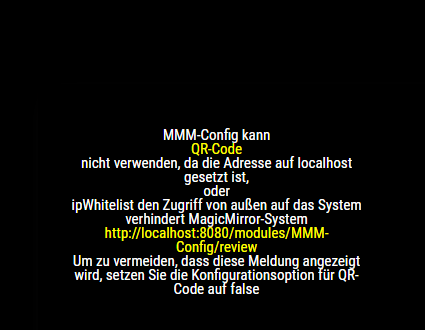
                        Also not getting it to work
                        in the browser i go to installer
                        and this is all that loads
                        fe43ab61-3e49-4402-b5ea-7b5dac920db9-image.png

                        S 1 Reply Last reply Reply Quote 0
                        • S Offline
                          sdetweil @Johanba
                          last edited by

                          @Johanba i posted in your other topic

                          Sam

                          How to add modules

                          learning how to use browser developers window for css changes

                          1 Reply Last reply Reply Quote 0
                          • D Offline
                            DarkV @sdetweil
                            last edited by DarkV

                            @sdetweil Script
                            You helped me on a while backScreenshot 2025-04-10 at 11-54-21 Failed Update MagicMirror Forum.png

                            S 1 Reply Last reply Reply Quote 0
                            • S Offline
                              sdetweil @DarkV
                              last edited by sdetweil

                              @DarkV i understand, but that wasn’t the question

                              the git checkout command should have worked,
                              but failed.

                              now i am trying to figure out why. and what to do about it

                              the command prompt looks different after

                              cd ~/MagicMirror 
                              

                              then the last time you did a command

                              so try this way

                              go to your MagicMirror folder
                              and do git status

                              show the results

                              Sam

                              How to add modules

                              learning how to use browser developers window for css changes

                              D 1 Reply Last reply Reply Quote 0
                              • D Offline
                                DarkV @sdetweil
                                last edited by

                                @sdetweil said in Are you tired of editing config.js, or have trouble doing it, see my new module:

                                git status

                                junior@MAGIC-MIRROR:~ $ cd ~/MagicMirror/modules/MMM-Config
                                junior@MAGIC-MIRROR:~/MagicMirror/modules/MMM-Config $ git status
                                On branch main
                                Your branch is up to date with ‘origin/main’.

                                nothing to commit, working tree clean
                                junior@MAGIC-MIRROR:~/MagicMirror/modules/MMM-Config $

                                junior@MAGIC-MIRROR:~/MagicMirror/modules/MMM-Config $ cd ~/MagicMirror
                                junior@MAGIC-MIRROR:~/MagicMirror $ git status
                                fatal: not a git repository (or any of the parent directories): .git
                                junior@MAGIC-MIRROR:~/MagicMirror $

                                S 1 Reply Last reply Reply Quote 0
                                • S Offline
                                  sdetweil @DarkV
                                  last edited by

                                  @DarkV asking again, how did you install MagicMirror?

                                  Sam

                                  How to add modules

                                  learning how to use browser developers window for css changes

                                  D 1 Reply Last reply Reply Quote 0
                                  • D Offline
                                    DarkV @sdetweil
                                    last edited by

                                    @sdetweil I think it must have been a script on the net. It was quite a long time ago, between 2022 and 2023. I honestly cannot remember. I found an old config.js from ‎06 ‎October ‎2023

                                    S 1 Reply Last reply Reply Quote 0
                                    • S Offline
                                      sdetweil @DarkV
                                      last edited by sdetweil

                                      @DarkV ok, my script is the only one I know about and it uses git

                                      lets do this to get a new copy and use your config/modules…
                                      copy paste this section to a terminal window

                                      cd ~
                                      # save MM folder
                                      mv MagicMirror MagicMirror.org
                                      # install new MM (reply N to screen saver/pm2
                                      bash -c  "$(curl -sL https://raw.githubusercontent.com/sdetweil/MagicMirror_scripts/master/raspberry.sh)"
                                      

                                      once MM is installed again lets make THIS new version look like the old
                                      copy/paste this

                                      # copy files
                                      cd ~
                                      cp MagicMirror.org/config/config.js MagicMirror/config
                                      cp MagicMirror.org/css/custom.css MagicMirror/css
                                      cd MagicMirror/modules
                                      # save the new default module folder
                                      mv default ..
                                      cd ..
                                      # copy all the org modules 
                                      cp -r -p ~/MagicMirror.org/modules .
                                      cd modules
                                      # remove the old default  modules folder
                                      rm -rf default
                                      # move back the new default 
                                      mv ../default .
                                      cd ~/MagicMirror
                                      

                                      now
                                      npm start should work

                                      Sam

                                      How to add modules

                                      learning how to use browser developers window for css changes

                                      1 Reply Last reply Reply Quote 0

                                      Hello! It looks like you're interested in this conversation, but you don't have an account yet.

                                      Getting fed up of having to scroll through the same posts each visit? When you register for an account, you'll always come back to exactly where you were before, and choose to be notified of new replies (either via email, or push notification). You'll also be able to save bookmarks and upvote posts to show your appreciation to other community members.

                                      With your input, this post could be even better 💗

                                      Register Login

                                      • 1
                                      • 2
                                      • 3
                                      • 4
                                      • 5
                                      • 14
                                      • 15
                                      • 2 / 15
                                      • First post
                                        Last post
                                      Enjoying MagicMirror? Please consider a donation!
                                      MagicMirror created by Michael Teeuw.
                                      Forum managed by Sam, technical setup by Karsten.
                                      This forum is using NodeBB as its core | Contributors
                                      Contact | Privacy Policy