MagicMirror Forum
    • Recent
    • Tags
    • Unsolved
    • Solved
    • MagicMirror² Repository
    • Documentation
    • 3rd-Party-Modules
    • Donate
    • Discord
    • Register
    • Login
    A New Chapter for MagicMirror: The Community Takes the Lead
    Read the statement by Michael Teeuw here.

    Black Screen

    Scheduled Pinned Locked Moved Forum
    16 Posts 5 Posters 5.0k Views 5 Watching
    Loading More Posts
    • Oldest to Newest
    • Newest to Oldest
    • Most Votes
    Reply
    • Reply as topic
    Log in to reply
    This topic has been deleted. Only users with topic management privileges can see it.
    • M Offline
      MassiveArts 0
      last edited by

      Good day,

      I would like to have MMM-Google Fit on my Smart Mirror. I have installed that too, but I have a black screen. But it starts in the black picture

      https://github.com/amcolash/MMM-GoogleFit

      "

      	{
      		module: "weather",
      		position: "top_right",
      		header: "Weather Forecast",
      		config: {
      			weatherProvider: "openweathermap",
      			type: "forecast",
      			location: "New York",
      			locationID: "5128581", //ID from http://bulk.openweathermap.org/sample/city.list.json.gz; unzip the gz file and find your city
      			apiKey: "YOUR_OPENWEATHER_API_KEY"
      		}
      	},
      	
      	{
      		module: 'MMM-GoogleFit',
      		position: 'position',
      		config: {
      			// If desired
      	}
      	},
      	
      ]
      

      };

      /*************** DO NOT EDIT THE LINE BELOW ***************/
      if (typeof module !== “undefined”) {module.exports = config;}

      "

      BKeyportB 1 Reply Last reply Reply Quote 0
      • BKeyportB Offline
        BKeyport Module Developer @MassiveArts 0
        last edited by

        @massivearts-0 the way you posted it, the forum corrupted it.

        Please place ``` around the code next time.

        That being said, go to the magicmirror directory, and type:

        npm run config:check

        It’ll help you solve the errors.

        The "E" in "Javascript" stands for "Easy"

        M 1 Reply Last reply Reply Quote 0
        • M Offline
          MassiveArts 0 @BKeyport
          last edited by

          @bkeyport said in Black Screen:

          @massivearts-0 the way you posted it, the forum corrupted it.

          Please place ``` around the code next time.

          That being said, go to the magicmirror directory, and type:

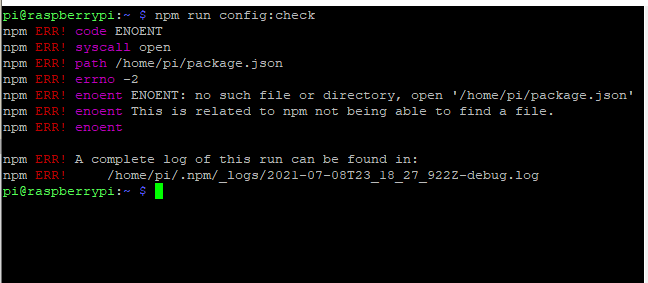
          npm run config:check

          It’ll help you solve the errors.

          Bild_2021-07-09_011948.png

          BKeyportB 1 Reply Last reply Reply Quote 0
          • BKeyportB Offline
            BKeyport Module Developer @MassiveArts 0
            last edited by

            @massivearts-0 you must be in the MagicMirror directory.

            pi@officemirror:~ $ cd MagicMirror/
            pi@officemirror:~/MagicMirror $ npm run config:check
            
            > magicmirror@2.16.0 config:check /home/pi/MagicMirror
            > node js/check_config.js
            
            [08.07.2021 16:19.03.333] [INFO]  Checking file...  /home/pi/MagicMirror/config/config.js
            [08.07.2021 16:19.03.575] [INFO]  Your configuration file doesn't contain syntax errors :)
            

            The "E" in "Javascript" stands for "Easy"

            M 1 Reply Last reply Reply Quote 0
            • M Offline
              MassiveArts 0 @BKeyport
              last edited by

              @bkeyport said in Black Screen:

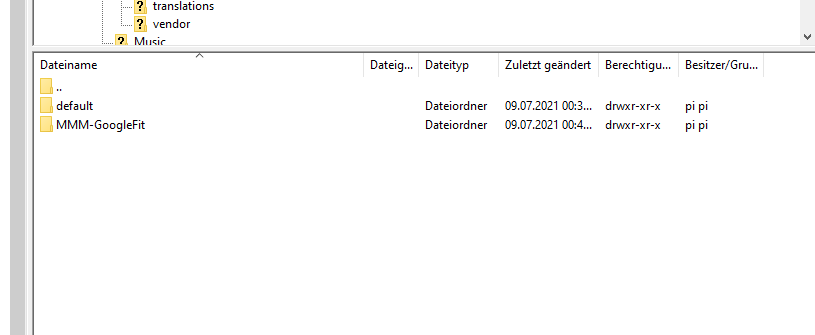
              you must be in the MagicMirror directory.

              Bild_2021-07-09_012601.png

              BKeyportB 1 Reply Last reply Reply Quote 0
              • BKeyportB Offline
                BKeyport Module Developer @MassiveArts 0
                last edited by BKeyport

                @massivearts-0 back down to ~/MagicMirror/ and try the command there. Also, the config file should be at ~/MagicMirror/config/config.js

                The "E" in "Javascript" stands for "Easy"

                M 1 Reply Last reply Reply Quote 0
                • M Offline
                  MassiveArts 0 @BKeyport
                  last edited by

                  @bkeyport said in Black Screen:

                  @massivearts-0 back down to ~/MagicMirror/ and try the command there. Also, the config file should be at ~/MagicMirror/config/config.js

                  Didn’t work

                  S 1 Reply Last reply Reply Quote 0
                  • S Offline
                    sdetweil @MassiveArts 0
                    last edited by

                    @massivearts-0 open a terminal window onto the pi

                    cd ~/MagicMirror
                    npm run check:config
                    

                    but as I said on discord
                    we need to see the messages that are output when u start MagicMirror

                    you either do
                    npm start
                    or pm2 start

                    if pm2 then the command to display the logs is
                    pm2 logs --lines=100

                    the black screen is probably a missing dependency module, and the messages will tell us which one

                    Sam

                    How to add modules

                    learning how to use browser developers window for css changes

                    1 Reply Last reply Reply Quote 1
                    • D Offline
                      DJBOOB66
                      last edited by

                      Maybe position: ‘position’, is your problem add a location on mirror like “top_left”

                      S 1 Reply Last reply Reply Quote 0
                      • S Offline
                        sdetweil @DJBOOB66
                        last edited by

                        @djboob66 yes, he had “top_Bar” before, but that is not the black screen

                        maybe no content displayed as mm can’t figure out where to put it

                        system is case sensitive

                        Sam

                        How to add modules

                        learning how to use browser developers window for css changes

                        S 1 Reply Last reply Reply Quote 0
                        • S Offline
                          sdetweil @sdetweil
                          last edited by

                          the module he added didn’t document needing request

                          Sam

                          How to add modules

                          learning how to use browser developers window for css changes

                          1 Reply Last reply Reply Quote 0
                          • D Offline
                            DJBOOB66
                            last edited by

                            You did do
                            cd git clone https://github.com/amcolash/MMM-GoogleFit.git
                            cd MMM-GoogleFit
                            npm install
                            ???

                            S 1 Reply Last reply Reply Quote 0
                            • S Offline
                              sdetweil @DJBOOB66
                              last edited by

                              @djboob66 yes he did. but the module uses the request library without documenting it in the package.json

                              and request was removed from the MagicMirror package in 2.15.

                              Sam

                              How to add modules

                              learning how to use browser developers window for css changes

                              BKeyportB 1 Reply Last reply Reply Quote 0
                              • BKeyportB Offline
                                BKeyport Module Developer @sdetweil
                                last edited by

                                @sdetweil how dare they remove libraries in the main program they don’t use anymore! 🤣🤣

                                The "E" in "Javascript" stands for "Easy"

                                S 1 Reply Last reply Reply Quote 0
                                • S Offline
                                  sdetweil @BKeyport
                                  last edited by

                                  @bkeyport and forced to stop using!!

                                  Sam

                                  How to add modules

                                  learning how to use browser developers window for css changes

                                  bugsounetB 1 Reply Last reply Reply Quote 0
                                  • bugsounetB Offline
                                    bugsounet Banned @sdetweil
                                    last edited by

                                    Many sub library use again it, it’s very very long to depreciate a library ;)

                                    1 Reply Last reply Reply Quote 0

                                    Hello! It looks like you're interested in this conversation, but you don't have an account yet.

                                    Getting fed up of having to scroll through the same posts each visit? When you register for an account, you'll always come back to exactly where you were before, and choose to be notified of new replies (either via email, or push notification). You'll also be able to save bookmarks and upvote posts to show your appreciation to other community members.

                                    With your input, this post could be even better 💗

                                    Register Login

                                    • 1 / 1
                                    • First post
                                      Last post
                                    Enjoying MagicMirror? Please consider a donation!
                                    MagicMirror created by Michael Teeuw.
                                    Forum managed by Sam, technical setup by Karsten.
                                    This forum is using NodeBB as its core | Contributors
                                    Contact | Privacy Policy