MagicMirror Forum
    • Recent
    • Tags
    • Unsolved
    • Solved
    • MagicMirror² Repository
    • Documentation
    • 3rd-Party-Modules
    • Donate
    • Discord
    • Register
    • Login
    A New Chapter for MagicMirror: The Community Takes the Lead
    Read the statement by Michael Teeuw here.

    Trouble getting Background Image to Show

    Scheduled Pinned Locked Moved Custom CSS
    27 Posts 2 Posters 10.7k Views 2 Watching
    Loading More Posts
    • Oldest to Newest
    • Newest to Oldest
    • Most Votes
    Reply
    • Reply as topic
    Log in to reply
    This topic has been deleted. Only users with topic management privileges can see it.
    • S Do not disturb
      sdetweil @ankonaskiff17
      last edited by sdetweil

      @ankonaskiff17 case doesn’t matter as long as it matches what the REAL name has.
      note for a url u need

      http:// - from a web server
      // using MM web server, whose base is MagicMirror
      http://localhost:8080/Backgrounds/IMG_0169.JPG

      or file:// – direct from the file system
      background: url(“file:///home/pi/MagicMirror/Backgrounds/IMG_0169.JPG”)
      (note three /// two on the file://, and one on the root path)

      you should be able to put each in a browser and get it to show (outside of MM), that proves the url is right

      Sam

      How to add modules

      learning how to use browser developers window for css changes

      ankonaskiff17A 1 Reply Last reply Reply Quote 0
      • ankonaskiff17A Offline
        ankonaskiff17 @sdetweil
        last edited by

        @sdetweil I’m more stumped now. The file name & location are good. If I hover over the url in your second example in VS Code it gives option to follow link and launches browser and loads picture just fine but no joy in MM.

        S 1 Reply Last reply Reply Quote 0
        • S Do not disturb
          sdetweil @ankonaskiff17
          last edited by

          @ankonaskiff17 ignore what other apps do… MM is primative

          Sam

          How to add modules

          learning how to use browser developers window for css changes

          ankonaskiff17A 1 Reply Last reply Reply Quote 0
          • ankonaskiff17A Offline
            ankonaskiff17 @sdetweil
            last edited by

            @sdetweil I’m just saying that the file address is good as entered.
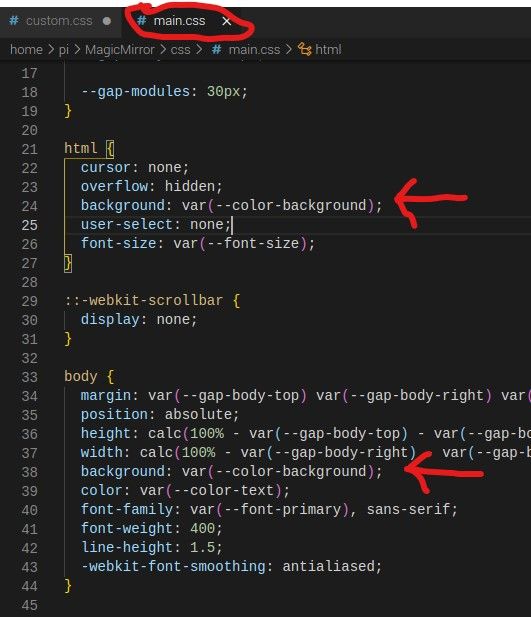
            In main.css you have

            html {
              cursor: none;
              overflow: hidden;
              background: var(--color-background);
              user-select: none;
              font-size: var(--font-size);
            }
            

            set for background. Is that causing issues? custom.css should override that, shouldn’t it?

            S 1 Reply Last reply Reply Quote 0
            • S Do not disturb
              sdetweil @ankonaskiff17
              last edited by

              @ankonaskiff17 where is your background set… body, there is an z-order too…

              i use fullscreen_background position for my background images

              if u look at the developer window elements tab to find your background, where is in the the css stack?

              Sam

              How to add modules

              learning how to use browser developers window for css changes

              ankonaskiff17A 1 Reply Last reply Reply Quote 0
              • ankonaskiff17A Offline
                ankonaskiff17 @sdetweil
                last edited by

                @sdetweil Right at the top just below html. The way I understand is that it will load html first, then body. My html is an abbreviated version of main.css html

                custom.css
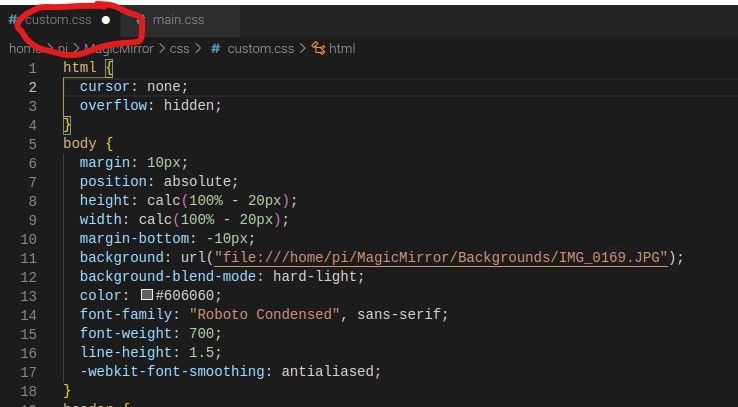
                Screenshot 2021-08-10 custom.jpg

                main.css

                Screenshot 2021-08-10 main.jpg

                S 1 Reply Last reply Reply Quote 0
                • S Do not disturb
                  sdetweil @ankonaskiff17
                  last edited by

                  @ankonaskiff17 body supercedes
                  html.

                  u should look in the developers window, elements tab to see the actual css tree

                  ctrl-shift-i, select elements tab.

                  Sam

                  How to add modules

                  learning how to use browser developers window for css changes

                  ankonaskiff17A 1 Reply Last reply Reply Quote 0
                  • ankonaskiff17A Offline
                    ankonaskiff17 @sdetweil
                    last edited by

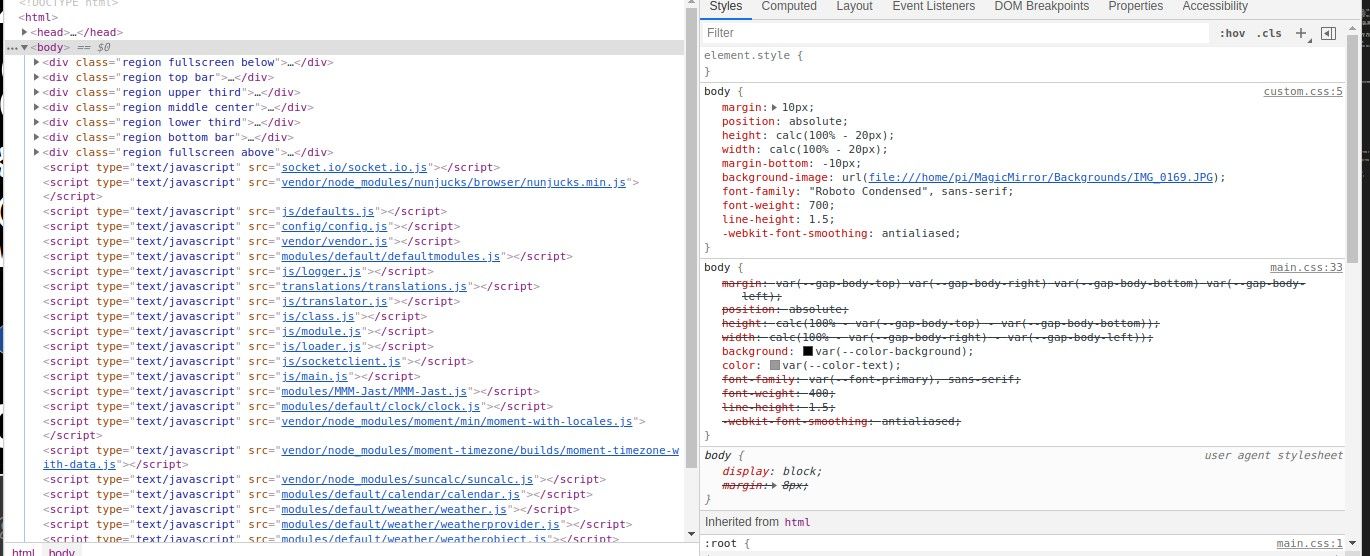
                    @sdetweil I’ve been doing that.

                    Screenshot 2021-08-10 201817.jpg

                    S 1 Reply Last reply Reply Quote 0
                    • S Do not disturb
                      sdetweil @ankonaskiff17
                      last edited by sdetweil

                      @ankonaskiff17 so u can turn off things with a click in front. so disable the background color

                      Sam

                      How to add modules

                      learning how to use browser developers window for css changes

                      ankonaskiff17A 1 Reply Last reply Reply Quote 0
                      • ankonaskiff17A Offline
                        ankonaskiff17 @sdetweil
                        last edited by

                        @sdetweil I’ve wrestled with this all morning and exhausted every combination I could imagine, I decided to try sticking a color in as shown below. Not sure if anything can be inferred if it will accept a background color but not a background image. I am ignorant of the vagaries of js but is it possible that background: var(--color-background); in is locking me i n to only color options since the default is set in

                        :root {
                        --background-color #000
                        }
                        
                        body {
                        background: red;
                        }
                        
                        S 2 Replies Last reply Reply Quote 0
                        • S Do not disturb
                          sdetweil @ankonaskiff17
                          last edited by

                          @ankonaskiff17 possibly… disable it in the dev window… uncheck it… right side, near the bottom (that is closest to main.css while top is closest to latest css.

                          Sam

                          How to add modules

                          learning how to use browser developers window for css changes

                          1 Reply Last reply Reply Quote 0
                          • S Do not disturb
                            sdetweil @ankonaskiff17
                            last edited by sdetweil

                            @ankonaskiff17 so I added a body with a background image, using the MM web server in my custom.css

                            body { 
                              background-image: url("http://localhost:8090/modules/images/testimage.jpg")
                            }


                            and then started MM
                            and got
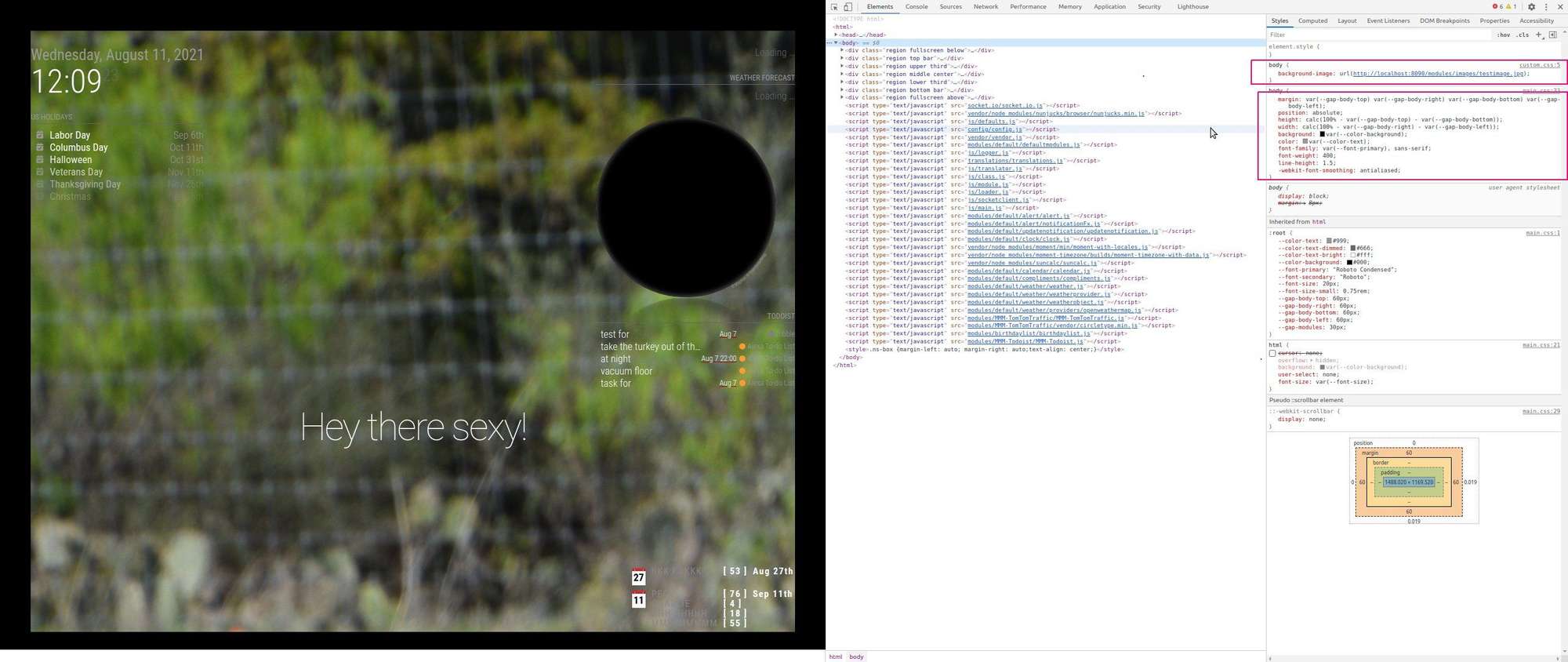
                            Screenshot at 2021-08-11 12-09-23.jpg

                            u can see the two body clauses on the right, top is custom.css (if u hover over the name it tells u where it came from)

                            Sam

                            How to add modules

                            learning how to use browser developers window for css changes

                            ankonaskiff17A 1 Reply Last reply Reply Quote 0
                            • S Do not disturb
                              sdetweil
                              last edited by

                              then I added a root entry to custom.css

                              root: {
                                background-color: black;
                              }
                              
                              html {
                              /*  cursor: none; */
                              }
                              
                              body { 
                                background-image: url("http://localhost:8090/modules/images/testimage.jpg")
                              }
                              

                              and got
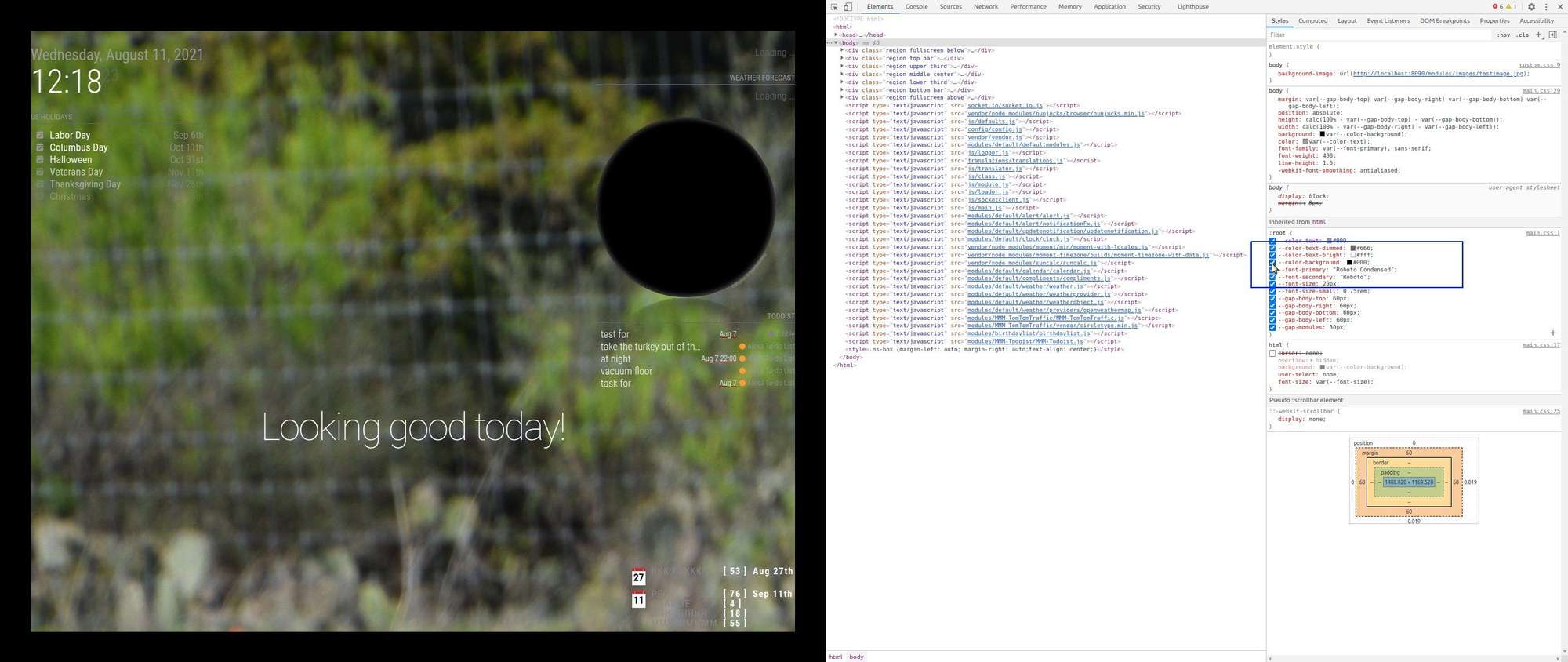
                              Screenshot at 2021-08-11 12-18-23.jpg

                              notice border around pic

                              then turned it off in the dev window
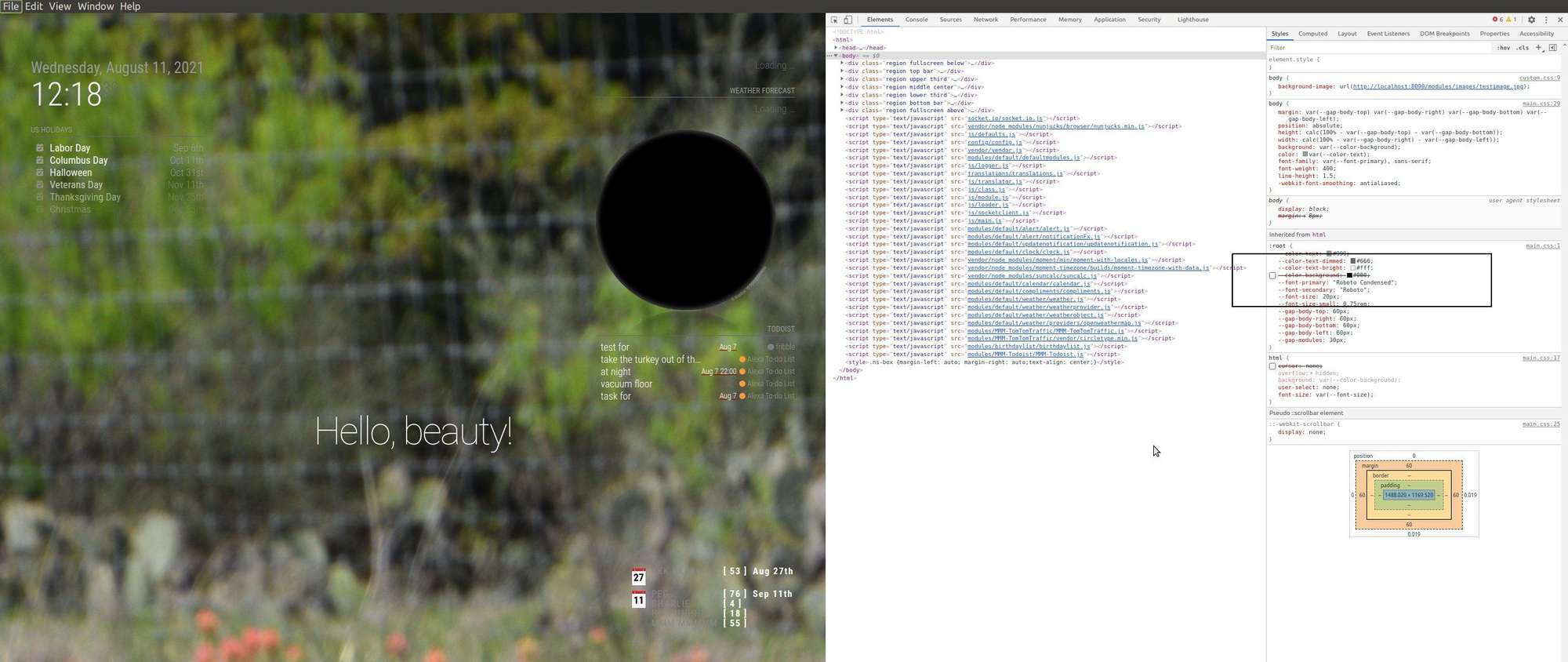
                              Screenshot at 2021-08-11 12-18-39.jpg

                              border gone

                              Sam

                              How to add modules

                              learning how to use browser developers window for css changes

                              1 Reply Last reply Reply Quote 0
                              • S Do not disturb
                                sdetweil
                                last edited by

                                same results with

                                root: {
                                  --background-color: black;
                                }
                                
                                html {
                                /*  cursor: none; */
                                }
                                
                                body { 
                                  background-image: url("http://localhost:8090/modules/images/testimage.jpg")
                                }
                                

                                Sam

                                How to add modules

                                learning how to use browser developers window for css changes

                                1 Reply Last reply Reply Quote 0
                                • S Do not disturb
                                  sdetweil
                                  last edited by

                                  using file:// does NOT work

                                  body { 
                                    background-image: url("file:///home/sam/MagicMirror/modules/images/testimage.jpg")
                                  }
                                  

                                  even tho it works in chrome

                                  Sam

                                  How to add modules

                                  learning how to use browser developers window for css changes

                                  1 Reply Last reply Reply Quote 0
                                  • ankonaskiff17A Offline
                                    ankonaskiff17 @sdetweil
                                    last edited by

                                    @sdetweil localhost is what shows in developer window? You show 8090 vs my 8080

                                    S 1 Reply Last reply Reply Quote 0
                                    • S Do not disturb
                                      sdetweil @ankonaskiff17
                                      last edited by

                                      @ankonaskiff17 localhost, cause I am on the same machine as MM is running

                                      and port 8090 cause I have another app using 8080 …

                                      Sam

                                      How to add modules

                                      learning how to use browser developers window for css changes

                                      ankonaskiff17A 1 Reply Last reply Reply Quote 0
                                      • ankonaskiff17A Offline
                                        ankonaskiff17 @sdetweil
                                        last edited by ankonaskiff17

                                        @sdetweil I am getting a Not allowed to load local resource
                                        I thought the image might have not been quite right so copied it fresh and did renaming in terminal but really sure what is going on.

                                        I’m a dummy. I do think the image file was messed up as I was getting file not found errors before I reloaded & renamed file in terminal vs in the Pi version of file manager. Windows habits die hard.
                                        After I did that I started getting the local resource message. I had been doing this through VNC on my laptop but pulled big screen tv over where I could read it, deleted the localhost address from file that I did in VNC and redid the exact same address via Pi directly and its all good now.
                                        Shame on me but is there some rule of thumb about what you can and can’t do remotely. I have built 5 of these things with no issues using VNC until this background sreen issue. Even on this one, I’ve loaded multiple modules, jumbo sized fonts etc.

                                        S 1 Reply Last reply Reply Quote 0
                                        • S Do not disturb
                                          sdetweil @ankonaskiff17
                                          last edited by

                                          @ankonaskiff17

                                          where are u doing this? on pi, or remote(pc desktop)

                                          what is the address: in config.js?

                                          Sam

                                          How to add modules

                                          learning how to use browser developers window for css changes

                                          ankonaskiff17A 1 Reply Last reply Reply Quote 0
                                          • ankonaskiff17A Offline
                                            ankonaskiff17 @sdetweil
                                            last edited by

                                            @sdetweil See my wordy edit above

                                            S 1 Reply Last reply Reply Quote 0

                                            Hello! It looks like you're interested in this conversation, but you don't have an account yet.

                                            Getting fed up of having to scroll through the same posts each visit? When you register for an account, you'll always come back to exactly where you were before, and choose to be notified of new replies (either via email, or push notification). You'll also be able to save bookmarks and upvote posts to show your appreciation to other community members.

                                            With your input, this post could be even better 💗

                                            Register Login

                                            • 1
                                            • 2
                                            • 1 / 2
                                            • First post
                                              Last post
                                            Enjoying MagicMirror? Please consider a donation!
                                            MagicMirror created by Michael Teeuw.
                                            Forum managed by Sam, technical setup by Karsten.
                                            This forum is using NodeBB as its core | Contributors
                                            Contact | Privacy Policy