MagicMirror Forum
    • Recent
    • Tags
    • Unsolved
    • Solved
    • MagicMirror² Repository
    • Documentation
    • 3rd-Party-Modules
    • Donate
    • Discord
    • Register
    • Login
    A New Chapter for MagicMirror: The Community Takes the Lead
    Read the statement by Michael Teeuw here.

    Magic mirror is not showing up

    Scheduled Pinned Locked Moved Solved Troubleshooting
    37 Posts 4 Posters 14.5k Views 4 Watching
    Loading More Posts
    • Oldest to Newest
    • Newest to Oldest
    • Most Votes
    Reply
    • Reply as topic
    Log in to reply
    This topic has been deleted. Only users with topic management privileges can see it.
    • C Offline
      CoopDog1712 @sdetweil
      last edited by

      @sdetweil thank you so much for replying I really appreciate your help.

      On the table that shows up, I see that one of the names is just mm, how would I change it to mm.sh. Also when I run your script all it does is create a new Id on the table, called MagicMirror and it dosent seem to do anything

      1 Reply Last reply Reply Quote 0
      • C Offline
        CoopDog1712 @sdetweil
        last edited by

        @sdetweil!

        https://share.icloud.com/photos/09aR5ulFMM0L4v-vHL3NDBRNA

        S 2 Replies Last reply Reply Quote 0
        • S Offline
          sdetweil @CoopDog1712
          last edited by

          @CoopDog1712 you can’t change and entry, but you can delete it

          pm2 delete 0 or pm2 delete mm

          pm2 logs --lines=50 might tell us what us going on

          pm2 is a command
          pm2 --help will show you all the things you can do

          ps, you can attach pics here… the third icon from the right above the editor here

          Sam

          How to add modules

          learning how to use browser developers window for css changes

          C 1 Reply Last reply Reply Quote 0
          • S Offline
            sdetweil @CoopDog1712
            last edited by

            @CoopDog1712 i couldnt see much of that image

            Sam

            How to add modules

            learning how to use browser developers window for css changes

            1 Reply Last reply Reply Quote 0
            • C Offline
              CoopDog1712 @sdetweil
              last edited by

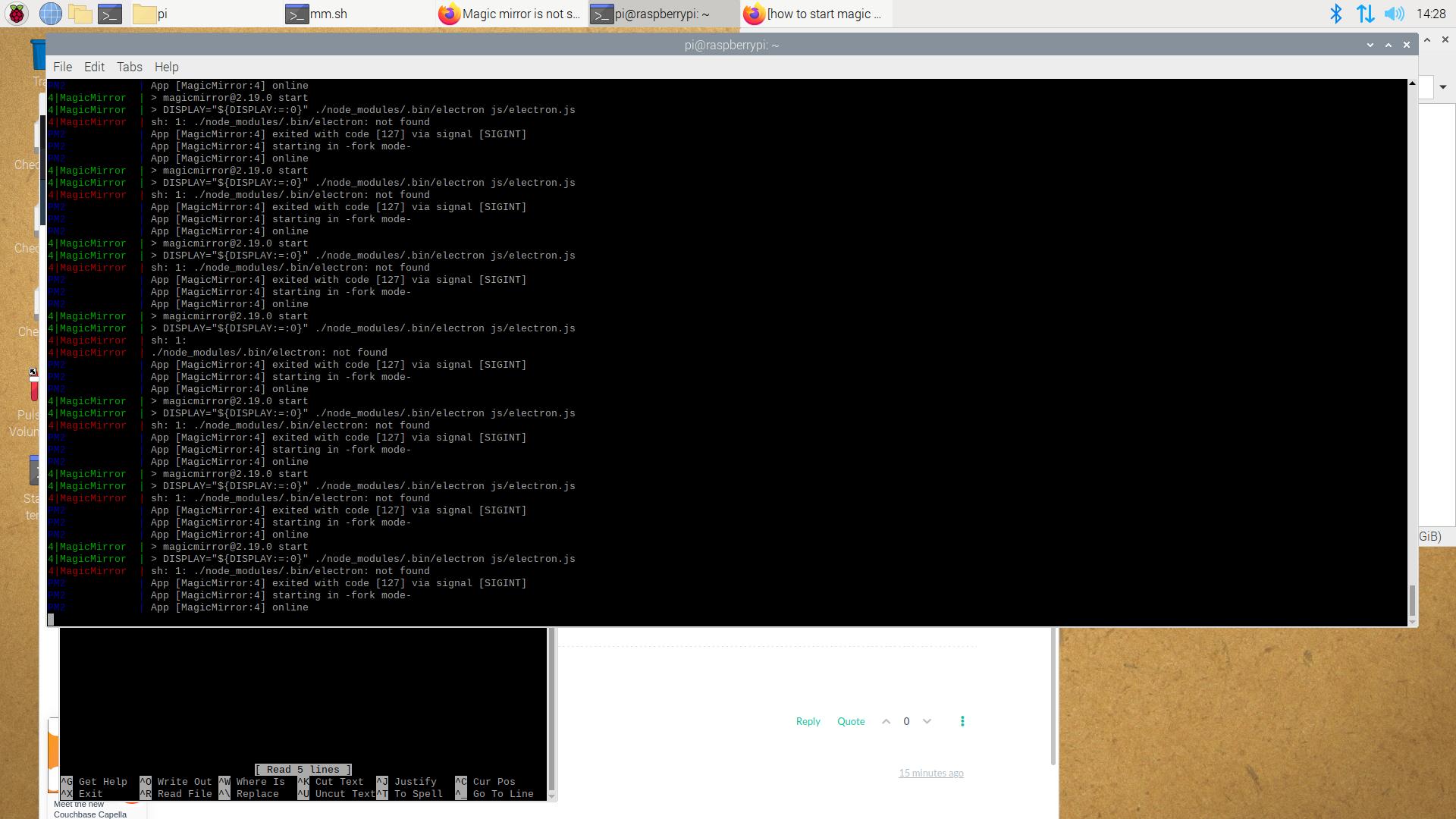
              @sdetweil 2022-04-21-142817_1920x1080_scrot.png

              after typing in pm2 logs --lines=50, all that is coming up is a repeating of these couple lines

              S 1 Reply Last reply Reply Quote 0
              • S Offline
                sdetweil @CoopDog1712
                last edited by sdetweil

                @CoopDog1712 yes, sometimes, the install messes up

                pm2 stop all
                cd ~/MagicMirror
                npm install electron@17.2.0
                

                to test

                cd ~/MagicMirror
                npm start
                

                if all looks good
                ctrl-c to stop
                then

                pm2 start MagicMirror
                

                I should have asked, what pi is this on ? not pi 0 w, right?

                Sam

                How to add modules

                learning how to use browser developers window for css changes

                C 2 Replies Last reply Reply Quote 0
                • C Offline
                  CoopDog1712 @sdetweil
                  last edited by

                  @sdetweil no its a pi 4

                  1 Reply Last reply Reply Quote 0
                  • C Offline
                    CoopDog1712 @sdetweil
                    last edited by

                    @sdetweil so it works now, and after i enter pm2 start MagicMirror, it loads the software for the magic mirror, the only issue is that their is nothing only a blank screen, no time, weather, nothing. all that comes up is a blank screen. any suggestions?

                    S 1 Reply Last reply Reply Quote 0
                    • S Offline
                      sdetweil @CoopDog1712
                      last edited by

                      @CoopDog1712 have u added modules?

                      if so see
                      https://forum.magicmirror.builders/topic/15778/fix-for-black-screen-in-2-16-and-later

                      and
                      pm2 logs --lines=50
                      will show you what is happening

                      Sam

                      How to add modules

                      learning how to use browser developers window for css changes

                      C 1 Reply Last reply Reply Quote 0
                      • C Offline
                        CoopDog1712 @sdetweil
                        last edited by

                        @sdetweil i did what you said and this is what came up.

                        pi@raspberrypi:~/MagicMirror/modules/default/clock $ npm init -y
                        Wrote to /home/pi/MagicMirror/modules/default/clock/package.json:

                        {
                        “name”: “clock”,
                        “version”: “1.0.0”,
                        “description”: “The clock module is one of the default modules of the MagicMirror². This module displays the current date and time. The information will be updated realtime.”,
                        “main”: “clock.js”,
                        “scripts”: {
                        “test”: “echo "Error: no test specified" && exit 1”
                        },
                        “keywords”: [],
                        “author”: “”,
                        “license”: “ISC”
                        }

                        pi@raspberrypi:~/MagicMirror/modules/default/clock $ npm install ???
                        npm ERR! code EINVALIDTAGNAME
                        npm ERR! Invalid tag name “???”: Tags may not have any characters that encodeURIComponent encodes.

                        npm ERR! A complete log of this run can be found in:
                        npm ERR! /home/pi/.npm/_logs/2022-04-24T14_06_36_382Z-debug-0.log
                        pi@raspberrypi:~/MagicMirror/modules/default/clock $ pm2 start MagicMirror
                        [PM2] Applying action restartProcessId on app [MagicMirror](ids: [ 4 ])
                        [PM2] MagicMirror ✓
                        [PM2] Process successfully started

                        S 1 Reply Last reply Reply Quote 0
                        • S Offline
                          sdetweil @CoopDog1712
                          last edited by sdetweil

                          @CoopDog1712 no… not in clock module… we ship that

                          what was the black screen failure message from the console output?

                          you read the messages and get the name of the missing library, and replace the ??? with that name

                          the reason YOU have to read the messages is because there are multiple libraries missing…
                          you only need to fix the ones that impact the modules you installed

                          Sam

                          How to add modules

                          learning how to use browser developers window for css changes

                          C 1 Reply Last reply Reply Quote 0
                          • C Offline
                            CoopDog1712 @sdetweil
                            last edited by

                            @sdetweil i dont think i saw one. i never installed any modulles, even the ones that should come with it are not showing up

                            S 1 Reply Last reply Reply Quote 0
                            • S Offline
                              sdetweil @CoopDog1712
                              last edited by sdetweil

                              @CoopDog1712 ok, still show the messages where u start mm

                              either via
                              npm start
                              or
                              pm2

                              if pm2., then
                              pm2 logs --lines=50

                              will show the console output

                              what pi is this?

                              Sam

                              How to add modules

                              learning how to use browser developers window for css changes

                              C 2 Replies Last reply Reply Quote 0
                              • C Offline
                                CoopDog1712 @sdetweil
                                last edited by

                                @sdetweil pi 4

                                1 Reply Last reply Reply Quote 0
                                • C Offline
                                  CoopDog1712 @sdetweil
                                  last edited by

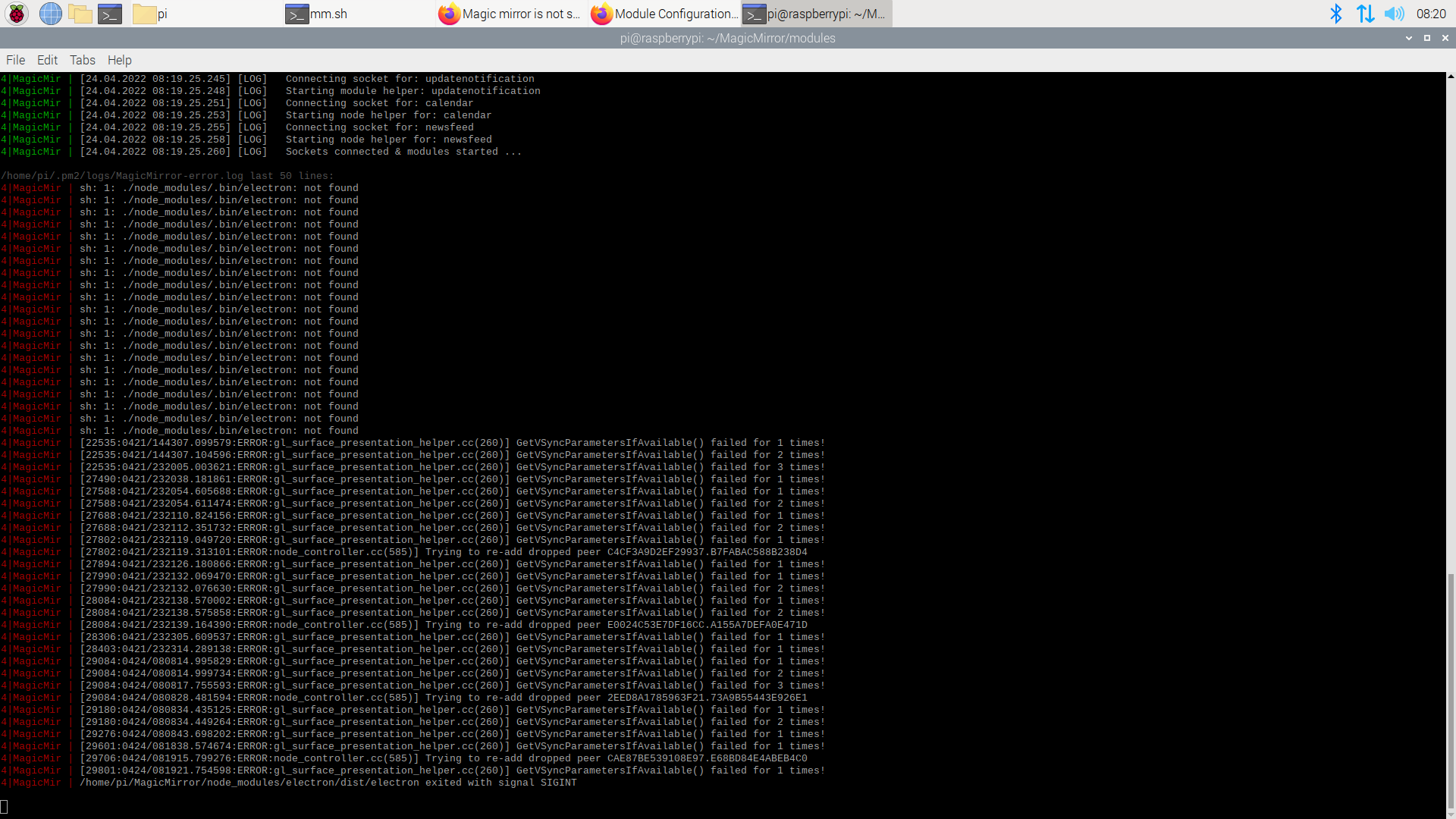
                                  @sdetweil 2022-04-24-082040_1920x1080_scrot.png

                                  S 1 Reply Last reply Reply Quote 0
                                  • S Offline
                                    sdetweil @CoopDog1712
                                    last edited by

                                    @CoopDog1712 ah yes, fun times…

                                    do

                                    pm2 stop all 
                                    cd ~/MagicMirror
                                    npm install electron@17.2.0
                                    npm start 
                                    

                                    mm should come up

                                    minimize mm (alt-spacebar, n)

                                    ctrl-c to stop running instance
                                    

                                    then

                                    pm2 status
                                    

                                    this will show the status or pm2 managed apps.

                                    ┌────┬────────────────────┬──────────┬──────┬───────────┬──────────┬──────────┐
                                    │ id │ name               │ mode     │ ↺    │ status    │ cpu      │ memory   │
                                    ├────┼────────────────────┼──────────┼──────┼───────────┼──────────┼──────────┤
                                    │ 0  │ MagicMirror        │ fork     │ 0    │ online    │ 0%       │ 2.7mb    │
                                    └────┴────────────────────┴──────────┴──────┴───────────┴──────────┴──────────┘


                                    use the name or the row number

                                    pm2 start xxx
                                    

                                    xxx is the name or the row number
                                    for example

                                    pm2 start 0 
                                    

                                    Sam

                                    How to add modules

                                    learning how to use browser developers window for css changes

                                    C 1 Reply Last reply Reply Quote 0
                                    • C Offline
                                      CoopDog1712 @sdetweil
                                      last edited by

                                      @sdetweil after i installed electron@17.2.0 then started it, this came up 2022-04-24-084424_1920x1080_scrot.png
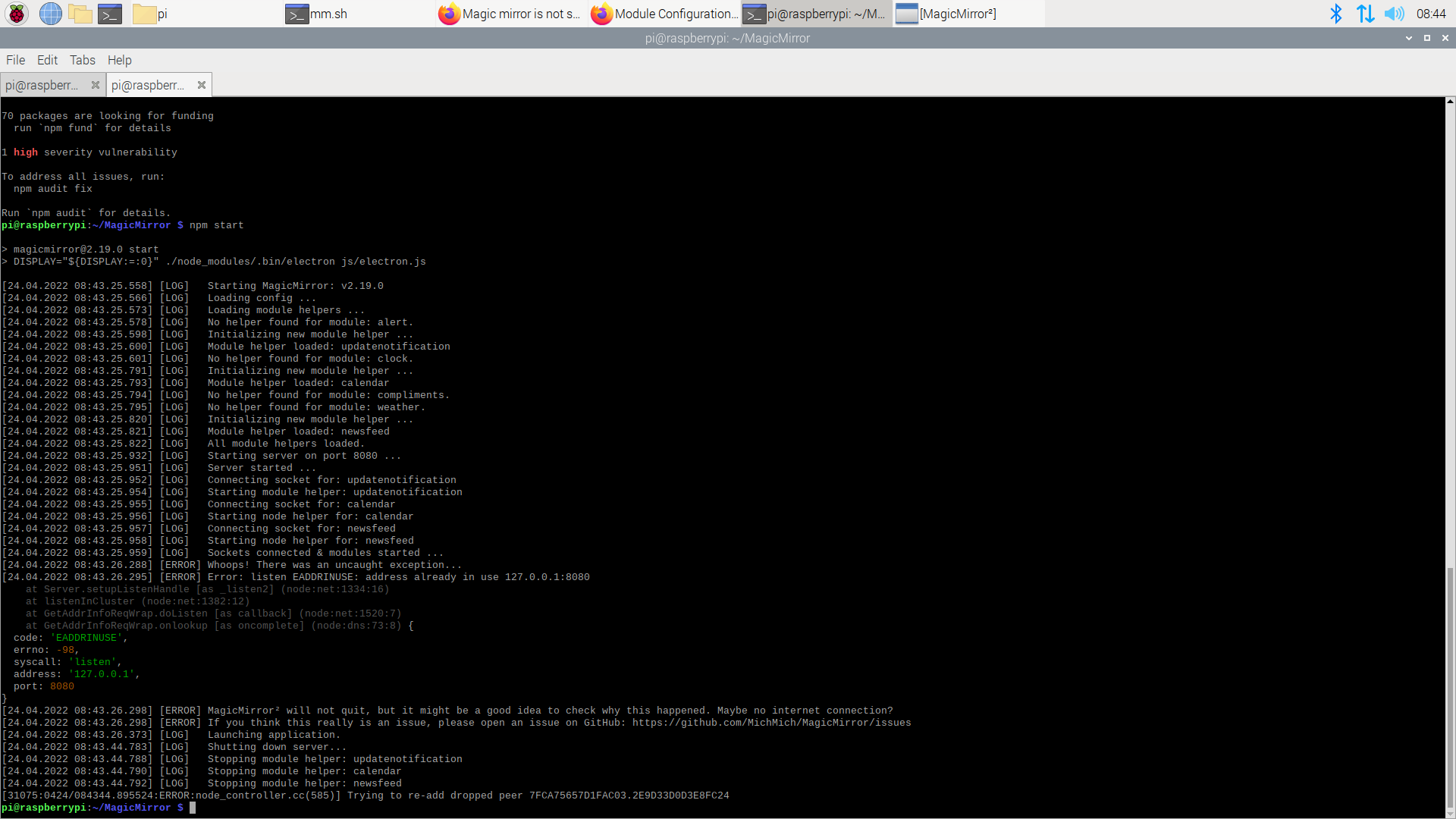
                                      then i did start pm2 start 4, and it started, but was still a blank screen

                                      S 1 Reply Last reply Reply Quote 0
                                      • S Offline
                                        sdetweil @CoopDog1712
                                        last edited by

                                        @CoopDog1712 says something is still running…

                                        you didn’t do pm2 stop all

                                        after doing test

                                        ps -ef | grep -i magicmirror

                                        should return nothing

                                        Sam

                                        How to add modules

                                        learning how to use browser developers window for css changes

                                        C 1 Reply Last reply Reply Quote 0
                                        • C Offline
                                          CoopDog1712 @sdetweil
                                          last edited by

                                          @sdetweil whoops…
                                          ok is did pm2 stop all and then entered that line of code you gave me and got this 2022-04-24-084933_1920x1080_scrot.png
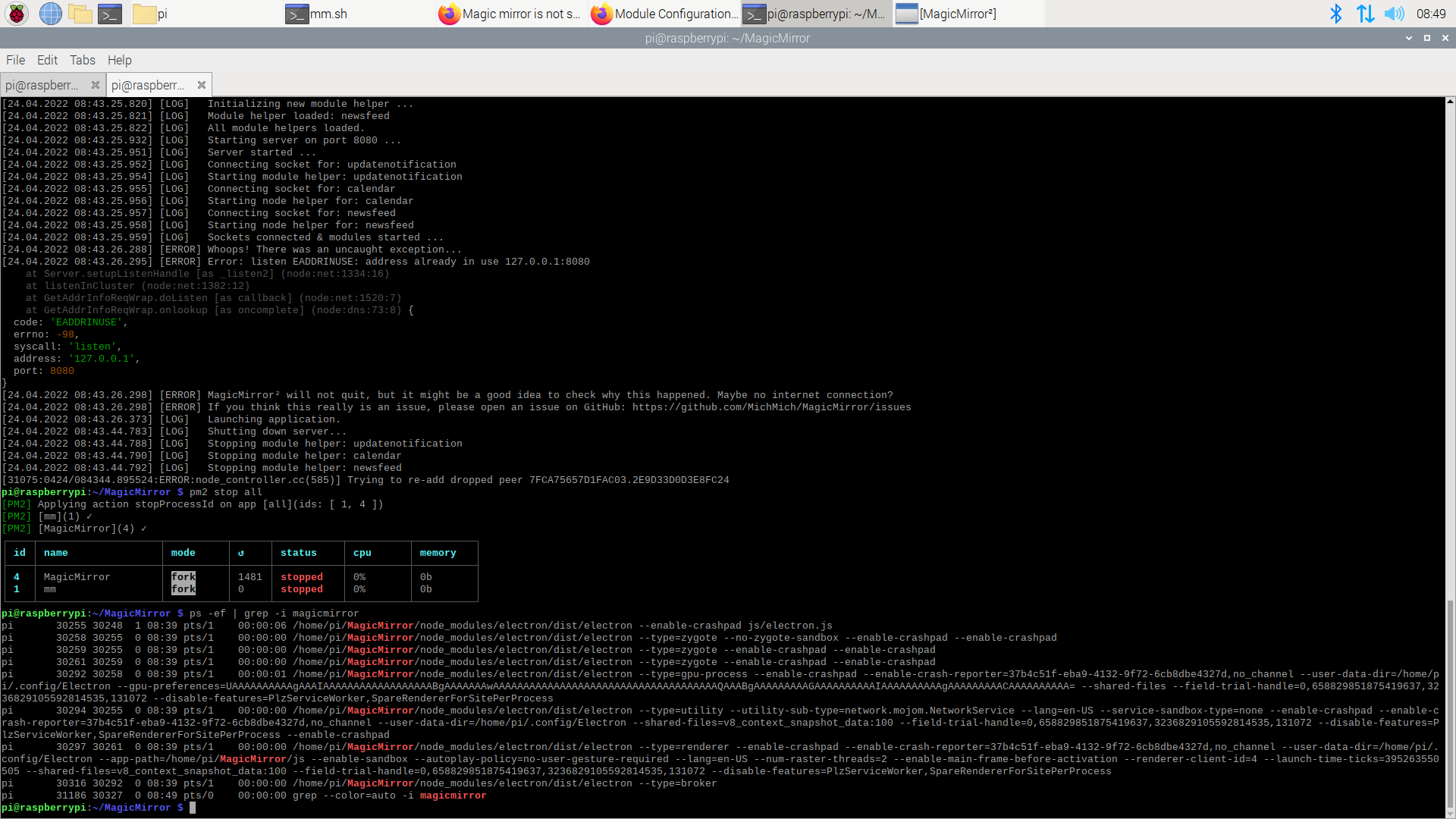
                                          S 1 Reply Last reply Reply Quote 0
                                          • S Offline
                                            sdetweil @CoopDog1712
                                            last edited by

                                            @CoopDog1712

                                            ok do

                                            we will delete 1 entry so you don’t have 2 trying to run at the same time
                                            and then reboot

                                            pm2 delete  1
                                            pm2 save
                                            sudo reboot 
                                            

                                            Sam

                                            How to add modules

                                            learning how to use browser developers window for css changes

                                            C 1 Reply Last reply Reply Quote 0

                                            Hello! It looks like you're interested in this conversation, but you don't have an account yet.

                                            Getting fed up of having to scroll through the same posts each visit? When you register for an account, you'll always come back to exactly where you were before, and choose to be notified of new replies (either via email, or push notification). You'll also be able to save bookmarks and upvote posts to show your appreciation to other community members.

                                            With your input, this post could be even better 💗

                                            Register Login

                                            • 1
                                            • 2
                                            • 1 / 2
                                            • First post
                                              Last post
                                            Enjoying MagicMirror? Please consider a donation!
                                            MagicMirror created by Michael Teeuw.
                                            Forum managed by Sam, technical setup by Karsten.
                                            This forum is using NodeBB as its core | Contributors
                                            Contact | Privacy Policy