Read the statement by Michael Teeuw here.
MMM-CalendarExt3
-
@cricket move,
put it on the bottom instead of center -
@sdetweil
Not sure if this is the “right” way but this worked:.region.middle.center { margin-top: 150px; }Even a blind squirrel… :-).
-
Hi folks,
it’s me again with a (probably) simple solution.
After I did a complete fresh install and re-added my custom.css, my Calendar looks a little odd - it triggers my OCD.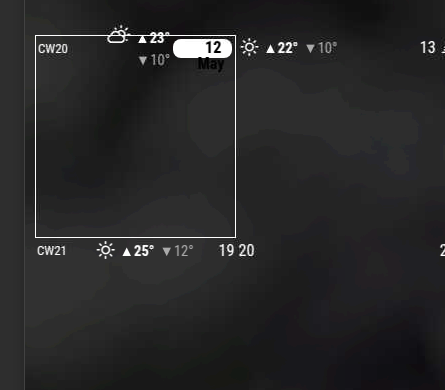
I guess I do not need to explain what is bothering me.
Why is the weather info centered on monday ?
How do I get CW, Weather and Current Day in 1 single line ?This is my current custom.css for MMM-CalendarExt3
.CX3 .cw {
        color: white;
}

.CX3 .weekend_2 {
        color: white;
}

.CX3 .weekend_1 {
        color: white;
}

.CX3 .event {
        border: none;
}

.CX3 .cell {
        border: none;
        background-color: rgba(255,255,255,0);
}

.CX3 .cellHeader .cellDate {
        flex-grow: 0;
}

.CX3 .cw::before {
        content: "CW";
        margin-right: 0px;
}
Ideas/Tips/Hints are much appreciated.
What I do not understand is, that this has changed after I did a fresh install but re-added my backed up custom.css :-/ -
@p1lspeda said in MMM-CalendarExt3:
What I do not understand is, that this has changed after I did a fresh install but re-added my backed up custom.css :-/
did you edit the css in the module folder??
this is WHY you DON’T do that… -
@p1lspeda first thing is to disable your settings in custom.css and see what the module provides
-
@sdetweil
not that I can remember as this would mess up things.
Luckily I found a back up my “old” (pre-fresh install) MMM-CalendarExt3.css and my “new” (post-fresh install) MMM-CalendarExt3.css.
And they are a match, so there is no difference.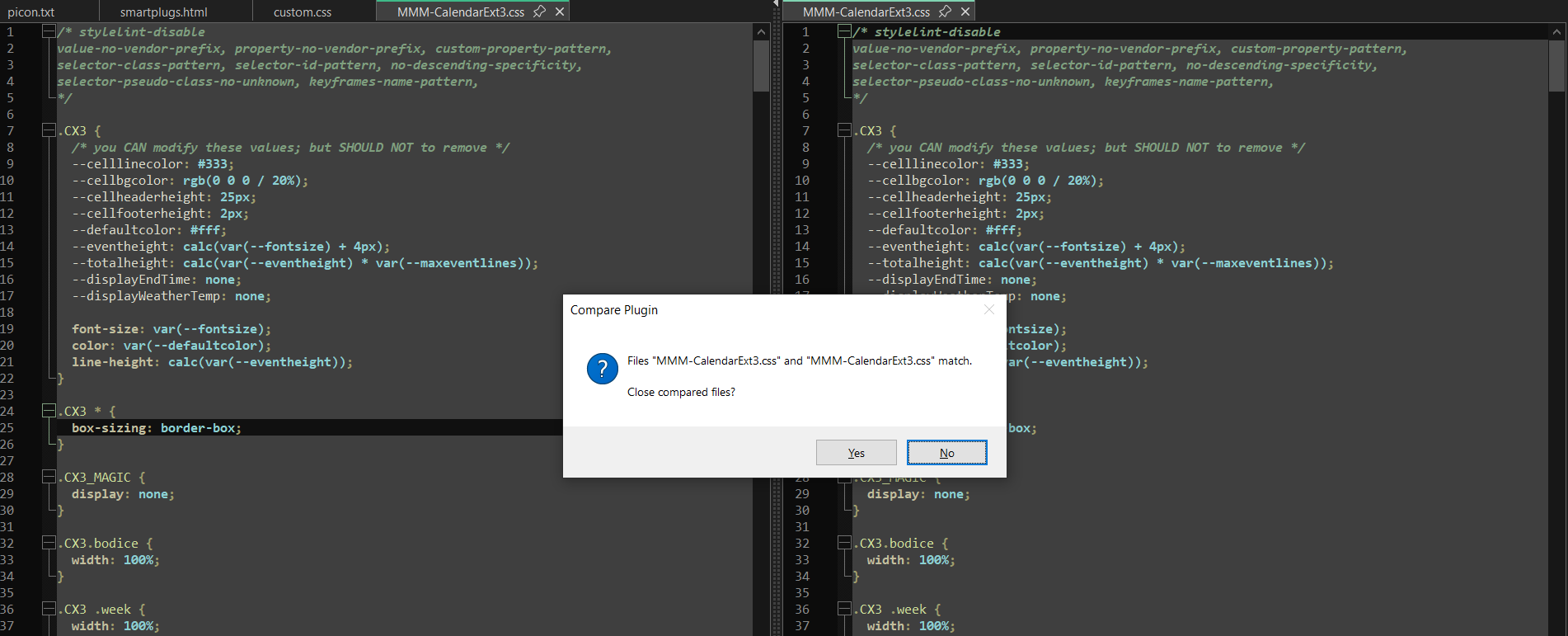
Any ideas ?
-
@sdetweil
We are getting there !
The module - without custom.css settings - already triggers my OCD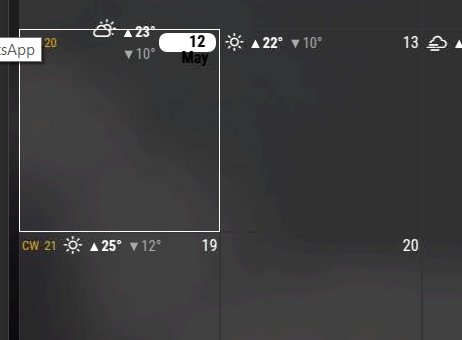
-
@p1lspeda well, that is ‘today’ style… so thats where I would look…
.CX3 .today .cellDate { font-weight: bold; background-color: white; color: black; border-radius: 8px; padding: 1px 8px; margin: 1px; line-height: 100%; } -
@sdetweil
I could narrow it down to cellWeather but I cannot find any css-styles in the module’s *.css :/
This means I am lost as to where to start testing :( -
@p1lspeda
they are there….CX3 .cellHeader .cellWeather { color: white; margin: 2px; font-size: 100%; align-self: center; } .CX3 .cellHeader .cellWeather .icon { font-size: 100%; font-weight: bold; } .CX3 .cellHeader .cellWeather .maxTemp { color: white; font-weight: bold; font-size: 90%; } .CX3 .cellHeader .cellWeather .minTemp { color: darkgray; font-weight: normal; } .CX3 .cellHeader .cellWeather .temperature { display: var(--displayWeatherTemp); padding-left: 5px; font-size: 90%; } .CX3 .cellHeader .cellWeather .maxTemp::before { content: " \25b2"; } .CX3 .cellHeader .cellWeather .minTemp::before { content: " \25bc"; } .CX3 .cellHeader .cellWeather .temperature::after { content: "° "; } -
I am sorry :(
Might need some new glasses after all -
@p1lspeda sometimes the class references are not standalone
.cellWeatherthe selector says when the element (in tree) has ALL these classes… then
if no spaces then if THIS element has ALL these classes -
@sdetweil
I managed to figure it out.
Just had to play around with the font-size and now it’s as I like it,
Thanks for your patience. -
@p1lspeda awesome
did you use the dev window?
-
When using the marque option, is there a way to get the event time to scroll with the title? I played with the marque lines in my custom.css but no luck.
-
@meshuggahn currently not, as they are two separate elements
-
Hi, I have made great progress on the calendar configuration and css customization but i seem to have stuck on some details, if someone could help me out.
- i am trying to achieve 3 weeks total, current week on top.
- i am trying to get 2 or 3 lines per event, in order to see more text of event titles. i have managed that but i see now that more than one event per day overlap one on top of the other.
you can see events ok on Jun 28,29 but overlapping at other days.
i would appreciate any help.
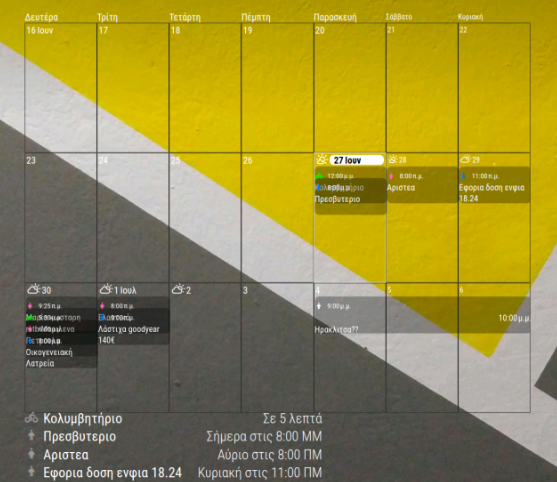
my config and css code:
{ // DEFAULT CALENDAR MODULE (LIST VIEW)
      module: "calendar",
      position: "bottom_left",
      config: {
        updateInterval: 200000,
        maximumEntries: 13,
        wrapEvents: true,
        fade: false,
        locale: "el-GR",
        displayType: "list",
        calendars: [
          {
            symbol: "person",
            name: "Chris",
            url: "https://p47-caldav.icloud.com/published/2/MjkyMDk3...........g970cQGs",
            color: "#007aff"
          },
          {
            symbol: "person-dress",
            name: "Rose",
            url: "https://p167-caldav.icloud.com/published/2/MT..........TmjE6A5QR",
            color: "#FF69B4"
          },
          {
            symbol: "person-biking",
            name: "Bike",
            url: "https://p47-caldav.icloud.com/published/2........._eRv9TyaVcZsIVIJA",
            color: "#00ff00"
          }

        ]
      }
    },
    {
      module: "MMM-CalendarExt3",
      position: "middle_center",
      config: {
        instanceId: "CX3",
        mode: "week",
        locale: "el-GR",
        timeFormat: "HH:mm",
        showHeader: false,
        maxEventLines: 10, // Reduced to a reasonable limit
        waitFetch: 1000 * 60 * 2,
        refreshInterval: 1000 * 60 * 2,
        showPastEvents: true,
        firstDayOfWeek: 1,
        calendarset: ["Chris", "Rose", "Bike"],
        displaySymbol: true,

        views: [
          {
            name: "3WeekCustom",
            mode: "week",
            type: "column",
            position: "middle_center",
            timeFormat: "HH:mm",
            startFromToday: true,
            weeks: 3,
            pastWeeks: 1,
            futureWeeks: 1,
            slotMaxHeight: "30em", // Set a reasonable maximum height
            slotHeight: "4em", // Base height per event, adjustable
            maxEventLines: 10, // Reduced at view level
            hideOverflow: false,
            overflowRolling: false, // Force stacking
            wrapEvents: true,
            showEventTime: true,
            displaySymbol: true,
            locale: "el-GR"
          }
        ],

        scenes: [
          {
            name: "DEFAULT",
            views: ["3WeekCustom"]
          }
        ]
      }
    },
.MMM-CalendarExt3 .module-header { visibility: hidden; } .CX3 { --cellbgcolor: transparent; } .CX3 .thisMonth { background: transparent !important; } .CX3 .cellContainer .cell:nth-child(1) .cw { display: none; } .CX3 .weekend { font-size: 80%; font-weight: normal; background: transparent !important; } .CX3 .weekend_1, .CX3 .weekend_2, .CX3 .weekday { color: var(--defaultColor); font-weight: normal; text-align: left; background: transparent !important; min-height: 0; /* Ensure no minimum height interferes */ padding: 0; /* Remove padding to control height */ } .CX3 .cellHeader { text-align: left; font-size: 100%; background: transparent !important; } /* Event styling with one-line icon/time and two-line title */ .CX3 .event.singleday, .CX3 .event.fullday, .CX3 .event.multiday { background-color: rgba(0, 0, 0, 0.3); /* Default fallback for entire event */ border-radius: 8px; line-height: 1.3em !important; overflow: visible !important; display: block !important; /* Ensure vertical stacking */ margin-bottom: 1em; /* Consistent spacing between events */ width: 100% !important; min-height: 3.9em; /* Minimum for one line icon/time + two title lines */ padding: 0.2em 0; /* Controlled padding */ position: relative; /* Ensure proper layering */ z-index: 1; /* Prevent overlap due to layering */ box-sizing: border-box; /* Include padding in height calculation */ } /* Calendar-specific colors with higher specificity */ .CX3 .event.singleday[data-calendar="Chris"], .CX3 .event.fullday[data-calendar="Chris"], .CX3 .event.multiday[data-calendar="Chris"] { background-color: rgba(0, 122, 255, 0.4); /* #007aff with 40% opacity */ } .CX3 .event.singleday[data-calendar="Rose"], .CX3 .event.fullday[data-calendar="Rose"], .CX3 .event.multiday[data-calendar="Rose"] { background-color: rgba(255, 105, 180, 0.4); /* #FF69B4 with 40% opacity */ } .CX3 .event.singleday[data-calendar="Bike"], .CX3 .event.fullday[data-calendar="Bike"], .CX3 .event.multiday[data-calendar="Bike"] { background-color: rgba(0, 255, 0, 0.4); /* #00ff00 with 40% opacity */ } /* Fix black text and layout */ .CX3 .event .headline { color: #ffffff !important; /* White text for readability */ background: transparent !important; display: block; /* Simplified layout */ width: 100%; } .CX3 .event .headline .time { font-size: 90%; /* Readable size */ text-align: center; white-space: nowrap; /* Prevent wrapping */ display: inline-flex; /* Inline flex for icon and time */ align-items: center; justify-content: center; } .CX3 .event .headline .symbol { margin-right: 0.5em; /* Space between icon and time */ font-size: 100%; /* Match time size */ display: inline-block; /* Ensure inline with time */ } .CX3 .event .headline .title { font-weight: normal; text-align: left; overflow: visible; /* Ensure visibility */ white-space: normal; /* Allow wrapping for two lines */ padding-left: 0; width: 100%; font-size: 90%; /* Ensure readable size */ display: block; /* Force below icon/time */ max-height: 2.6em; /* Limit to two lines */ line-height: 1.3em; /* Control line spacing */ } /* Hide μ.μ. if present */ .CX3 .event .headline .time::after { content: "" !important; } /* Ensure other headline elements inherit styles */ .CX3 .event.singleday .headline:not(.useSymbol)::before, .CX3 .event.singleday .headline.useSymbol .symbol.noSymbol::before { color: inherit !important; background: transparent !important; } .CX3 .event .headline.useSymbol .symbol, .CX3 .legends .legend, .CX3 .legend.useSymbol .symbol { font-size: 70%; background: transparent !important; } .CX3 .legends .legend { border-radius: 8px; color: var(--oppositeColor); max-height: 2.6em !important; line-height: 1.3em !important; overflow: visible !important; white-space: normal !important; word-break: break-word !important; word-wrap: break-word !important; display: block !important; width: 100% !important; background: transparent !important; } -
@chriskar weekIndex:0
should set the first week shown in mode week
-
@chriskar views and scenes were config options in calendarExt2, but are not used in Ext3
-
@sdetweil said in MMM-CalendarExt3:
@chriskar views and scenes were config options in calendarExt2, but are not used in Ext3
so i remove views and scenes and use only the config part?
Hello! It looks like you're interested in this conversation, but you don't have an account yet.
Getting fed up of having to scroll through the same posts each visit? When you register for an account, you'll always come back to exactly where you were before, and choose to be notified of new replies (either via email, or push notification). You'll also be able to save bookmarks and upvote posts to show your appreciation to other community members.
With your input, this post could be even better 💗
Register Login