MagicMirror Forum
    • Recent
    • Tags
    • Unsolved
    • Solved
    • MagicMirror² Repository
    • Documentation
    • 3rd-Party-Modules
    • Donate
    • Discord
    • Register
    • Login
    A New Chapter for MagicMirror: The Community Takes the Lead
    Read the statement by Michael Teeuw here.

    MMM-CalendarExt3

    Scheduled Pinned Locked Moved Utilities
    689 Posts 82 Posters 2.8m Views 86 Watching
    Loading More Posts
    • Oldest to Newest
    • Newest to Oldest
    • Most Votes
    Reply
    • Reply as topic
    Log in to reply
    This topic has been deleted. Only users with topic management privileges can see it.
    • S Offline
      sdetweil @megagprime
      last edited by sdetweil

      @megagprime that is the default calendar view.

      you add your ical url to the module config, replacing the US holidays url…

      note the ical url, not the embed url.

      really simple. if u use Google calendar

      open calendar.google.com on a PC
      in left nav, hover mouse over your calendar name,
      3 dots appear, click, select properties

      new stuff appears right,
      scroll down to sharing, ical
      select the public or secret url click copy

      that’s the url to use in mm

      Sam

      How to add modules

      learning how to use browser developers window for css changes

      1 Reply Last reply Reply Quote 0
      • F Offline
        fedale
        last edited by

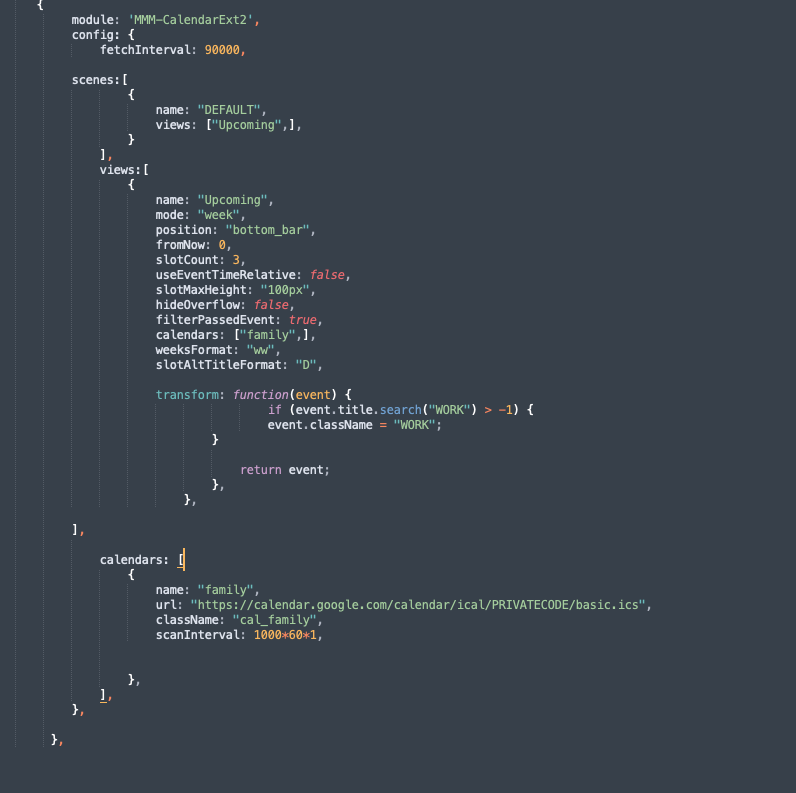
        Does anyone have a working config for google calendar. The old code i had in EXT2 isnt working with the new EXT3.
        In the new EXT3 one i cannot get any feedback from google.
        Screenshot 2023-01-16 at 12.44.32.png

        S 1 Reply Last reply Reply Quote 0
        • S Offline
          sdetweil @fedale
          last edited by

          @fedale ext3 does not read the calendar itself, like old ext2 did.
          .ext3 depends on the default calendar to read the ics data and broadcast the events

          so add your url to the default calendar module, and remove it’s position so it doesn’t show.
          then ext3 will receive the broadcast message

          Sam

          How to add modules

          learning how to use browser developers window for css changes

          F 1 Reply Last reply Reply Quote 0
          • F Offline
            fedale @sdetweil
            last edited by

            @sdetweil Thanks, that worked like a charm.

            Have some other questions.

            1. How to remove the CW wording, infront of the weeks number?

            2. The eventTransformer does not color not-fullday items. Is there a quick work around for that?
              So if i have only an hour in my calendar will still show color.

            /*
            eventTransformer: (ev) => {
            if (ev.title.search(‘garbage’) > -1) ev.color = ‘green’
            return ev
            }
            */

            1. Also i add picture to the eventTransformer? I had a recyle one for this garbage earlier.
            S F B 3 Replies Last reply Reply Quote 0
            • S Offline
              sdetweil @fedale
              last edited by

              @fedale not sure on cw,

              you could check if it’s full day event. not sure. not my module

              Sam

              How to add modules

              learning how to use browser developers window for css changes

              1 Reply Last reply Reply Quote 0
              • F Offline
                fedale @fedale
                last edited by

                @MMRIZE Any surgestions?

                Have some other questions.

                1. How to remove the CW wording, infront of the weeks number?

                2. The eventTransformer does not color not-fullday items. Is there a quick work around for that?
                  So if i have only an hour in my calendar will still show color.

                /*
                eventTransformer: (ev) => {
                if (ev.title.search(‘garbage’) > -1) ev.color = ‘green’
                return ev
                }
                */

                1. Also i add picture to the eventTransformer? I had a recyle one for this garbage earlier.
                F 1 Reply Last reply Reply Quote 0
                • B Offline
                  bicolorbore586 @fedale
                  last edited by

                  @fedale
                  I have the below in my custom.css

                  /* MMM-CalendarExt3 */
                  .CX3 .cw {
                  display:none;
                  }
                  
                  F 1 Reply Last reply Reply Quote 0
                  • F Offline
                    fedale @bicolorbore586
                    last edited by

                    This post is deleted!
                    1 Reply Last reply Reply Quote 0
                    • F Offline
                      fedale @fedale
                      last edited by

                      I learnt something new, never thought to look into the module folder css file.
                      Always though only the main.css and custom.css was the only ones to change.

                      Found the wordning now in MMM-CalendarExt3.css file within the module.
                      Removing the CW, the way i wanted. Just wanted to share.

                      MMM-CalendarExt3.css file and remove the CW to only get the week number:
                      .CX3 .cw::before {
                      content: 'CW ’
                      }

                      S B K 3 Replies Last reply Reply Quote 0
                      • S Offline
                        sdetweil @fedale
                        last edited by

                        @fedale u can override that in the custom.css

                        don’t change the modules files, it will break upgraded and fixes

                        Sam

                        How to add modules

                        learning how to use browser developers window for css changes

                        1 Reply Last reply Reply Quote 0
                        • B Offline
                          bicolorbore586 @fedale
                          last edited by

                          @fedale yes, as Sam says, don’t modify the module css, all css work should be done in the custom.css

                          F 1 Reply Last reply Reply Quote 0
                          • F Offline
                            fedale @bicolorbore586
                            last edited by

                            @bicolorbore586 Thanks guys.

                            1 Reply Last reply Reply Quote 0
                            • F Offline
                              fedale
                              last edited by

                              Could i have icons on different words in calendar?
                              I only have one calendar, but previously cx2 could get with differnt pictures like this example.

                               if (event.title.search("Work") > -1) {
                              	event.icon = "ic:outline-work-outline";
                              	event.className = "work" 
                              

                              }
                              else if(event.title.search(“Trash”) > -1) {
                              event.icon = “mdi:recycle”;
                              event.className = “Trash”
                              }

                              S M 2 Replies Last reply Reply Quote 0
                              • S Offline
                                sdetweil @fedale
                                last edited by

                                @fedale I think it works the same

                                Sam

                                How to add modules

                                learning how to use browser developers window for css changes

                                1 Reply Last reply Reply Quote 0
                                • M Offline
                                  MMRIZE @fedale
                                  last edited by

                                  @fedale
                                  CX3 has not support Iconify icons yet, only FontAwesome. It would be applied in near future updates.

                                  1 Reply Last reply Reply Quote 0
                                  • B Offline
                                    bicolorbore586
                                    last edited by bicolorbore586

                                    Is there a way of getting icons to sit in specific top bars (with the date number) of cells/days?

                                    I use MMM-CalendarExt3 to show my upcoming month, the default calendar to show the next couple of days events and MMM-Birthdays to show upcoming birthdays.

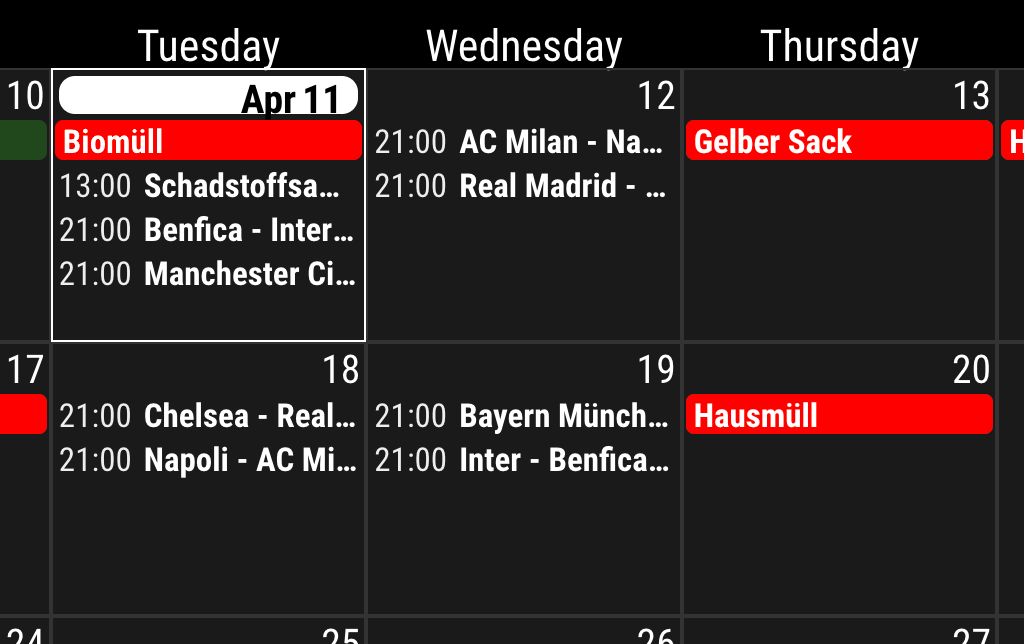
                                    What I would like to do is have a birthday cake icon sat in the date field, so I can see that that date is a birthday, without any written information in the cell, i.e. the white line wouldn’t be there in the image below.


                                    1af439a6-5ee7-4951-b584-06ffba318e30-image.png

                                    d16e0200-1d92-4fe7-bd9d-eca55bf8ef2e-image.png

                                    S M 3 Replies Last reply Reply Quote 0
                                    • S Offline
                                      sdetweil @bicolorbore586
                                      last edited by

                                      @bicolorbore586 no way without changing the module code. can’t move it w css

                                      Sam

                                      How to add modules

                                      learning how to use browser developers window for css changes

                                      1 Reply Last reply Reply Quote 1
                                      • M Offline
                                        MMRIZE @bicolorbore586
                                        last edited by

                                        @bicolorbore586
                                        Sorry, It can’t be done at this moment. In some day, I have a plan to update. I’ll consider your needs at that time.

                                        1 Reply Last reply Reply Quote 1
                                        • R Offline
                                          redink
                                          last edited by

                                          Can anyone help me make one last tweak? I would like to get rid of the icon next to the event name and display the event time in just a 24 hour format (23:30 instead of 11:30 PM). Here’s my current config

                                          {
                                            module: "MMM-CalendarExt3",
                                            position: "bottom_bar",
                                            title: "",
                                            config: {
                                              mode: "week",
                                              instanceId: "basicCalendar",
                                              locale: 'en-EN',
                                              weekIndex: 0,
                                              weeksInView: 4,
                                              maxEventLines: 5,
                                              firstDayOfWeek: 0,
                                              fontSize: "22px",
                                              eventTimeOptions: {
                                                hour: "2-digit",
                                                minute : "2-digit"
                                              }, 
                                              useSymbol: false,
                                              calendarSet: ['School', 'Family'],
                                            }
                                          },
                                          
                                          M 1 Reply Last reply Reply Quote 0
                                          • M Offline
                                            MMRIZE @redink
                                            last edited by MMRIZE

                                            @redink
                                            e4be9a45-b742-4a80-8ddc-ac6835d160c3-image.png

                                            1. Add this into your custom.css
                                            .CX3 .event.singleday:not(.useSymbol)::before, 
                                            .CX3 .event.singleday.useSymbol .symbol.noSymbol::before {
                                              display:none; 
                                            }
                                            
                                            1. Use this eventTimeOptions;
                                            eventTimeOptions: {
                                            	hour12: false,
                                            	hour: "2-digit",
                                            	minute : "2-digit"
                                            }, 
                                            
                                            R 1 Reply Last reply Reply Quote 0

                                            Hello! It looks like you're interested in this conversation, but you don't have an account yet.

                                            Getting fed up of having to scroll through the same posts each visit? When you register for an account, you'll always come back to exactly where you were before, and choose to be notified of new replies (either via email, or push notification). You'll also be able to save bookmarks and upvote posts to show your appreciation to other community members.

                                            With your input, this post could be even better 💗

                                            Register Login

                                            • 1
                                            • 2
                                            • 10
                                            • 11
                                            • 12
                                            • 13
                                            • 14
                                            • 34
                                            • 35
                                            • 12 / 35
                                            • First post
                                              Last post
                                            Enjoying MagicMirror? Please consider a donation!
                                            MagicMirror created by Michael Teeuw.
                                            Forum managed by Sam, technical setup by Karsten.
                                            This forum is using NodeBB as its core | Contributors
                                            Contact | Privacy Policy