MagicMirror Forum
    • Recent
    • Tags
    • Unsolved
    • Solved
    • MagicMirror² Repository
    • Documentation
    • 3rd-Party-Modules
    • Donate
    • Discord
    • Register
    • Login
    A New Chapter for MagicMirror: The Community Takes the Lead
    Read the statement by Michael Teeuw here.

    MMM-CalendarExt3

    Scheduled Pinned Locked Moved Utilities
    689 Posts 82 Posters 2.8m Views 86 Watching
    Loading More Posts
    • Oldest to Newest
    • Newest to Oldest
    • Most Votes
    Reply
    • Reply as topic
    Log in to reply
    This topic has been deleted. Only users with topic management privileges can see it.
    • F Offline
      furry131 @sdetweil
      last edited by furry131

      @sdetweil

      OK here is the ios calendar.

      I see lots of old stuff on there. but I for certain see something starting on 9/3 and 9/8. So I assume it is pulling the correct calendar down

      ###the following is from the beginning of the logs###
      BEGIN:VCALENDAR
      VERSION:2.0
      X-WR-CALNAME:Family
      X-APPLE-CALENDAR-COLOR:#ffcc00
      
      ####below here is from further down the log showing an upcoming event
      
      BEGIN:VEVENT
      CREATED:20230816T132451Z
      DTEND;TZID=America/Denver:20230903T140000
      DTSTAMP:20230816T132451Z
      DTSTART;TZID=America/Denver:20230903T100000
      LAST-MODIFIED:20230816T132451Z
      LOCATION:Walmart Supercenter\n200 W 136th Ave\, Westminster\, CO  80234\,
        United States
      SEQUENCE:0
      SUMMARY:Scouts popcorn
      UID:4B479445-47F6-4EE4-B4E4-2E45BE45949E
      URL;VALUE=URI:
      X-APPLE-STRUCTURED-LOCATION;VALUE=URI;X-ADDRESS="200 W 136th Ave, Westmin
       ster, CO  80234, United States";X-APPLE-MAPKIT-HANDLE=CAES7QIIrk0Qm/XnhY
       +ewPzYARoSCS9szVZe+ENAEZzB3y9mP1rAIqEBCg1Vbml0ZWQgU3RhdGVzEgJVUxoIQ29sb3
       JhZG8iAkNPKgxBZGFtcyBDb3VudHkyC1dlc3RtaW5zdGVyOgU4MDIzNEIbSW50ZXJjaGFuZ2
       UgQnVzaW5lc3MgQ2VudGVyUgtXIDEzNnRoIEF2ZVoDMjAwYg8yMDAgVyAxMzZ0aCBBdmWKAR
       tJbnRlcmNoYW5nZSBCdXNpbmVzcyBDZW50ZXIqE1dhbG1hcnQgU3VwZXJjZW50ZXIyDzIwMC
       BXIDEzNnRoIEF2ZTIWV2VzdG1pbnN0ZXIsIENPICA4MDIzNDINVW5pdGVkIFN0YXRlczgvUA
       FaVAolCJv154WPnsD82AESEgkvbM1WXvhDQBGcwd8vZj9awBiuTZADAaIfKgib9eeFj57A/N
       gBGh0KE1dhbG1hcnQgU3VwZXJjZW50ZXIQACoCZW5AAA==;X-APPLE-RADIUS=298.659415
       5911811;X-TITLE=Walmart Supercenter:geo:39.940379,-104.990612
      END:VEVENT


      BEGIN:VEVENT
      CREATED:20230816T131714Z
      DESCRIPTION:Oakhurst Park\n9255 Ammons St.\nWestminster\, CO 80021
      DTEND;TZID=America/Denver:20230908T184500
      DTSTAMP:20230816T131929Z
      DTSTART;TZID=America/Denver:20230908T171500
      LAST-MODIFIED:20230816T131928Z
      LOCATION:9255 Ammons Cir\nWestminster\, CO\, United States
      RELATED-TO;RELTYPE=X-CALENDARSERVER-RECURRENCE-SET:9C8B1CA1-25F8-4DFC-AE4
       2-ACCA1C4C81FF
      RRULE:FREQ=WEEKLY;UNTIL=20230929T231500Z
      SEQUENCE:0
      SUMMARY:Corvers footwork camp
      UID:FA306006-B4CD-4781-8228-BD46FDE21ACE
      URL;VALUE=URI:
      X-APPLE-STRUCTURED-LOCATION;VALUE=URI;X-ADDRESS="Westminster, CO, United
       States";X-APPLE-MAPKIT-HANDLE=CAESywEaEgn40spzM/BDQBFxPtBlxUVawCJqCg1Vbm
       l0ZWQgU3RhdGVzEgJVUxoIQ29sb3JhZG8iAkNPKhBKZWZmZXJzb24gQ291bnR5MgtXZXN0bW
       luc3RlcjoFODAwMjFSCkFtbW9ucyBDaXJaBDkyNTViDzkyNTUgQW1tb25zIENpcioPOTI1NS
       BBbW1vbnMgQ2lyMg85MjU1IEFtbW9ucyBDaXIyFldlc3RtaW5zdGVyLCBDTyAgODAwMjEyDV
       VuaXRlZCBTdGF0ZXNQAQ==;X-APPLE-RADIUS=0;X-APPLE-REFERENCEFRAME=0;X-TITLE
       =9255 Ammons Cir:geo:39.876570,-105.090173
      END:VEVENT
      BEGIN:VEVENT
      
      
      S 1 Reply Last reply Reply Quote 0
      • S Offline
        sdetweil @furry131
        last edited by

        @furry131 9/8 is along way away… maybe ext3 in month view can show that…
        default stops at 10 days I think. . actually 10 entries
        maximumEntries: 10,

        Sam

        How to add modules

        learning how to use browser developers window for css changes

        F 1 Reply Last reply Reply Quote 0
        • F Offline
          furry131 @sdetweil
          last edited by

          @sdetweil

          i found something in my IOS for tomorrow. so I would think it is pulling down ok.

          either way, the soccer one is pulling down current stuff this week.

          BEGIN:VEVENT
          CREATED:20230719T035111Z
          DTEND;VALUE=DATE:20230821
          DTSTAMP:20230810T232604Z
          DTSTART;VALUE=DATE:20230819
          LAST-MODIFIED:20230810T232604Z
          SEQUENCE:1
          SUMMARY:Soccer tournament
          UID:FB687F6C-CA14-4F4D-8AAD-FBB2D21688B2
          URL;VALUE=URI:
          END:VEVENT
          
          S 1 Reply Last reply Reply Quote 0
          • S Offline
            sdetweil @furry131
            last edited by

            @furry131 ok, one does it show on default cal? does default have position set?
            does it show in ext3?

            Sam

            How to add modules

            learning how to use browser developers window for css changes

            F 1 Reply Last reply Reply Quote 0
            • F Offline
              furry131 @sdetweil
              last edited by

              @sdetweil

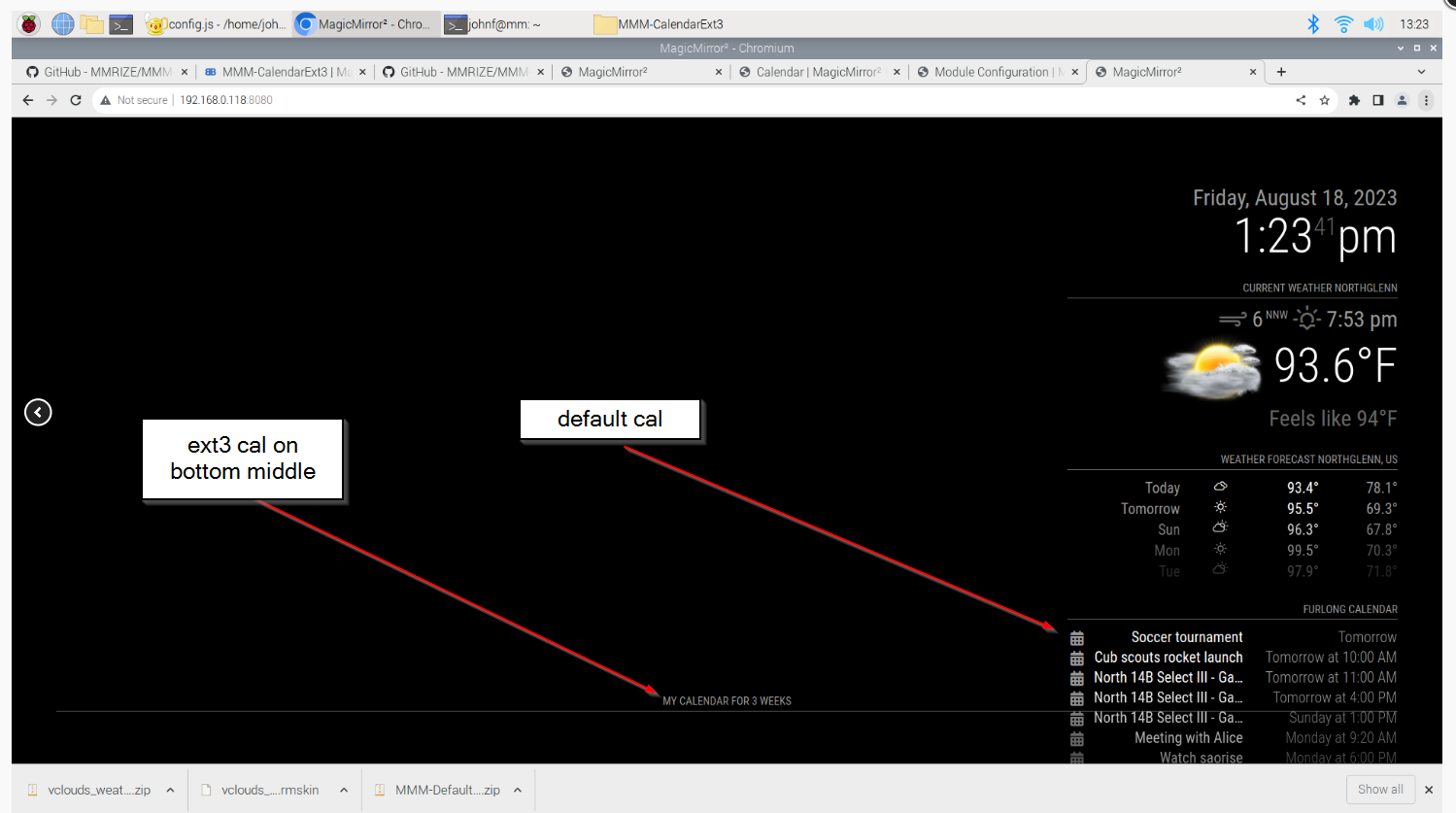
              default calendar shows on the top right. It shows entries from my IOS calendar and my soccer calendar( IOS is “meeting with alice” Soccer is “north 14 B select III”) as positioned on the config.js, (see screen shot below)

              it does not show on ext3. All I get is the header.
              a6a3aa8f-41be-4dc7-82d7-eb607b408eee-image.png

              1 Reply Last reply Reply Quote 0
              • F Offline
                furry131
                last edited by

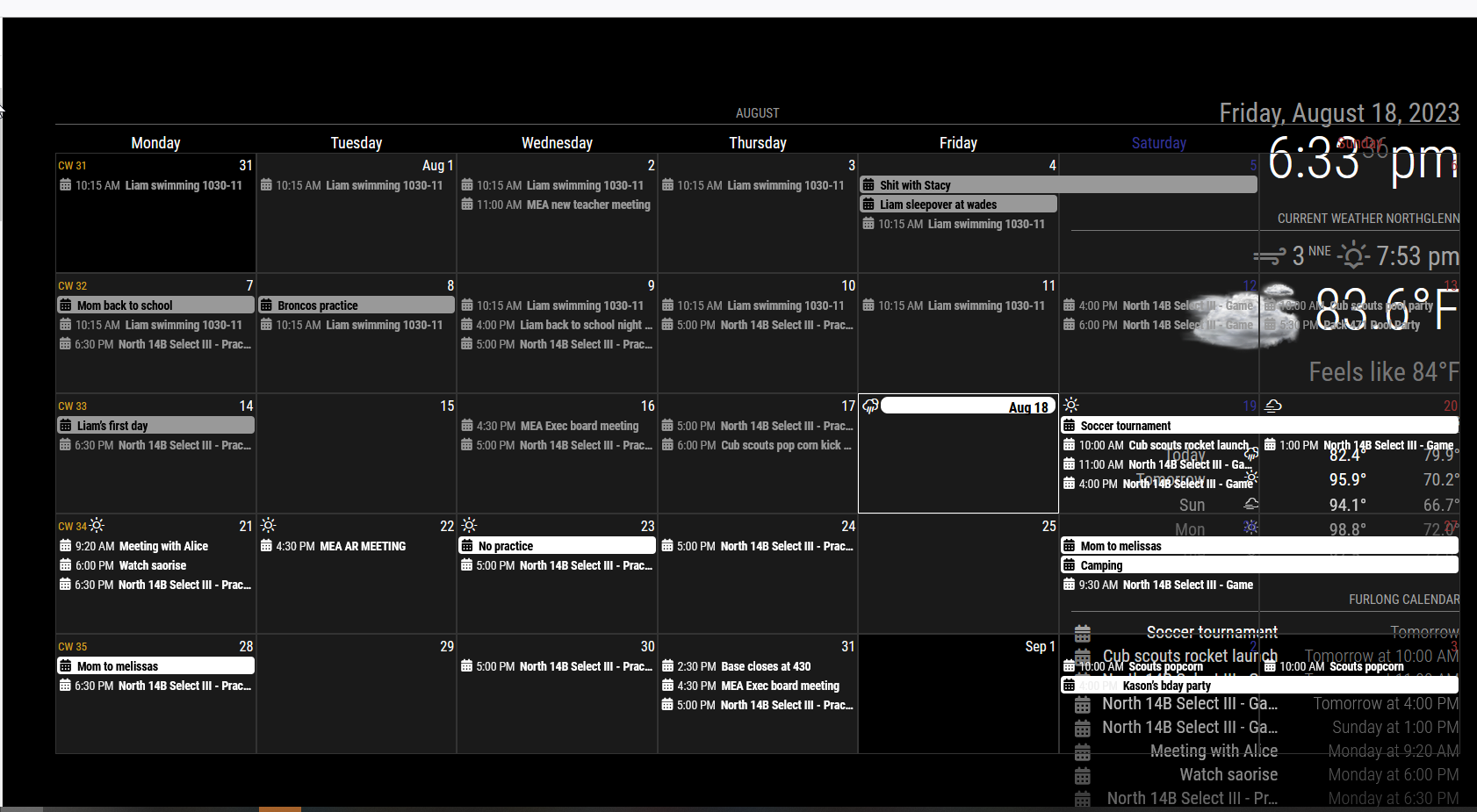
                OK well this is fun. I was reading again and saw in the instructions about moving back to 1.2.6. SOOOOOO… I decided to give it a hoot. Well, now the calendar is showing up for me.

                Not sure what this means.

                just thought I would share.

                Just need to fix the formatting now.
                8b4d2cc3-7e74-4a0e-9830-4db182fcc873-image.png

                johnf@mm:~/MagicMirror/modules/MMM-CalendarExt3 $ git checkout snap-1.2.6
                Branch 'snap-1.2.6' set up to track remote branch 'snap-1.2.6' from 'origin'.
                Switched to a new branch 'snap-1.2.6'
                
                M 1 Reply Last reply Reply Quote 0
                • M Offline
                  MMRIZE @furry131
                  last edited by MMRIZE

                  @furry131
                  It might mean;

                  1. Your module was not properly installed. I think this would be the solution in your case generally.
                  cd ~/MagicMirror/modules/MMM-CalendarExt3
                  git checkout main
                  git pull
                  npm install
                  git submodule update --init --recursive
                  
                  1. Or your MM (Or Chromium/Browser what you are using) is somewhat old, update it.
                  F 1 Reply Last reply Reply Quote 0
                  • F Offline
                    furry131 @MMRIZE
                    last edited by

                    @MMRIZE

                    OK thanks. I just ran your suggestions and restarted MM. It is running.

                    I just installed MM last week and I used sdetweil’s install script. Also just ran the the update script he has. seems to only needing to update Node.js from v16.13.0 to v16.13.1.

                    Must have been something odd with the install of the module then.

                    Appreciate everyone’s help.

                    1 Reply Last reply Reply Quote 0
                    • M Offline
                      MMRIZE
                      last edited by

                      UPDATE 1.5.0

                      4ca1e0a9-5e0e-4260-8dd3-8f3ee200308b-image.png
                      Now, the module has a new mode, day; it could show a relatively week-like view. You can adjust the beginning of the seven-day cells from today (or relatively by dayIndex).

                      G 1 Reply Last reply Reply Quote 0
                      • G Offline
                        gonzonia @MMRIZE
                        last edited by

                        @MMRIZE Thank you! That’s just what I wanted!

                        1 Reply Last reply Reply Quote 0
                        • B Offline
                          bicolorbore586 @MMRIZE
                          last edited by

                          @MMRIZE
                          Is there a way to change the height of a calendar so it’s either nothing, or very thin?

                          Using the “manipulateDateCell” I get the desired effect of having an icon in the cell header, however I’d like to not have a “blank” entry in the day view (see picture)

                          dd955139-2d6e-4bf4-b71a-596e7c6c73c2-image.png

                          M 1 Reply Last reply Reply Quote 0
                          • M Offline
                            MMRIZE @bicolorbore586
                            last edited by

                            @bicolorbore586
                            What is that ‘blank’? I cannot guess what it is pointing. Could you show me a bigger picture? and to reproduce your case, send or show me the config and css with real ical urls. (eouia0819@gmail.com)

                            1 Reply Last reply Reply Quote 1
                            • A Offline
                              aircliff
                              last edited by

                              Have a question I’m hoping others may have seen and resolved.

                              Currently I run my MagicMirror in server mode and have popover enabled on my calendar. When I access from a computer with a mouse and click the individual calendar events the popover comes up as expected. When I access from my tablet the popover will not come up when I touch the individual events. Other modules I have such as MMM-OnScreenMenu responds appropriately to touch on the tablets.

                              I’m hoping others may have seen this and have a recommendation for what I should look at. I’m assuming there is a setting somewhere in one of the files I need to enable or define in some specific way in the config file.

                              Everything with the module otherwise works perfectly, just the one item I’m trying to resolve with popover when using with a tablet touchscreen.

                              Thank you

                              S M 2 Replies Last reply Reply Quote 0
                              • S Offline
                                sdetweil @aircliff
                                last edited by

                                @aircliff it’s probable that the tablet doesn’t support the right level of JavaScript for the pop-up to happen

                                Sam

                                How to add modules

                                learning how to use browser developers window for css changes

                                1 Reply Last reply Reply Quote 0
                                • M Offline
                                  MMRIZE @aircliff
                                  last edited by MMRIZE

                                  @aircliff
                                  I’m using new way to handle popover thing, the “popover” API which is suggested recently as standard, but not all the browser supports it yet.

                                  https://github.com/MMRIZE/MMM-CalendarExt3/discussions/80

                                  S 1 Reply Last reply Reply Quote 0
                                  • S Offline
                                    sdetweil @MMRIZE
                                    last edited by

                                    @MMRIZE and tablets and TVs and fix devices are using fairly old browsers and don’t generally have any mechanism to upgrade them to the latest releases so it’s unlikely that the tablet will ever support the pop-up the same way as a native browser will

                                    Sam

                                    How to add modules

                                    learning how to use browser developers window for css changes

                                    1 Reply Last reply Reply Quote 0
                                    • C Offline
                                      CurlyQ12391
                                      last edited by

                                      Hello, I hope that this is the correct place to ask about this…

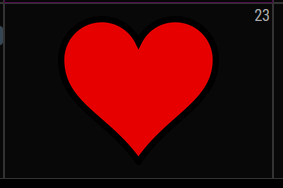
                                      I’ve been playing around with adding backgrounds to my CalX3 for US holidays (example of the Valentines background below):
                                      1964916b-3525-40e5-a81b-7f691ef45676-image.png

                                      Since the CSS is applying the background to a specific month/date combo I am unsure how I can accommodate holidays that occur on the same day but different dates each year (e.g., Thanksgiving, Labor Day, etc).

                                      The below CSS is all the dates Labor Day could fall on, but this wouldn’t work unless I comment out the incorrect dates each year :/ any ideas/suggestions?

                                      /* Labor Day - First Monday in September */
                                      .CX3 .month_9.date_1,
                                      .CX3 .month_9.date_2,
                                      .CX3 .month_9.date_3,
                                      .CX3 .month_9.date_4,
                                      .CX3 .month_9.date_5,
                                      .CX3 .month_9.date_6,
                                      .CX3 .month_9.date_7,
                                      .CX3 .month_9.date_8 {
                                        background-image: url("/modules/MMM-CalendarExt3/Backgrounds/LaborDay");
                                        background-position: center center;
                                        background-size: 60%;
                                        background-repeat: no-repeat;
                                      }
                                      

                                      Thank you!

                                      M 1 Reply Last reply Reply Quote 0
                                      • M Offline
                                        MMRIZE @CurlyQ12391
                                        last edited by MMRIZE

                                        @CurlyQ12391
                                        There is the selector “.weekday_N”(0-6). ATM I cannot remember exactly but “weekday_0” probably is “Sunday” (or Monday), anyway try it.
                                        https://github.com/MMRIZE/MMM-CalendarExt3#styling-with-css

                                        C 1 Reply Last reply Reply Quote 0
                                        • C Offline
                                          CurlyQ12391 @MMRIZE
                                          last edited by

                                          @MMRIZE,

                                          That did the trick! Adding “weekday” prevented the image from populating on multiple cells :) This module is by far my favorite because of how customizable it is.

                                          /* Labor Day - First Monday in September */
                                          .CX3 .month_9.date_1.weekday_1,
                                          .CX3 .month_9.date_2.weekday_1,
                                          .CX3 .month_9.date_3.weekday_1,
                                          .CX3 .month_9.date_4.weekday_1  {
                                            background-image: url("/modules/MMM-CalendarExt3/Backgrounds/LaborDay");
                                            background-position: center center;
                                            background-size: 60%;
                                            background-repeat: no-repeat;
                                          }
                                          

                                          The only one I haven’t been able to figure out is Easter Sunday because it is the first between March 22 and April 25. I dont believe CSS can handle that type of logic, maybe JS but thats a little too complex for me. For now I will just leave Easter off the calendar.

                                          M 2 Replies Last reply Reply Quote 0
                                          • M Offline
                                            MMRIZE @CurlyQ12391
                                            last edited by

                                            @CurlyQ12391
                                            I think it is possible with “manipulateDateCell”. I will show example after my return from a business trip in a few days.

                                            1 Reply Last reply Reply Quote 0

                                            Hello! It looks like you're interested in this conversation, but you don't have an account yet.

                                            Getting fed up of having to scroll through the same posts each visit? When you register for an account, you'll always come back to exactly where you were before, and choose to be notified of new replies (either via email, or push notification). You'll also be able to save bookmarks and upvote posts to show your appreciation to other community members.

                                            With your input, this post could be even better 💗

                                            Register Login

                                            • 1
                                            • 2
                                            • 18
                                            • 19
                                            • 20
                                            • 21
                                            • 22
                                            • 34
                                            • 35
                                            • 20 / 35
                                            • First post
                                              Last post
                                            Enjoying MagicMirror? Please consider a donation!
                                            MagicMirror created by Michael Teeuw.
                                            Forum managed by Sam, technical setup by Karsten.
                                            This forum is using NodeBB as its core | Contributors
                                            Contact | Privacy Policy
