MagicMirror Forum
    • Recent
    • Tags
    • Unsolved
    • Solved
    • MagicMirror² Repository
    • Documentation
    • 3rd-Party-Modules
    • Donate
    • Discord
    • Register
    • Login
    A New Chapter for MagicMirror: The Community Takes the Lead
    Read the statement by Michael Teeuw here.

    MMM-CalendarExt3

    Scheduled Pinned Locked Moved Utilities
    689 Posts 82 Posters 2.8m Views 86 Watching
    Loading More Posts
    • Oldest to Newest
    • Newest to Oldest
    • Most Votes
    Reply
    • Reply as topic
    Log in to reply
    This topic has been deleted. Only users with topic management privileges can see it.
    • S Do not disturb
      sdetweil @meshuggahn
      last edited by sdetweil

      @meshuggahn currently not, as they are two separate elements

      Sam

      How to add modules

      learning how to use browser developers window for css changes

      1 Reply Last reply Reply Quote 0
      • C Offline
        chriskar
        last edited by

        Hi, I have made great progress on the calendar configuration and css customization but i seem to have stuck on some details, if someone could help me out.

        1. i am trying to achieve 3 weeks total, current week on top.
        2. i am trying to get 2 or 3 lines per event, in order to see more text of event titles. i have managed that but i see now that more than one event per day overlap one on top of the other.

        you can see events ok on Jun 28,29 but overlapping at other days.
        i would appreciate any help.
        Screenshot 2025-06-27 115436.png

        my config and css code:

        { // DEFAULT CALENDAR MODULE (LIST VIEW)
              module: "calendar",
              position: "bottom_left",
              config: {
                updateInterval: 200000,
                maximumEntries: 13,
                wrapEvents: true,
                fade: false,
                locale: "el-GR",
                displayType: "list",
                calendars: [
                  {
                    symbol: "person",
                    name: "Chris",
                    url: "https://p47-caldav.icloud.com/published/2/MjkyMDk3...........g970cQGs",
                    color: "#007aff"
                  },
                  {
                    symbol: "person-dress",
                    name: "Rose",
                    url: "https://p167-caldav.icloud.com/published/2/MT..........TmjE6A5QR",
                    color: "#FF69B4"
                  },
                  {
                    symbol: "person-biking",
                    name: "Bike",
                    url: "https://p47-caldav.icloud.com/published/2........._eRv9TyaVcZsIVIJA",
                    color: "#00ff00"
                  }
                  
                ]
              }
            },
            {
              module: "MMM-CalendarExt3",
              position: "middle_center",
              config: {
                instanceId: "CX3",
                mode: "week",
                locale: "el-GR",
                timeFormat: "HH:mm",
                showHeader: false,
                maxEventLines: 10, // Reduced to a reasonable limit
                waitFetch: 1000 * 60 * 2,
                refreshInterval: 1000 * 60 * 2,
                showPastEvents: true,
                firstDayOfWeek: 1,
                calendarset: ["Chris", "Rose", "Bike"],
                displaySymbol: true,
            
                views: [
                  {
                    name: "3WeekCustom",
                    mode: "week",
                    type: "column",
                    position: "middle_center",
                    timeFormat: "HH:mm",
                    startFromToday: true,
                    weeks: 3,
                    pastWeeks: 1,
                    futureWeeks: 1,
                    slotMaxHeight: "30em", // Set a reasonable maximum height
                    slotHeight: "4em", // Base height per event, adjustable
                    maxEventLines: 10, // Reduced at view level
                    hideOverflow: false,
                    overflowRolling: false, // Force stacking
                    wrapEvents: true,
                    showEventTime: true,
                    displaySymbol: true,
                    locale: "el-GR"
                  }
                ],
            
                scenes: [
                  {
                    name: "DEFAULT",
                    views: ["3WeekCustom"]
                  }
                ]
              }
            },
            
        
        .MMM-CalendarExt3 .module-header {
          visibility: hidden;
        }
        
        .CX3 {
          --cellbgcolor: transparent;
        }
        
        .CX3 .thisMonth {
          background: transparent !important;
        }
        
        .CX3 .cellContainer .cell:nth-child(1) .cw {
          display: none;
        }
        
        .CX3 .weekend {
          font-size: 80%;
          font-weight: normal;
          background: transparent !important;
        }
        
        .CX3 .weekend_1,
        .CX3 .weekend_2,
        .CX3 .weekday {
          color: var(--defaultColor);
          font-weight: normal;
          text-align: left;
          background: transparent !important;
          min-height: 0; /* Ensure no minimum height interferes */
          padding: 0; /* Remove padding to control height */
        }
        
        .CX3 .cellHeader {
          text-align: left;
          font-size: 100%;
          background: transparent !important;
        }
        
        /* Event styling with one-line icon/time and two-line title */
        .CX3 .event.singleday,
        .CX3 .event.fullday,
        .CX3 .event.multiday {
          background-color: rgba(0, 0, 0, 0.3); /* Default fallback for entire event */
          border-radius: 8px;
          line-height: 1.3em !important;
          overflow: visible !important;
          display: block !important; /* Ensure vertical stacking */
          margin-bottom: 1em; /* Consistent spacing between events */
          width: 100% !important;
          min-height: 3.9em; /* Minimum for one line icon/time + two title lines */
          padding: 0.2em 0; /* Controlled padding */
          position: relative; /* Ensure proper layering */
          z-index: 1; /* Prevent overlap due to layering */
          box-sizing: border-box; /* Include padding in height calculation */
        }
        
        /* Calendar-specific colors with higher specificity */
        .CX3 .event.singleday[data-calendar="Chris"],
        .CX3 .event.fullday[data-calendar="Chris"],
        .CX3 .event.multiday[data-calendar="Chris"] {
          background-color: rgba(0, 122, 255, 0.4); /* #007aff with 40% opacity */
        }
        
        .CX3 .event.singleday[data-calendar="Rose"],
        .CX3 .event.fullday[data-calendar="Rose"],
        .CX3 .event.multiday[data-calendar="Rose"] {
          background-color: rgba(255, 105, 180, 0.4); /* #FF69B4 with 40% opacity */
        }
        
        .CX3 .event.singleday[data-calendar="Bike"],
        .CX3 .event.fullday[data-calendar="Bike"],
        .CX3 .event.multiday[data-calendar="Bike"] {
          background-color: rgba(0, 255, 0, 0.4); /* #00ff00 with 40% opacity */
        }
        
        /* Fix black text and layout */
        .CX3 .event .headline {
          color: #ffffff !important; /* White text for readability */
          background: transparent !important;
          display: block; /* Simplified layout */
          width: 100%;
        }
        
        .CX3 .event .headline .time {
          font-size: 90%; /* Readable size */
          text-align: center;
          white-space: nowrap; /* Prevent wrapping */
          display: inline-flex; /* Inline flex for icon and time */
          align-items: center;
          justify-content: center;
        }
        
        .CX3 .event .headline .symbol {
          margin-right: 0.5em; /* Space between icon and time */
          font-size: 100%; /* Match time size */
          display: inline-block; /* Ensure inline with time */
        }
        
        .CX3 .event .headline .title {
          font-weight: normal;
          text-align: left;
          overflow: visible; /* Ensure visibility */
          white-space: normal; /* Allow wrapping for two lines */
          padding-left: 0;
          width: 100%;
          font-size: 90%; /* Ensure readable size */
          display: block; /* Force below icon/time */
          max-height: 2.6em; /* Limit to two lines */
          line-height: 1.3em; /* Control line spacing */
        }
        
        /* Hide μ.μ. if present */
        .CX3 .event .headline .time::after {
          content: "" !important;
        }
        
        /* Ensure other headline elements inherit styles */
        .CX3 .event.singleday .headline:not(.useSymbol)::before,
        .CX3 .event.singleday .headline.useSymbol .symbol.noSymbol::before {
          color: inherit !important;
          background: transparent !important;
        }
        
        .CX3 .event .headline.useSymbol .symbol,
        .CX3 .legends .legend,
        .CX3 .legend.useSymbol .symbol {
          font-size: 70%;
          background: transparent !important;
        }
        
        .CX3 .legends .legend {
          border-radius: 8px;
          color: var(--oppositeColor);
          max-height: 2.6em !important;
          line-height: 1.3em !important;
          overflow: visible !important;
          white-space: normal !important;
          word-break: break-word !important;
          word-wrap: break-word !important;
          display: block !important;
          width: 100% !important;
          background: transparent !important;
        }
        
        S 2 Replies Last reply Reply Quote 0
        • S Do not disturb
          sdetweil @chriskar
          last edited by

          @chriskar weekIndex:0

          should set the first week shown in mode week

          Sam

          How to add modules

          learning how to use browser developers window for css changes

          1 Reply Last reply Reply Quote 0
          • S Do not disturb
            sdetweil @chriskar
            last edited by

            @chriskar views and scenes were config options in calendarExt2, but are not used in Ext3

            Sam

            How to add modules

            learning how to use browser developers window for css changes

            C 1 Reply Last reply Reply Quote 0
            • C Offline
              chriskar @sdetweil
              last edited by

              @sdetweil said in MMM-CalendarExt3:

              @chriskar views and scenes were config options in calendarExt2, but are not used in Ext3

              so i remove views and scenes and use only the config part?

              S 1 Reply Last reply Reply Quote 0
              • S Do not disturb
                sdetweil @chriskar
                last edited by

                @chriskar correct

                mode:week
                weeksInView:3
                weekIndex:0 //first week to see, -1 is last week, default

                etc

                Sam

                How to add modules

                learning how to use browser developers window for css changes

                1 Reply Last reply Reply Quote 0
                • C Offline
                  chriskar
                  last edited by

                  ok thanks, this worked fine!
                  what about the overlaping issue? css code is mostly AI generated so it probably has a lot of junk in

                  S 1 Reply Last reply Reply Quote 0
                  • S Do not disturb
                    sdetweil @chriskar
                    last edited by

                    @chriskar i do not know on css
                    he provides lots of control, but wrap seems difficult

                    Sam

                    How to add modules

                    learning how to use browser developers window for css changes

                    1 Reply Last reply Reply Quote 0
                    • P Offline
                      p1lspeda
                      last edited by

                      Hi,
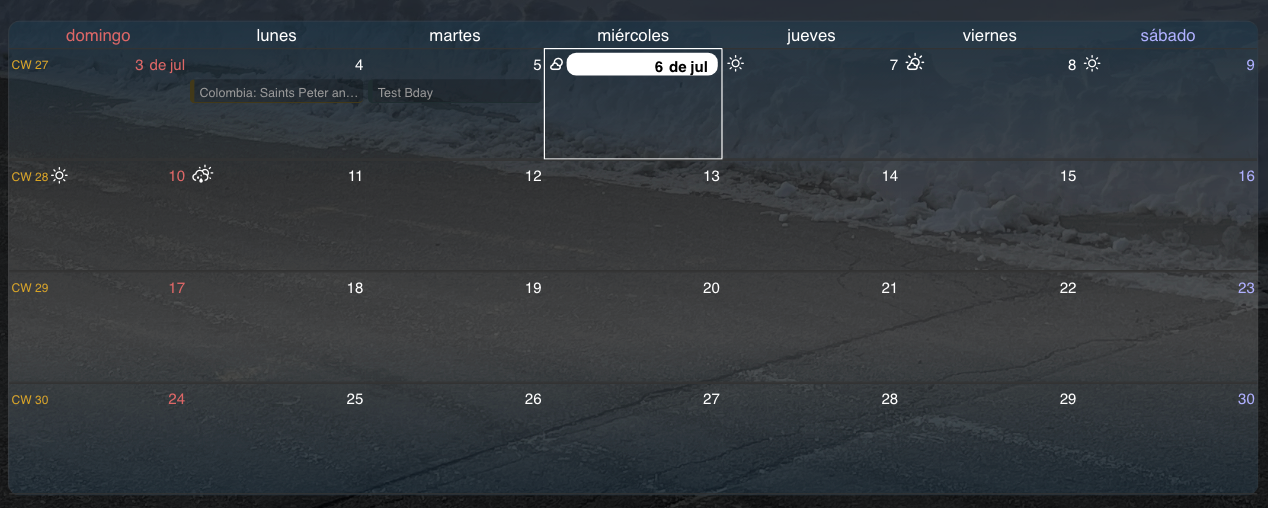
                      I updated to MM 2.32 this morning and ever since then, I have noticed that the CW entry in my MMM-CalendarExt3 is stuck at “CW1”:
                      e0c31178-fa62-4c21-8f01-ad2a29c0c4eb-image.png

                      I assume the newest changes have something to do with it
                      9cdc6813-31c8-4f3e-af65-9561cf029d8b-image.png

                      Any idea if I can solve this or do I need to wait for a module update ?
                      Thanks

                      S 1 Reply Last reply Reply Quote 0
                      • S Do not disturb
                        sdetweil @p1lspeda
                        last edited by sdetweil

                        @p1lspeda I see the same bug, but not sure where it is

                        a temp fix is to add this line to the CX3 config section

                                  minimalDaysOfNewYear:1,  // week number of 1st week in your country (should be 0 or 1) 
                        

                        there was an open issue on this inthe CX3 repo
                        https://github.com/MMRIZE/MMM-CalendarExt3/issues/215

                        I posted this workaround there too

                        Sam

                        How to add modules

                        learning how to use browser developers window for css changes

                        P 1 Reply Last reply Reply Quote 0
                        • P Offline
                          p1lspeda @sdetweil
                          last edited by

                          @sdetweil
                          Great.
                          Thanks for help (again!)

                          1 Reply Last reply Reply Quote 0
                          • K Offline
                            kribbitykrab
                            last edited by

                            Hi folks,

                            Trying to get MMM-CalendarExt3 working on my Pi Zero W running MM v2.30.0 and running into an issue where the calendar is blank. Relevant config.js below:

                            {
                               module: "calendar",
                               config: {
                                  broadcastPastEvents: true,
                                  maximumEntries: 10000,
                                  colored: true,
                                  calendars: [
                                      {
                                           fetchInterval: 1* 60 * 1000,
                                           symbol: "calendar-check",
                                           name: "p_and_b",
                                           color: "rgba(255, 0, 0, 1)",
                                           url: "..."
                                      },
                                      {
                                           fetchInterval: 1* 60 * 1000,
                                           name: "cal2",
                                           color: "rgba(0, 0, 255, 1)",
                                           url: "..."
                                      }
                                   [
                               }
                            },
                            {
                               module: "MMM-CaendarExt3",
                               position: "bottom_bar",
                               title: "family dashboard",
                               config: {
                                  mode: "month"
                                  instanceID: "basicCalendar",
                                  locale: 'en-US'
                                  maxEventLines: 5,
                                  firstDayOfWeek: 1,
                                  calendarSet: ["p_and_b", "cal2"]
                               }
                            },
                            

                            Can anyone help me understand why my monthly calendar is coming up blank and a workaround?

                            S 1 Reply Last reply Reply Quote 0
                            • S Do not disturb
                              sdetweil @kribbitykrab
                              last edited by sdetweil

                              @kribbitykrab ok, this is worse on pi 0w

                              Ext3 gets the calendar events from the default calendar

                              the calendar module fetches each url separately and broadcasts the events to other modules if they want to use them

                              but EXT3 doesn’t want to flash redraw the cal each time a block of events show up

                              so it also has a

                              refreshInterval
                              

                              take whatever events have arrived since last time and display ( default 30 minutes)

                              now there is another tuning thing
                              if it drew immediately on startup it would be empty, cause startup is faster than fetch. but EXT3 doesn’t know how many cal urls might supply events.
                              so there is the

                              waitFetch 
                              

                              config parm (default 5 seconds)
                              wait that long after startup before displaying any events
                              then next will be updateinterval

                              pi0w is SOOOOOOO slow ,no events arrive before waitFetch
                              so next time is updateInterval time

                              so you can adjust these some

                              you are probably
                              impacted by this bug too, timeout on the connection between front and back ends
                              see https://forum.magicmirror.builders/post/127456

                              Sam

                              How to add modules

                              learning how to use browser developers window for css changes

                              K 1 Reply Last reply Reply Quote 0
                              • K Offline
                                kribbitykrab @sdetweil
                                last edited by

                                @sdetweil As always, thank you for the response!

                                I added the pingInterval and pingTimeout lines to both MagicMirror/js/server.js and MagicMirror/js/socketclient.js as described in your link.

                                I have also moved my fetchInterval into the config portion of my calendar module as you requested, and increased it to 10minutes. I added a waitFetch of 10sec into my MMM-CalendarExt3 module config, along with a refreshInterval of 10minutes.

                                When I run MM now however, I am unable to reach localhost. I get an error on Midori booth that says Could not connect: Connection refused. Potentially something to do with the server.js and socketclient.js fiddling? Appreciate further guidance!

                                S 1 Reply Last reply Reply Quote 0
                                • S Do not disturb
                                  sdetweil @kribbitykrab
                                  last edited by

                                  @kribbitykrab i think you made a typo

                                  do

                                  npm run server
                                  

                                  Sam

                                  How to add modules

                                  learning how to use browser developers window for css changes

                                  1 Reply Last reply Reply Quote 0
                                  • T Offline
                                    thegooroo
                                    last edited by

                                    Default CW display shows on desktop Firefox but not on Chrome/Electron when using the rpi as a display. It only show “CW 1” for each week.

                                    Firefox shows the correct week number “CW 32” in this weeks case. My search-fu is not finding a fix for this.

                                    S 1 Reply Last reply Reply Quote 0
                                    • S Do not disturb
                                      sdetweil @thegooroo
                                      last edited by

                                      @thegooroo see
                                      https://forum.magicmirror.builders/post/127160

                                      Sam

                                      How to add modules

                                      learning how to use browser developers window for css changes

                                      T 1 Reply Last reply Reply Quote 0
                                      • T Offline
                                        thegooroo @sdetweil
                                        last edited by

                                        @sdetweil Awesome! Many thanks!

                                        1 Reply Last reply Reply Quote 0
                                        • A Offline
                                          almightyyoshi
                                          last edited by

                                          Is there a way to remove the space where a symbol would be only for calendars not using a symbol?

                                          S 1 Reply Last reply Reply Quote 0
                                          • S Do not disturb
                                            sdetweil @almightyyoshi
                                            last edited by

                                            @almightyyoshi yes

                                            add

                                            classes:"........ some_arbitrary_string "
                                            //like this
                                            classes:"foo",
                                            

                                            after the module: line
                                            to the instance you dont want the symbols to show

                                            then use

                                            .arbitrary_string .symbol {
                                                 display:none;
                                            }
                                            /*like this */
                                            .foo .symbol {
                                                 display:none;
                                            }
                                            

                                            Sam

                                            How to add modules

                                            learning how to use browser developers window for css changes

                                            S 1 Reply Last reply Reply Quote 0

                                            Hello! It looks like you're interested in this conversation, but you don't have an account yet.

                                            Getting fed up of having to scroll through the same posts each visit? When you register for an account, you'll always come back to exactly where you were before, and choose to be notified of new replies (either via email, or push notification). You'll also be able to save bookmarks and upvote posts to show your appreciation to other community members.

                                            With your input, this post could be even better 💗

                                            Register Login

                                            • 1
                                            • 2
                                            • 3
                                            • 4
                                            • 5
                                            • 34
                                            • 35
                                            • 3 / 35
                                            • First post
                                              Last post
                                            Enjoying MagicMirror? Please consider a donation!
                                            MagicMirror created by Michael Teeuw.
                                            Forum managed by Sam, technical setup by Karsten.
                                            This forum is using NodeBB as its core | Contributors
                                            Contact | Privacy Policy