MagicMirror Forum
    • Recent
    • Tags
    • Unsolved
    • Solved
    • MagicMirror² Repository
    • Documentation
    • 3rd-Party-Modules
    • Donate
    • Discord
    • Register
    • Login
    A New Chapter for MagicMirror: The Community Takes the Lead
    Read the statement by Michael Teeuw here.

    MMM-CalendarExt3Agenda

    Scheduled Pinned Locked Moved Utilities
    224 Posts 30 Posters 361.8k Views 32 Watching
    Loading More Posts
    • Oldest to Newest
    • Newest to Oldest
    • Most Votes
    Reply
    • Reply as topic
    Log in to reply
    This topic has been deleted. Only users with topic management privileges can see it.
    • S Offline
      Studio472
      last edited by

      How do I remove the “fade to black” at the bottom of the agenda?

      M 1 Reply Last reply Reply Quote 0
      • M Offline
        MMRIZE @Studio472
        last edited by

        @Studio472
        Append this to your custom.css

        .CX3A .agenda::after {
          display: none;
        }
        
        BKeyportB 1 Reply Last reply Reply Quote 0
        • BKeyportB Offline
          BKeyport Module Developer @MMRIZE
          last edited by

          @MMRIZE Boy, we did things the hard way…

          /* Fade adjustments */
          .CX3A .agenda::after {
          	position: absolute;
          	bottom: 0;
          	left: 0;
          	height: 6%;
          	width: 100%;
          	content: '';
          	background-image: unset;
          } 
          

          The "E" in "Javascript" stands for "Easy"

          1 Reply Last reply Reply Quote 1
          • M Offline
            MM19198
            last edited by

            I was able to get MMM-CalendarExt3 working, but I’m struggling with MMM-CalendarExt3Agenda. I cannot figure out what I’m doing wrong. None of the events appear in the MMM-CalendarExt3Agenda module but they do appear in the MMM-CalendarExt3 module. Any help is appreciated.

            Google Calendar Config

            {
            	module: "MMM-GoogleCalendar",
            	header: "Family Calendar",
            	classes: "calendar-agenda",
            	config: {
            		calendars: [
            			{
            				symbol: "calendar-week",
            				calendarID: "myemail@gmail.com",
            				name: "mycalendar"
            			},
            		],
            		broadcastEvents: true,
            		broadcastPstEvents: true,
            		maximumEntries: 100
            	}
            },
            

            MMM-CalendarExt3 Config

            {
            	module: "MMM-CalendarExt3",
            	position: "top_center",
            	title: "Family Calendar EXT3",
            	config: {
            		mode: "month",
            		instanceID: "Ext-Calendar-Month",
            		calendarSet: ['mycalendar'],
            		weeksInView: 3,
            		preProcessor: (e) => {
            			if (e.start?.dateTime) {
            				  e.startDate = new Date(e.start.dateTime).valueOf()
            			} else if (e.start?.date) {
            				  e.startDate = new Date('${e.start.date}T00:00:00').valueOf()
            			}
            
            			if (e.end?.dateTime) {
            				  e.endDate = new Date(e.end.dateTime).valueOf()
            			} else if (e.end?.date) {
            				  e.endDate = new Date('${e.end.date}T00:00:00').valueOf()
            			}
            
            			e.title = e.summary
            			e.fullDayEvent = (e.start?.date) ? true : false
            			return e
            		}
            	}
            },
            

            MMM-CalendarExt3Agenda Config

            {
            	module: "MMM-CalendarExt3Agenda",
            	position: "top_left",
            	title: "Something",
            	config: {
            		instanceId: "Ext3-Calendar-Agenda",
            		calendarSet: ['mycalendar'],
            		firstDayOfWeek: 1,
            		startDayIndex: -1,
            		endDayIndex: 10,
            		showMiniMonthCalendar: false,
            		preProcessor: (e) => {
            			if (e.start?.dateTime) {
            				  e.startDate = new Date(e.start.dateTime).valueOf()
            			} else if (e.start?.date) {
            				  e.startDate = new Date('${e.start.date}T00:00:00').valueOf()
            			}
            
            			if (e.end?.dateTime) {
            				  e.endDate = new Date(e.end.dateTime).valueOf()
            			} else if (e.end?.date) {
            				  e.endDate = new Date('${e.end.date}T00:00:00').valueOf()
            			}
            
            			e.title = e.summary
            			e.fullDayEvent = (e.start?.date) ? true : false
            			return e
            		}
            	}
            },
            
            M 1 Reply Last reply Reply Quote 0
            • M Offline
              MM19198 @MM19198
              last edited by

              I was able to get it working. For those that may need to resolve this in the future, the answer was at this link:

              https://github.com/MMRIZE/MMM-CalendarExt3Agenda#update-to-120

              When some submodule is not updated, try this.

              cd ~/MagicMirror/modules/MMM-CalendarExt3Agenda
              git submodule update --init --recursive
              
              1 Reply Last reply Reply Quote 0
              • D Offline
                danidanial
                last edited by

                I was able to get it working. For those that may need to resolve this in the future, the answer was at this link: :backhand_index_pointing_right_light_skin_tone:

                https://github.com/MMRIZE/MMM-CalendarExt3Agenda#update-to-120

                When some submodule is not updated, try this.

                cd ~/MagicMirror/modules/MMM-CalendarExt3Agenda
                git submodule update --init --recursive

                1 Reply Last reply Reply Quote 0
                • M Offline
                  MarNog @MMRIZE
                  last edited by

                  @MMRIZE Thanks for the module! I see your first screenshot and looks like you have multiple calendars using the original MMM-Calendar and MMM-CalendarExt3Agenda modules. What setting do you use to get it working like this? I setup mine, but I cant figure out what do do on the original MMM-Calendar module to display only one specific calendar and another calendar to be displayed using Ext3Agenda module. Also, what is the best way to get hyphens in the column to be between the times when using 2 digits for hours?
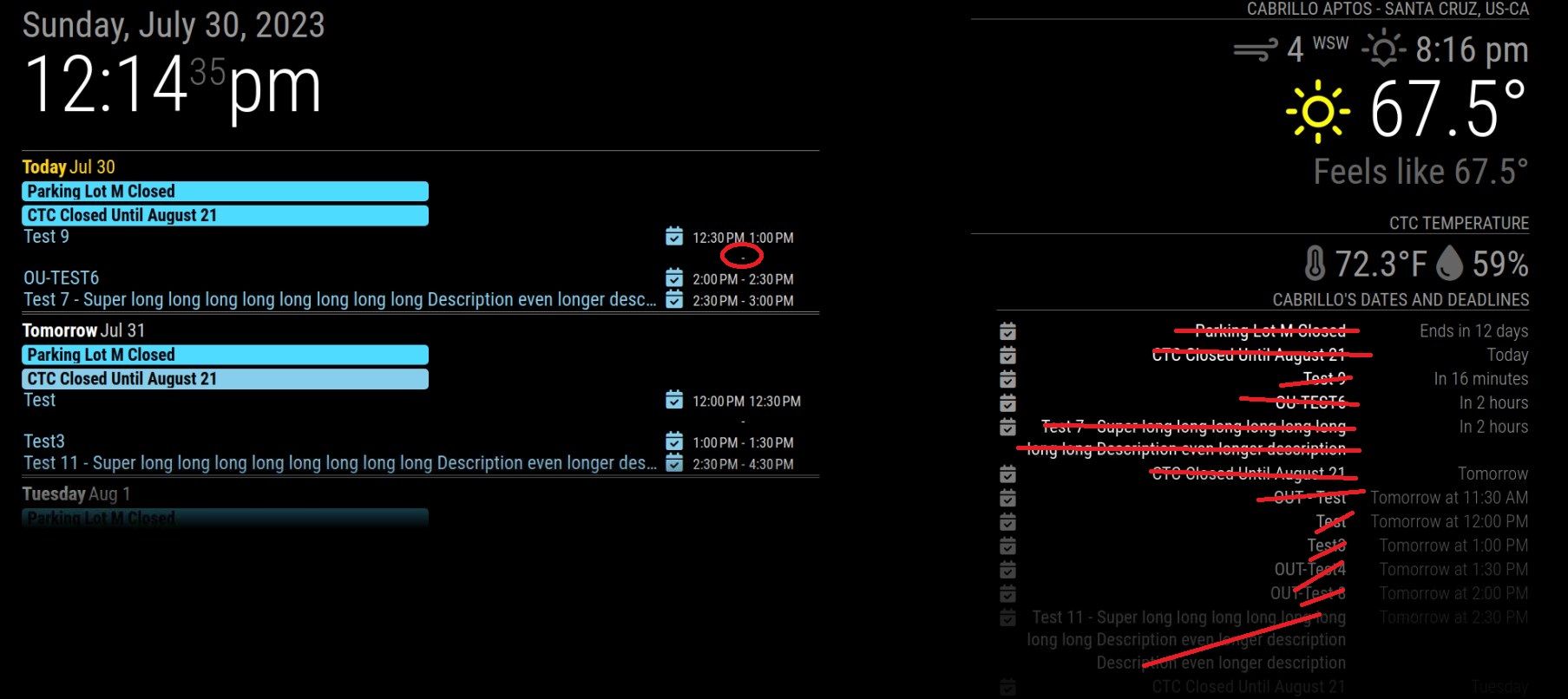
                  Screenshot 2023-07-30 121447.jpg

                  {
                  	module: "calendar",
                  	header: "Cabrillo's Dates and Deadlines",
                  	position: "bottom_right", //When you want to hide default calendar module, just remove position of calendar module.
                  	config: {
                  		maxTitleLength: 50,
                  		wrapEvents: true,
                  		tableClass: "small",
                  		maximumEntries: 13,
                  		//sliceMultiDayEvents: true,
                  		calendars: [
                  			{
                  			symbol: "calendar-check",
                  			name: "Cabrillo_Dates_Deadlines", // <-- specify calendar name
                  			url: "https://calendar.google.com/calendar/ical/c_5a2463022055508fcb5a604f131895484562edb98904940f4efb3fa1c1362e47%40group.calendar.google.com/public/basic.ics",
                  			},
                  			{
                  			// HOW to REMOVE this one from the Calendar Module??
                  			url: "https://calendar.google.com/calendar/ical/c_jvq8rotabh0rrru2qeo2oec9gc%40group.calendar.google.com/public/basic.ics",
                  			name: "CTC_Schedule", // <-- specify calendar name
                  			color: "skyblue", // <-- if you don't want to get color, just remove this line.
                  			broadcastPastEvents: true, // <-- need to broadcast past events
                  			maximalNumberOfDays: 30, // <-- how old events would be broadcasted
                  			maximumEntries: 100, // <-- assign enough number to prevent truncating new events by old events.
                  			symbol: 'calendar-check', // <-- when you want to display symbol. If you don't want, just set as `symbol:[],`
                  			}
                  		]
                  	}
                  },


                  {
                    module: "MMM-CalendarExt3Agenda",
                    position: "top_left",
                    title: "CTC TA Schedule",
                    config: {
                      instanceId: "CTCCalendar",
                      firstDayOfWeek: 1,
                      startDayIndex: 0,
                      endDayIndex: 2,
                      showMiniMonthCalendar: false,
                      calendarSet: ['CTC_Schedule'],
                      eventFilter: (ev) => {
                               if (ev.title.startsWith("OUT")) {
                               	return false
                               	}
                  	     return true
                  	},
                    }
                  },
                  

                  Thank you

                  BKeyportB M 2 Replies Last reply Reply Quote 0
                  • BKeyportB Offline
                    BKeyport Module Developer @MarNog
                    last edited by

                    @MarNog Multiple instances of the calendar module. One with position in place for the ones you want to show with the default module, one without a position for the ones you want to display with CX3A.

                    The "E" in "Javascript" stands for "Easy"

                    M 1 Reply Last reply Reply Quote 0
                    • M Offline
                      MMRIZE @MarNog
                      last edited by MMRIZE

                      @MarNog
                      Interesting. You might have added some custom CSS, so hard to guess what happened at the moment.
                      I think the area for time displaying is not so wide enough. Give them more space.

                      Currently, the hyphen and startTime/endTime condition is defined like this.

                      /* MMM-CalendarExt3Agenda.css line 187 */
                      .CX3A .event .time {
                        font-size: 75%;
                        vertical-align: text-bottom;
                      }
                      
                      .CX3A .event .time.notInDay {
                        display: none;
                      }
                      
                      .CX3A .event .startTime::after {
                        content: ' -';
                      }
                      
                      .CX3A .event .startTime.notInDay + .endTime.inDay::before {
                        content: '- ';
                      }
                      
                      M 1 Reply Last reply Reply Quote 0
                      • M Offline
                        MarNog @BKeyport
                        last edited by

                        @BKeyport I added another instance of the Calendar module and it worked like charm. Thank you.

                        1 Reply Last reply Reply Quote 0
                        • M Offline
                          MarNog @MMRIZE
                          last edited by

                          @MMRIZE I had used a custom.css from someone’s post and I modified the font size. After your suggestion I changed the width on the custom.css and the time is showing correctly now. Thank you

                          1 Reply Last reply Reply Quote 0
                          • T Offline
                            themoe @MMRIZE
                            last edited by

                            @MMRIZE I really like your modules! I tried to setup the Ext3Agenda, but with no success.

                            Can you share the part of the config file to show the Agenda for a couple of days with the scheduled meetings?

                            M 1 Reply Last reply Reply Quote 0
                            • M Offline
                              MMRIZE @themoe
                              last edited by

                              @themoe
                              In many cases; ppl might have missed/made wrong to the default calendar setting.
                              Show me your config for default calendars module and CX3A instead.

                              1 Reply Last reply Reply Quote 0
                              • G Offline
                                gonzonia
                                last edited by

                                I have two instances of MMM-CalendarExt3Agenda showing with different calendar sets.

                                For one set it shows data for 4 days, with all days populated.

                                For the other one, it shows 4 days but the last day isn’t populated. If I increase the endDayIndex by 1 it will add a 5th day and day 4 will be populated but the 5th day will not, so I know the data is there.

                                Any ideas what would cause this?
                                Working instance 1:

                                {
                                			module: "MMM-CalendarExt3Agenda",
                                			position: "top_right",
                                			classes: "SceneFamily",
                                			header: "Upcoming Family Calendar",
                                			config: {
                                				instanceId: "FamilyAgenda",
                                				locale: 'en-US',
                                				firstDayOfWeek: 1,
                                				startDayIndex: 0,
                                				endDayIndex: 3,
                                				showMiniMonthCalendar: false, 
                                				useSymbol: true,
                                				calendarSet: ['Dad', 'Mom', 'Kid1', 'Kid2', 'Work1', 'Work22, 'Home'],
                                			}
                                		}
                                

                                Missing Data Instance 2

                                		{
                                			module: "MMM-CalendarExt3Agenda",
                                			position: "top_left",
                                			classes: "SceneFamily SceneKids",
                                			header: "Chores",
                                			config: {
                                				instanceId: "Chores",
                                				locale: 'en-US',
                                				firstDayOfWeek: 1,
                                				startDayIndex: 0,
                                				endDayIndex: 3,
                                				showMiniMonthCalendar: false, 
                                				useSymbol: true,
                                				calendarSet: ['Dad Chores', 'Kid Chores', 'Mom Chores'],
                                			}
                                		},
                                
                                1 Reply Last reply Reply Quote 0
                                • UncleRogerU Offline
                                  UncleRoger
                                  last edited by

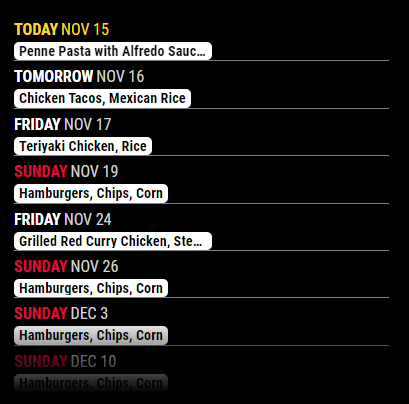
                                  I apologize for what I’m sure is a bonehead question… I had a stock calendar module to show events from one calendar (and a second, hidden instance of calendar) but when I tried to implement pages (MMM-Pages), it was loading the hidden calendar along with the non-hidden one.

                                  So I thought I’d try CalExt3Ag to replace the visible calendar. The problem is, I want it to look like the stock calendar:
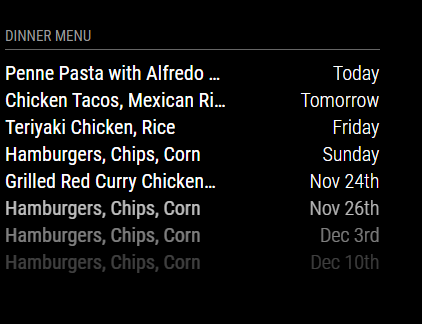
                                  35737256-280b-45fe-a124-d924f3ebae43-image.png

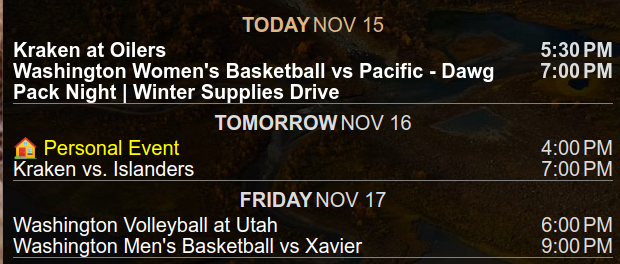
                                  but the best I could get is this:

                                  f6ef7364-2363-4972-812d-f4bc711947cb-image.png

                                  Is it possible to get a much simplified listing (one line per event, relative dates) of events using CalExt3Ag?

                                  BKeyportB M 2 Replies Last reply Reply Quote 0
                                  • BKeyportB Offline
                                    BKeyport Module Developer @UncleRoger
                                    last edited by

                                    @UncleRoger Not exactly. However you can get it simplied some:

                                    6d76561c-4d00-4bfa-924e-cb7968679d4d-image.png

                                    That’s all CSS.

                                    The "E" in "Javascript" stands for "Easy"

                                    1 Reply Last reply Reply Quote 1
                                    • M Offline
                                      MMRIZE @UncleRoger
                                      last edited by MMRIZE

                                      @UncleRoger

                                      1. About the look of the module to mimic the original calendar module;
                                        Sorry, it can’t. This module is an alternative view of your events listing, not a replacement. If you need only the same look as the original calendar, just use the original.

                                      2. About the working with MMM-Pages.
                                        MMM-Pages is a good, reliable module, though it doesn’t consider the multi-instance of the module. So when you need multi-instances and want to show/hide on different pages, it cannot work as expected. Try other paging/screen control module. (e.g. I recommend MMM-Scenes2 with shame.)
                                        MMM-Scenes2 Demo
                                        Click to see the DEMO

                                      My mistake. You can assign class name in MMM-Pages settings. (Thanks @sdetweil )

                                      S 1 Reply Last reply Reply Quote 1
                                      • S Offline
                                        sdetweil @MMRIZE
                                        last edited by

                                        @MMRIZE i.like you Scenes module.

                                        but MMM-Pages works fine for multi instance. just don’t use the module name in the page definition

                                        use page1, page2, page3…
                                        and then use that in the individual module classes: setting

                                        super easy and much more clear

                                        Sam

                                        How to add modules

                                        learning how to use browser developers window for css changes

                                        M UncleRogerU 2 Replies Last reply Reply Quote 1
                                        • M Offline
                                          MMRIZE @sdetweil
                                          last edited by

                                          @sdetweil
                                          Ah, I misunderstood those identifiers are module name not class name.

                                          S 1 Reply Last reply Reply Quote 1
                                          • S Offline
                                            sdetweil @MMRIZE
                                            last edited by

                                            @MMRIZE well they are used as class names in the code lookup. each module’s name is
                                            assigned as a class in the Dom for each module.
                                            that’s why using module name is not instance aware.

                                            but classes can be any string, and pages just search for all with that class.

                                            Sam

                                            How to add modules

                                            learning how to use browser developers window for css changes

                                            M 1 Reply Last reply Reply Quote 1

                                            Hello! It looks like you're interested in this conversation, but you don't have an account yet.

                                            Getting fed up of having to scroll through the same posts each visit? When you register for an account, you'll always come back to exactly where you were before, and choose to be notified of new replies (either via email, or push notification). You'll also be able to save bookmarks and upvote posts to show your appreciation to other community members.

                                            With your input, this post could be even better 💗

                                            Register Login

                                            • 1
                                            • 2
                                            • 3
                                            • 4
                                            • 5
                                            • 6
                                            • 11
                                            • 12
                                            • 4 / 12
                                            • First post
                                              Last post
                                            Enjoying MagicMirror? Please consider a donation!
                                            MagicMirror created by Michael Teeuw.
                                            Forum managed by Sam, technical setup by Karsten.
                                            This forum is using NodeBB as its core | Contributors
                                            Contact | Privacy Policy