MagicMirror Forum
    • Recent
    • Tags
    • Unsolved
    • Solved
    • MagicMirror² Repository
    • Documentation
    • 3rd-Party-Modules
    • Donate
    • Discord
    • Register
    • Login
    A New Chapter for MagicMirror: The Community Takes the Lead
    Read the statement by Michael Teeuw here.

    MMM-CalendarExt3Agenda

    Scheduled Pinned Locked Moved Utilities
    224 Posts 30 Posters 362.0k Views 32 Watching
    Loading More Posts
    • Oldest to Newest
    • Newest to Oldest
    • Most Votes
    Reply
    • Reply as topic
    Log in to reply
    This topic has been deleted. Only users with topic management privileges can see it.
    • F Offline
      ffingers6
      last edited by

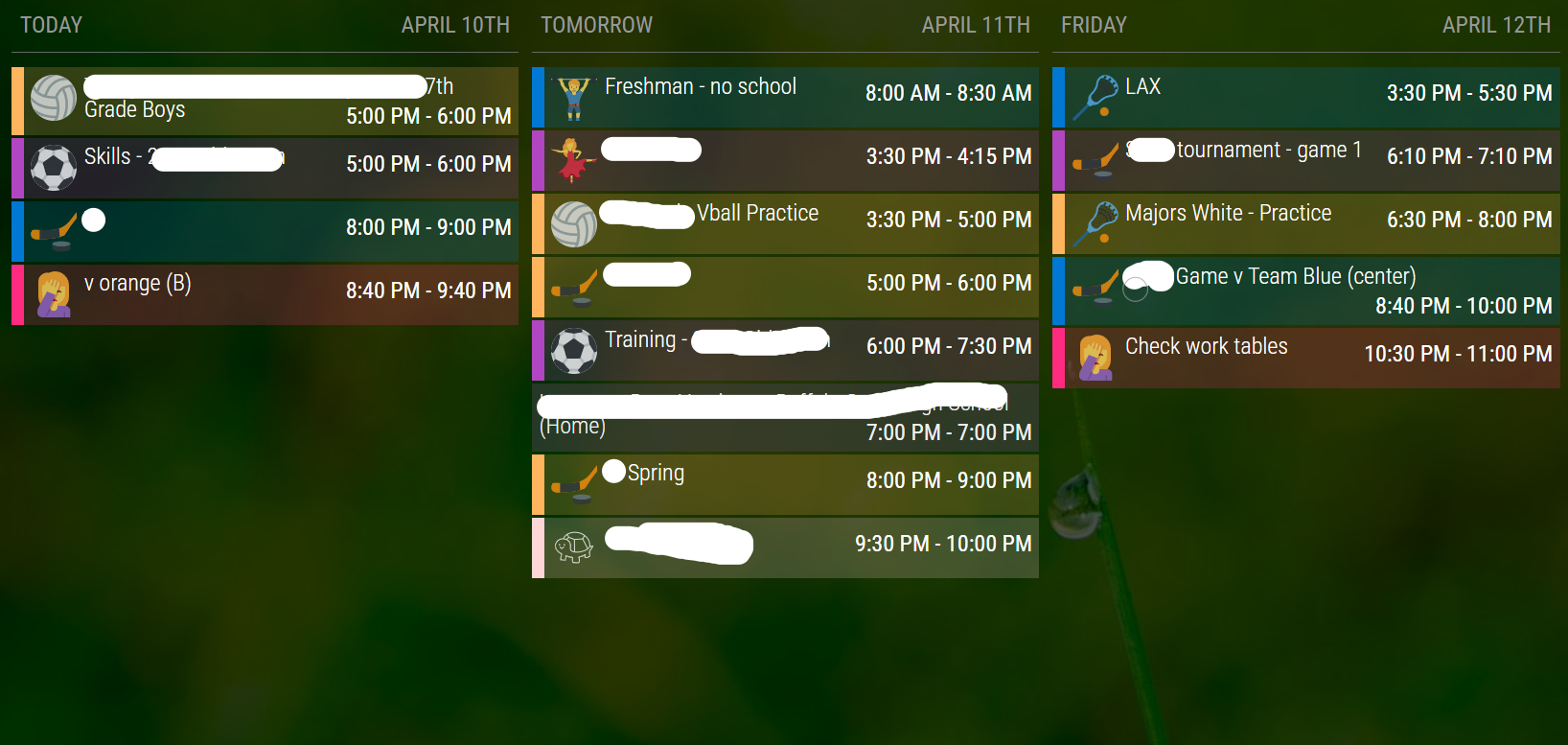
      I was curious if it was possible to get a row view similar to the way MMM-CalendarExt2 worked. I have a good setup that works well for our use case, but want to move to CX3 if possible for some additional features and the reliance on the default calendar module for parsing.

      This is my current setup…is it possible to adjust agenda to look like this? I can deal with the styling, but changing to a row format is the big question for me.
      tempsnip.png

      M D 3 Replies Last reply Reply Quote 0
      • M Offline
        MMRIZE @ffingers6
        last edited by

        @ffingers6
        I’ll try soon.

        1 Reply Last reply Reply Quote 0
        • M Offline
          MMRIZE @ffingers6
          last edited by MMRIZE

          @ffingers6
          a86ca1d6-517e-43d5-bdd4-3d864e42c7f4-image.png

          /* config/config.js */
          {
            module: "calendar",
            config: {
              broadcastEvents: true,
              defaultSymbolClassName: "", // This is needed to use the iconify icons instead of the font-awesome icons
                calendars: [
                  {
                    symbol: "noto:calendar",
                    url: "...",
                    color: "violet",
              ...
            }
          },
          {
            module: "MMM-CalendarExt3Agenda",
            position: "bottom_bar",
            config: {
              showMiniMonthCalendar: false,
              locale: "en-US",
              startDayIndex: 0,
              endDayIndex: 2,
              useIconify: true,
            }
          },
          
          /* css/custom.css */
          .CX3A {
            max-width: 100%;
          }
          
          .CX3A .agenda {
            display: flex;
            flex-flow: row nowrap;
            justify-content: space-between;
            gap: 10px;
            mask-image: none;
          }
          
          .CX3A .agenda .cell {
            flex-grow: 1;
            flex-basis: 0;
            border-bottom: none;
          }
          
          .CX3A .agenda .cell .cellHeader {
            border-bottom: 2px solid gray;
            margin-bottom: 5px;
          }
          
          .CX3A .agenda .cell .cellHeaderMain {
            justify-content: space-between;
            flex-grow: 1;
            padding: 5px;
          }
          
          .CX3A .event.singleday {
            border-left: 2px solid var(--calendarColor);
            padding-left: 3px;
            margin-bottom: 1px;
            background-color: color-mix(in srgb, var(--calendarColor), transparent 75%);
          }
          
          .CX3A .event .time {
            order: 2;
          }
          
          .CX3A .event .title {
            flex-grow: 2;
          }
          
          .CX3A .cellBody {
            line-height: 120%;
          }
          
          .CX3A .cellBody .fullday {
            padding-bottom: 5px;
          }
          
          .CX3A .cellBody .fullday .event {
            max-width: 100%;
          }
          

          For the size, you may need some manual adjustment for your view.

          C 1 Reply Last reply Reply Quote 0
          • C Offline
            cyberphox @MMRIZE
            last edited by

            Got tired of looking at the update notification today. Did a git pull and npm install…module isn’t showing at all now…
            Should have left it alone…sigh

            Full time Dad, DJ and entertainer and lover of technology.

            M 1 Reply Last reply Reply Quote 0
            • M Offline
              MMRIZE @cyberphox
              last edited by

              @cyberphox share me your config.(eouia0819@gmail.com)

              C 1 Reply Last reply Reply Quote 0
              • C Offline
                cyberphox @MMRIZE
                last edited by

                @MMRIZE sent! thanks for having a look!

                Full time Dad, DJ and entertainer and lover of technology.

                1 Reply Last reply Reply Quote 0
                • htilburgsH Offline
                  htilburgs
                  last edited by

                  Is there a way to hide (not show) Yesterday, Today, Tomorrow, etc. and just show the day and date?

                  (still trying to learn JS, but not afraid to ask and AI is my best friend) ☺

                  htilburgsH 1 Reply Last reply Reply Quote 0
                  • htilburgsH Offline
                    htilburgs @htilburgs
                    last edited by htilburgs

                    @htilburgs said in MMM-CalendarExt3Agenda:

                    Is there a way to hide (not show) Yesterday, Today, Tomorrow, etc. and just show the day and date?

                    Found it:
                    in custom.css change

                    .CX3A .relativeDay {
                    display: none;
                    }

                    c830af2e-f2c0-4472-a6a5-1f9b6ae2fbca-image.png

                    (still trying to learn JS, but not afraid to ask and AI is my best friend) ☺

                    1 Reply Last reply Reply Quote 0
                    • htilburgsH Offline
                      htilburgs
                      last edited by

                      Is there a way to only show MiniMonthCalendar and no calendars? I would like to run 2 instances of MMM-CalendarExt3 Agenda

                      1. only show MiniMonthCalendar
                      2. only show Calendar (no problem)

                      (still trying to learn JS, but not afraid to ask and AI is my best friend) ☺

                      M 1 Reply Last reply Reply Quote 0
                      • M Offline
                        MMRIZE @htilburgs
                        last edited by

                        @htilburgs
                        60739a0d-fd61-4047-ba25-2b40666a61b3-image.png

                        htilburgsH 1 Reply Last reply Reply Quote 0
                        • htilburgsH Offline
                          htilburgs @MMRIZE
                          last edited by htilburgs

                          @MMRIZE
                          I know this, but I like to have 2 instances running.
                          1 Calendar on the left and 1 MiniMonth on the right.
                          On this way the CSS wil override the Calendar part of both parts.

                          (still trying to learn JS, but not afraid to ask and AI is my best friend) ☺

                          M S 2 Replies Last reply Reply Quote 0
                          • M Offline
                            MMRIZE @htilburgs
                            last edited by

                            @htilburgs
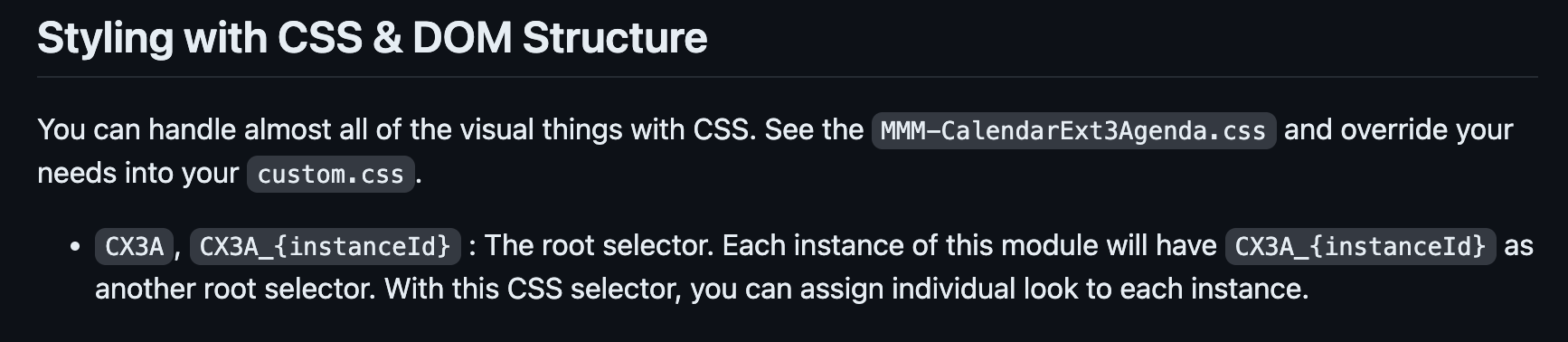
                            You can give instanceId for each instance. Then you can specify CSS selector with that instanceId.

                            /* config/config.js */
                            module: 'MMM-CalendarExt3Agenda',
                            position: 'top_left',
                            config: {
                              instanceId: 'mymodule1',
                              ...
                            
                            /* css/custom.css */
                            .CX3A_mymodule1 .agenda { // You can select a specific instance like this.
                              display: none;
                            }
                            

                            f09c5d43-5fe6-4f1c-ab85-e7d638146b28-image.png

                            1 Reply Last reply Reply Quote 0
                            • M Offline
                              MMRIZE
                              last edited by MMRIZE

                              @htilburgs
                              But I’m sorry, I forgot to implement that feature until now. :D.(nobody found it was not implemented )I fix it now. You can update the module and use that instanceId selector. Sorry again. :D

                              htilburgsH 2 Replies Last reply Reply Quote 0
                              • htilburgsH Offline
                                htilburgs @MMRIZE
                                last edited by

                                @MMRIZE
                                I didn’t see it either in the documentation, my mistake. Thanks for the quick reply and fix. I’ll try when I’m at home.

                                (still trying to learn JS, but not afraid to ask and AI is my best friend) ☺

                                1 Reply Last reply Reply Quote 0
                                • S Offline
                                  sdetweil @htilburgs
                                  last edited by sdetweil

                                  @htilburgs if you have 2 instance and want different css behavior, then you need to add more entries to custom.css using another selector prefix

                                  you can add a fake name to the classes property (at same level as module and position) and use that name instead of .CX3A.
                                  note the dot in front means classname

                                  Sam

                                  How to add modules

                                  learning how to use browser developers window for css changes

                                  htilburgsH 1 Reply Last reply Reply Quote 0
                                  • htilburgsH Offline
                                    htilburgs @sdetweil
                                    last edited by

                                    @sdetweil thanks Sam for the extra explanation.

                                    (still trying to learn JS, but not afraid to ask and AI is my best friend) ☺

                                    S 1 Reply Last reply Reply Quote 0
                                    • S Offline
                                      sdetweil @htilburgs
                                      last edited by sdetweil

                                      @htilburgs so an example

                                      in the second instance of agenda

                                      add

                                        classes:"agenda2",
                                      

                                      after the

                                        module:"MMM-CalendarExt3Agenda",
                                      

                                      and in the css
                                      copy all the .CX3A settings you have
                                      and add

                                      .agenda2 
                                      

                                      and a space after .agenda2
                                      as the start of the line w .CX3A

                                      .agenda2 .CX3A ....
                                      

                                      on all the newly duplicated lines
                                      leave out the ones you don’t want on the second instance of course

                                      Sam

                                      How to add modules

                                      learning how to use browser developers window for css changes

                                      htilburgsH 1 Reply Last reply Reply Quote 0
                                      • htilburgsH Offline
                                        htilburgs @MMRIZE
                                        last edited by

                                        @MMRIZE I’ve tried, but no luck

                                        (still trying to learn JS, but not afraid to ask and AI is my best friend) ☺

                                        1 Reply Last reply Reply Quote 0
                                        • htilburgsH Offline
                                          htilburgs @sdetweil
                                          last edited by htilburgs

                                          @sdetweil Yes! This works. Thanks

                                          (still trying to learn JS, but not afraid to ask and AI is my best friend) ☺

                                          1 Reply Last reply Reply Quote 1
                                          • D Offline
                                            danny607 @ffingers6
                                            last edited by

                                            @ffingers6 how do you get that view? can you post out the config.js and or relevant module JS thanks.


                                            M 1 Reply Last reply Reply Quote 0

                                            Hello! It looks like you're interested in this conversation, but you don't have an account yet.

                                            Getting fed up of having to scroll through the same posts each visit? When you register for an account, you'll always come back to exactly where you were before, and choose to be notified of new replies (either via email, or push notification). You'll also be able to save bookmarks and upvote posts to show your appreciation to other community members.

                                            With your input, this post could be even better 💗

                                            Register Login

                                            • 1
                                            • 2
                                            • 3
                                            • 4
                                            • 5
                                            • 6
                                            • 7
                                            • 11
                                            • 12
                                            • 5 / 12
                                            • First post
                                              Last post
                                            Enjoying MagicMirror? Please consider a donation!
                                            MagicMirror created by Michael Teeuw.
                                            Forum managed by Sam, technical setup by Karsten.
                                            This forum is using NodeBB as its core | Contributors
                                            Contact | Privacy Policy